25 November 2026 · Telegram Ban Service · 10 min read
How to report a Telegram bot that spams, scams or fakes
How to report a Telegram bot comes down to one menu: open its chat, select the message that shows the abuse, then pick Report and an honest reason. Telegram's moderators review it and decide whether the bot is labeled, limited or banned. Illegal content can also go to abuse@telegram.org, and scams and impersonation to @NoToScam.
What happens when you report a Telegram bot?
A report on a Telegram bot sends the flagged messages and your chosen reason to Telegram's moderators, who check them against the Terms of Service.
Telegram doesn't treat a bot as a special object. In the API, a bot is an ordinary user account with one extra switch, the bot flag on the user object, set to true. That same object holds the scam and fake flags behind the SCAM and FAKE labels. So a bot is reported, labeled and banned by the same machinery as a person's account.
The Telegram FAQ groups bots from outside developers with channels and sticker sets. All three count as public content that sits outside the core app. When one of them is reported, Telegram runs a legal check before taking it down.
Telegram Ban Service is an independent content reporting and takedown service that handles bot reports through those same official routes. It gathers the evidence and writes the report. Telegram's moderators alone decide whether a bot stays, gets a label or disappears.
Which report fits the bot you're dealing with?
The right route depends on what the bot actually did: sent spam, took money, copied someone or spread illegal material.
| What the bot did | Where the report goes | What to attach |
|---|---|---|
| Flooded you with ads or links | Report on its messages, reason Spam | Two or three of the worst messages |
| Took Stars and delivered nothing | /paysupport, then a Stars dispute; scam report to @NoToScam | Transaction ID from Settings > Your Stars |
| Asked for your login code | Report its messages, then lock your account | Screenshot of the request |
| Pretends to be you | @NoToScam | Link to your real profile |
| Shares illegal material | In-app report plus abuse@telegram.org | t.me links to the content |
| Sells bans or report floods | Report on its offer messages | The price list and payment request |
Some bots and channels take money to flood another person's account with reports and promise a ban in return. If that's the bot you want gone, start with a separate guide to Telegram channels selling account bans. It sets out what those sellers promise, where buyers' money ends up and which Telegram rules the sellers break themselves.
Some of those bots sell floods aimed at other apps. The buyer's side is covered in what Instagram mass report service buyers really get, and the WhatsApp version in WhatsApp mass report bots sold on Telegram.
How do you report a Telegram bot on iPhone, Android or desktop?
Here's how to report a Telegram bot in any app: you work from a message it sent, and only the gesture changes between phone and computer.
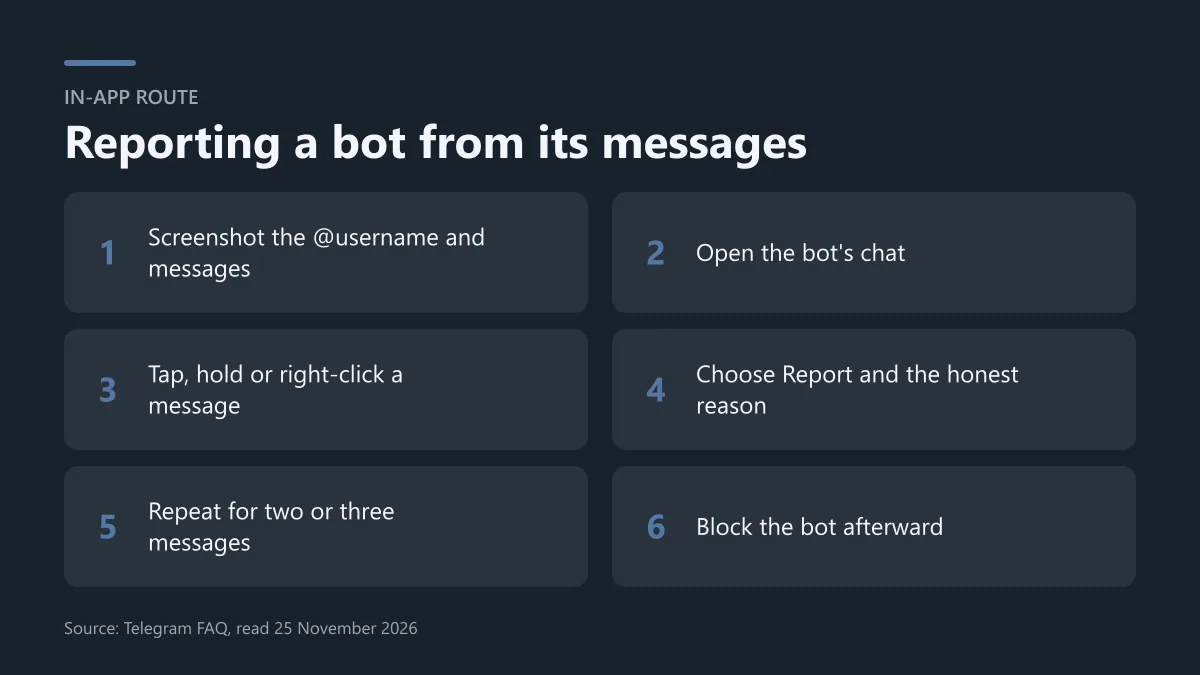
- Save the evidence. Screenshot the bot's @username, its t.me link and every message that breaks a rule. A report can only carry what still exists when a moderator opens it.
- Open the bot's chat. Scroll to the message that shows the problem plainly, such as the payment demand or the phishing link.
- Bring up the menu. The gesture depends on the device. Android wants a single tap, iPhone a long press, and the Desktop, Web and macOS clients a right-click. Report is in that menu, as the FAQ's takedown answer describes.
- Choose the honest reason. Match the reason to what the message shows. A spam message reported as violence wastes the reviewer's time.
- Repeat for two or three messages. Each one adds a separate piece of proof.
- Block the bot. Do it after the reports are in, so nothing gets lost.
Email is the second route. The FAQ points takedown requests to an automated inbox, abuse@telegram.org. That inbox wants t.me/... or @... links that point straight at the content, so paste the bot's link and the message links rather than describing them.
What belongs in a Telegram bot scam report?
A Telegram bot scam report needs proof a moderator can check: the bot's username, the messages that made the offer and the record of what you paid.
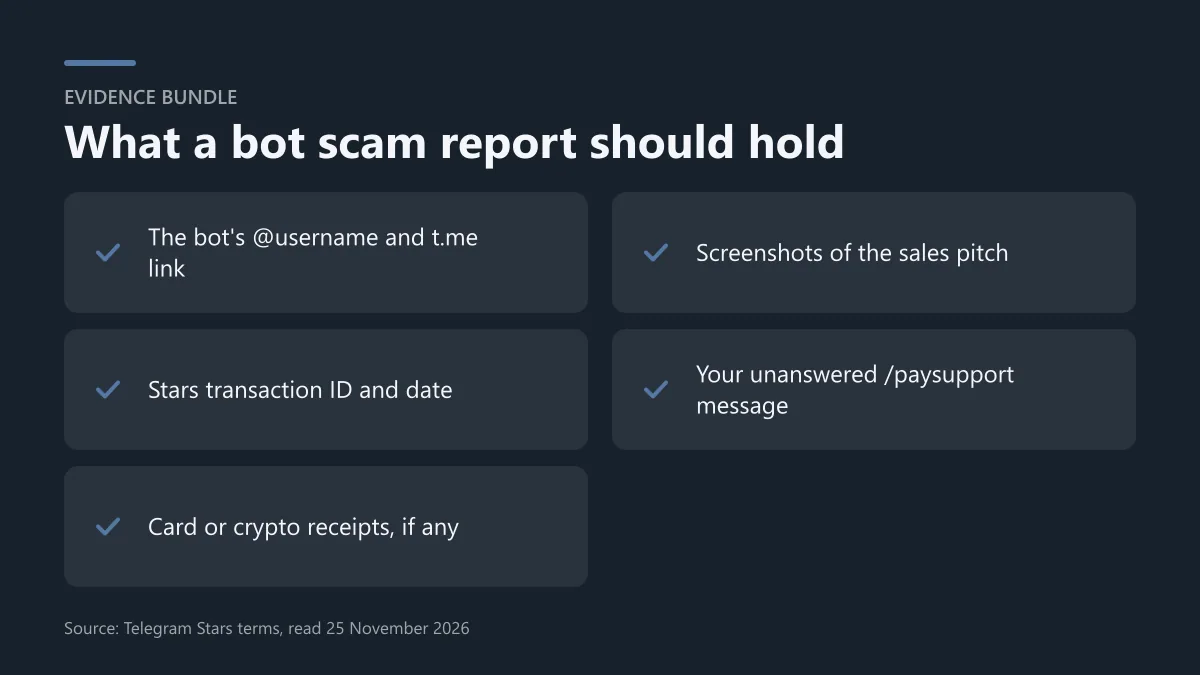
Telegram Ban Service builds bot cases from the same few parts, because a moderator can check each one alone.
- Its @username, plus the full t.me address
- Screenshots of the sales pitch
- The Stars transaction ID and the date paid
- Your unanswered /paysupport message
- Card or crypto receipts, if any
A bot report can fail in three ways. The reason picked in the menu doesn't match what the message shows. The bot deleted its messages before review, so the report points at nothing. Or the email describes the bot without the t.me or @ links the abuse inbox works from.
Payment is where bot scams differ from plain spam. As of 25 November 2026, Telegram's Stars terms call Stars sales final, with one exception. A bot that fails to deliver a purchase as advertised, within the agreed time, can be asked for a refund. Send the bot /paysupport first. If its developer refuses, the terms describe a dispute. It needs the transaction ID, which you'll find under Settings > Your Stars.
For example, take a hypothetical bot that sells "premium trading signals" for 500 Stars and goes silent after payment. A complete report bundle has four parts. It holds two screenshots of the sales pitch, the Stars transaction ID, the date paid and the /paysupport message that got no answer. Each item shows a moderator something they can verify without taking your word for it.
Money paid outside Telegram, by card or crypto, is beyond the Stars rules. In the U.S. you can file that loss with the FTC at ReportFraud.ftc.gov. Keep the bot's username in that report too. If a person behind the bot also messaged you, follow the fraud report steps for a scammer or scam bot.
One request should end the conversation at once: a bot asking for a fresh login code from Telegram. Telegram's FAQ is blunt here. The code is for you alone, and no app or service has a reason to request it. If you already sent it, work through the recovery steps for a hijacked Telegram account before reporting anything.
What can a bot's profile tell you before you report it?
A bot's profile can carry a SCAM or FAKE label, a verification mark and, on some bots, a count of monthly users.
The labels come from flags on the same user object. As of 25 November 2026, the scam flag reads "This may be a scam user". The fake flag marks an account that a large number of people reported as fake or as a scam. The same object has fields for a bot's active users and for a verification icon.
Checkmarks need care. Only Telegram hands out its official checkmark, according to its verification page, and outside verifiers use completely different icons. A copied logo or a blue emoji in the bot's name proves nothing.
A label is a warning, not a removal. A bot can keep running under a SCAM badge for a while. No label doesn't mean safe either. Before trusting any bot that offers to report others for you, read how to tell a real report bot from a scam one. Bots that make fake nude images have their own route, set out in reporting deepfake bots on Telegram.
What won't a bot report do, and what if your own bot was banned?
A bot report won't remove the bot on its own, and sending more copies won't speed up the review.
Under Telegram's spam FAQ, flagged messages land with Telegram's moderators, who review them. Group admins can report spammers too, and those reports join the same queue. A reviewer reads what the bot sent. Fifty identical reports add no new evidence to that reading.
Telegram Ban Service turns down bot reports that rest on dislike rather than a broken rule. It won't buy report floods or ask for anyone's login code.
Developers sit on the other side. The FAQ tells bot owners who think their bot was banned for no clear reason to write to abuse@telegram.org. Explain what the bot does and why the reported messages didn't break the rules.
FAQ
Does Telegram tell a bot's owner that you reported it?
Telegram doesn't say it does. Its spam FAQ explains that flagged messages are passed to human moderators, and nothing on that page or in the main FAQ mentions a notice to the account you flagged. A bot's developer only learns about trouble when Telegram acts: a label appears on the bot, the bot gets limited or it stops working. Even then, the developer isn't told who filed the report. Keep in mind that a scam bot can still see that you stopped replying or blocked it, so it may guess. That's one reason to save screenshots and finish your reports before you block. If the bot or the person behind it starts threatening you after you report, save those messages too and report them as a separate case, since threats are a breach of their own.
How do I send a complaint to Telegram about a bot by email?
Write to abuse@telegram.org, the address the Telegram FAQ gives for automated takedown requests. Put the bot's link in the first line, in the form t.me/examplebot or @examplebot, then the links to the specific messages if you can copy them. Add one or two sentences on what the bot did, such as taking Stars without delivering or asking for a login code. Leave out long stories and repeated pleas, because the request is processed against the content it points at. Email works best for illegal material and for cases where the bot has already blocked you, so in-app reporting from its chat is no longer easy. For copyright problems the FAQ names a different address, dmca@telegram.org, and it's reserved for whoever owns the work or represents that owner. Save the sent email with its date.
How can you check whether a Telegram bot is real or fake?
Start with the profile and the source of the link. Open the bot's profile and look at the @username letter by letter, since a copycat can add an underscore, swap a letter or tack "official" onto the name. A SCAM or FAKE label means Telegram has already flagged it, as shown by the flags on the user object in Telegram's API reference. A real company bot should be linked from that company's own website, so reach it from there instead of from a forwarded message. According to Telegram's verification page, the official checkmark comes from Telegram alone, so a blue emoji in the display name means nothing. Treat any bot promising guaranteed profits, free Premium or paid account unlocks as a scam until you've checked it.
Is the Telegram spam bot legit?
Yes, @SpamBot is Telegram's own bot, and the spam FAQ sends people to it. Its job is narrow, though. It tells you whether your own account is limited after spam reports and lets you ask for a review if you think that limit was a mistake. It isn't the place to report another bot. Reports about a third-party bot go through the Report option on its messages, @NoToScam for scams and impersonation or Telegram's abuse inbox for illegal content. Watch for copies. Any bot that calls itself a "spam unlock" or "ban removal" service and asks for payment, a phone number or a login code isn't Telegram. The real @SpamBot never asks for money. If a copy took your login code, change your security settings and end other sessions before you do anything else.
Can you get Stars back after a Telegram bot scam report?
Sometimes, and the report alone doesn't do it. Telegram's Stars terms treat Stars sales as final, with an exception for purchases a bot fails to deliver as advertised within the agreed time. The refund goes through the bot's developer first, so send the bot /paysupport and keep a screenshot of the request. If the developer ignores you or refuses, the terms describe a dispute that uses the transaction ID shown under Settings > Your Stars. A Telegram bot scam report filed with moderators runs on a separate track: it can get the bot labeled or banned, but it isn't a refund request. Do both if you lost Stars. Money paid by card belongs with your card issuer, and a crypto transfer can't be pulled back by Telegram.
What if a scam bot keeps messaging me after I report it?
Block it once your reports are filed. Open the bot's chat, tap its name, then choose Block, or Stop and block on some clients. A blocked bot can't send you new messages. If the same scheme comes back under a new @username, it's a fresh account. Report the new one too, and mention the old username in your email to Telegram's abuse address. Check how it found you. Bots can only message you after you start them, so another chat or a forwarded link probably brought you there. Leaving groups that keep pushing these bots cuts off the supply. If a bot links to a website that asks for your login, the Telegram FAQ is clear that your login code is for you alone. Report the link, don't follow it.
Will a bot get banned faster if friends report it too?
No, and asking a crowd to report it can backfire. The spam FAQ explains that moderators look at flagged messages, which means a person reads the messages and checks them against the rules. Reporting that message again shows the reviewer nothing new. What helps is a different message that shows a different part of the scheme, such as the sales pitch, the payment request and the silence after payment. If several people were scammed by the same bot, each of them should report their own messages, since each one holds separate proof. Organizing a mass report campaign is something else. Volume isn't evidence, and some of these campaigns are themselves sold as a service, which is a scam pattern of its own. One clear, honest report from each victim is enough.