28 September 2026 · Telegram Ban Service · 16 min read
Telegram Hacked Account Recovery: Beat the 24-Hour Clock
Telegram hacked account recovery works best from a device that was signed in before the intruder arrived. For 24 hours a new session cannot log out your other devices or change the phone number, so an older session can end it from Settings, Devices. Without one, you need the SIM and the cloud password.
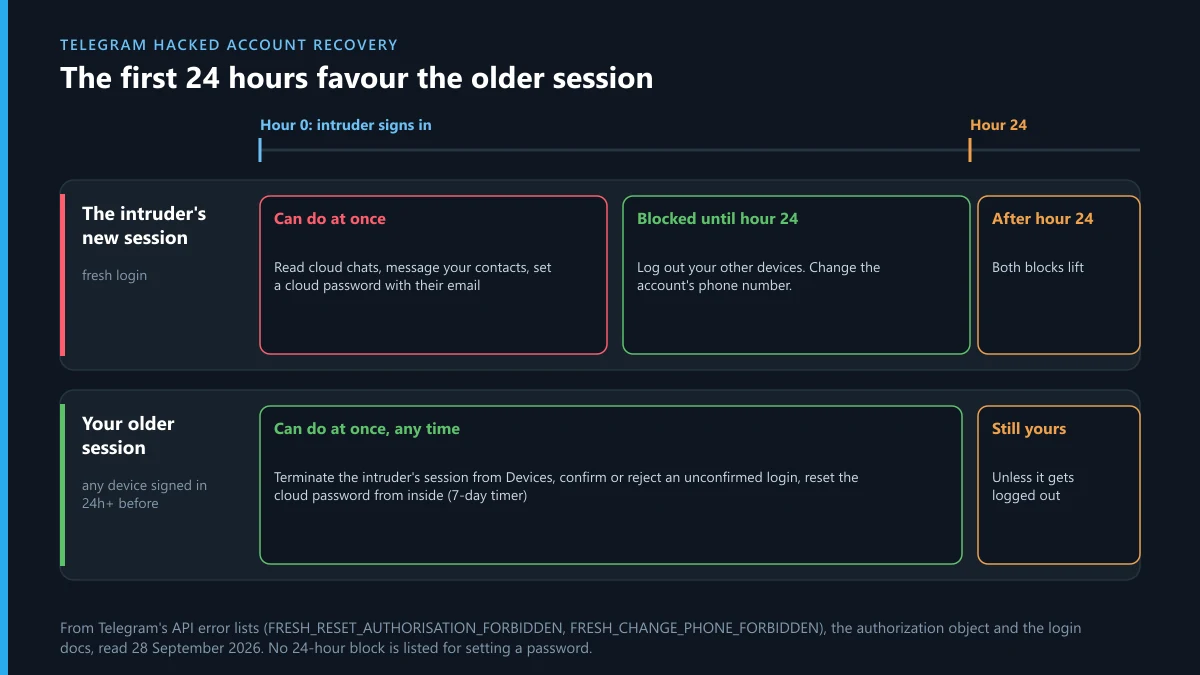
A hijacked Telegram account feels like a door slammed shut. Often it isn't shut yet. Telegram's servers treat a session that is less than a day old with suspicion, and they block it from the two moves that would lock you out for good. That gap is where most successful recoveries happen, and most guides never mention it.
When we went through Telegram's API error lists on 28 September 2026, we were looking for one rule and found two. The first was already known to us: a session younger than 24 hours "can't logout other sessions". The second sits on the method that changes a phone number, and its wording is blunt: "You can't change phone number right after logging in, please wait at least 24 hours." We then checked the method that sets a cloud password. It lists no such block. So an intruder can add a password within minutes, but cannot throw you out or move the account to their own SIM until the day is over. The rest of this page is built around that clock.
What is a hacked Telegram account recovery really racing against?
It races against hour 24 of the intruder's session. Before then, any device you had signed in earlier outranks theirs. After it, their session gains the same powers yours has, and the account can be moved beyond your reach.
Telegram identifies people by one thing. The Telegram FAQ says the phone number is "the only way for us to identify a Telegram user at the moment", and puts the consequence in five words: "whoever has the number, has the account". A takeover therefore has two stages. First the attacker gets a session, usually by tricking you out of a login code. Then, to keep the account, they need either your number or a password you can't get past.
Stage one gives them reading and sending. Stage two is what makes a telegram hacked recovery hard, and much of stage two is held back for a day. The session-termination method returns FRESH_RESET_AUTHORISATION_FORBIDDEN to a fresh session, and the change-number method returns FRESH_CHANGE_PHONE_FORBIDDEN. Your older phone, tablet or laptop meets neither block.
How do I know if my Telegram is hacked or just experiencing a glitch?
Open Settings, then Devices (called Active Sessions on some versions). A hack leaves a session there that you did not create. A glitch leaves nothing: same devices, same names, just an app that misbehaves. If you can't open Settings on any device, treat it as a takeover until proven otherwise.
Each session on that list carries more than a device name. Telegram's authorization object stores the app name and version, the "Last known IP", the "Country determined from IP", when the session was created and when it was last active. Two of its markers are worth knowing. One flags a session as "still waiting for a 2FA password", which means someone had your code and stalled at your cloud password. The other flags it as "unconfirmed".
That second flag matters. Under Telegram's login documentation, a fresh login triggers a notice on your other devices, and if the session is unconfirmed the app should ask "if they recognize the session". Saying no logs it out. If nobody answers, the session is confirmed automatically after a set period, which is why ignoring a strange login alert is the costliest mistake in this whole process.
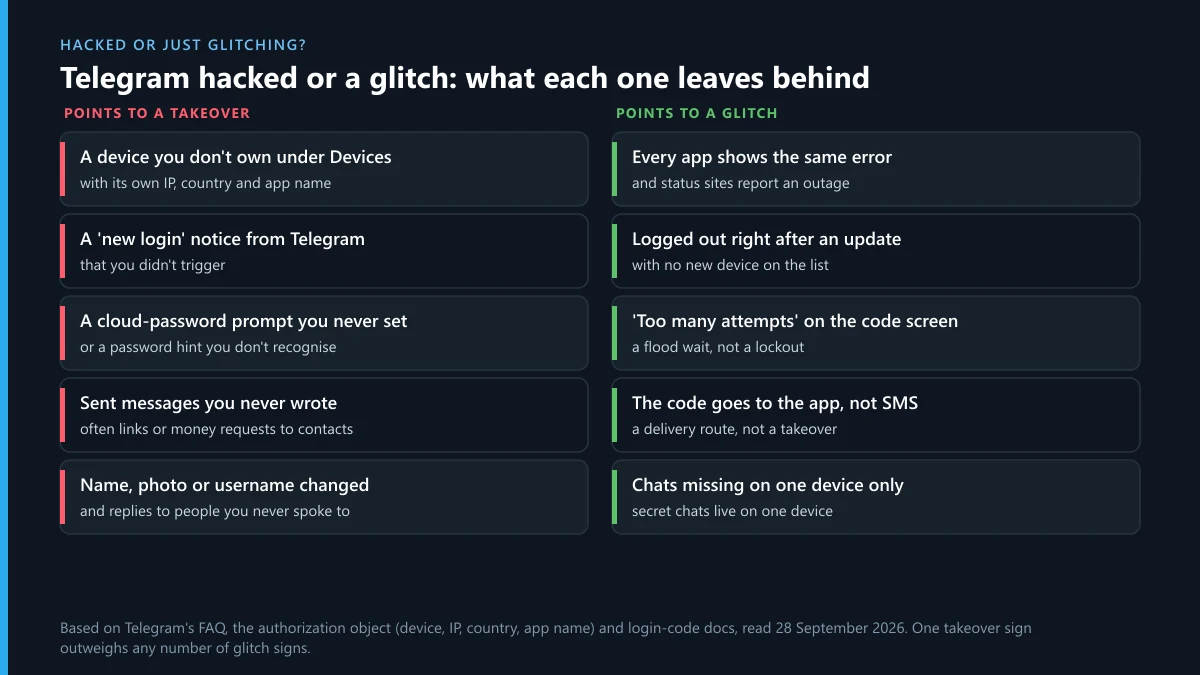
Glitches have their own fingerprints. A "too many attempts" screen is a flood limit on code requests, not a lockout. A code that arrives inside the Telegram app instead of by SMS is a delivery choice Telegram makes, not proof of anything. A wave of logouts right after an update, with no strange device on the list, points to the app. One sign from the takeover column outweighs all of these.
Which device are you holding when you notice?
That single fact sets your route. We sorted the common situations by what is still in your hands, because the steps differ sharply between someone with a signed-in laptop and someone looking at a login screen.
| What you still have | What to do first | What can still go wrong |
|---|---|---|
| A device signed in before the intruder | Settings, Devices: terminate every session you don't recognise, then set or change the cloud password | Nothing, if you act before hour 24 of their session |
| That device, but they already set a password | Terminate their session anyway; then reset the password from inside the app | The reset runs on a 7-day timer, and any live session can cancel it |
| Only the SIM, all devices logged out | Sign in with a fresh SMS code | Their cloud password stops you at the second screen |
| The SIM, and they set a password with their own email | Reset from the password screen | This deletes the account and its cloud history; you keep the number |
| Nothing: they moved the account to their number | The support form, then report the account | No documented way for Telegram to hand it back |
If you are in the first row, the order matters. Terminate first, password second. A password set while their session is still alive can be reset by them from inside, the same way you would reset it. With their session gone, the only person who can open the account is someone holding your SIM, and after the password, someone holding the SIM and the password. Then check Privacy and Security for a recovery email you don't recognise and replace it. The broader sign-in mechanics, from code types to the login email, are covered in our guide to recovering a Telegram account you can't log in to.
Is the 24-hour waiting period real, and whose side is it on?
It is real, and it cuts both ways. A session under 24 hours old cannot log out other devices or change the account's number. That protects you if you still have an older session. It hurts you if you have just signed back in on a new phone and want to throw the intruder out.
This is the part people misread on forums. Someone recovers their SIM, logs in on a replacement phone, opens Devices and taps the intruder's session, only to be refused. They conclude Telegram is shielding the hacker. What actually happened is that their own session is the fresh one now. The rule treats both parties identically: whichever device logged in last has to wait.
So the practical reading is this. If the intruder's session is younger than your oldest surviving device, you win every contest for a day. If you are the newcomer, change what you can: the cloud password, if you know the old one, and the recovery email. Watch the Devices list. Channel ownership has the same kind of guard. Telegram's ownership-transfer method refuses with "This session was created less than 24 hours ago" and also refuses when the password "was modified less than 24 hours ago", so a new intruder can't instantly hand your channel to themselves. Our page on what paid recovery sellers can and can't do covers why nobody can skip these timers for a fee.
The hacker enabled two-step verification before you did. Is the account gone?
Not always. If any device you own is still signed in, you can terminate their session and request a password reset from inside the app, which keeps the account. If every device is logged out, the only reset left deletes the account, and the timing depends on how old their password is.
Telegram's account-deletion page spells out the logged-out path. The deletion is delayed seven days only "if the account's 2FA password was modified more than 7 days ago and was active in the last 7 days". Otherwise, "the account will be immediately deleted". A password the intruder set yesterday is less than seven days old, so resetting it from a login screen ends the account at once. You get your number back as a clean, empty account. The chats, the contacts list and the channel ownership go with the old one.
The delayed version has a twist that works against victims. During those seven days Telegram sends a confirmation link to the account, and confirming it "will cancel deletion of the account and will log out the user that tried to reset it". If the intruder is inside when the link arrives, they can cancel your reset. That is why the logged-in route, when you still have it, is always the better one. There is also a recovery email. If the password carries one you control, you can recover through it. If the intruder attached their own address, that door is theirs.
Telegram hacked account recovery when the phone number was changed
Once the account sits on the intruder's number, recovery through Telegram is unlikely. Nothing on Telegram's public pages describes support moving an account back to a previous number, and its FAQ ties the account to whoever holds the number. You can still file the support form and report the account.
The change itself leaves a trace. The FAQ says a number change lets the account "keep everything, including all your contacts, messages, and media from the Telegram cloud". Everything moves with the new number, and the old number opens nothing. If you try to sign in with your number afterwards, Telegram will offer to create a fresh account. That is a sign the change went through, not a bug.
Two things are still worth doing. First, write to Telegram's support form. Give your old number, the approximate time you lost access, the username and display name as they were, and any login alert you screenshotted before losing the session. Be aware that the FAQ describes its support as run by volunteers. Second, the hijacked account is now someone else's tool, often pointed at your contacts. That is a reportable problem, not a recovery one. If it is running fake giveaways or requests for money, a fraud report routed to Telegram is the fitting route, and if it copies your identity after you rebuild, the fake-profile reporting steps apply.
Can someone take over your Telegram with only your phone number?
The number alone is not enough. They also need the login code sent to it, and, if you set one, your cloud password. With no password, anyone who gets that one code by interception, SIM swap or a trick holds the account. With a password, the code only gets them to a second locked door.
Code interception is documented. In August 2016, researchers told Reuters that an Iranian group had broken into more than a dozen Telegram accounts, likely by intercepting SMS codes, and had identified 15 million Iranian phone numbers registered on the service. Telegram's reply on 2 August 2016 acknowledged "several accounts which were accessed earlier this year by intercepting SMS-verification codes" and gave its advice in one line: "use 2-Step Verification to protect your account with a password".
SIM swapping is the other route. In its 2025 Internet Crime Report, the FBI's Internet Crime Complaint Center logged 971 SIM-swap complaints with reported losses of $17,366,758. Those figures cover all services, not Telegram alone, and most victims never file. The commonest route of all needs no carrier: a message that asks you to forward or read out a code. Telegram's servers "automatically invalidate login codes" that are forwarded or pasted into another Telegram chat, which is why attackers ask for screenshots or ask you to type the code into a fake page. Some even set up bots that promise to get a number banned through a report bot and harvest codes along the way.
What happens to your chats, groups and channels while someone else is in?
Cloud chats stay on Telegram's servers, and the intruder can read, send and delete them for as long as their session lives. Secret chats are different: they live on the device that started them, so an intruder cannot open the secret chats on your phone. Groups and channels stay yours unless ownership is moved.
The FAQ on secret chats says they "are device-specific and are not part of the Telegram cloud". That protection has a price. If the intruder later logs your phone out, your secret chats on it vanish with the session. Nothing restores them. Cloud history survives a logout and comes back when you sign in again. It does not survive the password reset that deletes the account.
Groups and channels need a closer look. The intruder can post in them, remove admins you appointed or delete a channel you own, and a deleted channel does not come back. Transferring ownership needs a cloud password and a session older than a day. Once you are back, open each group and channel you run, check the admin list and the recent actions log, and remove anyone you did not add. If the channel is beyond saving, our note on deleting a Telegram channel you own explains what goes with it. If the intruder spun up a copycat channel, taking down that copycat channel is the route, and a channel reposting your photos or files may fit a copyright complaint about a Telegram channel.
What is @notoscam, and should you message it after a hack?
@notoscam is Telegram's own channel for reports about impersonation. It is safe in the sense that it is genuinely Telegram's, but it is a reporting inbox, not a recovery desk. It will not restore access, and no official account will ask you for a login code, a password or a payment.
When we opened t.me/notoscam on 28 September 2026, the account was named "Report Impersonation" and its description read "Reports about scammers are welcome here." Telegram's FAQ points to it with one condition: "If a scammer is pretending to be you". That is the right use after a hack. If the intruder has rebuilt your identity on another account, or is using yours to pose as you, send a short report with both usernames and screenshots.
The unsafe part is the lookalikes. After a takeover people search in panic, and copycat usernames with "support", "help" or "recovery" added are waiting. Hijackers also message victims pretending to be Telegram staff and ask for the next code, which hands over the account a second time. Treat any account offering recovery as a scam until you have typed the username yourself. Our round-up of scams that pose as Telegram report or recovery bots shows the common scripts, and where each type of Telegram scammer should be reported lists the official inboxes.
You're back in. What should you check and report?
Check what the intruder changed, then report what they used the account for. Recovery is not finished at the login screen. Hijacked accounts are usually put to work within hours, and your contacts may already have lost money.
- Terminate every session except the one in your hand, and keep one old device signed in as your spare key.
- Set a new cloud password with a recovery email you control; confirm the email.
- Check your username, display name, photo, bio and linked channel. Put them back.
- Open Privacy and Security and read each setting, starting with who can find you by your number.
- Tell your contacts, in one short message, that requests sent from your account on those dates were not you.
- Report the messages the intruder sent, and any separate accounts they used.
For that last step, the right tool depends on what you found. Reporting individual messages the intruder sent covers links and requests still sitting in chats. A group or channel they used as a base is handled through reporting a Telegram group or channel, or reporting a whole channel rather than one post if the whole thing exists to scam. Mass-messaging from your hijacked account may already have earned it a spam limit, and our page on how Telegram handles spam reports explains both sides of that.
Some takeovers turn into blackmail. If the intruder demands payment to return the account or threatens to publish your chats, reporting extortion on Telegram sets out the evidence to keep. Manipulated photos of you are a separate problem that may involve the deepfake bots Telegram takes down. If they posted material that is illegal outright, use Telegram's illegal-content routes. For threats and harassment that don't fit those boxes, see reporting abuse on Telegram.
Can anyone promise a successful telegram account hacked recovery?
No, and a promise is a warning sign. Access depends on your SIM, your devices, your password and Telegram's own decisions. Nobody outside Telegram can sign in for you, and Telegram does not sell priority recovery. That includes us.
Telegram Ban Service is a reporting desk. We report accounts, channels, groups and bots that break Telegram's rules, through the in-app Report button, @notoscam and Telegram's published inboxes. After a hack, that is useful in one specific way. If the intruder is running a clone of you, scamming your contacts or holding your old account on their number, we can report that account with evidence. How bans on Telegram actually come about explains what makes such a report land, and why the number of reports matters less than people think covers the counting myth.
We will not sell you a login, a guaranteed unban or a "restore". Offers of that kind are usually scams, and mass-report bots are the same story. They flood Telegram with reports, and Telegram tends to discount them. If you want to know what a reporting service can honestly do, our breakdown of a Telegram report service sets out the limits. A known hijacker handle may already sit on a community Telegram scammer list, which helps your contacts check before they pay. When the account really does need to go, a Telegram account takedown for a hijacker's account is the service that fits. Stolen videos they re-upload elsewhere can be handled through a DMCA notice on Telegram. The full index of routes is on our Telegram solutions hub, the desk itself is introduced on the Telegram Ban Service home page, and case details can go through our contact page.
Sources
- Telegram FAQ: phone number identity, stolen phone, secret chats, changing your number, @NoToScam
- Telegram API, account.resetAuthorization: FRESH_RESET_AUTHORISATION_FORBIDDEN
- Telegram API, account.sendChangePhoneCode: FRESH_CHANGE_PHONE_FORBIDDEN
- Telegram API, account.updatePasswordSettings: error list (no fresh-session block)
- Telegram API, authorization object: IP, country, password_pending, unconfirmed
- Telegram API, user authorization: unconfirmed sessions and login-code invalidation
- Telegram API, account deletion: immediate vs 7-day delayed reset
- Telegram API, channels.editCreator: SESSION_TOO_FRESH and PASSWORD_TOO_FRESH
- Telegram blog, 2 August 2016: response to the Reuters report on SMS-code interception
- FBI Internet Crime Complaint Center: 2025 Internet Crime Report (SIM swapping)
- @notoscam, "Report Impersonation" (checked 28 September 2026)
FAQ
Can Telegram support recover my account if the hacker changed my phone number?
Probably not. Telegram's FAQ ties an account to whoever holds its number, and no public Telegram page describes support moving an account back to an old number. File the support form anyway with your old number, the time you lost access and your former username, then report the hijacked account if it is being used to scam people.
What is @notoscam and is it safe to use for hacked Telegram account recovery?
@notoscam is Telegram's official channel for impersonation reports, named "Report Impersonation". It is genuine, but it does not restore accounts. Use it to report an account pretending to be you. Never give a login code or password to any account offering recovery, including lookalike usernames.
Is there really a 24-hour waiting period for Telegram account hacked recovery?
Yes. A session less than 24 hours old cannot log out other sessions or change the account's phone number. That favours whoever has the older device. If you still have one, you can remove a new intruder straight away. If you just signed in on a new phone, you have to wait out the same day.
Can someone hack my Telegram with only my phone number?
Not with the number alone. They also need the login code sent to it, through SIM swapping, SMS interception or tricking you into sharing it. A cloud password stops them even when they have the code, which is why Telegram's own advice after the 2016 SMS-interception cases was to turn on two-step verification.
What happens to my messages and groups during Telegram account hacked recovery?
Cloud chats stay on Telegram's servers and return when you sign back in, unless the account is deleted by a password reset. Secret chats live only on the device that started them and disappear if that device is logged out. Groups and channels stay yours unless the intruder deletes them or moves ownership, which needs a session older than a day.
Can I recover my account if the hacker enabled two-step verification before I had it set?
If any device of yours is still signed in, yes: terminate their session and reset the password from inside the app, which keeps the account after a 7-day timer. If every device is logged out, the only reset left deletes the account. With a password under 7 days old, that deletion happens immediately.
Do you guarantee successful Telegram hacked recovery?
No. Telegram Ban Service does not sign in to accounts or restore them, and nobody outside Telegram can guarantee access. What we do is report the accounts, channels or clones a hijacker uses to scam or impersonate people, through Telegram's official routes, when they genuinely break the rules.