23 September 2026 · Telegram Ban Service · 16 min read
Telegram report bot or Instagram spam report bot: what works, and what is a scam
No Telegram report bot can ban an account alone, and neither can an Instagram spam report bot sold on Telegram. Telegram's Bot API has no report method; Instagram and TikTok take in-app reports only from signed-in accounts. A paid bot either borrows accounts, which breaks their terms, or does nothing. Crypto-only payment and a login-code request mark the scam.
What a Telegram report bot can reach, and what stays out of its hands
On Telegram itself, a bot reaches nothing. Reporting is reserved for people: the developer page for account.reportPeer, the method behind account and whole-channel reports, carries the line "Only users can use this method," and the post-level method says the same. Bots can ban members of a group they administer, delete messages there and answer commands. Past the walls of that group, they have no voice with Telegram's moderators.
That leaves three unrelated things sharing the name telegram report bot:
- Report collectors for group admins. A member types a command, and the bot pings the admins with the message. The open-source telegram-report-bot on GitHub is the usual example. Nothing it does reaches Telegram.
- Telegram's own @SearchReport. It takes reports about problematic search terms, carries Telegram's check mark, and its public page listed 37,772 monthly users on 23 September 2026.
- The paid kind. Storefront bots take an order and pass it to scripts logged in to many user accounts, or to nobody at all.
By the same logic, a telegram ban bot is a moderation bot that removes people from your own group. It can't touch a stranger's channel. Telegram's moderation meanwhile runs at a scale no seller adds to: on 23 September 2026 its safety page counted 26,338,546 groups and channels blocked so far in 2026, 166,250 more than it showed two days earlier. Each report there is read by a person. Pressing Report, Telegram's spam FAQ explains, sends the messages "to our team of moderators for review."
How does a report bot take your money inside Telegram, and who can give it back?
Usually in Telegram Stars, and only the bot's own developer can refund those. Telegram's rules for bot payments state that payments for digital goods and services "must be carried out exclusively in Telegram Stars," and a paid report is a digital service. Beyond that rule, Telegram stays out of the sale. Its Stars terms open the refund question bluntly: "All sales of Telegram Stars are final and Telegram does not issue refunds for unwanted or unintentional purchases."
One real lever stays with the buyer: a command. The developer rules for Stars payments say a paying bot must be able to "respond to the command /paysupport and process user requests regarding payment issues," and they put the owner on the hook with "full responsibility in case any conflicts or disputes arise." Refunds go out through a method called refundStarPayment, which only the bot can call. If the seller refuses after /paysupport, the Stars terms send you to Settings, then Your Stars, for the transaction ID, and from there to a dispute report opened through @BotFather.
Here the design runs into the product. The Stars terms frame a refund around a bot that fails to deliver "as advertised and within the agreed-upon timeframe," and a report seller will always say the reports went out. You can't see a report, so you can't prove one was never sent. Stars disputes work when the bot took payment and then went silent. They rarely work on a claim of poor results.
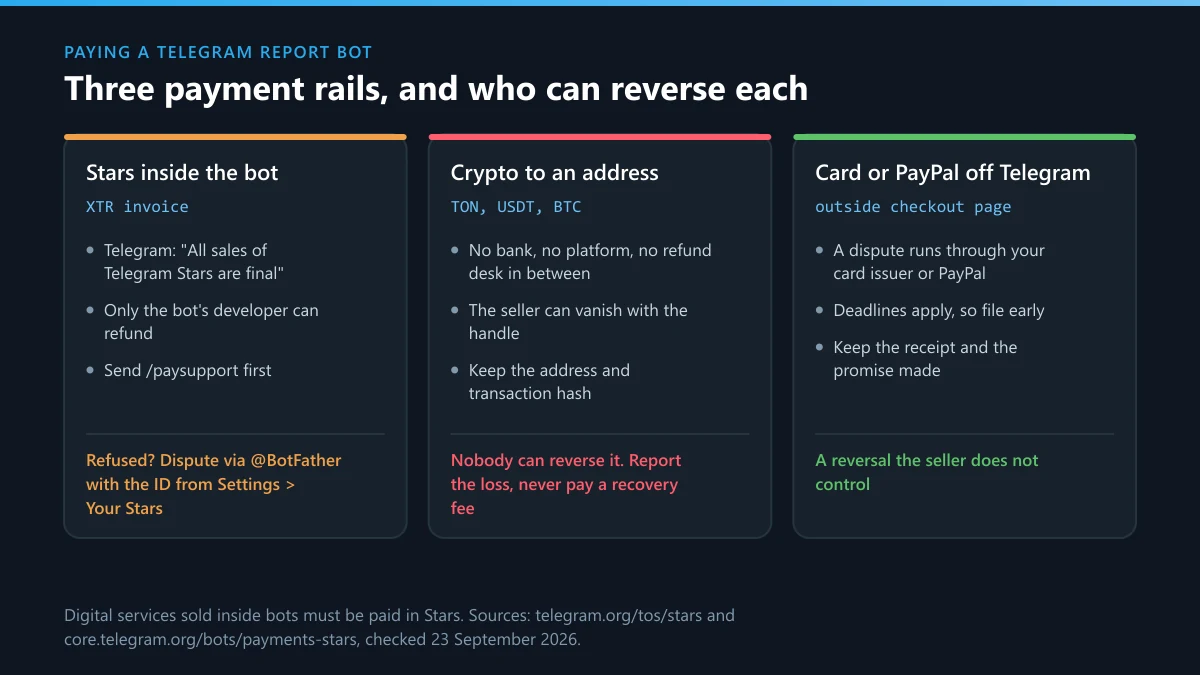
Sellers who skip Stars paste a wallet address, TON or USDT, into the chat instead. That step moves the deal outside the only payment system Telegram gives bots for digital services, and outside its dispute route with it. The US Federal Trade Commission's guidance on crypto payments states the consequence: "Once you pay with cryptocurrency, you can usually only get your money back if the person you paid sends it back."
| How you paid | Who can reverse it | What to keep now |
|---|---|---|
| Stars invoice inside the bot | The bot's developer, by refund; a dispute via @BotFather if they refuse after /paysupport | Transaction ID from Settings, Your Stars, and a capture of the offer |
| TON, USDT or other crypto sent to an address | Nobody | The address, the transaction hash and the whole chat |
| Card or PayPal on an outside website | Your card issuer or PayPal, inside their deadlines | Receipt, a capture of the product page, the seller's promise |
| A top-up on an SMM panel balance | Only the panel, under its own terms | Order ID and the listing as it read on the day you paid |
What a "buy telegram channel mass report" listing actually sells
When Telegram Ban Service opened one SMM panel's Telegram "Reports" listing on 23 September 2026, it sat in the same menu as views, reactions, subscribers and mass DMs. It was listed at 5 roubles with a 20,000 maximum per order, "Up to 5 000 / day", and a "No refill" tag. That page also credits residential mobile proxies and stored session files for keeping its sending accounts unblocked, which is a description of evading Telegram's moderation, and then concedes that moderation "may view this as a coordinated competitor attack and temporarily freeze the review of reports." We bought nothing; what we saw on the listing was enough. A telegram mass report service sells volume from accounts it manages, and it admits the volume can stall the very review you are paying to speed up.
Why report bots ask for your phone number, and what the login code gives away
Because your account is worth more to the seller than your money. A bot or web panel that asks you to "connect" Telegram wants the code Telegram sends at login, and whoever types that code in, plus your cloud password if you set one, opens a new session on a device you will never see. According to Telegram's FAQ, login codes arrive in the verified service chat named Telegram and "should never be shared with anyone, including other services or apps." A report bot is one of those apps.
What a mass report script or bot software asks you to hand over
Self-hosted scripts ask for the same keys more openly. The README of one open-source telegram mass report script on GitHub lists a phone number for each account, an api_id and api_hash from my.telegram.org, and a folder of saved .session files, and any telegram mass report bot software built on user sessions needs that set. Where that ends is spelled out on Telegram's page on obtaining an api_id: "If you use the Telegram API for flooding, spamming, faking subscriber and view counters of channels, you will be banned forever." Accounts that log in through unofficial clients, it adds, are "automatically put under observation." So mass report telegram account offers cut both ways. The account you lend becomes one of the reporters, and the ban risk sits with it.
- Your phone number alone: the first half of a login, and a spam target.
- The login code: a new session somewhere else, live until you end it.
- Your cloud password: the last barrier Two-Step Verification puts in front of the account.
- A .session or tdata file: the account itself, with no code needed.
- api_id and api_hash: your developer identity, which Telegram can ban.
Checking takes a minute. Settings, then Devices, lists every session open on your account, including any a report bot started. Telegram Ban Service never asks a client for a login code, and nobody who genuinely reports on your behalf needs one.
Do free online TikTok and Instagram report bots on Telegram or GitHub work?
No. Telegram bots have no connection to TikTok or Instagram, so every free TikTok mass report bot online free Telegram link and every Instagram mass report bot on Telegram has to borrow logged-in accounts on those platforms to send anything. Instagram's Terms of Use close both doors. They bar "creating accounts or accessing or collecting information in an automated way without our express permission," and they list "misusing any reporting, dispute, or appeals channel, such as by making fraudulent or groundless reports or appeals" as interference with the service. TikTok answered the volume question in 2021, when its US safety head Eric Han wrote that "mass reporting content or accounts does not lead to an automatic removal or to a greater likelihood of removal by our Safety team" (TikTok newsroom, 9 July 2021).
"Free" moves the price somewhere else. The tiktok report bot telegram links that promise reports at no cost ask you to sign in with your own TikTok or Instagram account, or to download a build from a file host. Downloads carry a documented risk. In July 2024 Check Point Research traced more than 3,000 ghost GitHub accounts and over 2,200 malicious repositories, several aimed at people "who wanted to increase their followers on YouTube, Twitch, and Instagram"; the payloads were information stealers such as Lumma and RedLine. Report tools are the same lure with a different promise. The GitHub or Telegram Instagram mass report bot choice is therefore a choice between installing unknown code and handing an unknown seller your login. Some of these repositories do not last long either: one that search engines still listed on 23 September 2026, its description quoting a success rate and a case count, returned a 404 when Telegram Ban Service opened it.
Is an Instagram spam report bot on Telegram any different?
Only in the label it picks. An Instagram spam report bot on Telegram sends the spam reason instead of the harassment one, through the same borrowed accounts, and the Instagram terms quoted above make no exception for the spam box. Instagram mass report Telegram groups sell the same service under a busier name, and the instagram mass report telegram bot in their pinned post is usually one of the storefront bots described above. Real spam, meaning fake giveaways, repeated DMs from throwaway accounts or impersonating profiles, is better served by one report from the account's own menu with the spam reason chosen, followed by a block.
Telegram account, channel, group & bot ban services explained
A genuine service files evidence about one of four Telegram objects, and each object is banned in its own way. The table sets out what that looks like, what an honest desk needs from you, and what nobody can sell. Any listing that prices a telegram channel mass report by the thousand is selling the last column. By contrast, the third column is the whole intake Telegram Ban Service asks for.
| Object | What a Telegram ban looks like | What an honest service asks you for | What nobody can sell |
|---|---|---|---|
| Account | A limit (messages only to people who saved its number), a SCAM or FAKE label, or a ban | The @username or t.me link and links to the messages that break the rules | The name of the person who reported it, or a ban on a clean account |
| Channel | "This channel can't be displayed", sometimes on some platforms only | The channel link and the two or three posts that prove the breach | An outside report on a private channel nobody on the case can open |
| Group or supergroup | The same block: a supergroup is a channel object in Telegram's API | The group link, message links, and membership if the group is private | Deletion, which only the group's own admins can do |
| Bot | The bot stops answering or carries a SCAM label | The bot's @username, what it does, and the account that runs it | A stop on the operator registering a replacement bot |
Two rows need a second step. Reporting a whole channel at profile level sends Telegram the channel with no posts attached, so the posts have to be filed too. And a group can be reported from outside only while it is public.
Channel and group removal, takedown and report services
These names cover different jobs. Search results for telegram channel removal service and telegram group removal service lean toward deleting your own posts or groups. Telegram channel takedown service and telegram group takedown service results are mostly copyright agents, because a rights holder's notice has a legal process behind it, set out on copyright infringement on Telegram channels. A telegram channel report service or telegram channel ban service, done honestly, is a reporting desk: it picks the route per violation, the way the route-by-violation takedown guide lays it out, and it sends nothing in bulk. Mass report telegram channel orders and mass report telegram group orders add accounts, not evidence, and the report-count figures sellers quote trace back to no Telegram source.
When a telegram account ban service search means your own account
About half of what ranks for telegram account ban service and ban telegram account service is aimed at people whose own number was restricted. For them no service helps: a limited account appeals through @SpamBot, and the "phone number is banned" screen has its own route, covered with reporting a Telegram bot and banned numbers. Anyone offering to "unban" a number for a fee is selling the same thing as the report bots, from the other side.
What does a report bot's own Telegram page tell you before you press Start?
Less than its description claims, and enough to catch the laziest sellers. On 23 September 2026 Telegram Ban Service opened the public t.me pages of three bots sold as report tools. Two shared a display name. Two carried the same line, "Unrivaled performance & reliability". One described itself as "Ensuring platform integrity and policy compliance." The bot calling itself "The world's #1 Instagram mass report bot" and "Trusted by thousands" showed no user figure at all, and only one of the three listed a count: 19,227 monthly users. None had a check mark. For comparison, Telegram's own @BotFather, checked the same afternoon, showed the check mark and 8,386,763 monthly users.
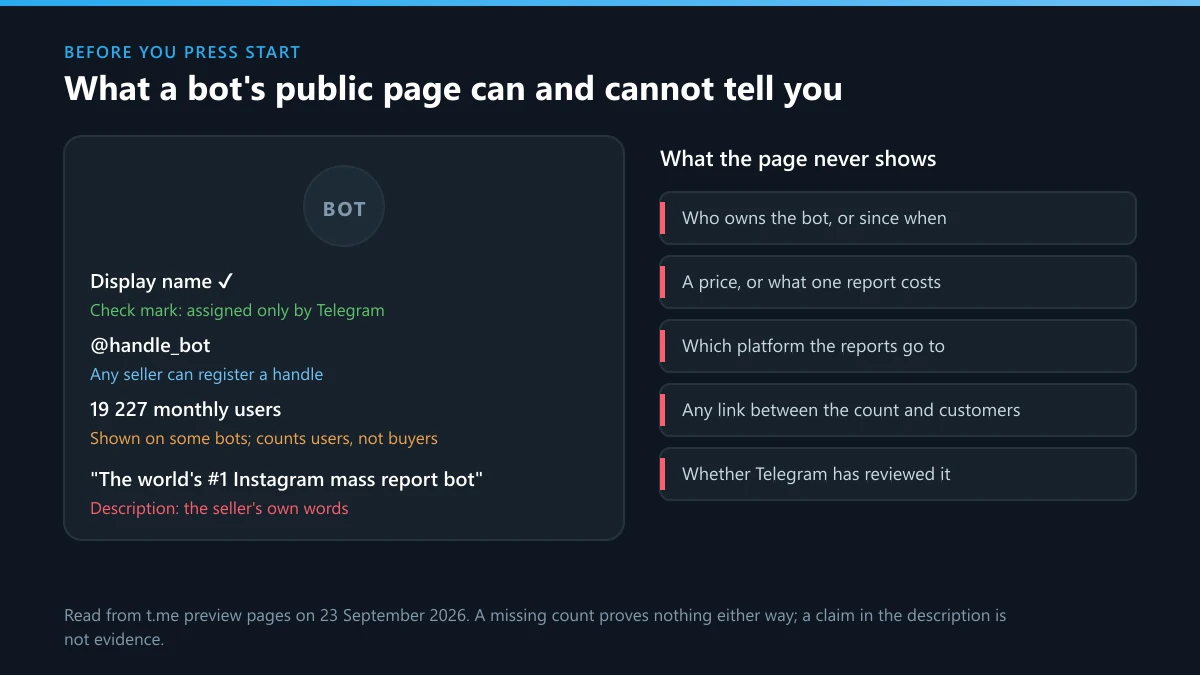
Three signals are worth reading. The check mark is Telegram's alone: its verification page says "Only Telegram is able to assign the official verification checkmark to chats. Third-party verifiers use completely different icons." Bots that Telegram has verified can hand out those other icons "in order to prevent scams and reduce misinformation," its developer documentation says, and each icon speaks for its verifier, not for Telegram. The monthly-user line counts users, not buyers, and a missing line proves nothing either way. And a red SCAM or FAKE label is Telegram's warning after complaints; the FAKE flag is described in its API as "reported by many users as a fake or scam user", explained further under what the SCAM and FAKE labels mean. Any report bot wearing that label has already been reported by its own customers.
None of this shows who runs the bot, how old it is or where its reports go. Removed bots also come back: the operator registers a new one through @BotFather under the next free handle, the pattern traced on bots that respawn after removal.
Already paid a report bot? Six things to do, in this order
Secure the account first and chase the money second, because a session left open does more damage than the payment.
- Open Settings, then Devices (Privacy and Security, then Active Sessions, in some apps) and end every session you don't recognise. Telegram's FAQ gives the same path for a stolen phone.
- Turn on 2-Step Verification under Settings, Privacy and Security. A login then needs your password as well as the code, so the next code a seller talks out of you is not enough on its own.
- If you paid in Stars, send /paysupport to the bot and keep its reply. If it refuses a refund or stays silent, copy the transaction ID from Settings, then Your Stars, and open a dispute through @BotFather.
- If you paid by card or PayPal, open a dispute with the issuer now. If you paid in crypto, save the wallet address and transaction hash and report the loss: in the US at ic3.gov, in the UK through Report Fraud.
- Report the bot from its own profile, choosing the scam reason and naming the payment in the comment. The route and the evidence it needs are set out in where to report a Telegram scammer.
- Ignore anyone who then offers to recover the money for a fee. If the seller starts threatening you with what they know, that is extortion, and reporting Telegram extortion covers it.
What works instead: one report a moderator can check
A single report that names the rule, links the evidence and reaches the right desk. There are four: the Report button in every app, [email protected] for illegal public content, @NoToScam when an account is impersonating you with a fake profile, and [email protected] for copyright. Each takes one well-built case. Posts go in one at a time through reporting a single message, unwanted messages have Telegram's own spam controls, and material that breaks the law follows the illegal-content routes. When the problem is a person rather than a post, reporting someone on Telegram starts from their messages.
Telegram Ban Service works that way and sells no volume. The desk takes the link, checks which rule is broken, files the report with the posts that prove it and escalates by email or the EU form when the content is illegal. Telegram Ban Service files and escalates; Telegram's moderators decide what happens to the account. A target that breaks no rule is turned down, and so is any request to report in bulk. The difference between a desk and a panel is laid out in what a report service can promise.
Skip the bot. Keep the Stars, keep your login code to yourself, and file one report with the post links and the rule it breaks. If a channel keeps coming back under new names, send the desk the old and new links, or browse the other Telegram report guides first.
Sources
- Telegram Stars terms: final sales, /paysupport and the @BotFather dispute route (retrieved 23 September 2026)
- Telegram bot payments in Stars: the XTR rule, refundStarPayment and developer responsibility
- Telegram API, account.reportPeer: "Only users can use this method"
- Telegram API terms for api_id holders
- Telegram verification: the check mark and third-party icons
- Telegram spam FAQ: reports reviewed by moderators
- Telegram safety: 26,338,546 groups and channels blocked in 2026 (retrieved 23 September 2026)
- Telegram FAQ: login codes, Devices and 2-Step Verification
- Telegram API, third-party verification by verified bots
- Telegram EU Digital Services Act page: suspending repeat unfounded reporters
- Instagram Terms of Use: automated access and misuse of reporting
- TikTok newsroom, 9 July 2021: mass reporting and removal
- Check Point Research, 24 July 2024: Stargazers Ghost Network on GitHub
- US Federal Trade Commission: what to know about cryptocurrency and scams
FAQ
Is there a free Telegram report bot that actually works?
For search terms, yes: Telegram's own @SearchReport, which carries the official check mark. For accounts, channels, groups and bots, the free tool is the Report button already in your app, and it reaches the same moderators a paid bot claims to reach. A free third-party bot that asks for your login is not free at all.
Can I get my Stars back from a report bot that did nothing?
Sometimes. Send /paysupport to the bot first, because Telegram's Stars terms put refunds in the developer's hands. If the seller refuses, copy the transaction ID from Settings, then Your Stars, and open a dispute through @BotFather. A bot that took payment and went silent is a far easier case than one that says the reports went out.
Is it illegal to use a mass report bot?
It breaks the terms of Telegram, Instagram and TikTok, which is enough to lose every account involved. Telegram's EU terms add that it may suspend processing your notices "if you repeatedly submit manifestly unfounded, fraudulent or misleading reports." Where a campaign targets one person again and again, harassment laws may also apply, and those differ by country.
Can a mass report panel get a private Telegram group banned?
Not from outside it: Telegram's whole-chat report method refuses non-members of a private channel or supergroup with "You haven't joined this channel/supergroup.", so reports from accounts that never joined go nowhere. Members can still report posts from inside, and illegal content can go to [email protected] as well.
Is a telegram ban bot the same thing as a report bot?
No. Ban bots are moderation tools an admin adds to their own group, where they remove or mute members under rules the admin sets, and they have no power over anyone else's channel or account.
Does a monthly-users count prove a report bot is real?
No. The figure on a bot's public page counts people who used it, not customers who got a result, and many bots show no figure at all. When Telegram Ban Service checked three report bots on 23 September 2026, the one describing itself as "Trusted by thousands" displayed no count. Telegram's own @BotFather showed 8,386,763 monthly users the same day, for scale.
Why does a report bot ask for my phone number?
Reporting doesn't need it. A phone number followed by a request for the login code is how an account changes hands, since the code opens a new session for whoever types it. Don't send that code to any bot. If you shared one already, end unknown sessions under Settings, then Devices, and turn on 2-Step Verification.