27 September 2026 · Telegram Ban Service · 21 min read
How to recover a Telegram account when the number, the code or the password is gone
Install Telegram, enter the same phone number and type the code it sends, which may arrive in another logged-in Telegram app rather than by SMS. If a cloud password stops you, use its recovery email or a 7-day reset from a device still signed in. Lost the SIM? Have your carrier reissue that number first.
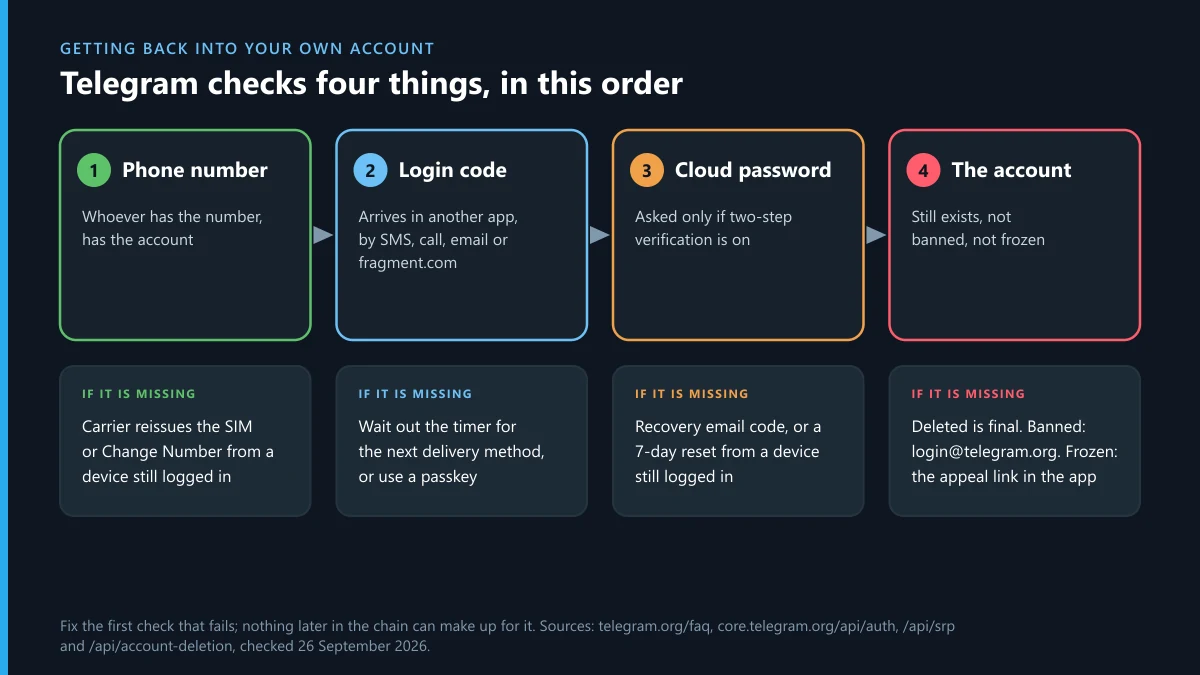
Telegram settles the question of identity in one line of its FAQ: "the phone number is the only way for us to identify a Telegram user at the moment." The next sentence is the one to remember: "whoever has the number, has the account." There is no selfie check, no ID upload and no appeal form that stands in for the number, which is also why a number is worth stealing. The FBI's Internet Crime Complaint Center logged 971 SIM-swap complaints and $17,366,758 in losses in its 2025 annual report, against $25,983,946 the year before and $48,798,103 in 2023. Losses fell 33% in one year and about 64% in two, while complaints moved by less than 10%, from 1,075 to 971. Whatever took your access, the way back is a sign-in, and Telegram runs the same four checks every time. Find the first one that fails and work on that one alone.
What does Telegram check before it lets you back in?
Four things, in a fixed order: the phone number, a one-time login code, the cloud password if two-step verification is on, and the state of the account itself.
The number comes first because, as far as Telegram's servers are concerned, it is the account's name. A code proves that you control that number right now, or that you already hold a signed-in session somewhere. The cloud password, which the settings screen calls Two-Step Verification, appears only if you switched it on at some point, and it is the one lock that still holds after someone else gets your SIM. Last comes the account. A deleted account fails there even with a perfect number, code and password, and so does a banned or frozen one, for a different reason.
That order explains most of the dead ends people describe. An email to support about a forgotten password goes nowhere while the code still refuses to arrive. A new SIM cannot bring back an account that the inactivity timer deleted months ago. Telegram passed "significantly over 1 billion monthly active users" in March 2025, Pavel Durov announced, and every one of those accounts signs in through this same sequence. Skipping a step is the usual reason advice fails.
Telegram account recovery options, matched to what you lost
Each row is one missing piece and the door Telegram itself documents for it. Find your row before you write to anyone.
| What you lost | The documented way back | Wait built in | What you keep |
|---|---|---|---|
| The phone or SIM, number still yours | Carrier blocks the old SIM and reissues the number; you sign in again | The carrier's, none on Telegram's side | Every cloud chat; secret chats stay on the old phone |
| The number itself (cancelled, recycled, abroad) | Change Number from a device still signed in, before the number is reissued | None | Everything, if a session survives; nothing if none does |
| The code, sent to an app you can't open | Let the timer run out; the app offers the next delivery method | The countdown on screen | Everything |
| The mailbox of your login email | Reset the login email from the sign-in screen | Set by Telegram's server; zero for Premium | Everything |
| The cloud password, recovery email still readable | Forgotten-password link; a code goes to the recovery email | None documented | Everything |
| The cloud password, one device still signed in | Reset the password from that device | 7 days, cancellable | Everything |
| The cloud password, signed out everywhere | Reset the account, which deletes it | Up to 7 days on an active account | The number, and what your contacts hold |
| The wallet holding a +888 number | None; Fragment says it cannot restore lost keys | Not applicable | Nothing you can reach |
| The account itself, deleted or timed out | None; Telegram calls termination irreversible | Not applicable | Groups you created carry on without you |
| Access, because of a ban or a freeze | The address or appeal link shown on that screen | Set by Telegram's review | Everything, if the decision is reversed |
Rows six and seven describe the same forgotten password, and the difference between keeping ten years of chats and losing them is whether one device somewhere is still signed in. Row two is the quieter trap. A cancelled number goes on working as a key to your account for whoever the carrier gives it to next, so moving the account to a new number while you still have a session is urgent, not housekeeping.
How to recover a Telegram account after losing the phone or SIM
Get the number back before you open Telegram. For a stolen phone, the FAQ's instruction is to "Contact your phone provider, so that they block your old SIM and issue a new one with your number," and only then to sign in. If Telegram is still open on another device, start there instead, because that device can lock the lost phone out tonight.
- Call your mobile carrier, report the phone lost and ask for a replacement SIM on the same number.
- If Telegram is still signed in on a laptop, tablet or second phone, open Settings, then Privacy and Security, and turn on Two-Step Verification with a recovery email you can read.
- On that same device, open Settings, then Devices, and end the session that belongs to the lost phone.
- Put the new SIM in any phone, install Telegram and enter your number in international format, such as +44 7700 900123.
- Type the login code, then your cloud password if you have one.
- If step 3 wasn't possible, end the lost phone's session from Settings, then Devices, on the new phone; Telegram refuses this from a session less than 24 hours old, so try again the next day if the button fails.
- Wipe the lost phone remotely through Apple's or Google's device-finding service.
What comes back is every cloud chat, the media in it, your contacts and the groups and channels you belong to, with nothing to transfer. Secret chats do not come back. "All secret chats in Telegram are device-specific and are not part of the Telegram cloud," the FAQ says, so those stay on the lost handset for good. A new phone on the same number is the same job without the trip to the carrier.
Sometimes the number goes as well: a contract ends, a prepaid SIM lapses, you move abroad. With a device still signed in, Telegram lets you move the account and "keep everything, including all contacts, messages, media from the Telegram cloud, and all Secret Chats on all devices"; tap your phone number in Settings and choose Change Number. Do it before the old number is recycled. Without a signed-in device the FAQ is blunt: Telegram "can't help you unless you have access either to the phone number or to Telegram itself on any of your devices."
Why does the login code go to an app you can't open?
Because Telegram saw a recent session somewhere else and picked it as the delivery route. "If you have recently used one of our apps on another device (it could also be a different app on the same device), we may send the login code via Telegram instead of SMS," the FAQ explains, and Telegram's authentication docs describe that code as a service notification sent "to all other logged-in sessions." If the device behind that session is lost, broken or wiped, the code lands where nobody can read it.
Patience fixes this, not a new request. Every code screen carries a countdown, and the API gives each code a next_type: the "phone code type that will be sent next, if the phone code is not received within timeout seconds." Let the countdown finish and the app offers the next route, usually an SMS. Tapping for fresh codes over and over does the opposite. The server answers with PHONE_NUMBER_FLOOD, "You asked for the code too many times," and then nothing arrives for a while.
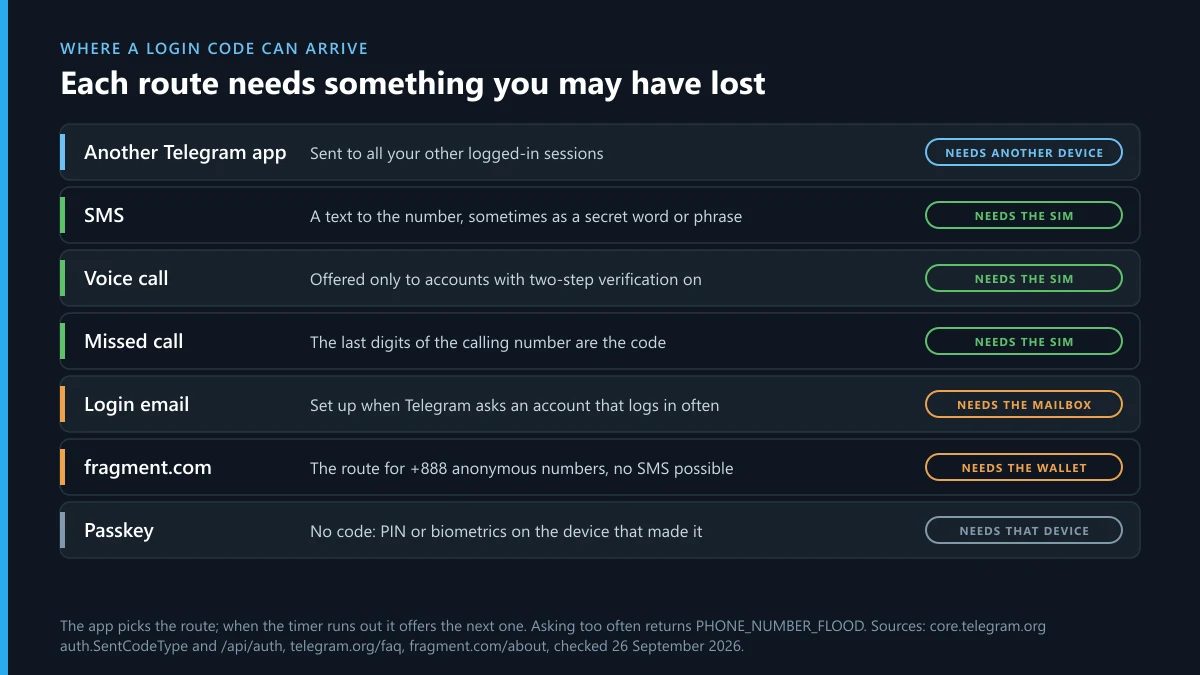
Most guides stop at SMS and the app. Telegram's list of code types includes a plain SMS; an SMS carrying "a secret word, starting with the letter specified" or a secret phrase in place of digits; a voice call; a missed call where "the last digits of the phone number that calls are the code"; a code sent to your login email; and delivery through fragment.com for anonymous numbers. The voice call has a condition people miss. "For security reasons, login codes dictated via a phone call are only available for accounts that have two-step verification enabled," according to the FAQ. In countries where SMS is expensive, the API even documents a screen telling someone they "must purchase a Telegram Premium subscription in order to proceed with the login/signup," per the sentCodePaymentRequired entry. If none of that helps, the FAQ names one official account for login trouble, @smstelegram on X.
Your login email and your recovery email do different jobs
A login email receives sign-in codes in place of SMS; a recovery email only helps with a forgotten cloud password. They can be the same mailbox, but Telegram sets, uses and resets them separately, and mixing them up sends people to the wrong screen.
The login email arrives on Telegram's terms. According to the authentication docs, "if the user logs in often enough, Telegram will ask the user to verify an email that will be used to send the login code," and from then on codes can go there instead of to the phone. The recovery email is the one you typed when you switched on two-step verification, an address "that will help regain access, should you forget your password," in the FAQ's words. Neither one replaces the phone number.
Lost the mailbox behind your login email? Reset it from the sign-in screen. Telegram's docs say "an email reset may be requested using auth.resetLoginEmail," after a countdown that Telegram's server sets and that "will be 0 for Premium users," according to the email-code reference. Free accounts wait; the length of the wait is not published.
One pattern should worry you. A login code sent to an email address you have never seen means somebody changed how your account receives its codes. That is a takeover, not a glitch, and it belongs with the hacked-account steps rather than the email reset.
Forgot the cloud password? Three exits, and only one deletes the account
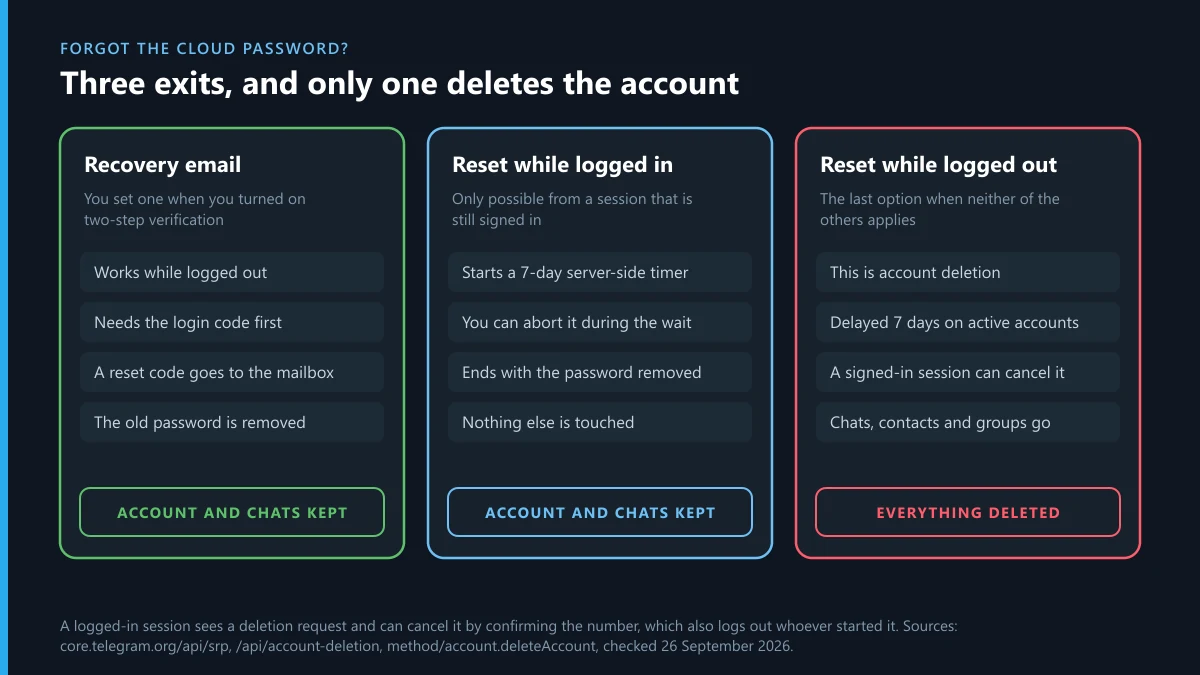
Recovery email first; a reset from any still-signed-in device second, with a seven-day wait; a logged-out reset last, because it deletes the account.
Most lockout stories that end badly end here, usually because the second exit was never tried. All three are documented in Telegram's developer pages, and the app screens built on them are worded differently on Android, iPhone and desktop, so match the function, not the label.
Recovery email: minutes, and nothing lost
On the password screen, choose the forgotten-password option and Telegram mails a code to your recovery address. The two-step verification docs say email recovery can be requested "from logged in sessions, and from non-logged in sessions if the user has successfully provided the login code," so you need the login code first; the email does not replace it. Entering the emailed code removes the current password and you set a new one. Give the password hint on that screen three honest guesses before you start anything else. You wrote it for exactly this moment.
Telegram account recovery steps for the 7-day reset from a signed-in device
This is the exit almost nobody mentions, and it keeps the account. Telegram's docs are explicit: "Password reset can be requested from logged-in sessions only. The following procedure can be used to reset the password without deleting the account." The request starts "a 7-day server-side timer, during which the user can abort the reset process," and when the week is up the password is gone. Chats, contacts, channels and admin rights stay exactly where they were.
So before anything drastic, hunt for a session: the desktop app on a work computer, an old tablet in a drawer, Telegram Web in a browser you rarely close. From any of them:
- Open Settings, then Privacy and Security, then Two-Step Verification.
- Choose the option to reset the forgotten password and confirm it; the label differs between apps.
- Leave the request alone for seven days. Cancelling has a price, because the API's resetPasswordFailedWait answer makes you wait before you can ask again.
- Come back after the timer ends and finish the reset on the same screen.
- Set a new password with a recovery email you can open, then sign in on your new phone.
One caution. The timer can be stopped from inside the account during that week, so if the password is new because someone else set it, this exit may not survive them. That case belongs with the takeover steps.
Resetting the account while logged out: the exit that deletes
With no recovery email and no signed-in device, the login screen offers to reset the account. That is deletion under another name. Telegram's account deletion rules add a delay for accounts in use: "if the account's 2FA password was modified more than 7 days ago and was active in the last 7 days, account deletion will be delayed for 7 days." The server's own message, as listed for account.deleteAccount, reads: "Since this account is active and protected by a 2FA password, we will delete it in 1 week for security purposes."
That week is a safeguard, not a penalty. While it runs, "a service message will be sent to the user, containing a phone number confirmation link," and confirming it "will cancel deletion of the account and will log out the user that tried to reset it." Somebody holding only your SIM cannot wipe an account you are still using. It works both ways, though: if an intruder is the one signed in, the link goes to them, and they can cancel your reset just as easily. If nobody confirms, the account is deleted and you are left with the number, an empty profile and whatever other people kept. The FAQ says your contacts "will still be able to chat in the groups that you have created," so ask whoever else administers those groups to add your new account back, and ask friends to forward the messages you cannot lose.
Can you retrieve a Telegram account on a +888 number or with a passkey?
Yes to both, with conditions: a +888 account needs the wallet that holds the number, and a passkey only helps if you made one before you were locked out.
Anonymous numbers arrived with Telegram's update of 6 December 2022, which let people "log in using blockchain-powered anonymous numbers available on the Fragment platform." Those numbers "cannot receive regular SMS or phone calls," Fragment's own page says, so the code comes another way: "When prompted for an OTP, connect your wallet to Fragment and navigate to this page to receive your login code." On a +888 account the wallet is the SIM card. Lose its recovery phrase and Fragment's answer is final: "if you lose the keys nobody will be able to help you restore them." Keep that phrase offline and away from the phone it protects.
Passkeys came with Telegram's 12 December 2025 update, which lets you "create a passkey on your device to instantly log in to Telegram with a PIN or biometric data." The FAQ adds the condition that matters for recovery: you can create one only "if you are already logged in to Telegram on a device," so it is a spare key you cut while you still hold the original. It also leaves the old door open. "With a passkey, you can still request an SMS code in order to log in," the FAQ warns, so a stolen SIM still threatens an account with a passkey unless a cloud password stands behind it.
Desktop users hit a similar wall. Telegram Desktop's sign-in QR code looks like a way around the phone, but the QR login docs say "the QR code must be scanned and accepted by an already logged-in Telegram app." A desktop can be the device that rescues you; it cannot be where you start.
How to restore a Telegram account that was deleted or timed out
You can't. "Termination of a Telegram account is irreversible," the FAQ says, and "if you sign up again, you will appear as a new user and will not get your history, contacts or groups back."
Accounts end in one of two ways. Someone deletes them, which Telegram's deletion page allows only after a code sent inside Telegram rather than by SMS; telegram.org/deactivate now forwards to my.telegram.org/delete, and the FAQ says the action "must be confirmed via your Telegram account and cannot be undone." Or the inactivity timer runs out: "If you stop using Telegram and don't come online for at least 18 months, your account will be deleted," with the period adjustable in Settings. Several recovery guides still print six months as the default. Telegram's FAQ and section 10.4 of its privacy policy both said 18 months when Telegram Ban Service checked them on 26 September 2026.
Search summaries sometimes promise a 30-day window to undo a deletion; no Telegram page we read describes one. What survives is what other people hold. Contacts keep their copies of your messages, groups you created keep running, and people who saved your number "will be notified" when you register it again. That fresh account is where you rebuild. If you are about to close something yourself instead, deleting a channel you control lists what goes with it.
Is there a Telegram account recovery form, and who reads it?
No dedicated recovery form exists. For failed logins the FAQ says "If you can't log in to your account, please use this form," linking its general support page, and adds: "Note that we rely on volunteers for support." Inside the app, Settings then Ask a Question reaches the same volunteers, but only once you are signed in.
When we opened telegram.org/support on 26 September 2026, we saw four boxes and a captcha: "Please describe your problem:", "Your full legal name:", "Your email:" and "Your phone number:". There was no dropdown for account access, although one widely read recovery guide tells readers to choose one. We also ran telegram account recovery form through a search engine that day. Telegram's own form did not show on the first page; a PDF parked on a medical clinic's domain did. A page dressed as a recovery form and reached from search is what phishing looks like, and the test takes one second: Telegram's real form never asks for your login code or your cloud password.
A volunteer reads what you send, so Telegram Ban Service suggests writing it for someone with thirty seconds to spare:
- Your number in international format.
- The exact text on the screen that stops you, copied rather than described.
- Which check fails: the code, the password, or a ban or freeze notice.
- What you have already tried, with dates, and whether any device is still signed in.
- The email address you typed into the form, so the reply reaches a mailbox you check.
Send it once and wait. Duplicate tickets do not move faster, and nobody can grant a request to restore an account the inactivity timer already deleted.
What if the account still exists but is banned or frozen?
Then the first three checks passed and the fourth did not, and what you need is an appeal, not a recovery. A banned number is refused at the login screen, and the screen itself names the address to write to; that address differs between Telegram's apps, so copy it from your own screen rather than from a guide. A frozen account runs on a deadline: Telegram's app configuration carries a date for "when a frozen account be deleted, unless an appeal is submitted," so use the appeal link inside the app early. Each ban screen and the appeal that answers it are matched one by one in recovering a banned Telegram account. Why recycled and virtual numbers draw bans is set out in what a banned phone number means. Suspect a wave of hostile reports? Read what a mass report bot can and cannot do and the report-count myth before believing anyone who sells an unban. Telegram's safety page counted 26,530,526 groups and channels blocked in 2026 when Telegram Ban Service read it on 26 September, and it gives no figure at all for personal accounts.
Someone else got in: what still works while they are signed in?
Any session of yours that is still open. Use it at once to switch on two-step verification if it is off, then end every session you don't recognise under Settings, then Devices.
Two server rules shape the next day. The first is a 24-hour wall. Telegram will not end other sessions from a new one, and the auth.resetAuthorizations reference gives the reason as "You can't logout other sessions if less than 24 hours have passed since you logged on the current session." When the intruder is the newcomer, that rule protects you: their fresh session cannot throw your older one out. When you are the one who has just signed back in, it works against you until a day has passed, so change what you can and return to the Devices screen tomorrow. The second rule is the reset tripwire. If the intruder tries a logged-out account reset to wipe you, your open session receives the confirmation link, and confirming the number cancels the deletion and logs the resetter out.
Almost every takeover starts with a code the owner handed over without meaning to. "Since January 2023, at least 50 victims have fallen prey to this variant, with total losses amounting to at least $18,000," Singapore's police and Cyber Security Agency warned on 31 August 2023 in a joint advisory, in Singapore dollars. In one script a hijacked friend asks the victim to search their chats for usernames such as login_not or not_this and send a screenshot of the results, which "would invariably contain a Telegram login code." In another, a handle posing as a "customer service bot" asks for your mobile number and then the code. Telegram has a safeguard for one route only: its servers "will automatically invalidate login codes if they are sent by the user to another Telegram chat," the authentication docs say. A forwarded code dies in transit. A screenshot of your chat list, or a code typed out by hand, does not, which is exactly why the scripts ask for those. Singapore's Cyber Security Agency had already warned in December 2022 that criminals "may impersonate your friend or Telegram's Support Team to request for the OTP sent to the victim's phone."
With no session left, the order is the lost-phone order plus one question for your carrier: was a SIM change made on your line? Then sign in with the number. If the intruder set a cloud password of their own, you are in the signed-out row of the options table and the support form is the door that remains; say in its first line that the password is not yours. Warn your contacts through another app while you wait, because whoever holds the account is usually writing to them already. Bots and "recovery helpers" that promise a shortcut in exchange for your code are covered in report bots that ask for your login code, and what a paid expert can honestly add is weighed in hiring help to recover an account.
Back in? Report what the hijacker left behind
Getting the login back ends the takeover; it does not clean up after it. A hijacked account gets used, and the traces stay on Telegram after you change the password: messages in your contacts' chats, groups the account was added to, sometimes a copy of you built while you were locked out. Each trace is a separate object, and each needs its own report.
Start with the people who were written to. Tell them from another app that the requests for money were not yours, and ask each of them to report those messages from their side of the chat; reporting single messages covers the gesture on each device. If the account sprayed links into groups, Telegram may have limited it for spam while it was not yours, and Telegram's spam controls sorts out which of them actually files a report. A profile built in your name during the lockout is an impersonation case with its own reason and its own desk, set out in reporting a fake profile of you.
Then follow the money and the people. Where a contact paid, the scam has routes beyond the Report button, listed in where each scam report goes and Telegram's fraud report routes. A SCAM label is often the most Telegram shows in public, and the flags Telegram writes on an account explains what that label means. An intruder who demands money to hand the account back, or threatens to publish your chats, has moved into extortion, with its evidence rules in extortion and blackmail cases. Photos lifted from your chats and fed to a nudify bot go through deepfake bots and channels, and anything illegal posted from your account while it was not yours goes through the intakes in illegal content on Telegram. When one known person is behind the takeover and keeps returning under new names, reporting the person behind it is the page to read.
Channels need a pass of their own. If you owned one and the intruder posted to it, check its admin list the moment you are back. A clone that copied your channel's posts to a new address is two problems at once: a copyright complaint, which what a copyright notice can reach and a DMCA notice to Telegram cover, and a report against the clone as a whole, described in reporting a channel as a whole. Groups the account joined and spammed are reported from their own profiles, as in reporting a group or channel, and the takedown route for each violation matches each kind of breach to the desk that handles it.
One shortcut deserves a straight answer. Paying for a flood of reports against the attacker's next account buys noise, not evidence; what actually triggers a ban is a moderator reading proof. And if the intruder is only a nuisance inside a group you run, Telegram's moderators are not needed at all. Removing them is an admin action, and the difference is laid out in admin bans versus platform bans.
What Telegram Ban Service can and cannot do after a takeover
Telegram Ban Service does not recover accounts, and no outside desk can: recovery runs through the four checks, and each of them belongs either to you or to Telegram. We never ask for a login code, a cloud password or a link from a recovery email. Anyone who does, whatever they call themselves, is running the script from the Singapore advisory.
What Telegram Ban Service takes on is the reporting that follows a takeover. For each case we list the objects the intruder created or used, each with its t.me link: the copy, the scam bot, the cloned channel, the groups it spammed. We file each one under the reason its evidence supports, with a single checkable sentence in the comment box, and we point clients to the police or IC3 when money moved. Our desk files and escalates; Telegram's moderators decide, and only genuine violations are taken. Related jobs are in the full list of our Telegram guides, and how an account takedown works shows what a removal does and does not look like.
Do it in this order. Find the first check that fails and work on that one only. If any device is still signed in, reset the password from it and wait out the seven days instead of resetting the account. Once you are back, set a cloud password with a recovery email you can open, keep a second device signed in and add a passkey. Then send us the handles of whatever the intruder left running.
Sources
- Telegram FAQ: phone number as identity, stolen phones, Change Number, code via Telegram and by call, passkeys, secret chats, self-destruct, deletion, support (retrieved 26 September 2026)
- Telegram API, user authorization: code delivery, login email, code invalidation
- Telegram API, auth.SentCodeType: SMS, word, phrase, call, missed call, email, Fragment
- Telegram API, auth.sentCodeTypeEmailCode: login email reset period
- Telegram API, auth.sentCodePaymentRequired
- Telegram API, two-factor authentication: email recovery and the 7-day password reset
- Telegram API, account deletion: the 7-day delay and the confirmation link
- Telegram API, account.deleteAccount: 2FA_CONFIRM_WAIT
- Telegram API, auth.resetAuthorizations: FRESH_RESET_AUTHORISATION_FORBIDDEN
- Telegram API, QR code login
- Telegram API, client configuration: frozen-account keys
- Telegram blog, 12 December 2025: passkeys
- Telegram blog, 6 December 2022: anonymous numbers on Fragment
- Fragment: anonymous numbers and lost keys
- Telegram Privacy Policy, section 10.4: deletion after 18 months offline
- Telegram support form (fields read 26 September 2026)
- Telegram safety: 26,530,526 groups and channels blocked in 2026 (retrieved 26 September 2026)
- Pavel Durov, 19 March 2025: over 1 billion monthly active users
- FBI Internet Crime Complaint Center, 2025 Internet Crime Report: SIM swap complaints and losses
- Singapore Police Force and CSA, 31 August 2023: impersonation scams involving Telegram
- Cyber Security Agency of Singapore, AD-2022-013, 1 December 2022
FAQ
Will my chats come back when I sign in on a new phone?
Cloud chats will: messages, media, contacts, groups and channels sync down from Telegram's servers, with nothing to transfer or restore. Secret chats will not. Telegram's FAQ calls them device-specific and says they are not part of the Telegram cloud, so they stay on the phone that created them, even when the new phone uses the same number.
Can I sign in on Telegram Desktop if my phone is gone?
Not from scratch: Telegram's QR sign-in needs the code scanned and accepted by an already logged-in Telegram app, and a code sent to your other sessions needs one of them to be open. A desktop that is already signed in is a different matter, because it is the device that can end the lost phone's session and reset a forgotten password.
What happens if someone tries to reset my account while I'm still signed in?
Your open session gets a service message with a phone number confirmation link. Confirming it cancels the deletion and, in Telegram's words, logs out the user that tried to reset it. If nobody confirms within 7 days, the account is deleted, so open any service message from Telegram the day it arrives.
My old number now belongs to someone else. Is my Telegram account lost?
Only if nothing of yours is still signed in. With a session open, use Change Number today; Telegram moves the account and keeps everything. Without one, whoever holds the number can request a login code, and your cloud password is the last lock between them and your chats. Telegram's FAQ puts it plainly: whoever has the number, has the account.
Does Telegram Premium help with account recovery?
In two documented places. The wait before you can reset a lost login email is zero for Premium users, and in countries where SMS is expensive Telegram can require a Premium purchase before it sends a login code at all. Nothing in Telegram's documentation gives Premium users faster support or a way back from a deleted account.
Is it safe to give a recovery service my login code?
No. For the few minutes it is valid, the login code is the account, and nobody who is really helping you needs it. Telegram cancels a code that is forwarded into another Telegram chat, which is why scammers ask for a screenshot or a retyped code instead. Singapore's police counted at least 50 victims of these requests between January and August 2023.
How do I stop a Telegram lockout from happening again?
Set a cloud password with a recovery email you can open, keep a second device signed in, and add a passkey, which Telegram introduced on 12 December 2025. Then ask your mobile carrier for a SIM or port-out PIN. Telegram's own settings cover a forgotten password; only the carrier lock protects the number itself.