27 September 2026 · Telegram Ban Service · 14 min read
Recover a banned Telegram account: the 5 kinds of ban and the way back from each
To recover a Telegram account banned by Telegram, start with the exact words on your screen. A spam limit is appealed to @SpamBot, a frozen account through Submit an Appeal before the date it shows, and a number refused at login through the Help button's email. An admin's ban covers one group, and only that admin lifts it.
Telegram's safety page counted 26,530,526 groups and channels blocked in 2026 when we loaded it early on 26 September. Eight days before, the same counter stood at 25,940,590: another 589,936 in just over a week, or about 73,700 a day. Not one of those figures is about a person. Telegram, which passed 1 billion monthly active users in March 2025 according to Pavel Durov, publishes no count of personal accounts that were limited, frozen or banned. So any recovery rate you read online comes from whoever wrote it, not from Telegram.
What Telegram does publish is the order in which things happen. Its privacy policy says that once moderators confirm a spam report on a message you sent, your account "may be limited from contacting strangers – temporarily or permanently," that you can appeal using @Spambot, and that "in case of more serious violations, your account may be banned." Since April 2025 there has been a step between those two. It changed what a ban looks like from the inside: the account is frozen, not signed out.
Which of the five Telegram bans is on your screen?
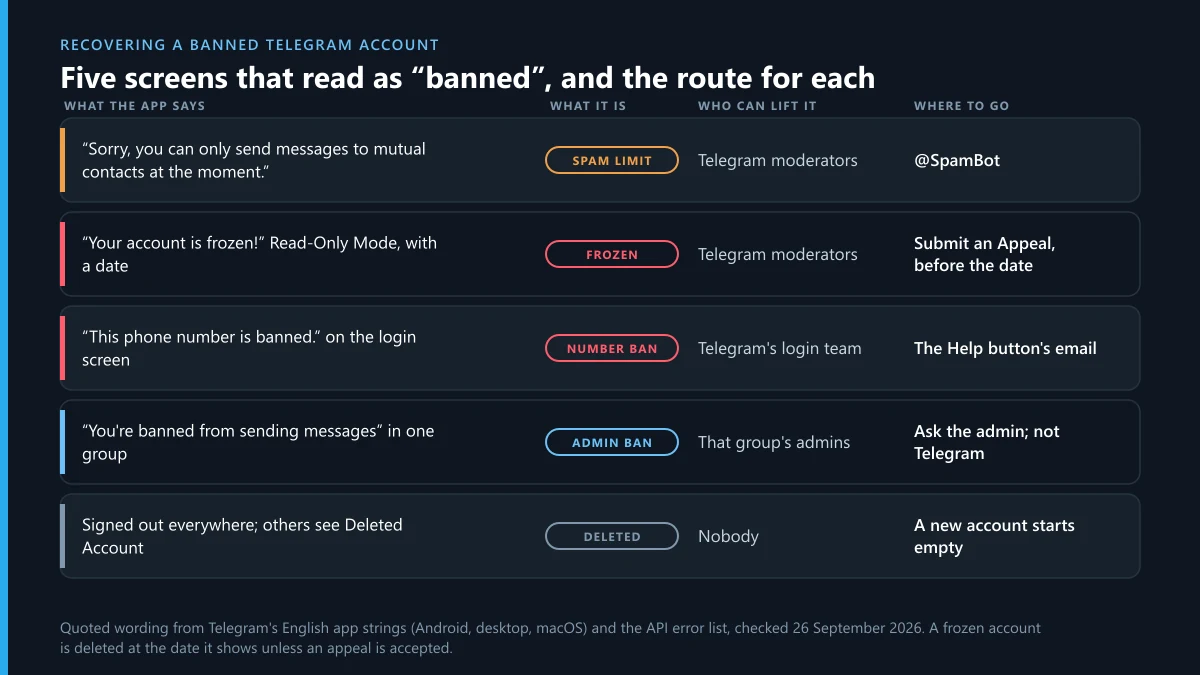
Read the message word for word before you touch anything. Five different states get called "banned", different people handle them, and an appeal sent down the wrong route reaches nobody who can lift what you actually have. Everything in the first column comes from Telegram's own English app strings and API descriptions, so it matches your screen rather than someone's memory of it.
| What the app says | What it is | Who can lift it | Where to appeal |
|---|---|---|---|
| "Sorry, you can only send messages to mutual contacts at the moment." | A spam limit: the account works, but strangers are off limits | Telegram's moderators | @SpamBot |
| "Your account is frozen!", then Read-Only Mode and a date | A frozen account: reading works, sending and posting do not | Telegram's moderators | Submit an Appeal, before the date shown |
| "This phone number is banned." when you try to sign in | A number ban: sign-in stops before any chat loads | Telegram's login support | The Help button's email |
| Removed from one group, or an error the API describes as "You're banned from sending messages in supergroups/channels" | An admin restriction in that group, unless it hits every public group at once | That group's admins | The admin, by direct message |
| Signed out on every device, while your old chats show "Deleted Account" to other people | A deleted account | Nobody | No appeal; a new sign-up starts empty |
Only the last row has no way back. A frozen account that reaches its deadline without an accepted appeal is deleted, and so is any account left offline for 18 months under the default self-destruct setting, "along with all messages, media, contacts and every other piece of data you store in the Telegram cloud," as the Telegram FAQ puts it. Inactivity is not a ban, which is little comfort. Termination of an account is irreversible, the same FAQ says.
Banned telegram account recovery in six steps, before you write to anyone
Most of the damage people do to their own case happens in the first hour, while they sign out, reinstall and email every address a search turns up, so follow this order whichever screen you have.
- Screenshot the exact message with the date and time showing, on the device that displays it.
- Stay signed in wherever you still are. Settings, then Devices, lists every session, and an appeal button only appears inside a session that is open.
- If the account still opens, save what you need first: on Telegram Desktop, go to Settings, then Advanced, then Export Telegram data.
- Match your screen to its row in the table and file one appeal, through that route only.
- Write in plain sentences, give your number in international format, and leave out every login code, password and cloud password.
- Then wait, and write again only through the same route. If you live in the European Union, the complaint described further down can run alongside the appeal.
Step five deserves a second look. An email that contains the code Telegram just texted you proves nothing about who owns the number, and it hands the account to anyone who reads that thread.
How to recover telegram account if banned: one appeal for each screen
File where the restriction came from. Both a spam limit and a freeze are lifted by Telegram's moderators, through two different doors, while a ban inside one group never reaches Telegram at all.
A spam limit is appealed through @SpamBot
A limited account keeps working. You can still write to anyone who has saved your number and answer anyone who messages you first; what you lose is the first message to a stranger, which is exactly what the error "Sorry, you can only send messages to mutual contacts at the moment" describes. Telegram's Spam FAQ expects a first offence to last "a few days or so" and repeat offences to last longer. Open @SpamBot. If it confirms a limit and you believe the limit is wrong, it asks for your side: say what you sent, to whom, and why a stranger might have pressed Report. Don't ask for an early release after an apology, which the FAQ turns down in so many words. Which spam buttons reach a moderator, and which only hide a sender, is set out in Telegram's spam controls and what each one files.
A frozen account runs against a date, so appeal early
Freezing replaced the instant sign-out in April 2025. An announcement on Telegram's blog described it this way: "Rather than being immediately logged out, banned violators will have a frozen account — where they cannot contact other users, but are able to submit an appeal for our moderators to review." Inside the app the notice is blunt. On desktop its last paragraph is headed Appeal Before Deactivation and carries a date, and the macOS version warns that if Telegram hears nothing by then, "your account will be fully deactivated and terminated."
That date is stored, not decorative. In Telegram's developer documentation it is stored as freeze_until_date, the moment the account "will be deleted, unless an appeal is submitted and accepted", beside a freeze_appeal_url that opens the appeal. So press Submit an Appeal in the first days, or follow the @SpamBot link the macOS app shows. Keep the appeal short and concrete: what the account is for, whether you run groups or channels from it, and what you think set off the freeze. If the appeal succeeds, the announcement says, the account is unfrozen and its restrictions are lifted. It was never deleted, so your chats are where you left them.
How to fix a Telegram account banned in one group only
Ask that group's admins, because nobody else can undo it. An admin ban is a setting on your membership of one chat, with an optional end date, and Telegram's moderators never see it. It changes nothing anywhere else on Telegram. Watch the scale, though. If every public group refuses your messages at the same moment, the cause sits on your account rather than in the groups, and @SpamBot is the place to check; Telegram's API even has a separate error for it. Why an admin ban and a platform ban are different jobs is spelled out in admin bans versus reports to Telegram.
How to recover a Telegram banned phone number from the login screen
Tap Help on the ban notice and send the email your app drafts. The official apps put that button on the "This phone number is banned." screen, and the draft already carries what Telegram's login support needs to find your number.
Where that email goes depends on the app, and it is the detail guides argue about most. To settle it, we read the login code of Telegram's open-source apps on 26 September 2026. We saw three answers. In the Android app's LoginActivity source, a banned number is addressed to [email protected] and every other sign-in problem to [email protected]. Telegram for iPhone sends the banned case to [email protected] as well. Telegram Desktop's banned-number box mails [email protected], and Telegram X writes [email protected] straight into its error message.
| App | Address it points you to | What the draft already holds |
|---|---|---|
| Telegram for Android | [email protected] | Subject "Banned phone number:" and your number; app version, Android version, device name, locale |
| Telegram for iPhone | [email protected] | Your number, app version, iOS version, locale and MNC, the code of your mobile network |
| Telegram Desktop | [email protected] | Subject "Banned phone number:" and your number; app version, system version, locale |
| Telegram X | [email protected], named in the error text | Write the email yourself if no draft opens |
So [email protected] is a real Telegram address after all. Two official apps send to it, Telegram's API terms tell anyone banned after using the API without breaking the rules to write there and explain what they meant to do, and when a user asked on the Telegram Desktop issue tracker to be unbanned, a project collaborator replied that the tracker was the wrong place and to mail [email protected]. Why a recycled SIM can inherit a stranger's ban, and what the strings on that screen say, is covered in what the banned-number message means.
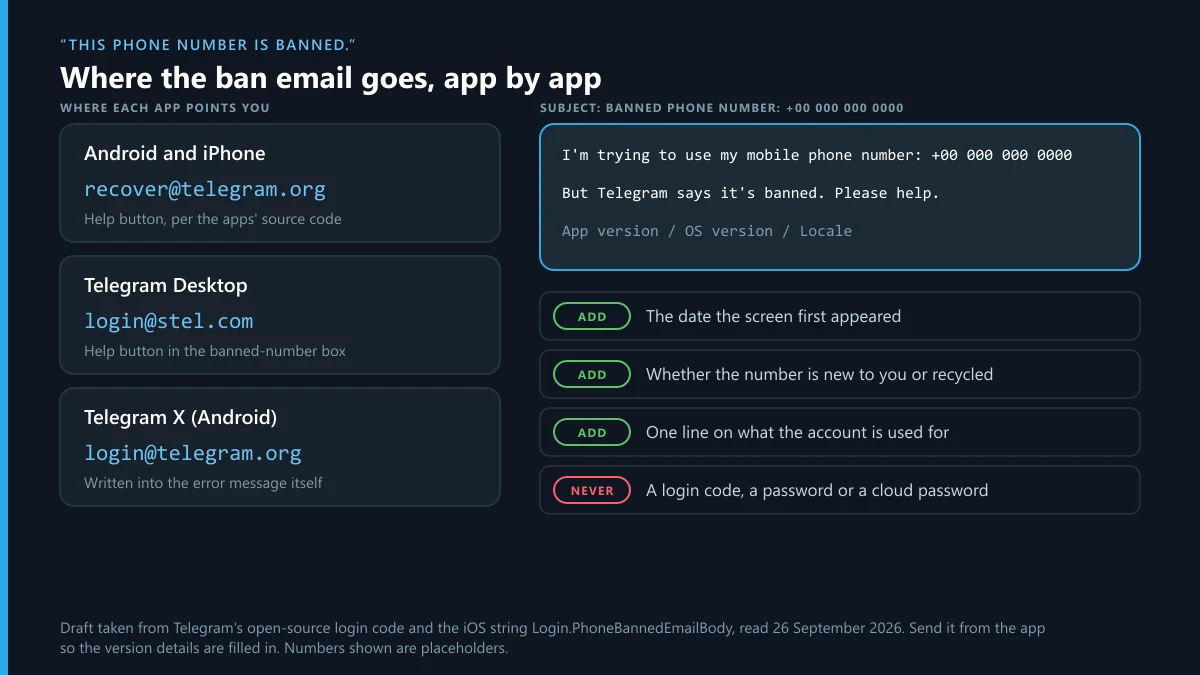
The iPhone draft opens: "I'm trying to use my mobile phone number: … But Telegram says it's banned. Please help." Add three lines before you press Send: the date the message first appeared, whether the number is new to you or has been yours for years, and one sentence on what the account is used for. That is enough. For sign-in trouble Telegram runs two more official channels. The support form asks for a description of the problem, your full legal name, an email address and the phone number. And @smstelegram on X is, in the FAQ's words, official, with an invitation attached: "Don't be afraid to DM it the number you use for Telegram, we need this info to investigate issues."
Telegram Ban Service has no line into that queue, and nobody outside Telegram does. If nothing comes back, a different number is the honest fallback, and it has a price: a new number opens a new account, with none of the chats, contacts or groups that sat on the banned one.
Telegram account banned for no reason? Where the reason usually is
Usually there is one, just not one the owner chose. Five causes that arrive without warning turn up in Telegram's own documents and its public bug trackers.
- A number with a past. Telegram's Spam FAQ admits that some numbers draw a harsher response because of what their previous owners did with them, or because they are virtual or VoIP numbers, and it apologises when that limits a new account for nothing. A number bought online for sign-ups is the textbook case.
- Software that is not Telegram's. Unofficial clients, personal accounts driven by scripts and automation tools all sign in through the API, and the API terms say such accounts are watched and that using the API for flooding or faked view counts ends in a permanent ban. Mass-report tools that borrow your sessions fall in the same category, as report bots that ask for your login code shows.
- A link that acted for you. The desktop tracker issue above is titled "Malware: Account gets banned after clicking t.me link", and its author's three-year-old account went the same day: "My phone number got banned within about an hour of clicking that link." If messages you never wrote went out from your account, open Settings, then Devices, and end every session you don't recognise before appealing.
- Your first messages were reported. Cold offers, bulk invites and mass contact imports are the ordinary road into a limit, and under the privacy policy a single spam report that moderators confirm can be enough.
- Someone wanted you gone. Coordinated reporting happens, but Telegram's EU terms state that "any critical restrictions require approval from a human moderator," so a pile of reports on its own is weaker than sellers make it sound. No published number of reports triggers a ban, as the missing report threshold explains, and the methods used against accounts are described from the other side in how people try to get someone banned.
Is my Telegram account banned, or is Telegram blocked where I am?
Look for words. Every account restriction in the table announces itself with a message, and a network block announces nothing. The app sits on Connecting…, messages never leave, and every account on that connection behaves the same way, including friends who have done nothing at all. Switch between Wi-Fi and mobile data or try another network; if Telegram comes back, your account was never the problem. The apps include a proxy setting for this situation, although whether using a proxy is lawful depends on the country you are in.
Telegram account ban recovery under the EU's Digital Services Act
If you live in the European Union, a ban is also a decision you are owed reasons for and can contest in law. Under the Digital Services Act, suspending or terminating a user's account is a regulated decision, and three of its articles apply to anyone whose Telegram account was restricted.
Article 17 requires a statement of reasons when a platform suspends or terminates an account. Article 20 requires a free, electronic complaint system that stays open for at least six months after the decision. Article 21 lets you take an unresolved dispute to a certified out-of-court settlement body. By its own count, Telegram has significantly fewer than 45 million average monthly active recipients in the EU, so it is not one of the "very large" platforms with extra duties, but those three articles do not depend on size. Its own EU terms promise to notify you of restrictions on your account and to "guide you on how to possibly remove them," and they name @EURegulation as the single point of contact under the Act.
- File the ordinary appeal for your screen first, and keep its screenshot.
- Message @EURegulation with your number in international format, the date, the restriction you see and any explanation Telegram gave.
- If no statement of reasons reached you, ask for one, and ask for the decision to be reviewed as a complaint under Article 20.
- If that review leaves the decision unchanged, take it to a certified out-of-court body, or complain to the Digital Services Coordinator of your country.
The Act gets you a review and a reason. It does not get you a result, and a decision resting on a real breach will stand. Reports going the other way fall under the same law, which is why reporting illegal content in the EU follows the notice rules of Article 16.
Who can recover a Telegram account banned by moderators, and who only claims to?
Telegram's moderators can, through the routes above, and nobody else. The in-app Ask a Question chat is answered by volunteers, as the FAQ notes, and none of the five ban notices sends you there.
Fake support is the larger risk. Telegram's FAQ says it has no support accounts on any social platform besides @smstelegram, and that "If anyone on Facebook or any other platform is telling you they're us, they are not." Impostors do well anyway: Americans reported losing $3.5 billion to impostor scams in 2025, according to the Federal Trade Commission. A "Telegram support" phone number posted in a forum question is bait, because Telegram lists no phone line, and an "unban service" that wants the code Telegram texts you is asking for the account itself. If you already paid one, report the fraud to Telegram, and use the fraud routes outside Telegram if money moved. A SCAM or FAKE label may already sit on the seller's profile, which Telegram's own scam flags explain. Anyone who threatens to get your account banned unless you pay is committing extortion, and reporting that threat beats paying it.
Telegram Ban Service stands on the other side of that line. It is a reporting desk: it files reports about accounts, channels and bots that break Telegram's rules, it has no access to Telegram's moderation tools, and it cannot unban your account or anyone else's. Its reporting work is listed across all of the Telegram reporting guides, and an account takedown request shows what one looks like.
When someone else caused the ban, appeal first and report them second
An impostor, a rival or a channel that organised false reports can put you here, and reporting them does nothing for your account until your own appeal is filed. Keep that order. Then go after the source with evidence: a copy of your profile through the impersonation report, a person harassing you through reporting someone on Telegram, and their worst posts through single-message reports. When a channel or group coordinated it, a whole-channel report or reporting the group itself reaches the entity, and a channel takedown case lists the evidence that gets one removed. Paid mass-report bots help on neither side.
Some restrictions start with a rights complaint rather than a report. If your channel lost posts to a copyright notice, the three copyright labels show how much was removed, and how a DMCA notice works on Telegram shows what the complainant had to send. Content made with nudify and deepfake bots is another matter, since sharing a sexual deepfake of a real person is a crime in the UK and the US among other places, as the deepfake bot guide sets out. And if a channel you own is what keeps drawing reports, deleting a channel you own takes a minute.
Do it in this order: photograph the message, file one appeal through the route your screen names, and only then deal with whoever caused it. If that last step involves an account genuinely breaking Telegram's rules, Telegram Ban Service can take the report through Telegram's own channels: send us its t.me link and what it did, and Telegram's moderators decide what happens to it.
Sources
- Telegram safety: 26,530,526 groups and channels blocked in 2026 (retrieved 26 September 2026)
- Telegram Privacy Policy, 5.3 Spam and Abuse and 10.4 Account Self-Destruction
- Telegram Spam FAQ: limited accounts, @SpamBot, numbers with a history
- Telegram FAQ: support form, volunteers, @smstelegram, self-destruct after 18 months
- Telegram blog, 30 April 2025: frozen accounts and in-app appeals
- Telegram API, authorization: frozen accounts, freeze_until_date, freeze_appeal_url
- Telegram API, auth.sendCode: PHONE_NUMBER_BANNED
- Telegram API, messages.sendMessage: USER_BANNED_IN_CHANNEL
- Telegram API terms: unofficial clients, bans, [email protected]
- Telegram Translations, Desktop: frozen-account strings (retrieved 26 September 2026)
- Telegram Translations, iOS: Login.PhoneBannedEmailBody
- Telegram for Android source, LoginActivity (read 26 September 2026)
- Telegram Desktop source, phone_banned_box.cpp
- Telegram Desktop issue 8644: Malware: Account gets banned after clicking t.me link
- Telegram Terms of Service, including the Premium terms
- Telegram EU Digital Services Act page: account restrictions, @EURegulation
- Regulation (EU) 2022/2065, the Digital Services Act: Articles 17, 20 and 21
- FTC, June 2026: $3.5 billion reported lost to imposter scams in 2025
FAQ
Can you sign up again with a banned Telegram phone number?
Not while the ban stands, because the number itself is refused at sign-in and no account can open on it. Appeal through the Help button first. If the number stays banned, a different number gets you a working account, but an empty one: no chats, contacts or groups carry over from the account on the old number.
Do you get your chats back when a frozen account is unfrozen?
Yes. A frozen account is read-only rather than deleted, so its chats stay readable while the appeal is reviewed, and Telegram says a successful appeal unfreezes the account and lifts its restrictions. The deadline is the danger: after the date in the notice, an account without an accepted appeal is deleted along with its cloud data.
How long does a Telegram ban last?
That depends on the kind. Telegram's Spam FAQ expects a first spam limit to last a few days, with longer blocks for repeat offences. A frozen account lasts until its appeal is decided or its date passes. For a banned number Telegram publishes no duration, and the fixed figures guides quote, from under an hour to five working days, cite no source.
Does Telegram Premium protect an account from a ban?
No. The Premium section of Telegram's terms says that breaking the Terms of Service may result in a temporary or a permanent ban, and that you might lose the benefits of Premium with no compensation. A subscription changes nothing about which rules apply, and a Premium account appeals through exactly the same routes as a free one.
Is there a phone number for Telegram support?
Telegram lists none. Its documented contacts are the in-app Ask a Question chat, which volunteers answer, the sign-in form at telegram.org/support, @SpamBot for limits and @smstelegram on X for login problems. A phone number advertised as Telegram support, including ones planted in forum question titles, belongs to whoever posted it.
Will reinstalling Telegram or switching phones lift a ban?
No. The restriction is stored on Telegram's servers against your account or your number, so a fresh install, a new handset or a factory reset changes nothing. It can make things worse. If the number is refused at sign-in, uninstalling throws away the last open session, and with it the only place a frozen account's appeal button appears.
Can Telegram Ban Service unban my account?
No, and no outside service can; only Telegram's moderators lift limits, freezes and number bans. Telegram Ban Service reports accounts, channels and bots that break Telegram's rules, so if an impostor or a false-report campaign is behind your ban, we can report that source while your own appeal goes through Telegram's routes.