12 November 2026 · Telegram Ban Service · 15 min read
How to Remove a Review You Wrote, and Request Removal of One You Didn't
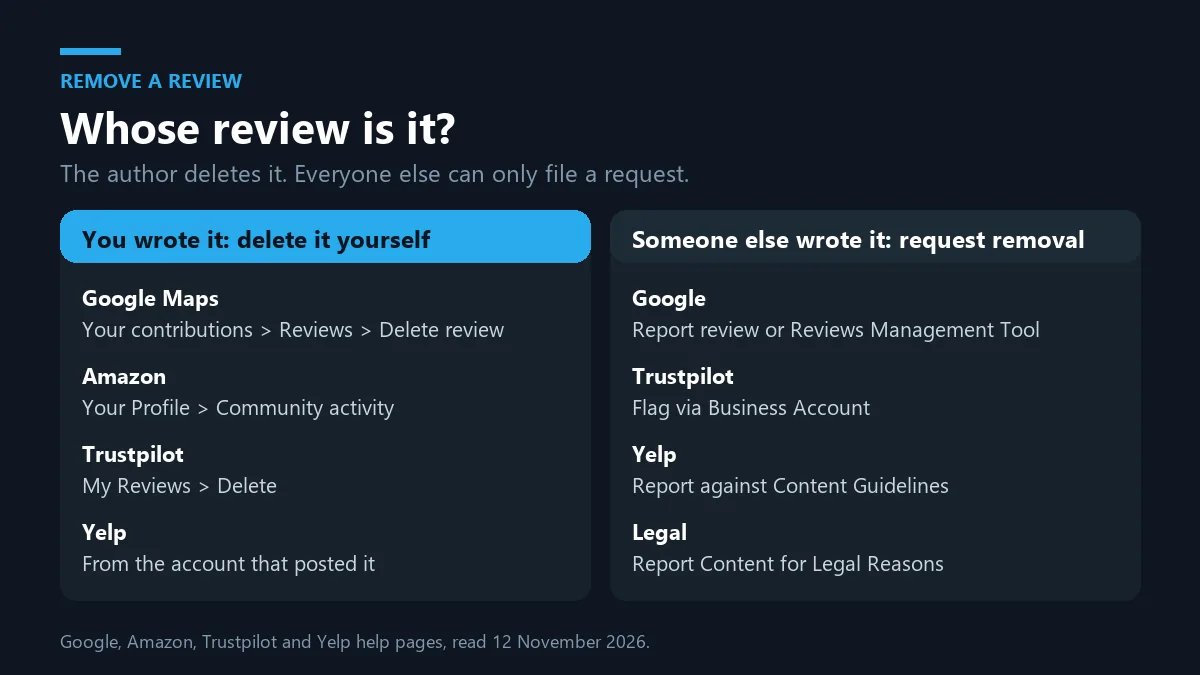
How to remove a review depends on who posted it. If you wrote it, delete it from your own account; on Google Maps that means Your contributions, then Reviews, then Delete review. If someone else wrote it, only the platform can take it down, and Google's Business Profile help says only reviews that break its policies qualify.
Who can remove a review: the author or only the platform?
Only the author or the platform can remove a review, so how to remove a review depends on which one you are. The author works from their own account; the platform works under its published rules. A business owner is neither. That is why no remove review button sits on a Google Business Profile, a Yelp page or a Trustpilot listing. The author can edit or delete whenever they like, and Trustpilot's guidelines for businesses say outright that reviewers own their reviews. Everyone else, the reviewed business included, can only ask, through a flag, a report form or a legal notice, and the ask works only when the review breaks a written policy or the law. A harsh account of a real visit does neither. Telegram Ban Service, a reporting desk that files documented Telegram violations through Telegram's own channels, runs on the same split: an honest opinion is not a violation, and dressing it up as one burns the single appeal some platforms allow.
So the first question is never how. It's whose review this is.
A report starts a check, not a verdict, which what happens after someone reports you on Facebook shows from the receiving side. Repeating one flag adds nothing, as the rundown of what Facebook counts when pages and groups are mass-reported makes clear.
How do I remove a review I wrote?
Delete it from the account you posted it with; the big platforms ask for no form and no reason. Only the location of the control changes. On a computer, Google Maps help on editing and deleting reviews gives the path: open the Menu, choose Your contributions, then Reviews, click More beside the review and pick Delete review or Edit review. Amazon's help pages keep your reviews under Your Profile, in the Community activity section, where each can be edited or deleted. Trustpilot keeps them under My Reviews in your profile. Yelp leaves deletion to the author as well, from the same account that published it. Treat deletion as final, because none of these platforms offers an undo button for it. If the business has since fixed the problem, an edited rating with a line about what changed often tells the next reader more than a blank space would.
| Platform | Where your own review lives | Edit instead of delete? |
|---|---|---|
| Google Maps | Menu, Your contributions, Reviews, More | Yes, Edit review in the same menu |
| Amazon | Your Profile, Community activity | Yes, from the review itself |
| Trustpilot | Profile, My Reviews | Yes, the reviewer owns the text and stars |
| Yelp | The account that posted it | Yes, only the author can change it |
How to remove reviews you regret, or edit them instead
Here's the short version of how to remove review text you wrote in a bad moment: open the same menu, choose edit, and say what happened next.
If you posted several and want to know how to remove reviews in one go, the help pages cited here describe one review at a time, each from its own menu. A business is allowed to suggest an update once a problem is solved. Trustpilot's guidelines still say it must never pressure you into one, and they list refunds and discounts among the incentives a business must not tie to writing or editing a review. Telegram Ban Service stays out of that conversation entirely and never contacts reviewers.
How to take down a review someone else wrote
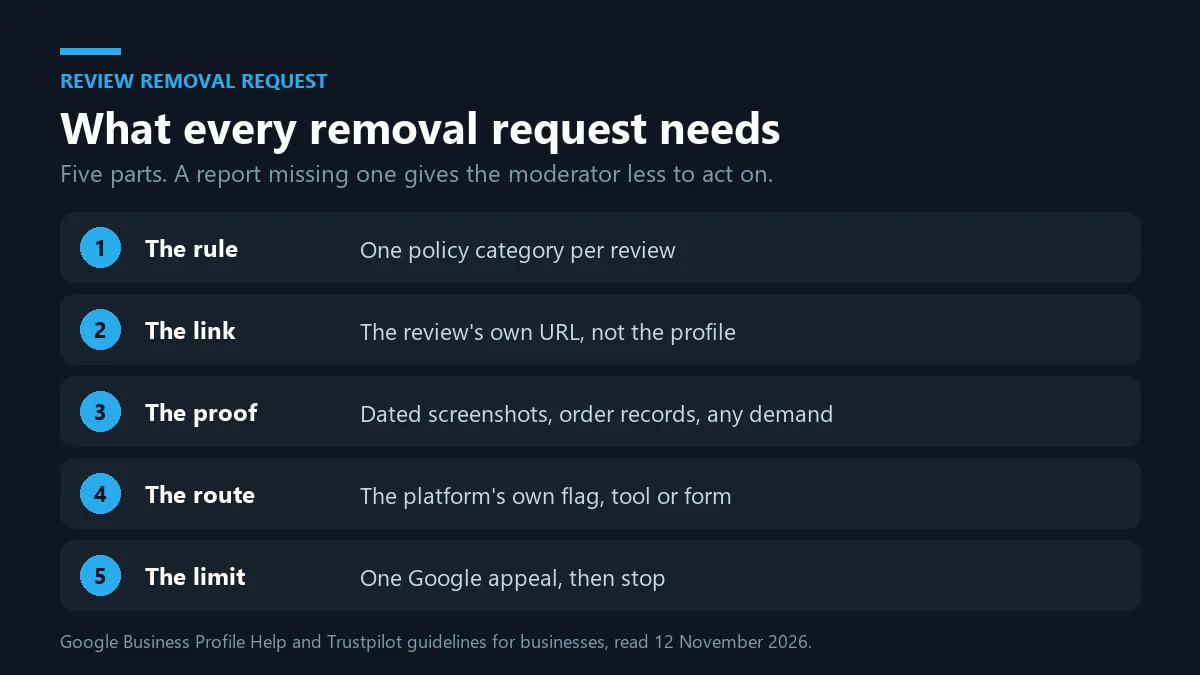
You can't take down a review written by someone else; you file a review removal request and show the platform which rule it breaks. Requesting review removal works best as a short, specific case rather than a complaint, and when you request review removal the moderator reads your reason against one rule. Google's Business Profile help on removing reviews warns against reporting a review just because you disagree with it, and Trustpilot treats flagging too quickly or for the wrong reasons as misuse of its tool. Every official route reduces to the same five parts, shown below. Skip the policy category and a moderator has nothing to test; skip the link and they cannot tell which post you mean. Telegram Ban Service sends nothing on this route, because the review platforms take these reports from the business itself. Owners who need to take down review spam on a seller page should read how a Facebook Marketplace seller report is handled or the evidence each TikTok Shop seller route expects, because marketplaces run their own queues.
- Name the rule. Match the review to one category in the platform's policy: fake engagement, conflict of interest, harassment, personal information, off-topic, or a reference to a different business.
- Save the review's own link. Copy the URL of the review itself, not the business profile.
- Collect dated proof. Screenshots with dates, an order or booking search showing no matching customer, and any message demanding money.
- Use the official route. File through the platform's own flag, review removal tool or legal form, once per review.
- Track it and stop at the limit. Read the status, appeal once where an appeal exists, then move to replying publicly.
What each review removal form actually asks for
On Google, an owner opens Read reviews in the Business Profile, clicks the report icon, picks a reason and selects Send report. The Reviews Management Tool does the same in bulk: Report a new review for removal, then Report beside the review, a reason, and Submit. Its statuses read Decision pending, Report reviewed - no policy violation, and Escalated - check your email for updates. A one-time appeal covers up to 10 eligible reviews.
Trustpilot accepts flags from a Business Account, or through its Content Integrity team for businesses without one. Flagged reviews stay visible during the check unless flagged as harmful or illegal, and a reviewer asked for proof gets three days to respond. Yelp judges each report against its Content Guidelines, and the same discipline applies to Instagram's split complaint routes in Instagram's separate report forms.
What does it mean to request removal of inappropriate reviews?
To request removal of inappropriate reviews is to ask a platform to apply one named content rule, not to tell it a review feels unfair. "Inappropriate" carries a narrow meaning in each policy. Google's Maps user-generated content policy lists fake engagement, conflict of interest, harassment, hate speech, personal information and off-topic posts among the content it removes. Yelp's guidelines allow strong language but bar threats, harassment, lewdness, hate speech and bigotry, along with reviews of your own business or a competitor's. Trustpilot names harmful or illegal content, personal information, promotional material, reviews not based on a genuine experience, and reviews about a different business, and it adds that disliking a star rating is not a valid reason. So the honest way to remove online reviews that hurt is to find the rule a specific sentence breaks and quote that sentence in the report. Insults aimed at a named employee belong under harassment, which mirrors the way harassment reports are filed on Facebook.
No rule match, no removal. That holds even for the angriest one-star post, and Telegram Ban Service won't pretend otherwise to win a client.
When does a review removal request become a legal one?
A review becomes a legal matter when it states something false as fact and harms you, or when a court has already ruled on it. Opinion stays opinion. "The worst haircut of my life" is a view; "this salon was fined for unlicensed staff", if untrue, is a claim a court could test. For that second kind, Google runs a separate Report Content for Legal Reasons page in its Legal Help Center. It asks for the exact URL of each item, an explanation of what is unlawful and why, and a separate notice for each Google product involved. A court order naming the review gives the platform something concrete to weigh, though the platform still decides how to act on it. Defamation law differs by country, so a lawyer should judge the claim before you file. The two-track logic matches when a Facebook post crosses into libel: report the policy breach, and sue only when a false statement does real damage.
A copyright claim won't do the job either. A customer's description of your service is their own expression, not your work, so filing one against a video review misuses a system built for stolen content. When a YouTube copyright strike is justified and what a valid TikTok DMCA notice contains show the bar, while the non-copyright grounds for getting a YouTube video removed covers privacy and harassment.
Why is a paid review removal tool a scam risk?
A paid review removal tool can't do anything you can't do for free; it presses the same flag and the platform makes the same call. What a seller can add is mostly risk. The US Federal Trade Commission's rule on consumer reviews and testimonials, 16 CFR Part 465, in force since October 21, 2024, bans review suppression: unfounded legal threats, intimidation or certain false public accusations used to stop or remove a negative review. Trustpilot's guidelines separately forbid businesses to pressure, blackmail or threaten reviewers into editing or deleting a review. So a vendor promising guaranteed reviews removal is either filing ordinary reports and charging for the wait, or doing something that puts your business on the wrong side of those rules. Some are worse. Google keeps a help page on negative review extortion scams, where a crew floods a listing with one-star reviews and then asks for money to stop.
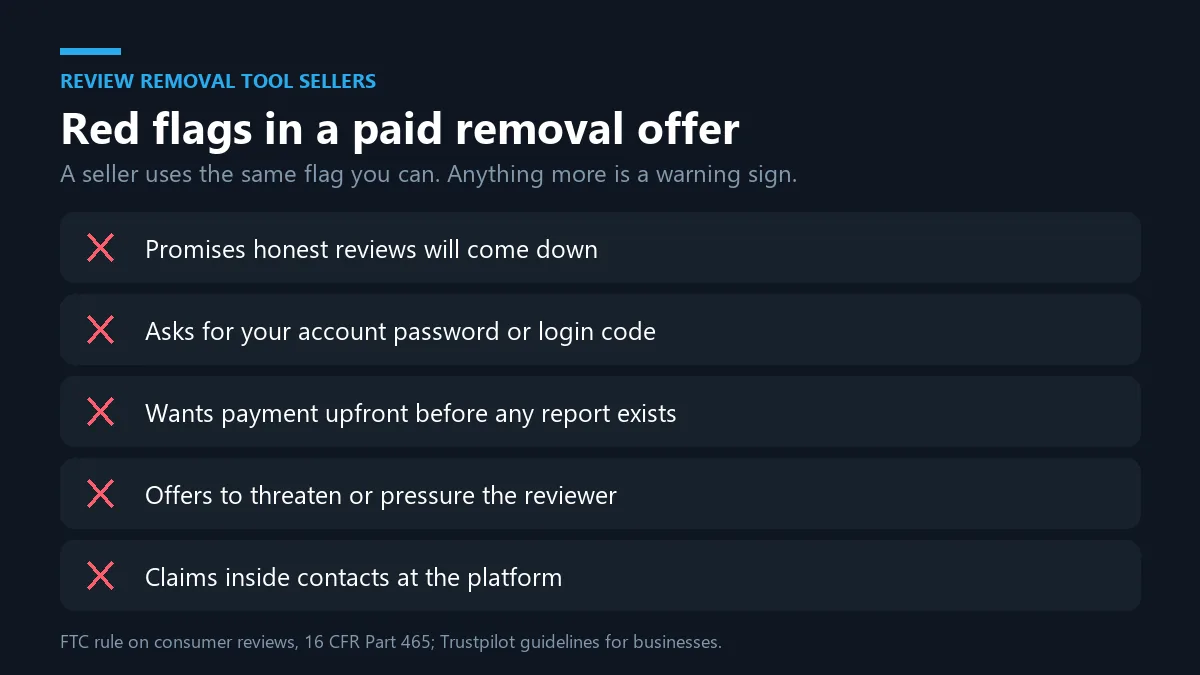
Telegram Ban Service sells no review removal product of any kind. The scripts repeat across platforms. Compare the blackmail patterns seen on Facebook with sextortion and doxxing demands on X, and use Facebook's scam reporting steps when the seller found you there.
What if the review attack is coordinated on Telegram?
Fake reviews and extortion are often arranged in a Telegram channel or group, and that end can be reported to Telegram separately. Google's extortion page sends merchants to a merchant extortion report form and asks for the date and time you first saw the spike and first got the demand, so note both. Don't pay. Then the Telegram side. You can report the channel, group or bot in the app, send scam evidence to @notoscam, or write to abuse@telegram.org, the addresses listed in the Telegram FAQ. Telegram Ban Service handles that step on request: the owner sends the t.me link, screenshots and dates, the desk checks them against Telegram's Terms of Service, and a documented report goes through those official routes. Telegram reviews it and decides; the desk promises no ban and no date, and it never touches the reviews on Google or Yelp.
Background on how a Telegram ban actually happens and whether Telegram itself is a scam risk helps set expectations, and review sellers who cold-message owners use the playbook in how mass DM campaigns are priced and run.
What we decline
Sometimes the request is the reverse: an owner wants an honest critic's account gone. We decline it. Volume doesn't decide outcomes, as what TikTok moderation sees behind a report bot, the reality of YouTube mass report bots and mass reporting on Snapchat explain, and under the FTC rule pressure on a reviewer is review suppression. Offers to erase a person deserve the same doubt: read what a TikTok ban service can honestly do, why nobody can delete someone else's TikTok, the limits on deleting another person's Facebook account, the truth about deleting someone's Snapchat, when a Snapchat account really comes down and what it takes to get a Facebook account taken down. No password or login code is ever requested.
Sources
- Google Maps Help: edit or delete a review
- Google Business Profile Help: remove reviews from your Business Profile
- Google Maps user-generated content policy
- Google Legal Help: Report Content for Legal Reasons
- Google Business Profile Help: negative review extortion scams
- Trustpilot: guidelines for businesses
- Yelp: Content Guidelines
- FTC: final rule banning fake reviews and testimonials (16 CFR Part 465)
- Telegram FAQ
FAQ
How do I remove a review I left on Google Maps?
Open Google Maps, go to the Menu, choose Your contributions and then Reviews. Find the review, click More beside it and choose Delete review, then follow the prompts. Those labels come from Google's own Maps help page for computers, and the Android and iPhone apps carry their own versions of the steps on the same help page. Only the account that posted the review can delete it, so sign in with that account first. If you changed your mind because the business fixed the problem, Edit review sits in the same menu and lets you change both the stars and the text, which leaves a more useful record for the next customer. Nobody else can remove the review for you, and no legitimate helper needs your Google password to do it. Anyone who asks for your login or a verification code to delete a review is attempting account takeover, not offering a service.
Can a business remove reviews it doesn't like?
No. A business cannot remove reviews itself on Google, Yelp or Trustpilot, and it cannot take down review content just because it is negative. What it can do is ask the platform to apply its rules. On Google that means the report icon in the Business Profile or the Reviews Management Tool; on Trustpilot it means a flag from the Business Account; on Yelp it means a report judged against the Content Guidelines. Reviews removal follows only when the platform finds a breach, such as a fake review, a conflict of interest, harassment or personal information. Trustpilot states that disliking a star rating is not a valid reason to flag, and Google advises against reporting reviews you simply disagree with. For honest criticism, the useful move is a calm, specific public reply plus a fix to whatever caused the complaint. That reply is read by future customers long after the reviewer has moved on.
What should a review removal request include?
A review removal request needs five things: the policy category, the review's own link, dated proof, the official route and one clear reason. Start by naming the single rule the review breaks, for example conflict of interest when a former employee posts as a customer. Paste the URL of the review itself rather than your business page. Add evidence a moderator can check quickly: screenshots with dates, a booking or order search showing no matching customer, or a message where someone demanded payment. Then file through the platform's own tool once per review. Requesting review removal for many reviews at once only helps when each one breaks the same rule for the same reason. When you request review removal on Google, keep the one-time appeal for the cases where you have the strongest evidence, since it cannot be used twice on the same review.
Is there an official review removal form or review removal tool?
Yes, each platform has its own, and they are free. Google's Reviews Management Tool lets a Business Profile owner choose Report a new review for removal, pick a reason and submit, then track the report as Decision pending, Report reviewed - no policy violation, or Escalated - check your email for updates. One appeal can cover up to 10 eligible reviews. For legal issues, Google's review removal form is the separate Report Content for Legal Reasons page, which asks for exact URLs and an explanation. Trustpilot uses a flag from the Business Account, or its Content Integrity team for businesses without one. A paid third-party review removal tool has no extra access; it uses these same routes. If a vendor claims a private channel into a platform's moderation team, treat that as a warning sign, and never hand over an account password so they can act for you.
How do I request removal of inappropriate reviews on Yelp or Trustpilot?
Report the review through the platform and tie it to the specific guideline it breaks. To request removal of inappropriate reviews on Yelp, check the post against Yelp's Content Guidelines, which allow strong language but bar threats, harassment, lewdness, hate speech and bigotry, plus reviews from owners, staff or competitors. On Trustpilot, flag it from your Business Account and choose the matching reason: harmful or illegal content, personal information, promotional material, no genuine experience, or a different business. Trustpilot leaves most flagged reviews visible while it checks, hides those flagged as harmful or illegal, and can ask the reviewer for documents within three days. Both platforms decide on their own. The aim is to remove online reviews that actually break a rule, so describe which sentence breaks it rather than arguing about the rating. A report built around a quoted sentence is easier for a moderator to test.
How to take down a review that says false things about my business?
First decide whether it is a policy issue or a legal one. If the review is fake, from a competitor, or exposes personal details, report it through the platform's normal flag, because that is quicker than law. If it states something false as fact and harms you, how to take down a review becomes a legal question. Google's Report Content for Legal Reasons page asks for the exact URL, what is unlawful and why, and a separate notice for each product. A court order naming the review gives the platform concrete grounds, although it still decides how to act. Defamation rules vary by country, so ask a lawyer before you file or send any letter. Under the FTC's 2024 rule, unfounded legal threats used to remove a negative review count as review suppression, so a bluff can backfire. If you only want to learn how to remove review content you posted yourself, the delete option in your account is enough.
Someone on Telegram is selling fake reviews or threatening my listing. What can I do?
Don't pay, keep every message and report on both platforms. Google's help page on negative review extortion scams points merchants to a merchant extortion report form and asks for the date and time you first noticed the spike and first received the demand. Flag the fake reviews themselves as fake engagement. On Telegram, report the account, channel or bot in the app, and send scam evidence to @notoscam or abuse@telegram.org, the contacts in Telegram's FAQ. Telegram Ban Service can take on that Telegram step: send the t.me link and screenshots, and the desk checks them against Telegram's Terms of Service and files a documented report through official routes when there is a genuine violation. Telegram makes the final decision, so there is no promised ban or date. The desk does not remove reviews on other platforms, does not act against honest critics, and never asks for your password or login code.