15 October 2026 · Telegram Ban Service · 12 min read
How to take down a Facebook account, Page, post or photo, and who gets the final say
How to take down a Facebook account depends on whose it is. If it's yours, Accounts Centre lets you deactivate it or delete it, with 30 days to change your mind. If it belongs to someone else, you can't remove it. You report it from the menu under its cover photo, or use one of Meta's forms, and Meta decides.
People who search how to take down a Facebook account usually mean one of two very different jobs. Some want their own account, Page or post gone. Others want someone else's gone: a fake profile, a Page selling stolen photos, a post about them. Facebook gives the first group a button and the second group a report. Mixing the two up is where most wasted hours come from, so this page sorts every route by one question first: whose is it?
What does "take down" mean on Facebook?
It means one of three things, and each has a different person in charge.
- You take down your own thing. Deleting a post, a profile picture, a Page or the whole account is instant or close to it. Nobody reviews it.
- Meta takes down someone else's thing. You report it, Meta reviews it against its Community Standards or the law, and Meta decides. A report is a request, not a switch.
- Meta takes down your thing. When content is taken down on Facebook without you pressing anything, it was removed for a rule, and the route back is an appeal.
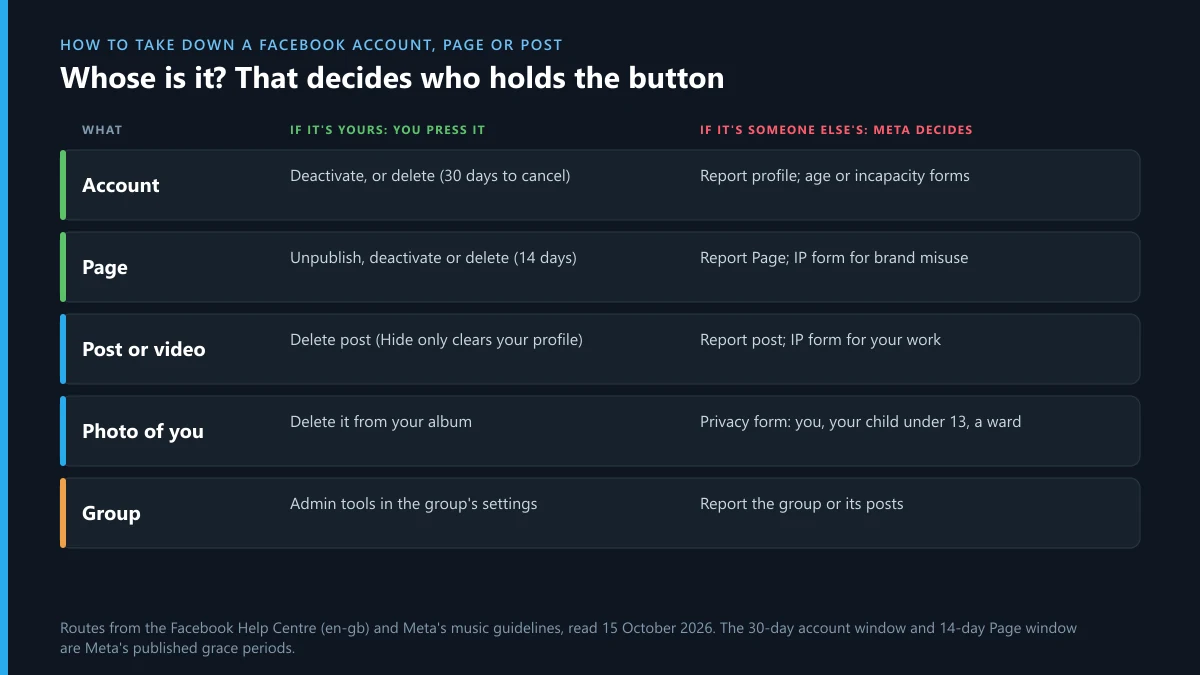
The table on this page follows that split. Find the row for the thing you're dealing with, then read the column that matches whose it is.
| What | If it's yours | If it's someone else's |
|---|---|---|
| Account (profile) | Deactivate, or delete with 30 days to cancel | Report profile; under-age and incapacity forms |
| Page | Unpublish, deactivate, or delete (permanent after 14 days) | Report Page; IP form if it trades on your brand |
| Post or video | Delete post | Report post; IP form if it copies your work |
| Photo or profile picture | Delete it from the album | Privacy form, if the photo shows you, your child or a ward |
| Group | Admin settings | Report the group, or its posts |
How to take down a Facebook account: your own, or someone else's?
Your own account
Open Settings, go to Accounts Centre, then Personal details, then Account ownership and control, and pick Deactivation or deletion. Deactivation hides your profile and can be undone by logging back in. Deletion is the real take down. Meta gives you 30 days to cancel it, and says the full removal of what you posted can take up to 90 days. Messages you sent to other people stay in their inboxes.
Two things catch people out. Deactivating the account also deactivates any Page that only you controlled. And if you want your photos, download them first from Accounts Centre, under Your information and permissions, because a deleted account can't be reopened to fetch them.
Someone else's account
Nobody outside Meta can delete another person's account. What you can do is give Meta a reason to disable it. Meta's Help Centre lists the grounds it acts on: repeated violations, a single severe violation, accounts made to get around an earlier restriction, dangerous individuals, convicted sex offenders, and accounts that "misrepresent their identity". If your report doesn't fit one of those, a disable is unlikely.
Two forms reach past the report button. The under-age form takes a profile or Page URL, and Meta says it deletes an account when the owner's age is "reasonably verified" as under 13. It also warns that you will not get confirmation. A separate form covers adults who can't manage their own account because of illness or incapacity. It needs proof that you're the guardian, such as a power of attorney or court order, plus a doctor's note.
One fact saves a lot of effort: Meta's reporting page says "the number of times something is reported doesn't determine whether or not it's removed". Fifty reports on a profile that breaks no rule achieve nothing. One clear report on a profile that does is enough to start a review.
Facebook won't take down a fake profile of me: what now?
Start by checking which report you filed. Facebook's impersonation help page says profiles and Pages that impersonate other people "aren't allowed on Facebook", and the right path is the profile's Options menu, then Report profile, then the option that says it's pretending to be you. A report filed as spam or "fake account" is judged against a different rule, and a real-looking copy of you can pass that test. If you've lost your own login, the same page links a contact form for people without an account.
If the impersonation report was rejected, three things usually change the outcome:
- Report from your real account, not a friend's. Choosing the option that says the profile is pretending to be you gives Meta your real profile to compare against.
- Request review of the decision. Your Support Inbox lists your reports. Open the report, choose See options and Request another review. Meta says it usually answers within 24 hours.
- Collect what the profile is doing with your name. Messages to your friends asking for money add a scam rule to the impersonation one, and screenshots of them belong in the report.
The help page also links a request for information about an account that impersonated you, which matters if you plan to go to the police. Fake profiles rarely stay on one network. They tend to ask victims' friends to "continue on Telegram". If that's happening, read what Telegram's "limit exceeded" warning means when someone floods your login. Impersonators also register lookalike handles, so checking whether a Telegram username is already taken shows you whether your name is free there, and what buying your own name as a Telegram handle involves covers claiming it first.
How do I take down my Facebook page without losing it for good?
Pick the weakest option that does the job. Facebook gives Page owners three, and only the last is final.
- Unpublish. The Page is hidden from the public, but you can still edit it and publish it again whenever you like.
- Deactivate. The Page is hidden from everyone, followers included, and you can't edit it. You bring it back from your personal profile, under Your activity, Reactivate a Page.
- Delete. The Page is deactivated at once and deleted permanently after 14 days. Cancel inside those 14 days if you change your mind.
Whichever you pick, you need what Meta calls Facebook access with full control, and the path is Settings & privacy, then Settings, then Access and control. So whether you ask "how do I take down a Facebook page", "how can I take down my Facebook page" or how do you take down your Facebook page, the first check is the same: does your role on that Page show full control? If it doesn't, ask whoever has it. If nobody has it, Meta automatically deactivates the Page and schedules it for deletion, and the fix is a Page admin dispute.
One last trap: deactivating a parent Page deactivates its child and store Pages too. If you run a brand with location Pages, take down the one you mean, not the one at the top.
How to get a Facebook page taken down that isn't yours?
Report it, and make the report easy to judge. Go to the Page, click Options below the cover photo, and choose Report Page. Meta's own wording is cautious here. It says you "may then be able to submit a report", and some report options only train its systems. They don't open a review. Choose the option that names a rule, such as scam, impersonation or intellectual property.
Before reporting, open the Page's Transparency section. Click the Page name under the cover photo, then Transparency and privacy policy. It shows when the Page was created, previous names, and the countries its managers work from. A Page called "Official Support" that was renamed from a meme account last month and is managed from a different country than the business it claims to be is easy to judge. Put those facts in the report.
If the Page sells your products, logos or photos, the general report is the wrong tool. Meta's intellectual property reporting form, which now opens on help.meta.com, asks one question first: copyright, trademark or counterfeit. Rights complaints are reviewed against the law instead of the Community Standards, and a Page that collects enough of them gets taken down as a whole. That is the most reliable way to get a Facebook page taken down when it's built on someone else's brand.
How to take down a Facebook post: delete it, hide it, or report it
For your own post, use Delete. Open the three dots on the post and choose Delete post. Meta's Help Centre says delete "removes the post from Facebook entirely", and you can only delete your own posts. Hide from profile is a different control. It only takes the post off your profile. People in the audience can still find it in Feed and search. So the answer to how do you take down a Facebook post, how to take a post down from Facebook and every other wording of that search is the same: Delete, not Hide.
If you were tagged in someone else's post, removing the tag takes your name off it. The post stays up for its audience. To get a Facebook post taken down that someone else wrote, report it from the same three-dot menu and pick the rule it breaks. For a post that copies your photo, video or text, the IP form above is quicker and judged more strictly than a general report. The same split exists on Instagram, where reporting a single Instagram post runs through the same Meta review.
How to take down a photo or profile picture on Facebook
Your own profile picture comes down from Photos, then Albums, then Profile pictures. Open the image, choose Edit, then Delete photo. Meta notes that "your profile picture is always public", and that a temporary picture that has expired stays in that album, so check the album as well as the profile.
A photo of you posted by someone else is harder. Facebook's privacy form accepts images involving you, your child under 13, or someone you are the legal representative or guardian for. Meta's policy draws age lines: for a child under 13, the child or a parent can ask; between 13 and 18, the teenager asks themselves; adults outside the US can ask where local law gives a removal right. A photo that is merely unflattering doesn't qualify. A photo that shows you in a private moment, or that exposes a child, usually does. The Instagram version of the same request is covered in getting a photo of you removed from Instagram.
Do stock photos get taken down on Facebook?
Yes, when the rights holder complains. Meta doesn't check licences when you post. A stock image used without a licence stays up until the agency or photographer files a copyright report, and then the post is removed. Repeated complaints count against the account or Page that posted it. Stock agencies do file. If you run a Page, a licence receipt is the only defence that works, so keep it.
Does Facebook take down videos with copyrighted music?
Often, yes. Meta's music guidelines say that a video with someone else's music "may be blocked, muted or removed" if the use isn't authorised, and that using videos to create "a music listening experience" can get a Page, profile or group deleted. The guidelines add that the more music a video contains, the more likely it is to be limited, and that there should always be a visual component.
Most of these takedowns aren't reports by a person. Rights holders register their catalogues, and matching happens on upload. If you hold the rights, the guidelines say you may be able to dispute the action from the notification you received. Depending on the case, the content is restored, you're put in touch with the rights holder, or a Meta team reviews it.
Facebook group taken down: by an admin, by a report, or by Meta?
A group you admin is yours to close, from the group's settings. A group run by someone else is reported like a Page: open the menu on the group and report it, or report the individual posts that break the rules, which is often more effective in a large group. Meta also tracks Group Quality, a view for admins of the violations counted against a group.
When a Facebook group is taken down by Meta, the admins get the notice. Members usually just find the group gone. Music-heavy groups are at particular risk, since the music guidelines name groups among the things that can be deleted.
Content taken down on Facebook: how the appeal works
Start with the notification. When Meta removes something of yours, it tells you in Feed and in your Support Inbox, and the notice carries the option to disagree with the decision. That is the content taken down Facebook appeal. There is no separate form that gets you a faster review.
- Open Account Status. Go to your profile, open the menu, then Help and support, then Account Status. It lists removed content, strikes and restrictions on the profile and on everything it manages, including Pages.
- Request review on each item. Explain in one or two sentences why the post doesn't break the rule named. Context matters: a quote of someone else's slur, posted to criticise it, is a different post from the slur itself.
- If the review upholds the removal, look for the Oversight Board option. Some decisions become eligible for an appeal to the Board, Meta's independent review body. It takes only a small share of cases.
A Facebook page taken down appeal works the same way, from the Page's own Account Status. A Page usually comes down for a pattern of strikes rather than one post, so the review goes better when you've already removed the posts that weren't defensible. Meta says restrictions expire after one year.
Facebook take down requests in numbers, October 2026
Meta reports every Facebook moderation decision affecting people in the EU to the EU's DSA Transparency Database. We counted the first two weeks of October on 15 October 2026. Between 1 and 14 October, Meta filed 10,688,972 decisions for Facebook. 2,174,701 removed content, 7,482,064 suspended accounts, and 12,118 terminated them. 194,754 were made without any automation, which is under 2%.

The useful number is the source. Only 7,008 decisions were triggered by a formal notice under Article 16 of the DSA, the legal route used by rights holders, lawyers and the forms we described above. Of those 7,008, 6,394 removed a piece of content and just 63 terminated an account. Meta files decisions that follow in-app reports as its own initiative, so those sit inside the larger total. Intellectual property accounted for 121,043 decisions over the same fortnight, and privacy and data protection for 186,286, of which only 249 came from a formal notice.
Read together, the figures say what experience suggests. A legal notice is very good at taking down a specific post or photo. It almost never removes an account on its own. Accounts come down when the pattern of violations is clear enough for Meta to act, which is why a well-built report beats a large number of weak ones.
The same account is on Instagram, X or Telegram: which page covers each?
Someone who runs a fake Facebook profile or a scam Page usually runs copies elsewhere. Each network takes its own report.
Instagram shares Meta's review teams but has its own menus. Read which violations get an Instagram account taken down for the account itself, and reporting an Instagram page that runs the same scheme for business profiles. Where the forms run out, Meta's legal request routes on the Instagram side cover court orders and privacy law.
X works differently. The routes for taking down an X account set out the order, filing a DMCA notice with X handles copied posts and photos, and clearing bot followers off an X profile helps when fake accounts are boosting the copy. What an X account removal service may lawfully file explains the paid version and its limits.
Telegram is where many Facebook scams end up. Besides the login and username checks above, owners closing down an old channel name can read about selling a Telegram username you no longer use, so it doesn't sit free for an impersonator to claim.
FAQ
How long does Facebook take to remove a reported account?
Meta publishes no deadline for first reviews. Requests for another review usually get an answer within 24 hours, by Meta's own estimate. You won't always be told the outcome, and under-age reports never get a confirmation.
Will the person know I reported their Facebook account?
No. Meta doesn't tell the account owner who reported them. IP reports are different: Meta may pass the rights holder's name and contact details to the person whose content was removed, so they can respond.
Can I take down a Facebook account of someone who died?
A family member can ask Meta to memorialise the account or remove it. Removal needs proof of the death and of your relationship. Memorialisation keeps the profile visible with "Remembering" next to the name.
Does deactivating my Facebook account delete my Pages?
No, but it hides Pages that only you controlled. They come back when you reactivate the account. If a Page should stay up while you're away, give someone else full control of it before you deactivate.
Is it legal to pay someone to take down a Facebook account?
Paying for help to prepare and file genuine reports or legal notices is legal. Paying for mass false reports, hacking or fake legal claims isn't, and breaks Meta's terms. No outside service can remove an account itself; Meta decides.
Why was my Facebook post taken down when I didn't break any rule?
Most removals are automated, and automated systems misread context. Open Account Status, find the post, and request review with a short explanation. If the review upholds the removal, check whether the Oversight Board option appears.
Can I get a Facebook post taken down if I'm only mentioned in it?
Only if it breaks a rule or the law. Being named isn't enough on its own. Posts that harass you, share your private information, or make false claims of a crime can be reported, and serious cases can be taken to the police or a lawyer.