14 October 2026 · Telegram Ban Service · 11 min read
Telegram limit exceeded and Telegram too many attempts: what each message means
Telegram limit exceeded and Telegram too many attempts are flood limits. The first is the iPhone app's wording after repeated wrong two-step passwords. The second appears when login codes are requested or typed too often. Both lift after a wait that Telegram's servers set, and retrying early doesn't shorten it.
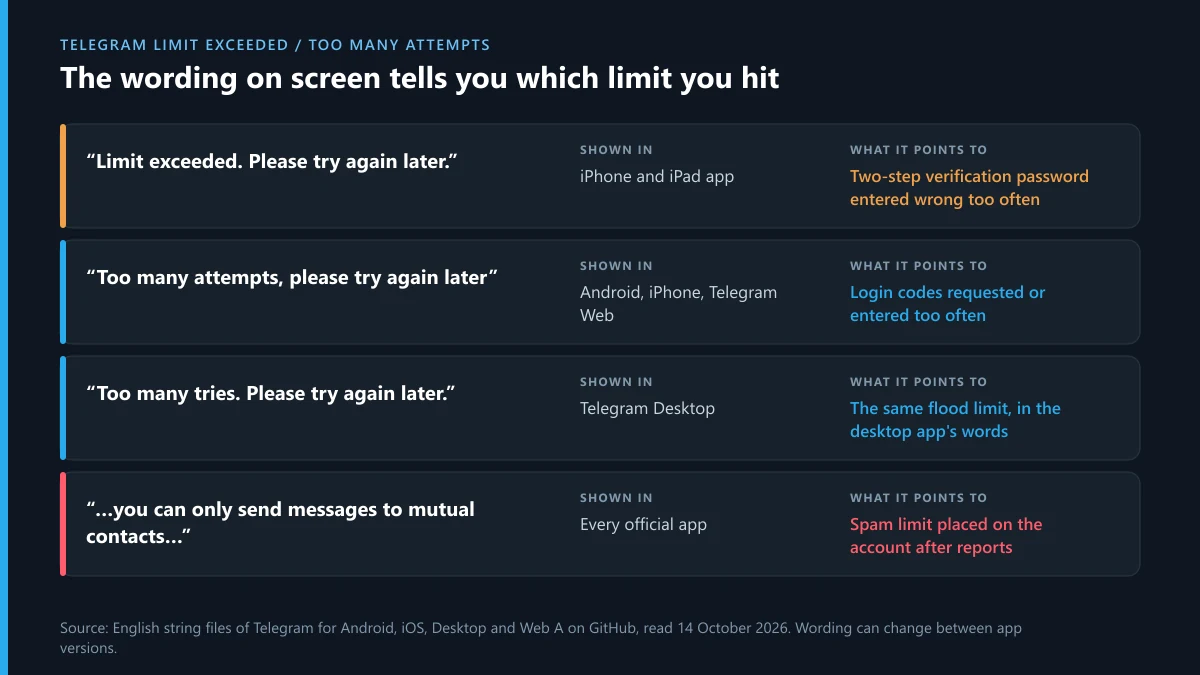
Guides on these errors tend to treat every message as one problem and hand out one number, usually 24 hours. We wanted to know where that number comes from. On 14 October 2026 we opened the English string files of four official apps (Android, iPhone, Desktop and Web) and searched them for the exact sentences people quote. Then we read Telegram's API error pages and its Spam FAQ for the waits. The sentences turned out to belong to different limits, and the 24-hour figure isn't in any of those documents.
Which app shows Telegram limit exceeded, and which shows too many attempts?
The iPhone app says "Limit exceeded". Android and the web app say "Too many attempts". Desktop says "Too many tries". Each app ships its own English text for the same family of server errors, so the wording you see depends on the device in your hand as much as on what you did.
| Exact wording | App | Name of the string in the app's code | What it points to |
|---|---|---|---|
| Limit exceeded. Please try again later. | iPhone and iPad | LoginPassword.FloodError, TwoStepAuth.FloodError | Two-step verification password tried too often |
| Too many attempts, please try again later. | iPhone and iPad | Login.CodeFloodError | Login code flood |
| Too many attempts, please try again later | Android | FloodWait | Any flood wait without a timer |
| Too many attempts, please try again in [time] | Android, Web | FloodWaitTime, ErrorFloodTime | Flood wait with the timer shown |
| Too many tries. Please try again later. | Desktop | lng_flood_error | The same flood wait |
| Sorry, you can only send messages to mutual contacts at the moment. | All four | NobodyLikesSpam1 on Android | Spam limit on the account |
The files are public. The Android text sits in the Android app's strings.xml on GitHub, and the iPhone text in the Localizable.strings file of the Telegram-iOS repository. One detail surprised us. The Android file has no "Limit exceeded. Please try again later." line at all. So when someone reports the Telegram limit exceeded message, they are almost always on an iPhone or iPad, and almost always at the password step or in the two-step verification settings. Wording can change with an app update, so treat the table as a reading of mid-October 2026.
What does Telegram too many attempts mean at login?
It means the server counted more code requests, code entries or password entries for your number than it allows in a short period, and it has stopped answering for a while. Telegram's API error documentation files this under error 420, FLOOD: "The maximum allowed number of attempts to invoke the given method with the given input parameters has been exceeded." Its own example is a large number of SMS requests for the same phone number.
Two related errors sit on the page for the method that sends login codes. PHONE_NUMBER_FLOOD is described as "You asked for the code too many times." PHONE_PASSWORD_FLOOD is "You have tried logging in too many times." That is why searches such as "telegram number too many attempts" are accurate: the count is kept against the phone number. Switching to another phone, reinstalling the app or opening Telegram Web doesn't start a fresh count.
The message isn't a ban, and it says nothing about reports. Whether you describe it as Telegram saying too many attempts, or "telegram says too many attempts" after one typo too many, the cause is repetition. The usual triggers are tapping Resend several times while an SMS is slow, guessing a forgotten password, and login tools or scripts that retry on their own.
How long does Telegram too many attempts last?
Telegram publishes no fixed length. The server sends the wait with the error, in seconds, and the apps either show it or hide it. The documented form is FLOOD_WAIT_X, explained as "A wait of X seconds is required". When the Android or web app has the figure, the screen reads "Too many attempts, please try again in" followed by the time. When it reads only "try again later", the number exists but isn't displayed.
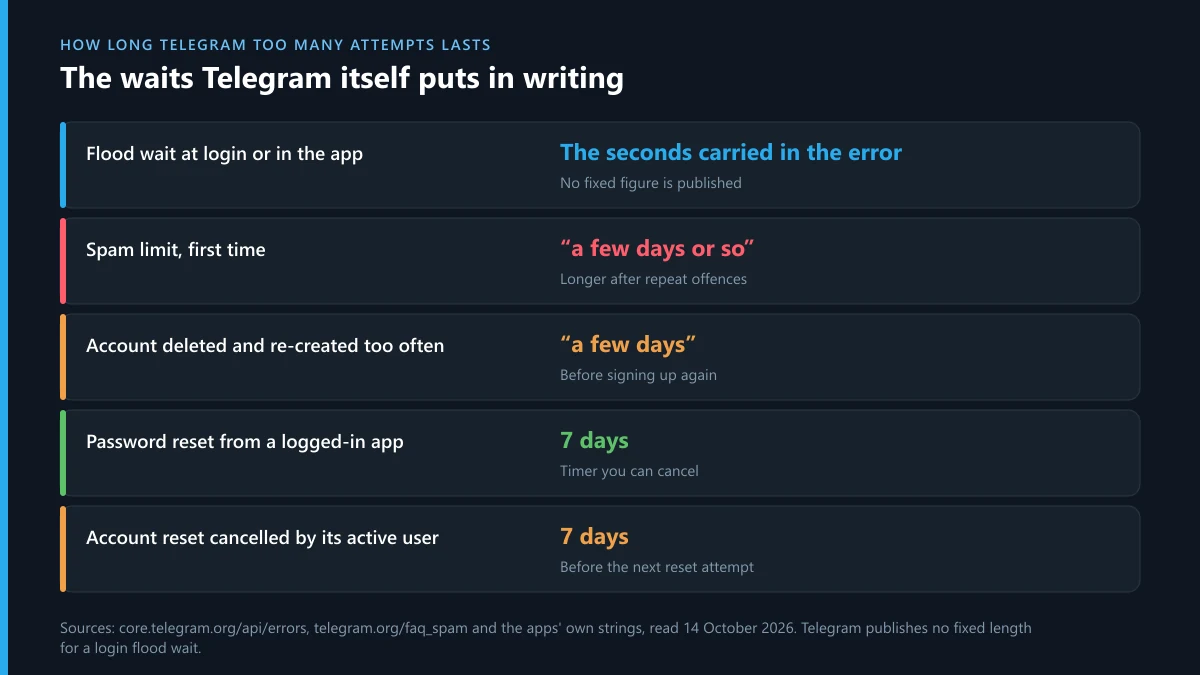
So the honest answer to "how long telegram too many attempts" lasts, or "telegram too many attempts how long", is that it varies per case and tends to grow when you keep trying. Several fix-it sites say 24 hours. We couldn't trace that to a Telegram document. Users on forums report anything from a few minutes to most of a day, which fits a wait that scales with how hard the limit was hit.
| Limit | What Telegram has put in writing | Where |
|---|---|---|
| Flood wait on codes or passwords | "A wait of X seconds is required" | API error page |
| Spam limit, first time | "a few days or so" | Spam FAQ |
| Account deleted and re-created too often | "wait for a few days before signing up again" | App text |
| Account reset cancelled by its active user | "try again in 7 days" | App text |
| Reset of a password-protected, active account | "we will delete it in 1 week" | App text |
If you are asking how long to wait for Telegram too many attempts when no timer shows, a practical rule is to leave the number alone for a full day. One clean attempt after a long gap does better than ten spread through the afternoon, because each failed try can be counted again.
What to do if Telegram says too many attempts?
Stop trying, find the code you already have, and make the next attempt count. In order:
- Stop tapping Resend and Next. Every extra request is another count against the number.
- Read the screen for a timer. "Try again in" with a time is the server's own figure. Set an alarm for it.
- Look for the code in Telegram itself. If any phone, tablet or computer is still signed in, the code arrives there as a message from Telegram's service account, with no SMS involved.
- Check your login email. Accounts with a login email get the code by mail.
- Close automation. Userbots, auto-forwarders and unofficial clients keep retrying while you wait.
- Wait out the period, then try once. Type the number in international format and enter the newest code only.
- Write to Telegram if a day passes with no change. The form at telegram.org/support takes login problems. Give the number, the exact message and the app.
That list covers the phrasings we see most, from "telegram too many attempts try again later" to "telegram too many attempts please try again later", the shorter "telegram too many attempts please try again", and the desktop version, "telegram too many tries try again later". The steps are the same for all of them.
For the password version on an iPhone, don't keep guessing. Use the recovery email link under the password field. Without a recovery email, a password reset from a logged-in app runs on a seven-day timer, and a reset from outside means deleting the account. Our guide to the recovery routes Telegram offers for a locked account walks through each door, and what a Telegram account deletion erases is worth reading before you press Reset.
If you never asked for the codes, someone else is typing your number. That is a different problem with a different clock: start with the steps for a Telegram account someone else got into. People who want a second pair of eyes before they touch anything can read what a Telegram recovery expert can and can't do.
Why does Telegram say you can only message mutual contacts?
Because the account has a spam limit on it. The banner "Sorry, you can only send messages to mutual contacts at the moment" isn't a flood wait and has nothing to do with login. Telegram's Spam FAQ explains the mechanism: when users press Report spam, the messages go to moderators, and "if the moderators decide that the messages deserved this, the account becomes limited temporarily."
The limit is narrower than it feels. The same page says limited accounts can still write to people who have their number saved as a contact, and can always reply to anyone who messages them first. A sister message, "you can only add mutual contacts to groups at the moment", blocks invites in the same way. A third, found in the Android file, restricts posting to public groups.
On length, the FAQ gives the only published figure: a first offence "will be limited for a few days or so", and repeated offences bring longer periods. Keep going and "you may lose the ability to do so forever". So the query "telegram can only message mutual contacts" has a short answer: reports were reviewed, the limit is temporary the first time, and it gets worse with repetition.
Telegram restricted: which Telegram restrictions exist, and how do they differ?
There are at least five, and they are easy to confuse because they all stop you doing something. When a user tells us "Telegram limited my account", the first job is working out which of these it is.
- Flood wait. Too many of one action in a short time. It affects logging in, joining, searching or sending. It lifts by itself after the wait.
- Spam limit. Applied after reports are reviewed. You can write only to contacts who saved your number, and reply to people who write first.
- Slow mode. A group setting, not an account penalty. The admin chose how long each member waits between messages.
- Frozen account. The apps describe it as read-only: you can open the account but can't send messages or take actions, and the notice gives a date to appeal by.
- Ban. The number can't sign in at all.
A Telegram restricted notice inside one group is usually an admin's doing and stays in that group. Account-wide Telegram restrictions come from Telegram and follow you everywhere. Frozen accounts have their own appeal path with a deadline, covered in how a frozen Telegram account gets reviewed and released.
How to unrestrict my Telegram account?
For a spam limit, there are two legitimate routes: wait it out, or appeal to @SpamBot if the limit was a mistake. Nothing else works, and Telegram says so. The Spam FAQ's reply to users who admit fault and ask for early release is "We're sorry, but this is impossible."
- Open @SpamBot. Search the name, check for the verified mark, and press Start. It reports whether a limit is active and, in our experience, shows when it ends.
- Appeal only if you have a case. The FAQ invites users who are sure the limit was wrongly applied to contact the bot, and admits that "even the best systems, algorithms and well-trained people can make mistakes sometimes."
- Mention a new or recycled number. Telegram concedes that some numbers trigger "an overly harsh response" because of previous owners or because they are virtual numbers.
- Change what caused it. Cold messages to strangers, invite links and adding people to groups are the reported behaviours the FAQ names.
People who search how to unrestrict on Telegram often land on sellers of instant unlocks. Nobody outside Telegram can lift a limit. The accounts that claim to are after a login code, a payment or both, and handing over a code turns a limited account into a stolen one. We report those accounts when clients send them to us, and that is the only part of this problem a third party can honestly take on.
A flood wait has no appeal at all. There is no bot or form that shortens it, and nobody reviews it, because nobody imposed it. A counter did.
Do username changes and checks run into the same limits?
Yes. Username actions have their own counters and their own messages. The apps carry "Sorry, you have reserved too many public usernames" for accounts that hold too many public links across groups and channels, and "you have too many active public links already" for collectible names switched on at once. Rapid availability checks can also end in a flood wait like any other repeated request.
If that is where you hit the wall, slow down and check a name once in the right place: where a Telegram username's status can be looked up compares the app, t.me and Fragment. Buyers and sellers who refresh auction pages all day should know the trade happens on Fragment and doesn't need the app's search, as how the Telegram username market works explains. The practical side is split across buying a Telegram username through the official auction and selling a username you already hold. A limited or frozen account can complicate both, so settle the account first.
The limit followed a dispute on Instagram or X: where do reports go?
To the platform where the abuse happened, and through its own forms. We hear this often: a quarrel starts on one app, moves to Telegram, and ends with one side reported and limited. Retaliating with reports of your own, or paying for a wave of them, gets discounted by moderators and can count against you. A report that names a real rule break is the one that gets read.
On Instagram. Start with the report options Instagram gives for a person. Abuse in DMs and comments goes through harassment reporting on Instagram, and threats tied to a demand through Instagram's route for blackmail and sextortion. Stolen photos or video call for a copyright takedown notice to Instagram, and matters already in front of a court for a formal legal request to Instagram. If you reported in anger and regret it, see whether an Instagram report can be withdrawn.
For accounts that should come down entirely, read which violations get an Instagram account taken down and whether you can delete an Instagram account that belongs to someone else. Paid help is described in what an Instagram ban service may lawfully do and how Instagram account removal services work.
On X. A single post is handled in how to report one tweet, and a whole profile in reporting an account on X. The specific forms each have a page: impersonation reports on X, reporting posted private information, copyright notices to X and trademark complaints on X. Swarms of fake followers or reply bots are covered in clearing bots off an X account.
What happens to the offender is set out in the rule breaks that lead to an X suspension and the routes for taking down an X account. Before paying anyone, read whether another person's X account can be deleted and what an X account removal service is allowed to file.
FAQ
Is Telegram limit exceeded a ban?
No. It is a temporary flood limit, shown mainly by the iPhone app after too many wrong two-step verification passwords. The account and its chats are untouched. A banned number gets a different message and can't sign in at all, while this one clears after a wait.
Does a VPN or reinstalling the app clear too many attempts?
No. Telegram's error descriptions tie the count to the phone number and the action, so a new IP address, a reinstall or another device doesn't reset it. Extra attempts from other devices can add to the count and lengthen the wait.
Can I still use Telegram on a device that is already logged in?
Yes. A login flood limit blocks new sign-ins for the number. Sessions that are already open keep working, and the login code is also delivered there as a message from Telegram, so check those devices before requesting another SMS.
Why did I get too many attempts on the first try?
Someone or something else may have been requesting codes for your number: an old device retrying, an unofficial app, or a person attempting to sign in as you. If codes arrive that you didn't ask for, turn on two-step verification and review active sessions.
Will @SpamBot tell me when my restriction ends?
It tells you whether your account is limited and lets you appeal if you believe the limit is a mistake. Telegram's Spam FAQ says a first limit lasts a few days or so and that it can't be lifted early for users who did break the rules.
Can someone get my account limited by reporting me falsely?
Reports alone don't do it. Telegram's Spam FAQ says reported messages go to moderators, who limit the account only if they decide the messages deserved it. If you were limited without sending unwanted messages, appeal through @SpamBot.