28 September 2026 · Telegram Ban Service · 16 min read
Delete Telegram account: the route depends on what you can still open
Can you delete a Telegram account? Yes, and only its owner can. Signed in on a phone, the delete option sits under Privacy and Security. Signed in on any device, my.telegram.org/delete works too. Signed out with a forgotten cloud password, Reset account deletes it, sometimes after seven days. With the number gone, only the self-destruct timer is left.
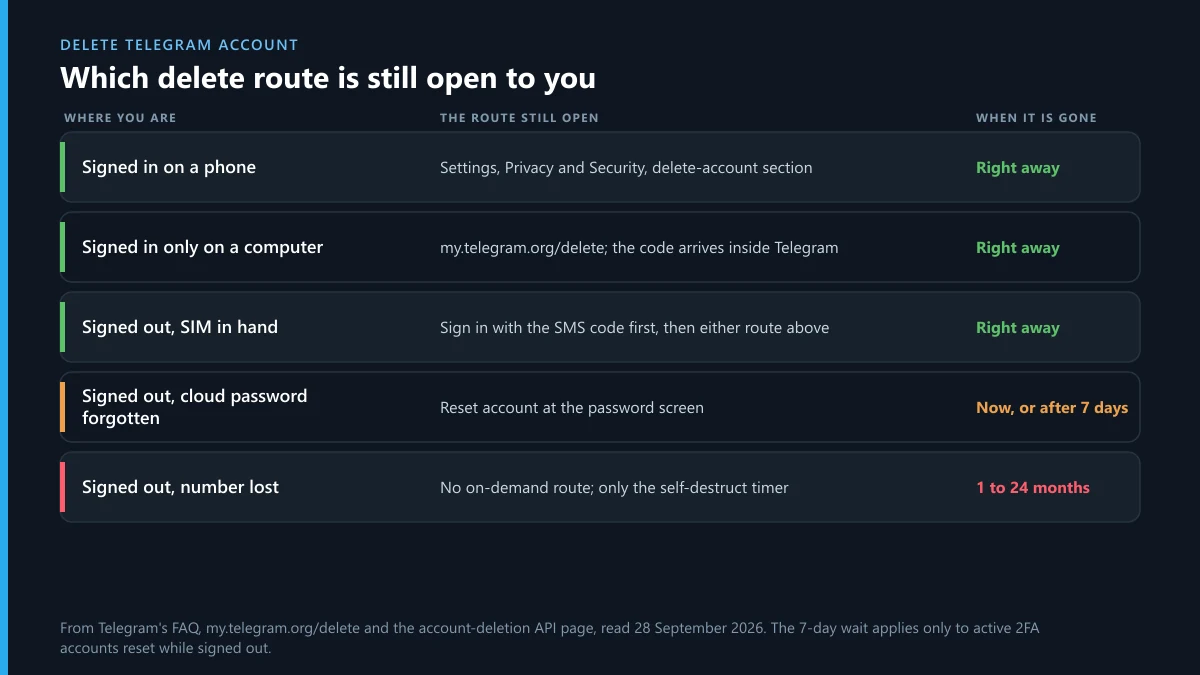
Most guides to deleting Telegram assume you are holding a phone that is signed in. That is the easy case, and it takes under a minute. The people who search for how to remove a Telegram account are often somewhere harder: an old number they no longer own, a laptop that is still logged in, a cloud password nobody remembers. Each of those has its own door, and one of them has no door at all.
When we tested every door on 28 September 2026, the first surprise came early. The old address telegram.org/deactivate now redirects to my.telegram.org/delete, a page headed "Delete Account or Manage Apps", and it says plainly that the confirmation code comes "via Telegram (not SMS)". That one line decides a lot. It means the web deletion page, the one people think of as the fallback, only works for someone who can still open Telegram on some device. The rest of this page follows from that.
Can you delete a Telegram account, or only log out of it?
You can delete it for good. Logging out, uninstalling or wiping the phone is not the same thing. Telegram keeps your chats in its cloud, so the account carries on without the app: your name still shows in groups, contacts can still message you, and your profile stays findable by your number. Deleting is what ends all of that.
The Telegram FAQ sets out what goes: deletion "permanently removes all your messages and contacts", and after it "all your data will be flushed from our system". It also says two things that surprise people. Groups and channels you created are "orphaned and left without a creator but admins retain their rights", and your contacts "will still have their copy of the messages you sent them". Deletion wipes your side, not everyone else's.
So when someone asks how to shut down a Telegram account, there are really three answers, and only one of them is a Telegram account removal. Delete it now, by one of the routes below. Let it lapse, by staying offline past the self-destruct period. Or leave it running and just sign out, which shuts down nothing. Only the first is quick, and only the first is under your control on a date you choose.
Which delete route is open to you right now?
It depends on two things: whether any device is still signed in, and whether you still receive texts on the number. Match your situation to a row and skip the rest.
| Your situation | Route that works | How long it takes | The catch |
|---|---|---|---|
| Signed in on a phone | The app: Settings, Privacy and Security, delete-account section | Minutes | Asks for the cloud password if you set one |
| Signed in only on a computer or the web | my.telegram.org/delete | Minutes | The code arrives inside that signed-in Telegram, not by SMS |
| Signed out, SIM still in hand | Sign in with the SMS code, then use either route above | Minutes | Needs the cloud password too, if 2FA is on |
| Signed out, SIM in hand, password forgotten | Reset account at the password prompt | At once, or after 7 days | This is deletion, not recovery |
| Signed out everywhere, number lost | None on demand | The self-destruct period | Default 18 months unless you set it shorter earlier |
The last row is the one nobody wants. If you have lost the SIM and every session, nobody can delete the account for you, Telegram support included, because the phone number "is the only way for us to identify a Telegram user". Getting the number back from your carrier puts you on row three. If that fails, the timer is the answer. If what you actually want is the account back rather than gone, the sign-in recovery guide starts from the same four checks.
How to delete a Telegram account on the app
On a signed-in phone, the delete option is at the bottom of the privacy screen on both iPhone and Android. The wording shifts a little between versions, so follow the order rather than the exact labels.
- Open Telegram and go to Settings.
- Tap Privacy and Security and scroll to the bottom, to the section about deleting your account.
- Ignore the "If away for" timer for now; that sets the self-destruct period. Choose the option to delete the account now.
- Read the warning screens. Telegram shows several before it lets you go on, each one pointing to something you will lose.
- Confirm with your phone number, and enter your cloud password if two-step verification is on.
- Confirm once more. The account is deleted and the app returns to the sign-in screen.
That is the whole job.
Why is the button there on an iPhone at all? Since 30 June 2022 Apple's App Review Guideline 5.1.1(v) has required that apps which let you create an account "must also offer account deletion within the app". Telegram had the web page long before that; the in-app route is newer. Some older guides still send iPhone users to the browser, which works but is the longer way round.
How do you delete a Telegram account if you set up the cloud password years ago and forgot it? The app will stop at the password step. Don't use Reset from here: on a signed-in device, forgetting the password is a password problem, and the two-step verification docs say a reset "can be requested from logged-in sessions only … without deleting the account", on a seven-day timer. Reset the password first, then delete.
What does the Telegram account deletion page ask for?
Your number in international format, then a code. That is all it asks before letting you in. When we loaded my.telegram.org/delete on 28 September 2026, the page read: "Enter your number and we will send you a confirmation code via Telegram (not SMS)." The same page also manages developer API apps, which is why its heading mentions both.
The code landing inside Telegram is the part that trips people up. If the only signed-in session is on a laptop, open Telegram Desktop and the code arrives there as a message from Telegram's service account. If no session exists anywhere, nothing arrives, and the page is no use to you until you sign in on a phone first.
Once in, the tool asks you to confirm before it deletes. The API call behind it, account.deleteAccount, carries an optional free-text reason; you are not obliged to explain anything. Two practical tips from our run-through. Use a private browser window, because "Remember Me" keeps the page signed in afterwards. And never type that code into anything a stranger sent you. A link that claims to be the Telegram account deletion page but lives on any domain other than my.telegram.org is a phishing page, and the code it asks for signs someone into your account.
Can you delete a Telegram account permanently and instantly?
Permanently, always. Instantly, in most cases. The account-deletion page of the Telegram API lays out when the delete runs straight away. Without two-step verification it does. With it, it does as long as you enter the password.
There is one delay, and it is deliberate. If someone asks for deletion without the password, from a signed-out device, and the password "was modified more than 7 days ago and was active in the last 7 days", deletion is held for seven days. Telegram sends a service message with a phone confirmation link to your signed-in sessions. Confirming through that link "will cancel deletion of the account and will log out the user" who asked for it. If nobody confirms, the account is deleted when the week runs out.
That delay protects the owner, not the person pressing the button. It exists so that a thief who took your SIM cannot wipe an account you are still using. It also explains why a reset sometimes runs at once: an account whose password was set up this week, or which nobody has used for a week, gets no grace period. Our guide to the four kinds of reset covers the other buttons that share the name.
Whatever the timing, a Telegram account delete is permanent. The FAQ is blunt: "Termination of a Telegram account is irreversible." There is no 30-day restore, whatever some forum answers claim, and no support request that undoes it.
What should you save before you remove a Telegram account permanently?
Anything you want to keep after the account is gone, because afterwards nobody has it except the people you talked to. Go through this list on a signed-in device first.
- Your chat history and media. Telegram Desktop has Settings, Advanced, Export Telegram data. The phone apps don't. Start it early; a security delay can apply before the export begins.
- Channels and groups you own. Transfer ownership to someone you trust. The API that does this, channels.editCreator, refuses with PASSWORD_MISSING ("You must enable 2FA before executing this operation") and with SESSION_TOO_FRESH when your session is under 24 hours old. Switch on the cloud password a day ahead.
- A Premium subscription. If you pay through the App Store or Google Play, the store bills you, so cancel the subscription there as well.
- Sites where you log in with Telegram. Any service you entered with a Telegram login button loses its way to recognise you. Add an email or password there first.
- People who reach you only on Telegram. Tell them where to find you. A deleted account can't send a goodbye.
If you run a channel and want it gone rather than handed over, do that separately. Deleting a channel you own removes it for every subscriber, which account deletion does not do: an orphaned channel stays up and keeps its posts.
What happens to chats, groups and contacts after deletion?
Your side of everything goes. Messages, media and contacts stored in your account are deleted from Telegram's cloud, and the privacy policy repeats that the deactivation page is the place to do it. What stays is whatever other people hold: the copies in their chats, the groups you started, the channels you ran, and anything they forwarded or saved.
In other people's chat lists your profile turns into a deleted account, with no name, photo or username. The API reports such a user with the error INPUT_USER_DEACTIVATED, "The specified user was deleted", which is how bots and clients know to stop trying. Your username is released from the account; Telegram does not say how soon someone else can claim it.
If you come back later with the same number, you start fresh. The FAQ puts it this way: "you will appear as a new user and will not get your history, contacts or groups back." Your contacts may see you as joined, because Telegram tells people when someone in their address book signs up.
Why was my Telegram account deleted automatically?
Usually because of one of five things, and each leaves a different trace. Work down the list before assuming Telegram removed you for something.
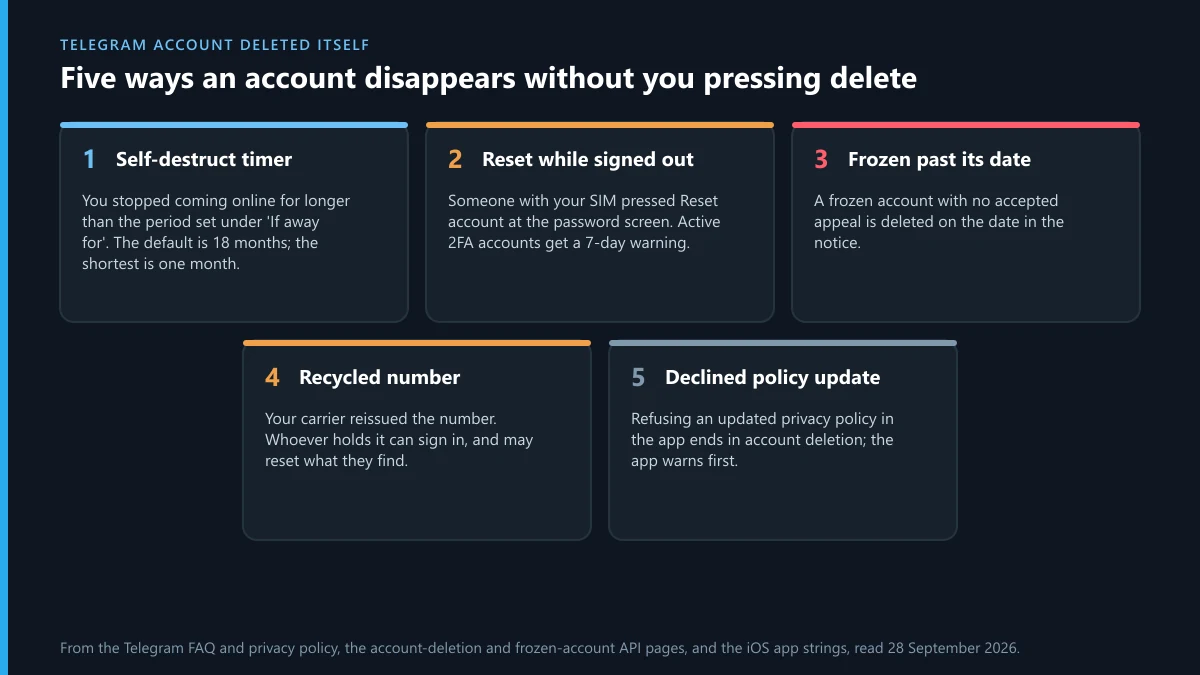
| Cause | What you would have seen | How to tell |
|---|---|---|
| Self-destruct timer ran out | Nothing, if you were offline the whole time | Your last use was longer ago than the "If away for" setting |
| Someone reset it while signed out | A service message with a confirmation link, if 2FA was active | Your SIM left your hands, or the carrier moved the number |
| A frozen account passed its date | A freeze notice with a deletion date | You saw the read-only banner and no appeal was accepted |
| The number was recycled | Nothing; the new owner signed in | You stopped paying for the number or changed carriers |
| You declined an updated privacy policy | A warning before it happened | You tapped Decline on a policy screen in the app |
The timer is the most common reason, and the Telegram privacy policy describes it: if you "do not come online for at least 18 months, your account will be deleted along with all messages". That is the default. Anyone who once set it shorter, while tidying settings, may have forgotten doing it.
The recycled number deserves a closer look. The FAQ warns that "whoever has the number, has the account", and numbers change hands in less innocent ways too: the FBI's IC3 2025 report logged 971 SIM-swap complaints with $17,366,758 in losses.
Short version: a number is not a lock. Carriers reissue unused numbers, and a new owner who signs in with an SMS code lands in your account if no cloud password protects it. With one, they hit the password screen, and pressing Reset there deletes the account. A freeze is its own chain of events; the frozen-account appeal guide covers the deadline. The last row is rare: the iOS app still carries a warning that declining a new privacy policy "will irreversibly delete your Telegram account".
Why does a Telegram account get deleted automatically on Android?
For the same reason as on any other device: the self-destruct period. Android users notice it more often only because the setting is one tap away in Privacy and Security, and the Android picker offers periods from 1 month up to 24 months (1, 3, 6, 12, 18 and 24). Someone who chooses one month, then switches to another messenger for a few weeks, comes back to a sign-in screen and a new, empty account.
The timer runs on Telegram's servers. Uninstalling the app, clearing its data or buying a new phone does not start or stop it. What resets the count is coming online, from any device. So if Telegram deleted an account on your Android phone and you had not opened it in a while, check the period you picked. If you had opened it recently, go back to the table above: the timer is not your cause.
To keep it from happening again, set the period to the longest option you are comfortable with and open Telegram at least once inside it. For a second phone you keep only as a backup, open the app on it every few months, since that session is what keeps the account alive if the main phone dies.
What does "deleted too many times" mean when you sign up again?
It is a rate limit on re-creating accounts with the same number. The iOS string Login.PhoneFloodError reads: "Sorry, you have deleted and re-created your account too many times recently. Please wait for a few days before signing up again." It appears after several delete-and-sign-up cycles in a short span.
Telegram has explained the wait once, in a reply from its X account in April 2023: users "have to wait several days before they can create the account again", to prevent "potential misuse of the ability to delete and recreate accounts". It has never published the number of cycles that triggers the block or a fixed length for the wait.
There is no shortcut. Waiting is the fix. Anyone who offers to lift a Telegram account deleted too many times block for a fee is selling nothing; the limit sits on Telegram's side and is not something outsiders can touch. Stop trying to sign up for a few days, since each attempt tells the system the number is still busy.
Is there a Telegram account deletion service that works?
Not for your own account, and not for anyone else's. Deleting needs a login code or the cloud password, and handing those over to a stranger is handing over the account. A "deletion service" that asks for your code can just as easily sign in, read your chats and use your name to scam your contacts, and some of them do. The scam report bots we have taken apart run on the same trick.
Offers to delete someone else's account are a different product with the same pitch. No outsider can delete a Telegram account. What sellers really mean is reporting, and often mass-report bots that promise bans on demand. Telegram has no published report count that triggers a ban, as the report-threshold myth shows, and coordinated false reports are discounted. Buyers of those services are regularly the ones who lose money; checking a seller against scammer lists takes a minute.
What does work, when an account is genuinely breaking the rules, is an evidence-led report through Telegram's own channels. Getting a rule-breaking account banned explains what moderators act on, and an account takedown request shows how we build a case. Where the number itself was banned and a bot is involved, bots tied to a banned number are reported differently. The decision is always Telegram's.
What if the account you want gone isn't yours?
Then deletion isn't the tool; a report is, and the right report depends on what the account does. An account using your photos and name is an impostor, and reporting a fake profile uses Telegram's impersonation reason. One that cheated you out of money belongs in a fraud report to Telegram, and also with police or consumer bodies outside the app, listed under where to report a scammer beyond Telegram.
Threats and blackmail call for reporting extortion and counterfeit sellers quickly and keeping every message. Harassment follows the abuse report route, and a single offending post can go through a report on one message. Unwanted bulk messages go to Telegram's spam report, and bots that make sexual deepfakes of real people have their own deepfake report path, which is urgent because the images spread.
If the problem is a channel or group rather than a person, report the container, not one member. Reporting a Telegram group, a report against the whole channel and a channel takedown case cover that. Content that is illegal where you live has the EU illegal-content notice. Stolen work goes through a copyright infringement claim or a DMCA notice sent to Telegram. And the difference between a group admin removing someone and Telegram acting on a report is set out in how admin bans compare with reports.
Telegram account delete process: the short version
If you only read one section, read this one. Save what you need on a signed-in device, including a Desktop export. Transfer your channels, with two-step verification switched on a day early. Cancel store billing for Premium. Then delete from Settings, Privacy and Security, or from my.telegram.org/delete with the code that arrives inside Telegram. Signed out with a lost password, Reset account works but may hold for seven days. Signed out with a lost number, set your hopes on the timer.
Telegram Ban Service is a reporting desk, not a deletion service. We can't delete, restore or unban any account, yours included. If an account that breaks Telegram's rules is the reason you want to leave, send us its t.me link and what it did, and browse all our Telegram reporting guides for the route that fits.
Sources
- Telegram FAQ: deleting your account, what happens after, self-destruction, phone number identity
- Telegram Privacy Policy: deactivation page and 18-month self-destruction
- my.telegram.org/delete: "Delete Account or Manage Apps" (checked 28 September 2026)
- Telegram API, account deletion: immediate deletion, the 7-day delay and the confirmation link
- Telegram API, two-step verification: password reset from logged-in sessions
- Telegram API, channels.editCreator: PASSWORD_MISSING and SESSION_TOO_FRESH
- Telegram Translations, iOS: Login.PhoneFloodError
- Telegram on X, April 2023: the wait after repeated delete-and-recreate
- FBI IC3 2025 Internet Crime Report: SIM swap complaints and losses
- Apple App Review Guidelines 5.1.1(v): in-app account deletion
FAQ
Can I delete my Telegram account without the phone number?
Only if you are still signed in somewhere. The in-app option needs no SMS at all, and my.telegram.org/delete sends its code into the Telegram app rather than by text message. Signed out everywhere with the number gone, there is no route on demand, and the self-destruct timer you had set is what eventually removes the account.
How do I delete a Telegram account if I only use it on a computer?
Open my.telegram.org/delete in a browser, enter your number in international format, and read the confirmation code in Telegram Desktop, where it arrives as a message from Telegram. Sign in with that code and confirm the deletion. No phone is needed as long as the desktop session is still signed in.
Does uninstalling Telegram delete my account?
No. The account and its cloud chats live on Telegram's servers, not on the phone. Uninstalling or logging out leaves the account intact and visible to your contacts. It is only removed when you delete it yourself or when you stay offline longer than the self-destruct period.
Can a deleted Telegram account be recovered?
No. The Telegram FAQ calls termination irreversible, and signing up again with the same number creates a new user with no history, contacts or groups. The only thing you can stop is a deletion that is still pending: the seven-day delay after a signed-out reset, cancelled through the confirmation link Telegram sends.
Will my contacts know I deleted my Telegram account?
They will see that the account no longer exists when they open your chat. Telegram does not send them a notice, but they keep their own copy of the messages you exchanged, and they can keep talking in groups you created, because those groups stay up with their admins.
Can I sign up again with the same number after deleting?
Yes, as a new user. If you delete and re-create the account several times in a short period, the app stops you with a message saying you have done it too many times recently and must wait a few days. Telegram has not published the exact limit or the length of the wait.
What happens to channels I own when I delete my account?
They stay up without a creator, and the admins you appointed keep their rights, according to the Telegram FAQ. To hand a channel to someone properly, transfer ownership before deleting; Telegram asks for your cloud password for that, so two-step verification has to be switched on first.
Can Telegram Ban Service delete an account for me?
No. Deleting an account takes a code or password that only its owner should ever have, so we never ask for one. What we do is report accounts, channels and bots that break Telegram's rules through Telegram's official routes, and Telegram's moderators decide whether they are banned.