28 September 2026 · Telegram Ban Service · 15 min read
Telegram frozen account recovery: work to the date on the notice, and know what a reset takes with it
Telegram frozen account recovery goes through one door: the appeal link in the freeze notice, used well before the date that notice gives. An accepted appeal unfreezes the account with every chat in place. A reset is another matter. Resetting a signed-out account whose cloud password you forgot deletes it, and no appeal reverses that.
On 28 September 2026 Telegram's moderation page showed 26,643,380 groups and channels blocked so far in 2026, and it put 427,225 of them down to child sexual abuse material. Those are the only moderation counters Telegram keeps in public. None of them counts people. How many personal accounts were frozen this year, how many owners appealed and how many got their accounts back are figures Telegram does not publish. Any success rate quoted for an unfreeze was made up by whoever quotes it.
What Telegram does publish is the mechanism, and it is short. When we checked it line by line on 28 September 2026, we saw that it fits on a few screens: the frozen-account section of the API authorization docs, three client-configuration fields, one TDLib update and a handful of app strings. Two facts come out of that reading and they drive everything below. A frozen account keeps its data but runs against a deletion date. And the word "reset" covers four different actions on Telegram, only one of which deletes an account, and that one is the one people press in a panic.
Is a frozen Telegram account banned or only paused?
Paused, with a deadline attached. Telegram's FAQ entry on frozen accounts says that while frozen "you can still read your chats, but you cannot send messages or post content", and that the account "will be unfrozen" if the restriction was a mistake. The developer documentation is blunter about the other outcome: frozen accounts are held for serious violations of the Terms of Service and are deleted after a set time unless an appeal is submitted and accepted.
Freezing arrived on 30 April 2025. Telegram's announcement that day replaced the old instant sign-out, so a violator now keeps the session but cannot contact other users and gets a button to appeal. Before that change, a banned account was simply logged out everywhere. That history matters for reading old advice. A forum answer from 2024 about "banned" accounts describes a sign-out that no longer happens, and it will send you to the wrong place.
A freeze is also narrower than the other states people call a ban. A spam limit leaves the account able to message its own contacts, a banned number stops sign-in before any chat loads, and a group admin's ban covers one group. Which of those five screens you are looking at, and the right appeal for each, is laid out in our guide to the five Telegram bans. This page stays with the freeze and the reset.
What still works in a frozen Telegram account?
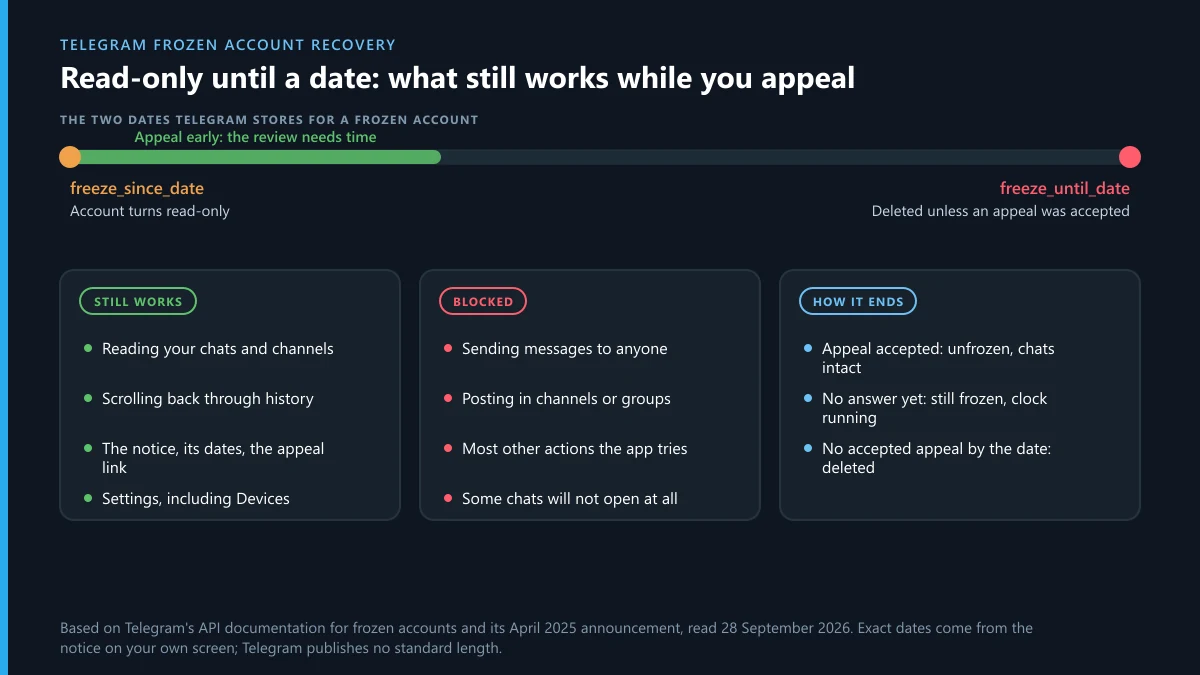
Reading works. Almost everything that writes to Telegram does not. The API returns an error called FROZEN_METHOD_INVALID when a frozen account calls a method it "cannot be used at all by", and a second one, FROZEN_PARTICIPANT_MISSING, when even an allowed action points at a chat the account can no longer reach.
| You try to | In a frozen account | Where that comes from |
|---|---|---|
| Read your chats and channels | Works | Telegram FAQ: "you can still read your chats" |
| Send a message, to a stranger or a saved contact | Refused | Desktop string: "can't send messages or take actions" |
| Post in a channel or group you run | Refused | FAQ: you "cannot send messages or post content" |
| Open a particular chat | Sometimes refused | API error FROZEN_PARTICIPANT_MISSING |
| See when the freeze started and when deletion is due | Works, in the notice | Config fields freeze_since_date and freeze_until_date |
| Open the appeal | Works | Config field freeze_appeal_url; the notice links it |
So a frozen account is still a useful account for one purpose: gathering what you will need. You can scroll back, reread old conversations, find the channel you run and the names of its other admins, and note what you sent in the days before the notice. Do that while the session is open, because you get nothing of the sort back once the deletion date passes.
How long does a Telegram account stay frozen?
As long as the dates on your own notice say, and no longer. Telegram publishes no standard length. Each frozen account carries two timestamps in the app's client configuration: freeze_since_date, "the unixtime when the account was frozen", and freeze_until_date, the moment a frozen account is deleted "unless an appeal is submitted to the freeze_appeal_url and accepted."
The apps turn those numbers into words. On macOS the notice says the account has been in read-only mode since the first date and ends with a warning that if Telegram does not hear from you by the second, "your account will be fully deactivated and terminated." Telegram Desktop puts it in one line: appeal before the date, "or your account will be deleted." TDLib, the library many clients are built on, names the end point deletion_date and describes it as the moment the account "will be deleted and can't be unfrozen." After that, there is no appeal left to win.
Three practical points follow. Write the end date down somewhere outside Telegram the moment you see it. Don't count on a reminder, because the notice is all the warning you get. And don't treat the gap between the two dates as time to think it over: moderators need part of it to read the appeal, and one that lands on the last evening is racing the deletion job.
Telegram frozen account recovery in seven steps
Work through these in order on a device that is still signed in. The first three cost nothing and protect the rest.
- Photograph or screenshot the freeze notice with both dates visible, then copy the end date to your calendar or a note outside Telegram.
- Stay signed in. Don't log out, uninstall or clear the app's data; the appeal link and the notice live in the open session.
- Open Settings, then Devices, and read the list. A session you don't recognise means someone else may have used the account, and that belongs in your appeal.
- On Telegram Desktop, try Settings, then Advanced, then Export Telegram data. If the frozen account refuses, or the app shows a security delay, note it and move on; the appeal matters more.
- Open the appeal from the notice (the apps route it through @SpamBot) and write it the same day, following the outline in the next section.
- Keep a copy of what you sent and the date you sent it, outside Telegram.
- Check the notice every few days. If the account unfreezes, change your cloud password and end any session you don't recognise before doing anything else.
Step four has a catch worth knowing about. Telegram's data export runs through a special "takeout" session, and the API method behind it can answer with TAKEOUT_INIT_DELAY, meaning you may begin downloading only after a waiting period and every signed-in device is told about the request. Telegram Desktop phrases it as a security delay counted in hours, with a date to come back and repeat the request from the same device. Telegram does not say whether a frozen account may start an export at all, so treat it as a bonus that may or may not work, never as a reason to delay the appeal.
What should a frozen-account appeal say?
Enough for a moderator to decide without writing back. Nobody answers follow-up questions in a chat with a bot, so the first message has to carry the whole case. Five short paragraphs do it.
- Who you are to the account. How long you have had it, whether the phone number is yours or was recently issued, and what you use it for.
- What you run from it. Channels, groups and bots you own, with their public links, since a freeze on the owner freezes their work too.
- What happened just before. The last things you posted or sent, bulk invites, a new client or automation tool, a link you tapped. Be plain about it.
- Anything that points away from you. Unknown sessions in Devices, messages you never wrote, an impostor using your name, a group that told members to report you.
- What you have changed since. Sessions ended, a tool removed, a password added.
Leave out every login code, cloud password and recovery email address. Moderators do not need them, and a thread that contains them is worth stealing. Don't send the same appeal three times through three doors either; the freeze notice names one route, and scattering copies around support forms only adds noise.
Telegram's FAQ ties freezes to reports from other users, so if you think those reports were coordinated, say so. Give evidence rather than adjectives: a screenshot of a post calling for reports, the name of the channel that posted it. Telegram has no published report threshold that triggers a freeze, as the report-count myth explains, and paid mass-report bots that promise one are selling a number that doesn't exist.
What happens after you appeal a frozen account?
One of three things, and only one of them is in your hands. If moderators accept the appeal, the account is unfrozen, and because it was never deleted, the chats, channels and contacts are exactly as you left them. If they have not answered yet, the account stays read-only and the clock keeps running. If no appeal has been accepted by the end date, the account is deleted.
Telegram documents no second appeal for a freeze and no published review time. In the EU you have one more lever. The Digital Services Act gives users a free internal complaint system for account restrictions, and Telegram names @EURegulation as its point of contact; the full route, from Article 17 reasons to an out-of-court body, sits in the EU section of the banned-account guide, and illegal content going the other way follows the notice rules in reporting illegal content under EU law.
Once you are back, act as though someone else had the account, because sometimes someone did. End the sessions you don't know, set or change the cloud password, and add a recovery email. Then look at what set off the freeze. An account that goes straight back to the same bulk invites, the same automation client or the same scraped contact list has taught the system something about itself, and a second freeze is less likely to be read as a mistake.
Telegram frozen account recovery on Reddit: which forum tips hold up?
A few do, and most don't. Threads about frozen accounts repeat the same half-dozen tips, and each one can be checked against what Telegram itself documents.
- "Message @SpamBot" holds up, for the right reason. The macOS freeze notice itself sends you to appeal via @SpamBot, so this is the official door for a freeze, as it is for a spam limit.
- "Just wait, it lifts on its own" is wrong for a freeze. A spam limit can expire; a frozen account's end date is a deletion date, and waiting runs it out.
- "Email [email protected]" mixes up two screens. That address belongs to the banned-number message in the official apps. For a freeze, the appeal link is the documented route.
- "Log out and log back in, or reinstall" does harm. The freeze sits on Telegram's servers, so nothing changes, and a fresh sign-in on a restricted account can leave you with fewer ways to see the notice.
- "Buy Premium" has no documented effect. Telegram's terms say a breach can cost you Premium benefits, and they say nothing about Premium protecting an account.
- "DM this person, they got mine back" is the most expensive tip of the lot. The replies that promise a contact are usually the scam, a pattern covered in report bots that ask for your login code.
Why so many threads exist at all is easy to see from the size of the place. Telegram passed 1 billion monthly active users in March 2025, according to Pavel Durov, and a restriction that touches even 0.1 per cent of them would be a million people.
The useful thing forums do is show that frozen accounts are common and that people come back from them. What forums cannot give you is a success rate, because Telegram publishes none and every thread is a sample of people who were still upset enough to post.
What does a "reset" do to a Telegram account?
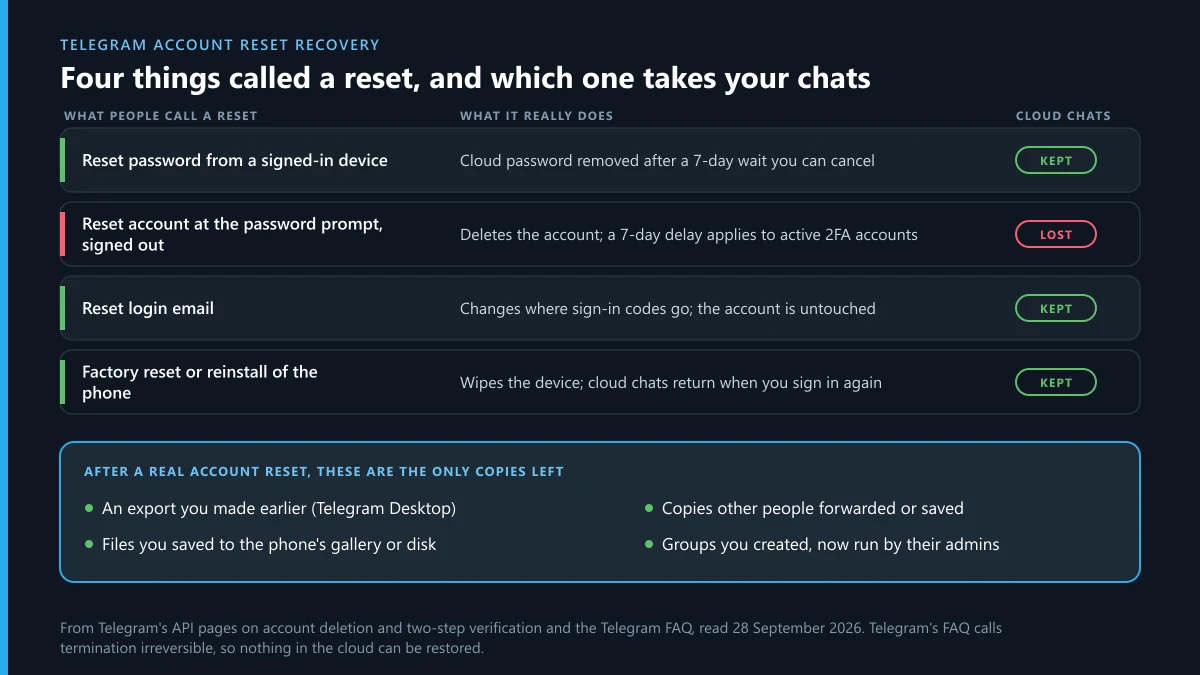
It depends which of four buttons you mean, and they differ by whether your chats survive. People use "reset" for all of them, which is why searches like "how to recover telegram reset account" mix people who lost nothing with people who lost everything.
| The reset | What it does | Your cloud chats |
|---|---|---|
| Reset password, from a signed-in device | Removes a forgotten cloud password after a 7-day timer you can abort | Kept |
| Reset account, at the password prompt while signed out | Deletes the account; a 2FA account active in the past week waits 7 days first | Lost |
| Reset login email | Changes the address that receives sign-in codes | Kept |
| Factory reset or reinstall of the phone | Clears the device; cloud chats return at next sign-in, secret chats do not | Kept |
The first row is the safe one, documented on Telegram's two-step verification page: a logged-in user who forgot the cloud password starts a seven-day server-side timer and can abort it at any point. The second row is the one that hurts. When the login code is right but the cloud password is forgotten and no recovery email is set, the only way forward that the sign-in screen offers is to reset the account, and on Telegram resetting the account means deleting it. How both password resets work in full, including the recovery email, is covered in the four sign-in checks.
How to recover a Telegram account after reset
If the reset was the account-deleting kind and it has completed, you can't. The Telegram FAQ says it outright: "Termination of a Telegram account is irreversible. If you sign up again, you will appear as a new user and will not get your history, contacts or groups back." No support form, email or paid service changes that, and anyone who says otherwise wants something from you.
Two situations are not that final, and it is worth checking which one you are in before you give up.
The reset is still pending
Telegram's account deletion rules hold back the reset for seven days when the account has a cloud password that was set more than a week ago and used within the last week. During that week, every signed-in session receives a service message with a phone number confirmation link. Confirming it "will cancel deletion of the account and will log out the user that tried to reset it." If you still have any signed-in device, an old tablet, Telegram Desktop on a work computer, Telegram Web in a browser you forgot, open it now and look for that message.
The reset has gone through
Then telegram account reset recovery means collecting copies, not restoring an account. Check, in this order: any export you made earlier with Telegram Desktop; photos, videos and files the app saved to your phone's gallery or downloads folder; and people you talk to, who can forward important messages back or export a shared chat from their side. Groups and channels you created are not deleted with you. The FAQ says they are "orphaned and left without a creator but admins retain their rights", so a trusted admin can keep a community running and add your new account.
Signing up again with the same number gives you a working, empty account. Set your old username straight away; Telegram doesn't say whether it is held or released, and if a stranger has already taken it to pose as you, reporting an account that impersonates you is the fix. Should the number be refused at sign-up instead, that is a separate problem with its own screen, explained in what the banned-number message means.
How to recover a Telegram reset account that someone else reset
Move fast, from any device where you are still signed in. A stranger who has your login code but not your cloud password can press the same reset button you would, and the seven-day delay in the deletion rules is there for exactly this case. The confirmation link cancels the reset and signs the stranger out.
- Open Telegram on every device you own and look for the service message about an account reset; confirm your number from it.
- Go to Settings, then Devices, and end every session you don't recognise. A brand-new session can't end older ones for its first 24 hours, which works in your favour if yours is the older one.
- Change the cloud password and add a recovery email you control.
- Warn your contacts through another app, because whoever tried the reset may already have written to them.
How the code got out is worth finding, because it will be tried again. The usual routes are a message that asked you to forward or screenshot a code, a fake "Telegram Support" account, and bots that offer to report or unban something if you sign in through them. If the person who did it is still messaging you or others, reporting a person on Telegram and reporting the specific messages put the evidence in front of moderators, and a paid "recovery expert" adds nothing you can't do yourself, as what a recovery service can really do shows.
Who can unfreeze or restore a Telegram account, and who only claims they can?
Telegram's moderators can unfreeze an account, through the appeal in the notice. Nobody can restore a deleted one. Everyone else offering either is selling something, and frozen-account owners are a favourite target because they are frightened and on a clock.
The patterns are easy to spot once named. A "Telegram agent" who writes first. A fee in crypto or Stars to "escalate" your appeal. A request for the login code "to verify ownership". A profile with a SCAM or FAKE label, which Telegram's own scam labels explain. If you paid one, report the fraud inside Telegram, and when money left your account, use the fraud routes outside Telegram as well. Someone threatening to get your account frozen unless you pay is committing extortion, and reporting that threat is the answer. Spam you get from them can be flagged through Telegram's spam controls.
Telegram Ban Service sits on the reporting side of that line. We file reports about accounts, channels and bots that break Telegram's rules, we have no access to moderation tools, and we cannot unfreeze, unban or restore any account, yours included. Our work is set out across every Telegram reporting guide we publish, and an account takedown request shows what a case looks like.
What if a report campaign set off the freeze?
Appeal first, then go after the source, and keep that order. A group that told its members to report you can be filed through reporting the group itself, and a channel that did the same through a whole-channel report; a channel takedown case lists the evidence that gets one removed. How people go about trying to get someone banned is written up from the other side, and the difference between an admin removing you and a report to Telegram is in admin bans compared with reports.
Some restrictions begin with a rights claim rather than a report. If a copyright notice took posts from your channel, the copyright labels on removed posts show how much went, and how a DMCA notice reaches Telegram shows what the claimant had to send. Content that is illegal almost everywhere is different again: sexual deepfakes of real people made with nudify bots are a crime in several countries, and reporting deepfake bots covers them. And if a channel you own is what keeps pulling reports, deleting your own channel takes a minute and removes the target.
Write the date down, appeal today, and don't press reset on a signed-out phone until you have checked every device you own. If an account that genuinely breaks Telegram's rules is behind any of this, send us its t.me link with what it did, and Telegram's moderators decide what happens to it.
Sources
- Telegram moderation overview: 26,643,380 groups and channels blocked in 2026 (retrieved 28 September 2026)
- Telegram FAQ: What is a Frozen Account?; account termination and orphaned groups
- Telegram blog, 30 April 2025: frozen accounts replace instant sign-out
- Telegram API, authorization: frozen accounts, FROZEN_METHOD_INVALID, FROZEN_PARTICIPANT_MISSING
- Telegram API, client configuration: freeze_since_date, freeze_until_date, freeze_appeal_url
- TDLib, updateFreezeState: deletion_date
- Telegram Translations, macOS: ChatList.FreezeAccount
- Telegram API, account deletion: the 7-day delay and the confirmation link
- Telegram API, two-step verification: account.resetPassword and its 7-day timer
- Telegram API, account.initTakeoutSession: TAKEOUT_INIT_DELAY
- Telegram Spam FAQ: limits and @SpamBot
- Telegram Terms of Service, including the Premium terms
FAQ
How long does a frozen Telegram account last?
Until one of two things happens: moderators accept your appeal, or the deletion date in the notice arrives. Telegram publishes no standard length. Each frozen account carries its own start date and end date, and the only reliable place to read yours is the notice inside the app on a device that is still signed in.
Can I send one message to tell my contacts my account is frozen?
Not from the frozen account. Sending is exactly what a freeze stops, to strangers and saved contacts alike. Use another messenger, email or a phone call, and tell people not to trust anyone who claims to be fixing your account for money on your behalf.
Does paying for Telegram Premium unfreeze an account?
No. Nothing in Telegram's frozen-account documentation links a freeze to Premium, and the Premium terms say a breach of the Terms of Service can cost you Premium benefits with no compensation. Only an appeal that moderators accept lifts a freeze.
If I sign up again after a reset, do I get my username back?
Telegram does not say. Its FAQ confirms that a new sign-up appears as a new user with no history, contacts or groups, and it is silent on usernames. Try setting the old one on the new account at once, and if it is taken by someone posing as you, report that account for impersonation.
Can Telegram support restore a deleted account if I explain it was a mistake?
No. The Telegram FAQ says termination is irreversible and that a returning user will not get history, contacts or groups back. The only window is the pending seven days after a reset request, and it is closed by confirming the phone number from a signed-in device, not by writing to support.
What happens to my channel while my account is frozen?
It stays up, but you can't post in it, because posting is one of the actions a freeze blocks. Other admins keep their rights and can keep it running. If the account is later deleted, the Telegram FAQ says channels and groups you created are left without a creator while their admins keep their rights. A channel whose only admin is the frozen account has nobody left to post.
Can Telegram Ban Service unfreeze or restore my account?
No. Only Telegram's moderators decide appeals, and nobody can bring back an account that was deleted. Telegram Ban Service reports accounts, channels and bots that break Telegram's rules, so if an impostor or a report campaign is behind your freeze, we can report that source while your appeal runs.