9 October 2026 · Telegram Ban Service · 13 min read
Twitter report an account guide: the Report button, X's web forms and which one fits your problem
To use the Twitter report an account option, open the profile, tap the three-dot menu, choose Report, say who is affected and pick the reason. X may ask for example posts. Abuse, impersonation and copyright also have web forms, but bots, spam and fake accounts that copy nobody can only be reported in the app.
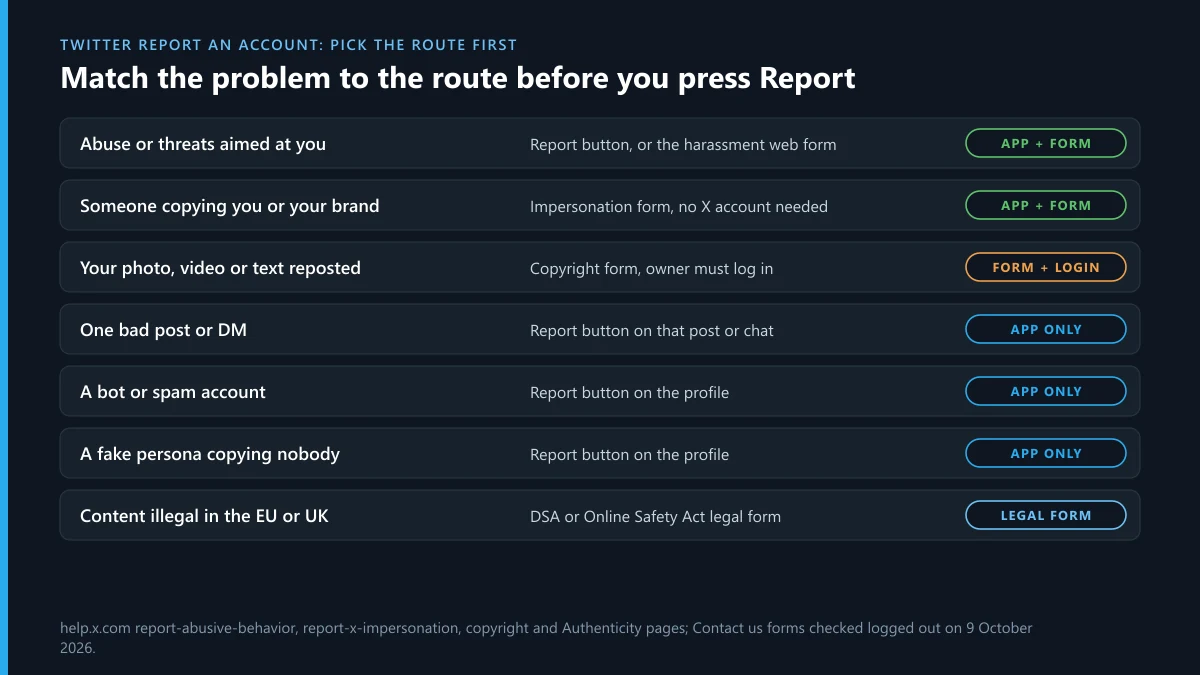
Most people who want to report an account on Twitter already know what's wrong. A stranger keeps replying with slurs, a bot floods your mentions, someone has copied your photos onto a fresh profile, or a page is reposting your work. What they don't know is which of X's routes takes that problem, and picking the wrong one is the main reason a report goes nowhere. X has one Report button and a set of web forms behind its Contact us page, and they don't overlap as much as you'd expect. On 9 October 2026 we opened every report menu on that page without logging in and wrote down what each one offers. The short version: abuse, impersonation and copyright have web forms, while bots, spam and fake accounts that copy nobody can only be reported in the app.
How does the Twitter report an account flow work?
It starts on the profile, not on a post. Here's how to report a Twitter account from the app or from x.com in a browser:
- Open the account's profile and take a screenshot that shows the @handle, the display name and the bio. Handles can be changed in seconds, and the screenshot is your proof of what you saw.
- Tap the three-dot menu at the top of the profile and choose Report.
- Say who the problem affects. X's reporting guide lists three answers: yourself, someone else or a specific group, or everyone on X.
- Choose the reason. X's flow asks what's happening before it names a policy, so describe the behaviour you saw rather than guessing the rule.
- When X asks you to select posts from the account, pick the clearest two or three. A single obvious example beats ten borderline ones.
- Submit. X then offers to mute or block, which you decide separately.
Reporting an account on Twitter needs a logged-in X account, because the button doesn't exist for visitors. Searches such as report account twitter, twitter report account, twitter account report and reporting twitter account all lead to this same button. The only difference is where you press it: the profile menu reports the whole account, a post's menu reports one post.
Can you report a tweet instead of the whole account?
Yes, and for a one-off problem it's the better choice. Open the post, tap the three dots and choose Report. The flow is the same, minus the step where X asks for more examples. A post report fits a single threat, one leaked photo or one hateful reply. An account report fits a pattern: someone who targets you day after day, a profile built to deceive, or an account that posts nothing but spam.
Direct messages have their own entry point. Open the conversation, tap the info icon and pick the option to report that user. Do this before deleting the chat, because a deleted conversation can't be reported afterwards. The same applies to posts: copy the link first, since the author can remove a post at any time and take your evidence with it.
How do you report abuse on Twitter?
Through the Report button first, and through the safety web form if you can't use the app. Most people who search report abuse twitter are dealing with one account that won't leave them alone, and that's the case X's rules handle best. X's abuse and harassment policy covers targeted harassment, wishing harm on people, unwanted sexual content, insults and the use of someone's former name or pronouns. Two details change how you should report it:
- Who reports matters. X says it sometimes needs to hear from the person being targeted before acting, and for misgendering or deadnaming it always does. If a friend is the target, ask them to file the report themselves, or file yours as "someone else" and expect a slower result.
- Threats get a copy. When you report a violent threat, the confirmation screen offers an Email report button. Use it. That email is the cleanest record to give the police.
The web route for abuse sits under Contact us, then "Staying safe on X and sensitive content". The harassment option asks first whether the content is directed at you or at someone else. It suits people who are blocked by the abuser, logged out, or reporting for a family member who doesn't use X. Abuse rarely stays on one app. If the same person is following you onto Instagram, Instagram's harassment reporting routes work in a similar way, and threats to share intimate images belong in a sextortion or blackmail report on Instagram as well as with the police.
Which X report forms work without the app?
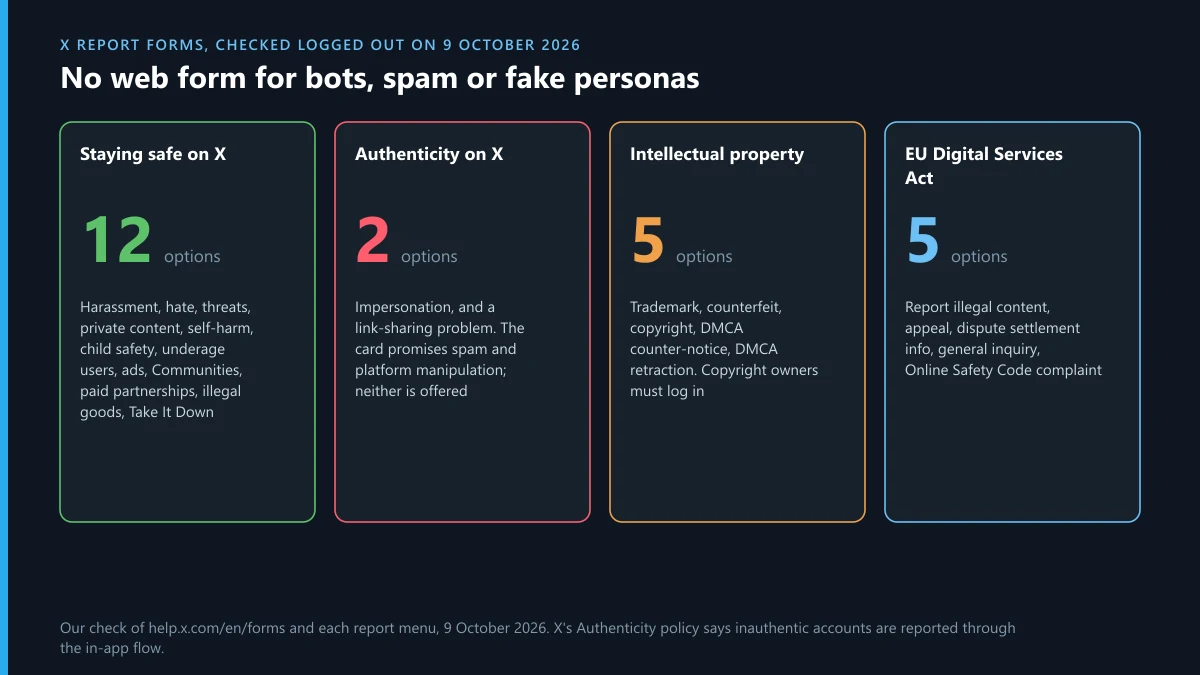
Fewer than the Contact us page suggests. We went through each menu on help.x.com/en/forms on 9 October 2026, logged out, and listed what it actually offers:
| Contact us menu | Options on 9 October 2026 | What it takes |
|---|---|---|
| Staying safe on X and sensitive content | 12: private content, harassment, hateful conduct, violent threats, self-harm, child sexual exploitation, underage user, ads, Communities, paid partnerships, illegal and regulated behaviour, US Take It Down Act | The harassment option asks whether the content targets you or someone else |
| Authenticity on X | 2: report impersonation, or "I'm not able to share a link in a Post" | The menu card promises platform manipulation and spam; neither option is there |
| Intellectual property | 5: trademark, counterfeit goods, copyright, DMCA counter-notice, DMCA retraction | The copyright owner branch needs an X account; trademark needs a registration number |
| Digital Services Act (EU) | Report illegal content, appeal a decision, out-of-court dispute settlement, general inquiry, Online Safety Code complaints | Your name and email |
| UK Online Safety Act | Report illegal content, appeal | Reached from X's UK resources page, not from the main menu |
The gap is in the second row. The Authenticity card on the Contact us page says it handles "potential platform manipulation or spam", but when we opened it, we saw a single reporting option: impersonation. X's Authenticity policy confirms where the rest goes: inauthentic accounts, behaviour and content are reported through the in-app flow. So if you're logged out, or the account has blocked you, there's no web form for a bot or a spam account. Log in and report it from the profile, or ask someone who can still see it.
How to report a bot on Twitter
From the bot's profile, with the Report button, choosing the spam or fake-account reason the flow offers. There's no other route, as the forms table shows. One report won't get a person assigned to it. X fights bots mostly with automated detection, and your report adds a signal to that system.
The EU figures show how lopsided this is. We counted X's filings in the DSA Transparency Database for 1 to 30 September 2026: 570,678 account suspensions for scams and fraud, and 569,877 of them were fully automated. Bot sweeps happen at a scale no stack of reports could match. The report still matters when a bot slips past, because it points the filters at an account they missed.
Two things not to do. Don't report the same bot from several accounts. X's Authenticity policy lists reporting the same post or account again and again, by hand or by script, as engagement spam. And don't use a tool that reports for you. Only law-enforcement bodies and NGOs can get X's prior consent to automate reports, and they have to identify themselves when they do. A Telegram bot that promises the same thing is selling a breach of X's rules, which we covered in detail on how the Twitter mass report bots on Telegram work. The Instagram versions follow the same script: spam report bots for Instagram and the mass report scripts shared on GitHub and Telegram promise what a report can't deliver.
How to report fake Twitter accounts
Start by deciding which kind of fake it is, because X treats them differently.
- It copies you or someone you represent. That's impersonation, and it has its own route. X's impersonation help page says you don't need an X account to file it. The form asks who is being impersonated: you or someone you're authorised to represent, your company or brand, or someone else on X. Have a photo ID ready, since X may ask you to prove you're the real person.
- It copies someone else. Pick "someone else on X", or report straight from the fake profile, which is the route X's help page gives bystanders. If you can reach the person being copied, tell them too; their own report carries proof you can't supply.
- It copies nobody. A made-up persona used to scam, spam or inflate numbers is a fake account under the Authenticity policy, not impersonation. That one goes through the in-app flow only.
Before you report a fake Twitter account, check for a label. Parody, commentary and fan accounts are allowed if they meet all four of X's rules: the parody label, a profile photo that isn't identical to the original, a display name that starts with a word like "parody" or "fan", and a bio that says the same. An account that meets all four will survive the report. One that skips any of them is fair game. Companies whose brand is being copied are pointed to the trademark policy instead. The trademark report we walked through for Instagram asks for much the same paperwork as X's, and if the fake also exists on Instagram, Instagram's impersonation process needs its own report.
How do you file a Twitter DMCA report?
Through the intellectual property menu, choosing copyright, and only if you own the work or act for whoever does. The form asks which of the three you are: the owner, an authorised representative, or neither. Pick "neither" and the form tells you it can't help. Pick "owner" and it asks you to log in, because the copyright route needs an X account. Here's what a Twitter DMCA report has to get right:
- Link to the exact post or media. X's copyright policy says a link to a profile page isn't enough.
- Describe the original and where it was first published. The photographer owns a photo, not the person in it.
- Sign it. Typing your full name counts as a signature.
- Expect your details to travel. X sends the person you report a full copy of the notice with your name, address, phone number and email. Use an agent or a business address if that worries you.
The reported user can file a counter-notice, and the policy gives you 10 business days to show you've started a court case before X may restore the content. Only the person who filed a notice can withdraw it, through the retraction form or by email. In September 2026, X filed 3,487 intellectual property decisions with the EU, and 1,377 of them were account suspensions. If your work is also being reposted on Instagram, a DMCA takedown on Instagram runs through Meta's own form, and a photo of you posted without permission is usually a privacy report, not a copyright one.
What should a report on a Twitter user include?
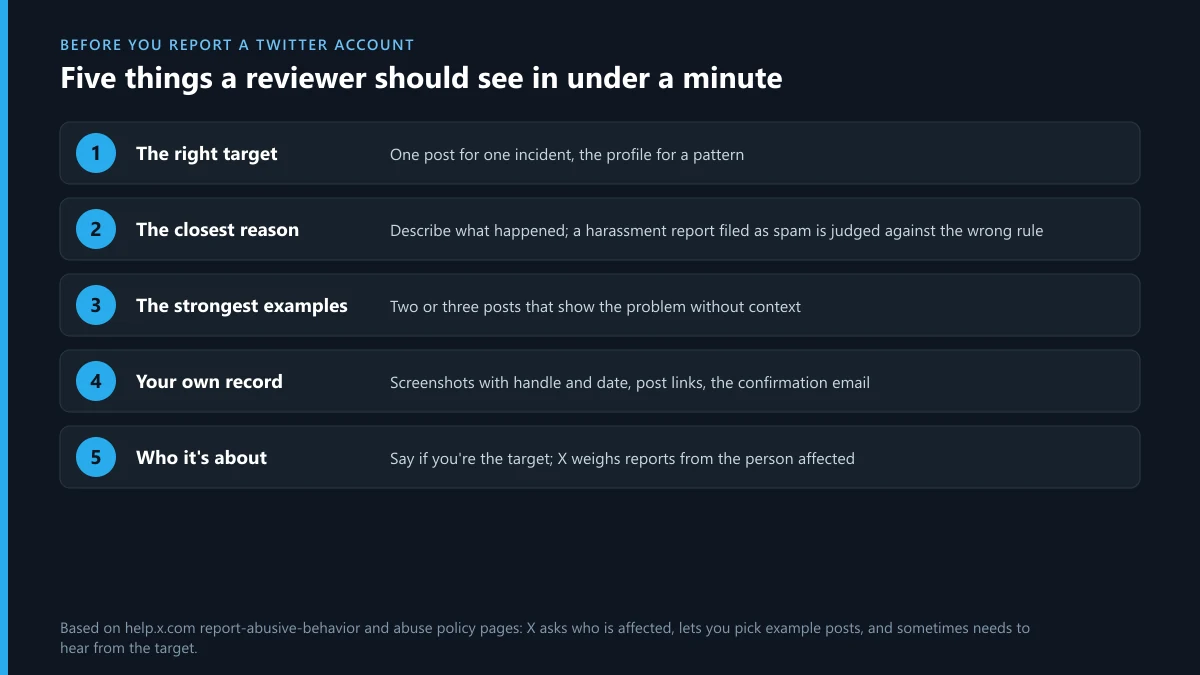
Enough for a stranger to see the problem in under a minute. When you report a Twitter user, the reviewer, or the filter, compares what you sent with one policy. Make that comparison easy:
- The right target. One post for one incident, the account for a pattern.
- The closest reason. A harassment report filed as spam lands in the wrong queue and gets judged against the wrong rule.
- The strongest examples. Choose posts that show the problem without context: the threat itself, the copied photo, the scam link.
- Your own record. Screenshots with dates and handles, post links, and the confirmation email. You'll need them if X says no and you want to appeal, or if you go to the police.
- Who it's about. If you're the target, say so. Reports from the person affected carry weight for harassment and impersonation.
Then wait. X says reports are usually resolved within a few days and some take up to 30. What the other side sees in the meantime, and whether they learn who filed, is a separate question we answered in what happens after you report someone on X.
Does reporting a Twitter account more than once help?
No. X doesn't count reports to decide. A reviewer or a filter matches the content to a rule, and one clear report does that as well as fifty. Filing again only helps when something new happens, like a fresh threat or a new copied post. Then report the new post, not the old account again.
What actually ends an account is a rule that allows suspension. For most behaviour, X's first step is a reach limit or an order to delete the post, and the ladder X climbs before it suspends someone shows how far most reports get. If the account breaks a rule that allows removal on a first offence, the routes for taking down a Twitter account are worth matching against your case. Anyone offering a shortcut deserves suspicion. We looked at what the sellers behind a Twitter ban service really do, and most of it breaks the same Authenticity rules your report relies on.
What if the same person is on Instagram or Telegram?
Report each account where it lives. X can't act on an Instagram profile, and Meta can't act on X. Here's where to start for the problems that most often follow someone from one app to the next:
| What turned up on Instagram | Where to start |
|---|---|
| One post that breaks the rules | Reporting a single post on Instagram |
| A person or profile | Reporting someone on Instagram or reporting a whole Instagram page |
| A scam account taking payments | Reporting an Instagram scammer |
| An account you want removed entirely | Getting an Instagram account taken down and whether you can delete someone else's Instagram account |
| Content that needs a legal route | Sending Instagram a legal request |
| A worry about being found out | Whether Instagram tells someone you reported them |
| A report you regret | Taking back a report on Instagram |
| Paid offers to remove an account | What an Instagram account removal service can do and the claims behind Instagram ban services |
Telegram is often where a dispute on X ends up, sometimes against you. People who report an abusive account occasionally find their own Telegram account targeted next. If someone has taken yours over, recovering a hacked Telegram account starts with ending their sessions, and the general Telegram recovery steps cover lost numbers and login codes. If you'd rather leave Telegram after a campaign against you, deleting your Telegram account explains what disappears and what doesn't.
FAQ
Can I report a Twitter account without an X account?
Only on some routes. The Report button needs you to be logged in. The impersonation form doesn't need an X account, the abuse form under Contact us can be opened logged out, and EU and UK legal forms ask for your name and email instead. The copyright route asks the owner to log in.
How do I report a Twitter account that has blocked me?
Log out and open the profile in a browser, or ask a friend to report it from their account. If the problem is abuse aimed at you or someone copying you, the Contact us forms for harassment and impersonation work without seeing the profile, as long as you have the @handle and screenshots.
Is there a phone number or email to report a Twitter account?
No. X has no phone line for reports, and its support email addresses only answer for specific cases such as copyright retractions. Reports go through the app or the forms on help.x.com/en/forms.
How do I report a hacked Twitter account belonging to someone else?
Report the posts it's sending, usually as spam or a scam link, and tell the owner through another channel. X's compromised-account help is written for the owner, who has to prove control of the email or phone on the account, so a bystander can't recover it for them.
Will the account owner see that I reported them?
Not by name. X tells the owner which rule and which post led to action, not who reported it. Copyright notices are the exception, since X forwards the full notice with the filer's contact details.
What happens if X decides the account didn't break any rules?
Nothing happens to the account, and nothing happens to you either, as long as the report was made in good faith. You can mute or block the account, report new posts if the behaviour continues, or use the EU or UK legal forms if the content is illegal where you live.
How long does X take to act on a reported account?
Expect a confirmation within a day. X's help pages put most outcomes at a few days and the slowest at about a month. Spam and bot sweeps mostly run on their own detection, while harassment and impersonation cases usually need a person to review them.