7 October 2026 · Telegram Ban Service · 13 min read
How to un-report a post on Instagram, and what to do when you can't
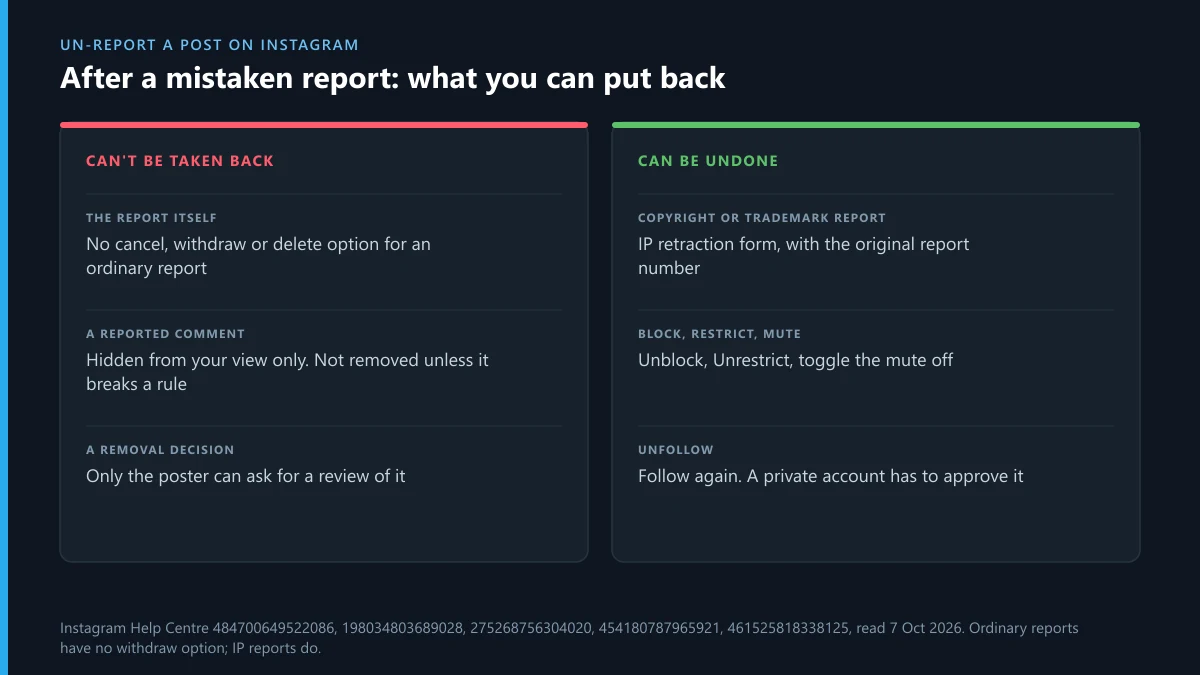
You can't un-report a post on Instagram: once a report is submitted there's no cancel or withdraw option. If you tapped Report by mistake, the post is only checked against the rule you picked. If it breaks nothing, it stays up and the poster never learns who reported it. Copyright and trademark reports are the exception and can be retracted.
How to un-report a post on Instagram: can a sent report be cancelled?
No. Once a report is submitted there's no cancel, withdraw or delete button for it, in the app or on instagram.com. That's the short answer to how to un-report a post on Instagram, and it's the same for a comment, a Story, a message or a whole account. The report goes into Instagram's review queue and stays there until someone looks at it.
We wanted to be sure before saying so. When we went through the Help Centre pages Instagram keeps on reporting on 7 October 2026, we read the report-status page in its iPhone, Android and desktop versions, the comment-report page, and the page on what to do when Instagram doesn't remove something you reported. What we saw on every one of them was the same gap: no way to cancel an ordinary report. The single withdrawal route we found anywhere is for intellectual property claims, which gets its own section below.
The missing button is less an oversight than a design choice. A report isn't a vote you can take back; it's a request to check one item against one rule. If the item breaks no rule, the check comes back empty and nothing happens to it. So if you're here because you typed "I accidentally reported a post on Instagram" into a search bar a minute ago, the useful question isn't how to undo it but what the report can and can't do.
Is there any Instagram report you can take back?
One kind: a copyright or trademark report. Instagram has a Help Centre article called Retract an intellectual property report that you've submitted to Instagram or Threads, and it covers exactly the case of someone who reported content by mistake, or who has since reached an agreement with the person who posted it. The quickest way out is the retraction form linked in the email Instagram sent about your report. If that email is gone, there's a standalone IP retraction form that asks for the original report number and an email address tied to the original report.
If the post has already come down, Instagram says it will put it back and confirm by email, unless it was removed for some other reason or can't be restored for technical reasons. The form also warns that abusing it can get your own account terminated, so it's for genuine mistakes and settled disputes, not for filing and withdrawing claims as a pressure tactic.
This is the one retraction worth rushing. An intellectual property report is also the one Instagram report that isn't anonymous: the poster can receive the rights owner's name and the reporter's email address. Pointed at the wrong post, it does real damage to someone else's account, and your contact details travel with it.
What happens when you accidentally report someone on Instagram?
The same thing that happens when you report on purpose: a reviewer, or an automated system, checks the item against the reason you picked. If the post doesn't break that rule, it stays up, nothing is taken down, and the report simply closes. Reports on Instagram aren't counted like votes. Instagram's page on how it decides what to remove says it plainly: “The number of times that something is reported doesn't determine whether or not it's removed from Instagram.”
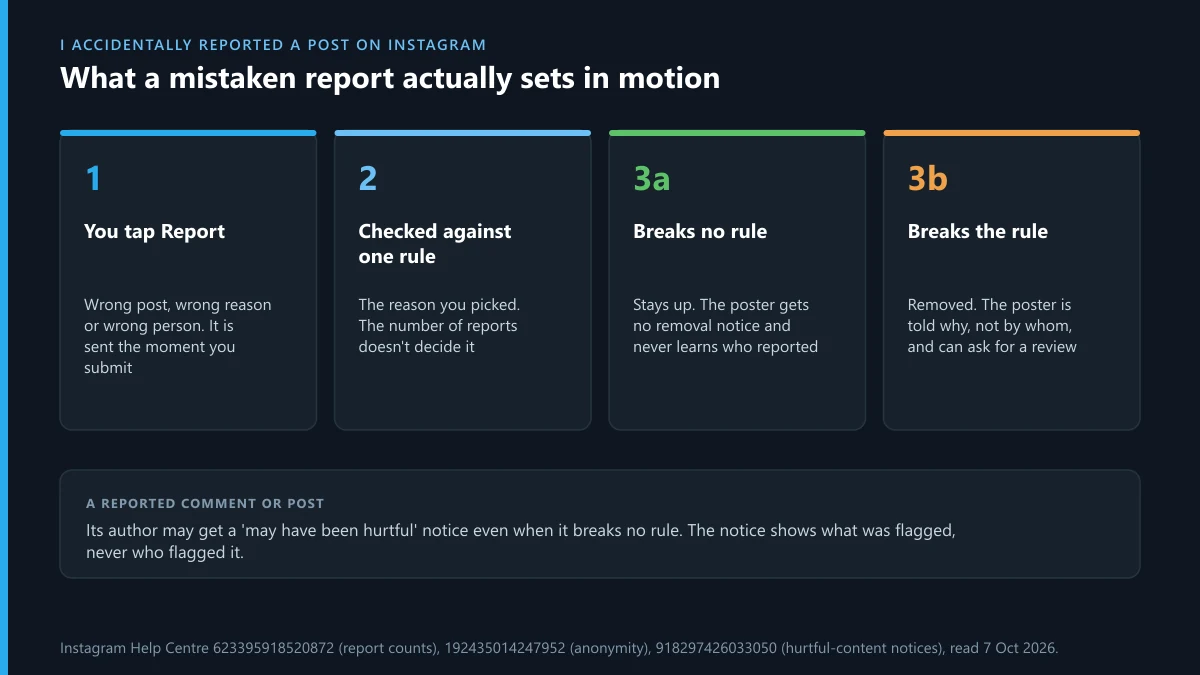
Your name doesn't travel with it either. Instagram's post and profile reporting page says “The account that you reported won't see who reported them.” Instagram reports for bullying, spam, nudity and the rest stay anonymous; only the intellectual property claims described above carry the reporter's details.
If the post does break the rule you picked, it can come down, and its owner is told it went against the Community Guidelines. At that point the report wasn't really a mistake. You tapped the wrong button on content that would have earned a report from someone else anyway.
A wrong reason is the other common slip. Say you meant spam and hit nudity by accident. The reviewer looks for nudity, finds none and closes the report, while the spam you actually saw goes unchecked. That's the one case where reporting the same post a second time makes sense: not to cancel the first report, but to send it to the rule it really breaks.
Could one mistaken report get the post removed or your account flagged?
Not by itself. Removal follows a rule violation that the reviewer can see in the post, not the fact that a report exists. And a single honest slip isn't what Meta penalises. Its Inauthentic Behavior policy targets people who “Misuse Meta reporting systems to harass, intimidate or silence others”: repeated, deliberate, aimed at a person.
EU law draws the same line. Article 23 of the Digital Services Act tells platforms to suspend, after a prior warning, the processing of notices from people who “frequently submit notices or complaints that are manifestly unfounded”, in the wording of Article 23(2). Frequently, and manifestly unfounded. One wrong tap on a post you scrolled past is neither, and nothing in Instagram's Help Centre suggests a lone mistaken report counts against the reporter.
Deliberate false reporting is a different animal, and it's sold openly. We've looked at the offers in detail: what a Telegram mass report bot really sends, GitHub report scripts resold through Telegram, spam-report bots pointed at Instagram profiles, the X version of the same pitch and bots that pocket the fee and report nothing. They all lean on the volume myth that Instagram's own sentence above rules out. Telegram works the same way: no number of reports bans a channel on its own, a ban there needs a rule that was actually broken, and a reporting service is only as good as the evidence it files.
Which parts of a report can you actually reverse?
Everything except the report. People often block, restrict, mute or unfollow in the same breath as reporting, and every one of those has an off switch. If you came here asking how to undo report on Instagram after a slip of the thumb, these are the parts you can put back:
| What you did | Can it be undone? | How |
|---|---|---|
| Submitted the report | No | It closes on its own if nothing breaks a rule |
| Filed a copyright or trademark report | Yes | Instagram's IP retraction form, with the original report number |
| Blocked the account | Yes | Profile, Menu, Blocked, then Unblock next to their name |
| Restricted the account | Yes | Unrestrict, from their profile |
| Muted their posts or Stories | Yes | Toggle Posts or Stories off again in the mute options |
| Unfollowed them | Yes | Follow again. A private account has to approve the request |
| Reported a comment, which then vanished for you | Not directly | It's hidden from your view only, not removed |
The block is the one people worry about, and Instagram's block and unblock page is clear on it: “People aren't notified when you block them.” Its blocked-accounts page shows where the list lives, under Who can see your content. So if the only thing that went wrong is that you blocked a friend while reporting a spam reply under their post, unblock them and nobody is any the wiser.
Where do you see reported posts on Instagram afterwards?
In the Help menu, though the label depends on where you look. In the app it's Profile, Menu, Help, then Reports and violations, then Reports. On a computer the same list sits under More, Settings, Help, Support requests, Reports. That's how to see reported posts on Instagram, each with what was decided about it, according to Instagram's report-status page. It comes with a caveat in Instagram's own words: “Every report that you've made may not be viewable in Support requests.”
That screen is also the closest thing to an answer for how to check report on Instagram status. It shows when Instagram acted on a report and what it decided, and for some kinds of content it lets you request a review of that decision. A mistaken report usually shows up there as no action taken. What it doesn't give you is a button to pull the report back, so a report you regret can only run its course.
The review option points the other way from what most people here want. It exists for reporters who think Instagram got it wrong by leaving something up, not for reporters who wish they hadn't reported at all. It does get used: in Meta's Instagram DSA report for January to June 2026, people in the EU lodged 5,179 complaints that Instagram had taken no action on their notice, and 1,542 of those decisions were reversed.
I accidentally reported a comment on Instagram: does the commenter find out?
Not that you reported it. An accidentally reported Instagram comment goes through the same review as a post, and the commenter isn't told who flagged it. Instagram's comment-report page adds the detail that confuses people: “After you've reported a comment, you'll no longer see it, but this doesn't mean that the comment was removed by Instagram.” The comment that vanished from your screen is most likely still there for everyone else.
The commenter might get one thing, though. Instagram's page on notifications about hurtful comments says that when a comment or post is reported, its author may be told it may have been hurtful to others, even if it doesn't go against the Community Standards. The notice shows them the flagged comment and lets them delete or keep it. It doesn't name you, but if the comment was a reply under your own post, they can probably work it out. When it was a friend's joke and you hit Report instead of Like, a quick message saying your thumb slipped does more than anything in the app.
The comment-report steps are short enough that misfires happen: open the comments, tap and hold the comment, tap Report. On a crowded thread the hold can land on the wrong line. Check the name before choosing a reason.
Can you un-report someone on Instagram, or a Story?
No to both, and for the same reason as a post. There's no un-report Instagram account option on a profile, and the Story menu has no undo either. People asking how to un report someone on Instagram usually mean one of two things, and the answer differs a little for each:
- You reported the account by mistake. An account report asks Instagram to look at the profile as a whole. If there's nothing on it that breaks a rule, nothing happens to it, and the owner isn't told who reported it.
- You reported a Story by mistake. Knowing how to un-report a story on Instagram wouldn't change much anyway: the Story drops out of view after 24 hours unless it's saved to a Highlight, and the review only looks at what was in it.
- You reported the wrong person entirely. Report the right account now, from its own profile, and leave the first report to close with no action.
The impulse to file a second report saying "ignore my last one" is understandable, but there's no reason in the menu for that. A second report on the same item is just another report.
What should you do if the post you reported was fine?
Mostly, nothing. A short checklist covers the rest:
- Don't report it again to cancel the first one. There's no reason to choose that does that.
- Undo anything else you tapped: unblock, unrestrict, unmute or follow again, as in the table above.
- If it was a copyright or trademark claim, use the retraction form now, before the post comes down.
- Look up the report later under Reports in the Help menu if you want to see how it ended.
- If you know the person and it bothers you, tell them. Instagram won't say it was you.
- If their post was removed and they think it was wrong, only they can ask for a review, from the removal notice or Account Status.
Most mistaken reports end at step one, with a post that stays up and an owner who never knew.
The anxious version of this question sometimes comes from the other side: you suspect someone reported you on purpose, and it cost you an account. That's a different problem from a slip of the thumb, and on Telegram it has its own way back: appealing a ban Telegram has already applied, getting a frozen account working again, recovering an account you've been locked out of, and what a paid recovery specialist can and can't do.
When the thing you meant to report is on Telegram
Then report it there, against the right target, because an Instagram report goes no further than Instagram. The careful-tap lesson carries over. Telegram has separate routes for a channel, a group, a message and an account, and picking the wrong one wastes a report.
- A whole channel: reporting the channel rather than one post, what it takes to get a channel removed and how deleting a channel works, yours or someone else's.
- A group or a single message: reporting a group and its admins and flagging one message in a chat.
- A person: how an account takedown request is built, a fake profile using your name or photos and abuse or harassment from one user.
- Money and scams: a fraud report with the payment trail attached, which outside agencies take Telegram scam reports, how far public scammer lists can be trusted and extortion threats and counterfeit sellers.
- Bots and spam: a spam report Telegram acts on, bots that make fake nude images and reporting a bot, or a number already banned.
- Copied or illegal material: a DMCA notice sent to Telegram, a copyright complaint against a channel and who handles content that's illegal, not just offensive.
Sources
- Instagram Help Centre: How Instagram decides what to remove
- Instagram Help Centre: Report a post or profile
- Instagram Help Centre: Report a comment
- Instagram Help Centre: See the status of reports you've made
- Instagram Help Centre: Retract an intellectual property report
- Instagram: Intellectual property retraction form
- Instagram Help Centre: Notifications about hurtful comments or content
- Instagram Help Centre: Block or unblock people
- Instagram Help Centre: See the accounts you've blocked
- Digital Services Act, Article 23: Measures and protection against misuse
- Meta Transparency Centre: Inauthentic Behavior policy
- Meta regulatory transparency reports: Instagram DSA report, January to June 2026 (published 28 August 2026)
FAQ
Will the person know I reported their post by mistake?
Not from Instagram. The account you reported won't see who reported them, and if nothing breaks a rule, nothing is removed. The only signal they might get is a notice that a post or comment may have been hurtful, which never names the reporter.
Can I delete a report from my report history?
No. The Reports list shows what Instagram decided and, for some content, lets you ask for a review, but it has no delete or cancel option for an ordinary report. Instagram also notes that not every report you've made shows up there.
Will Instagram ban me for one accidental report?
Nothing Instagram publishes suggests it. Meta's policy targets people who misuse reporting to harass, intimidate or silence others, and the EU's Digital Services Act only makes platforms suspend, after a warning, people who frequently send manifestly unfounded notices.
Should I report the post again to cancel the first report?
No. No reason in the menu cancels an earlier report, so a second one is just another request to review the same post. Leave the first report to close on its own.
Can I withdraw a copyright report I sent against the wrong post?
Yes. Use the retraction form linked in Instagram's email about your report, or the standalone IP retraction form with the original report number. If the post was removed because of your report, Instagram says it will restore it and confirm by email.
Why did the comment I reported disappear?
Instagram hides a reported comment from the person who reported it. That doesn't mean it was removed. Everyone else can still see it unless a reviewer finds that it breaks the Community Standards.
Does a mistaken report give the poster a strike?
Only if the post is actually removed. Meta counts strikes against content it takes down for breaking its rules, not against reports, so a report that ends with no action leaves nothing on the poster's account.
How long does Instagram take to review a mistaken report?
Instagram doesn't publish a review time for ordinary reports. The decision appears under Reports in the Help menu once it's made, and a report on a post that breaks no rule ends there with no action taken.