2 November 2026 · Telegram Ban Service · 11 min read
Instagram spam report bot: identify the account, then report it where the spam landed
An instagram spam report bot means one of two things: a spam account you want to report, or a tool that claims to file reports for you. For the first, use Report on the exact comment, message or profile, then block it. Skip the second, because Instagram says the number of reports doesn't decide removal.
A bot in your comments, or a bot someone wants to sell you?
Two different people type this phrase, and they want opposite things. One has a stranger dropping the same crypto line under every post, or a new follower with no photo and a link in its profile. The other has heard that a spam report bot Instagram sellers advertise can make somebody's account vanish. The first person needs a few taps. The second needs talking out of a purchase.
An Instagram spam bot report, in the sense this guide cares about first, is an ordinary in-app report about an account that behaves like automation. A spam report Instagram bot is the other meaning: software or a paid service claiming to send reports for you. Telegram Ban Service is a Telegram-focused reporting desk, so it has no private line into Instagram, and nothing here suggests otherwise. The order below follows the job: recognise the account, file on the right surface, deal with silence, and only then look at the sales pitch.
How can you tell an account is really a spam bot?
Judge what the account does rather than how it looks; repetition, misleading links and engagement bait are what Meta's rules actually name. Meta's Spam policy covers posting or engaging at very high frequencies, whether by hand or automatically, and adds that slower accounts can be restricted when repetitive content or other signs of inauthenticity appear.
- The same words, pasted under many posts or into many inboxes.
- A link that delivers something other than it promised, which the policy treats as a misleading link.
- A giveaway or prize that requires a like, share or follow first.
- Unprompted investment tips, plus a request to carry on in WhatsApp or Telegram. Bitdefender's March 2026 analysis of Instagram crypto scams lists both as red flags.
Then open About this account. It shows the date joined and the former username count, meaning how many times the name changed but never the old names. A week-old profile that has already changed its name several times deserves suspicion. For certain accounts you may also see "Account based in", which helps when a profile claims to be somewhere it isn't.
None of this proves automation.
A quiet new user with a default photo is not spam, and a report needs a reason that is true. If the account copies you or your business, the better route is Instagram's impersonation report, and if it took money from you, start with the scammer route and your bank.
How do you report a spam bot on each Instagram surface?
Report the place where the spam appeared, because each surface has its own menu. To report spam Instagram bot accounts well, file on the item you actually saw and pick the reason that fits it. These labels come from Instagram's Help Centre as read on 2 November 2026, and your app may word them slightly differently. Telegram Ban Service can't file any of these for you, so the taps are yours. A wider guide to reporting a person on Instagram covers the reasons that have nothing to do with spam.
| Where you met it | What to use | What to expect |
|---|---|---|
| Comment | Tap and hold, then Report | It leaves your view, removed or not |
| DM | Tap and hold, or Options for the chat | Up to 30 recent messages reviewed |
| Follower | Flagged for review, or Remove | The follower isn't notified |
| Profile or post | Options, then Report | Status may appear under Reports |
Report spam bot Instagram comments
- Tap Comments below the post.
- Tap and hold the comment, then tap Report.
- Choose the option that fits and follow the screens. Instagram's comment page names spam among the examples.
Spam bot Instagram report from a DM or message request
Tap and hold the single message, tap Report, select a reason and tap Submit report. For a whole one-to-one conversation, tap the person's name at the top of the chat, then Options, then Report. Instagram's message page says it reviews up to 30 of the most recent messages in a reported conversation, and a whole group chat can't be reported, only its messages and members. Junk from strangers often sits in a separate folder: Messages, Requests, then Spam, per the spam folder article. A reported spam message goes to Instagram's Help Team for review.
Instagram report spam bot followers
Followers get a filter as well as the usual block. On a public account, its unwanted-followers article describes a Flagged for review notice under Followers, where you can tap Remove all, remove one at a time, or mark an account Not spam or irrelevant. Incoming follows from flagged accounts arrive as requests and are declined automatically after 30 days without approval. Instagram warns that the feature may not be available to you yet. On a private account, tap the X beside the follower and Remove, and they won't be notified.
Spam report Instagram account bot: the whole profile
Tap the username, tap Options in the top right of the profile, tap Report and follow the screens. Instagram's post and profile page lists profile reports for posting what it shouldn't, pretending to be someone else, or being under 13. Where the spam lives in a post, use Options above that post and the reason "Scam, fraud or spam". Your name stays off the report unless it concerns intellectual property, and whether a reported account can ever work out it was you has a fuller answer.
Why does a report sometimes seem to do nothing?
Mostly because what changes on your screen and what Instagram decides are two separate events. Report a comment and it disappears for you, yet Instagram's page says that doesn't mean the comment was removed. So the bot can still be visible to everyone else while you assume the matter is closed. Sometimes the review also finds no violation, since a tiresome account can sit inside the rules. Telegram Ban Service can't see that review or influence it, and neither can a paid reporter.
Check rather than guess. The status route is Profile, Menu, Help (below More info and support), Reports and violations, Reports, though Instagram cautions that not every report you made may be listed. Open the update, tap See report details, then Request review if it's offered; some content types can't be re-reviewed.
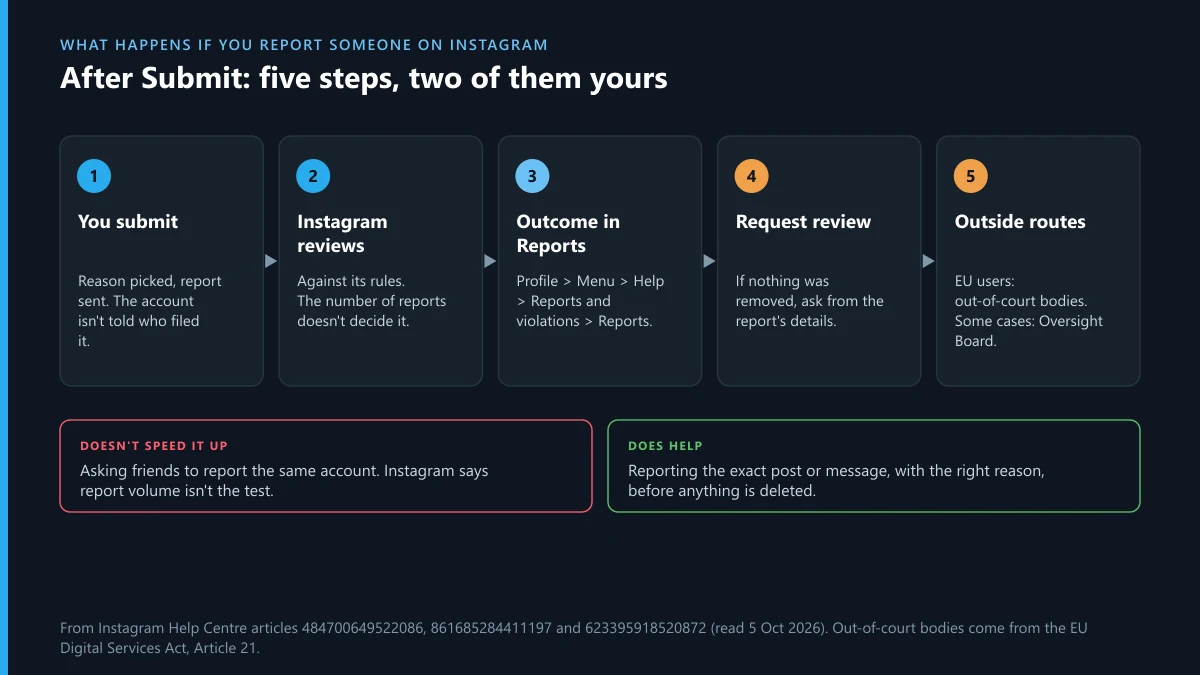
Instagram's page on unremoved reports says a second look usually comes within 24 hours, and that a decision upheld twice may be open to the Oversight Board, which chooses only some eligible appeals. Don't refile while you wait. Instagram may also use a report that didn't lead to removal to push similar content lower in your feed, Suggested posts and Explore, so it isn't wasted.
Meanwhile, stop the contact yourself. Block the account, then add its repeated phrases, handle or coin name to Hidden words; the sender won't know a comment or message was hidden. That ends your exposure on the day you do it, whatever the review says.
Does a paid Instagram spam report bot add anything?
No, an instagram spam report bot only adds volume, and Instagram says volume isn't the test. The clearest sentence sits on How Instagram decides what to remove:
The number of times something is reported "doesn't determine whether or not it's removed from Instagram."
The same guidelines apply at every review, so a single accurate report about a real spam bot and a pile of copies face one question: does the content break the rules? The report-count myth looks the same on Telegram, where sellers quote thresholds nobody publishes.
The buyer also carries risk the seller doesn't mention. Instagram's Terms of Use class fraudulent or groundless reports as misuse of the reporting channel and bar automated access without permission. Meta's Inauthentic Behavior policy prohibits misusing its reporting systems to harass, intimidate or silence others, and in its threat report of 1 December 2021 Meta described removing a Vietnam network built around exactly that behaviour. A panel that wants your login can leave you locked out, and paying a stranger in crypto for an outcome nobody can deliver is how the scam side of these bots makes its money.
Telegram Ban Service won't explain how such tools run. Where these listings come from and what an "Instagram ban" seller really offers cover the sales side, and both end the same way: keep your money and use the Report button.
Why do some spam trails end on Telegram?
Because the Instagram comment is often only the hook, with the pitch and the payment moved to a private channel. Bitdefender describes profiles, ads and DMs inviting victims into WhatsApp or Telegram groups where staged activity does the selling. That is why a removed Instagram account can change so little: the destination keeps working, and a report filed in Instagram goes to Instagram's reviewers, so Telegram needs its own.
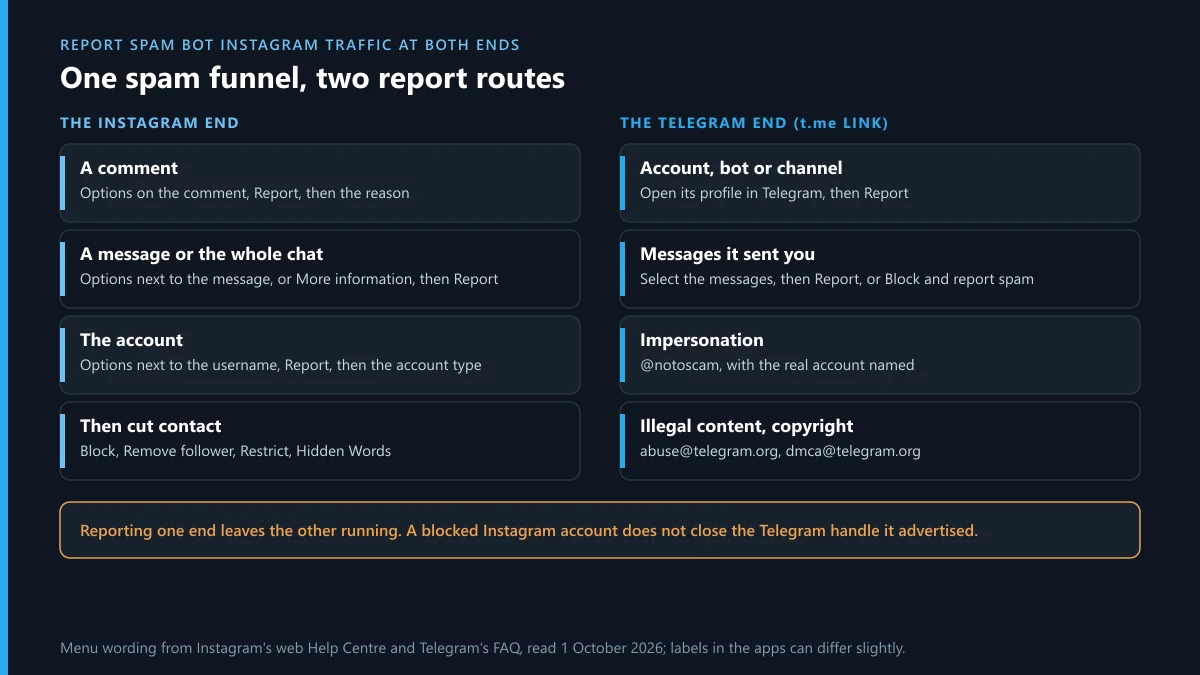
Telegram's side is short. Its FAQ says every app has Report buttons for flagging content to moderators, gives abuse@telegram.org as a takedown address that wants t.me links, and points people impersonated by a scammer to @NoToScam. The Spam FAQ adds that moderators review what a Report spam press forwards to them, and may limit the sender temporarily. Telegram's own spam controls walks through each button, reporting a group or channel from its profile handles the funnel itself, and a fraud report built on the payment trail fits when money has moved.
What will Telegram Ban Service do here, and what does it decline?
Telegram Ban Service works on the Telegram end only; every Instagram report stays with you, in your own app, through Instagram's routes. The handling is plain. You send the Instagram link, the t.me address it pushes, screenshots and a short account of what happened. The desk checks that Telegram account, bot or channel against Telegram's Terms of Service and the law. If a real violation is there, it files through Telegram's official routes with the links attached. If nothing breaks the rules, you hear that instead of getting a report anyway. Telegram's moderators make the decision, and Meta decides anything on Instagram.
What we decline, every time:
- Filing or buying Instagram reports for you, or signing in to any Instagram account.
- Passwords, login codes or two-factor codes, for either platform.
- Bots, bulk reporting and false reports.
- Targets that follow the rules, including rivals, critics and people you've simply fallen out with.
- Promises of a ban or a date, since neither is ours to give.
Pages this guide was checked against
- Instagram Help Centre: How Instagram decides what to remove
- Instagram Help Centre: Report a post or profile
- Instagram Help Centre: Report a comment
- Instagram Help Centre: Report a message or chat
- Instagram Help Centre: View, delete or report spam
- Instagram Help Centre: Manage unwanted followers
- Instagram Help Centre: Remove a follower
- Instagram Help Centre: About this account
- Instagram Help Centre: Check the status of a report
- Instagram Help Centre: What to do if Instagram didn't remove content
- Instagram Help Centre: Hide comments or message requests
- Instagram Terms of Use
- Meta Community Standards: Spam
- Meta Community Standards: Inauthentic Behavior
- Meta adversarial threat report, 1 December 2021
- Bitdefender, 24 March 2026: Instagram crypto scams
- Telegram FAQ and Telegram Spam FAQ
FAQ
How do I file an Instagram spam bot report from a comment or a DM?
Open the item itself, because a report aimed at the exact comment or message gives the reviewer the evidence. For a comment, tap Comments below the post, tap and hold it, tap Report and choose the option that fits. For a DM, tap and hold the message, tap Report, select a reason and tap Submit report. If you want to report spam bot Instagram chats as a whole, tap the person's name at the top, then Options, then Report, and remember that Instagram reviews up to 30 of the most recent messages in that conversation. Group chats can't be reported whole, only the individual messages and people inside them. Afterwards block the account so nothing new reaches you while the review runs. None of this needs a third party, a password handed to anyone, or a fee. These labels come from Instagram's Help Centre as of November 2026, so your app may word them a little differently.
What does a spam report Instagram account bot actually sell?
It sells the appearance of action. A spam report Instagram account bot, or a spam report bot Instagram listing on a Telegram storefront, claims that enough reports will take a named account down. Instagram has no route that rewards this, because its Help Centre states that the number of reports doesn't determine removal, and the same guidelines apply at each review. Nothing in that promise is something a buyer can check. Real harm is possible on your side: handing over a login can cost you the account, and paying in crypto leaves little chance of a refund. Instagram's Terms of Use also treat fraudulent or groundless reports as misuse of the reporting channel. So if the target truly posts spam, your single free report covers it, and if the target follows the rules, no honest service should touch it.
Is an Instagram report spam bot tool safe to use on my own account?
No, and the danger grows with whatever access the tool asks for. An Instagram report spam bot that wants you to sign in gets control of a real account, while Instagram's Terms of Use bar automated access without express permission. Meta's Inauthentic Behavior policy separately prohibits misusing its reporting systems to harass, intimidate or silence others, and its 1 December 2021 threat report describes removing a network in Vietnam over mass complaints. Your account could end up restricted for the same conduct you paid for, depending on what Instagram's review finds. Free scripts carry the same terms problem plus the risk of whatever else the download does. The safe alternative is dull and costs nothing: file one accurate report in the app, block the account, and add its repeated phrases to Hidden words. Keep your password and login codes to yourself, whoever is asking.
Will the account find out I made a spam bot Instagram report?
Not from Instagram's report system in ordinary spam cases. Instagram's pages on comments, messages, posts and profiles all say the report is anonymous except where it concerns intellectual property, and that the reported account won't see who reported them. A spam bot Instagram report almost never falls into that exception, because you are reporting junk rather than claiming ownership of a work. Blocking people doesn't notify them, and neither does removing a follower or hiding a comment with Hidden words. You can still give yourself away through your own actions: replying to announce it, or naming the account publicly. A human running a scam behind an account might notice that a comment has vanished. If you fear retaliation from a real person, save your screenshots first, then block, so that you keep the evidence even if the account later disappears.
How many reports does a spam report Instagram bot need to remove someone?
There is no number to reach, and any seller quoting one is inventing it. A spam report Instagram bot pitch usually names a figure because a figure sounds like a mechanism, yet Instagram's Help Centre says the count doesn't determine whether something is removed. Instagram uses technology and user reports together, then checks the content against its Community Guidelines. A real spam account can therefore fall on one report, or on none, when Meta's own detection reaches it first, while an account inside the rules isn't supposed to fall to a thousand. Better evidence is what helps: report the item that shows the problem, under the reason that fits it. If you have friends who received the same spam, each can report what they personally saw, which is different from organising a campaign against a person.
Why can I still see a bot after I report spam Instagram bot activity?
Usually one of three things has happened, and you can check which. The review may still be running. The review may have ended with no violation found, which a tiresome account can earn. Or you may be looking at a different item, since a removed comment doesn't remove the account behind it. When you report spam Instagram bot comments, the comment disappears from your own view whether or not Instagram took it down, so its absence doesn't tell you much and neither does its return under a new post. To see the result, go to Profile, Menu, Help, Reports and violations, then Reports, keeping in mind that not every report is listed. If a review is offered, tap See report details and then Request review. Instagram says that second look usually comes within 24 hours. Block the account in the meantime, and add its repeated words to Hidden words.
Can Telegram Ban Service remove an Instagram spam report bot or spam account?
No. Telegram Ban Service is a Telegram-focused desk, and it neither signs in to Instagram nor files Instagram reports for anyone, so the instagram spam report bot question has one honest reply: use Instagram's own report on the item you saw. Where the desk can help is the far end of the funnel. Some Instagram spam exists to move people to a Telegram account, bot or channel, and that end can be reported on Telegram. Send the Instagram link, the t.me address and your screenshots, and the desk checks them against Telegram's Terms of Service and the law. A real violation gets filed through Telegram's official routes with the links attached, and the decision belongs to Telegram's moderators. Rule-abiding channels get turned down. No password or login code is ever requested, and no outcome or date is promised, for the Telegram end or anything on Instagram.