5 October 2026 · Telegram Ban Service · 13 min read
How to report someone on Instagram, and what your report can actually do
To report someone on Instagram, open their profile, tap the three dots at the top right, tap Report and follow the prompts. Report a single post, comment or message from its own menu instead, because that sends the reviewer the exact item. Instagram won't tell the person who reported them, and the number of reports doesn't decide the outcome.
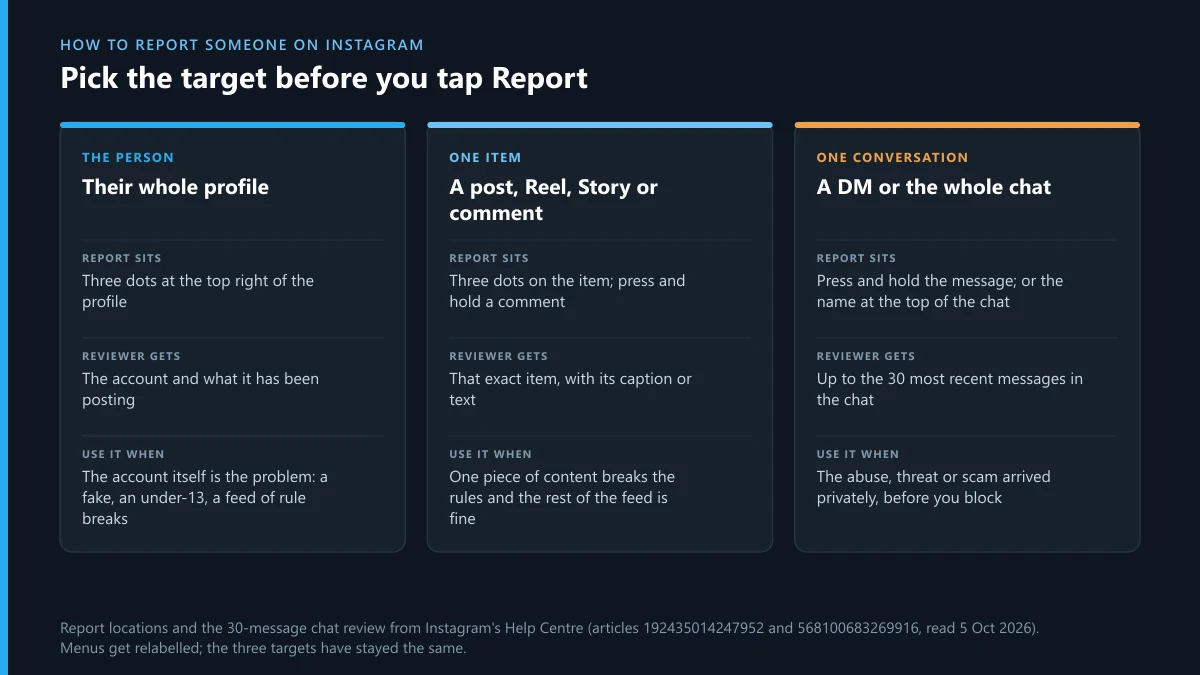
What are you reporting: the person, a post or a message?
Settle that first, because Instagram files each one separately and the reviewer sees only what you point at. Every surface has its own Report entry, which is why “how to report something on Instagram” has three answers rather than one. A profile report asks Instagram to judge an account. A post, comment or message report hands over the evidence itself. If a single photo is the problem, reporting the whole profile makes the reviewer go looking for it.
| What's wrong | Report this | Where the Report button is |
|---|---|---|
| The account copies you, a friend or a public figure | The profile | Three dots at the top right of the profile |
| The account looks like it belongs to a child under 13 | The profile | Same three dots; pick the under-13 option |
| One photo, video or Reel breaks the rules | That post | Three dots above the post on a phone; Options at its top right on a computer |
| A Story that's still up | The Story | The three dots on the Story while it plays |
| A cruel or threatening comment | The comment | Press and hold it on a phone; Options below it on a computer |
| Threats, scams or abuse sent privately | The message or the chat | Press and hold the message, or tap the name at the top of the chat |
| A feed full of bought followers and engagement bait | The profile, as spam | The profile's three dots |
One person can need all three. Someone harassing you might have a fake account, a post about you and a string of DMs, and each can go in as its own report.
How do I report someone on Instagram from their profile?
Open their profile, tap the three dots in the top right corner, tap Report, and answer the questions Instagram puts on screen. That is the whole route on both iPhone and Android, and it is the one Instagram's help page on reporting a post or profile describes. On instagram.com the three dots sit in the profile header, beside the Follow and Message buttons.
- Go to the profile. Searching the username is fine; you don't have to follow the account.
- Tap the three dots, then Report.
- Choose to report the account rather than a post, message or comment.
- Pick the situation that fits. For an account, Instagram narrows it to three: the account posts things it shouldn't, it pretends to be someone else, or its owner may be under 13.
- Follow the follow-up screens and submit. For impersonation it asks whether the copy is of you, someone you follow, a public figure or a business.
That covers how to report an Instagram account in the usual case. If someone is posing as you and you'd rather not use the app, Instagram's impersonation report form takes the username and works without an Instagram login. Instagram's report pages also promise that the account you reported won't see who reported it.
How do you report someone on Instagram for one post, Reel, Story or comment?
Report the item itself: tap the three dots on the post, Reel or Story, tap Report, and pick the reason that matches what you see. So if you're wondering how to report a post on Instagram, it's the same three taps you'd use on a profile, just started from the post instead. Comments work differently on each device:
- On a phone, tap Comments below the post, press and hold the comment, then tap Report.
- On a computer, hover over the comment, click Options below it, then Report.
- On your own post, Instagram's May 2020 update lets you delete up to 25 at once. Report the ones that break the rules first, or the evidence goes with them.
One thing confuses people. A reported comment disappears from your screen straight away, and that is not the verdict. Instagram's comment reporting page says you'll no longer see it, “but this doesn't mean that the comment was removed by Instagram.” The decision comes later, and it shows up in your report history.
Screenshot the post with the username and date in frame before you report it. If the owner deletes it, your report has nothing left to point at.
How can you report someone on Instagram for what they sent you in DMs?
Press and hold the message, tap Report, choose a reason and tap Submit report. To report the whole conversation, tap the person's name at the top of the chat, then Options, then Report. Instagram's message and chat reporting page sets the scope: reviewers look at up to the 30 most recent messages in a reported conversation. Deleted, unsent or edited messages can be included too, as long as the whole chat or a message next to them is reported.
So the order matters. Screenshot first, report second, block third. Blocking doesn't wipe your side of things: Instagram's blocking page says the person isn't notified and your message threads with them stay in your inbox, you just can't message them any more. In a group chat you can't report the group as a whole. Report the specific messages, photos or videos, or the members who sent them.
A one-off rude message is usually better handled with Restrict or block. Report when the message is a threat, a scam, sexual content you didn't ask for, or part of a pattern.
How to report someone on Instagram that blocked you
You can't report what you can't see, so Instagram's answer is to ask a friend with an account to report it for you. Its help page for people who can't see the content names being blocked as the example, asks for links and screenshots, and warns that nothing happens until Instagram can find the content. Give your friend the exact post or profile link, not just the username.
We read that page and the general reporting page again on 5 October 2026. The general page says people without an account can still report abuse and spam, but the only link next to that sentence goes to the Community Standards. We saw no form behind it, on the phone view or the desktop one. In practice, the routes that work around a block are these:
- One friend reports the item. One accurate report from someone who can see it is enough. Recruiting a crowd doesn't help, as the outcome section below explains.
- Old messages. Check your inbox first. If the conversation is still there, report the messages from it.
- Impersonation of you. Use the impersonation form linked above. It asks for a username, so you don't have to see the account.
- Your own photo or video. Instagram's privacy violation form is for people reporting a privacy breach involving their image or video.
Don't open a second account to get around the block. Meta's account integrity rules list accounts created to contact someone who has blocked you as a violation, and a fresh account that heads straight for the person who blocked you is exactly what that rule describes. The report you meant to file could end with your own account being restricted.
Can you report someone on Instagram for buying followers?
Yes, but no report reason says “bought followers”, and a report alone rarely touches the buyer's account. Instagram's Community Guidelines ask people to stay spam-free “by not artificially collecting likes, followers or shares”. In practice, Instagram cleans up the fake activity rather than punishing whoever paid for it. Its 19 November 2018 announcement said it would start removing inauthentic likes, follows and comments from accounts that use third-party apps to boost their popularity.
Here is how to report someone on Instagram for buying followers without wasting your time. Report the profile and choose “Scam, fraud or spam”. Report a few of the obvious bot accounts following them the same way, because that is the part Instagram's systems remove. If an influencer used bought followers to sell sponsorships to brands, that can also break US law: the FTC's rule on fake social media indicators, in force since 21 October 2024, covers buying fake followers for a commercial purpose, and brands can complain at ReportFraud.ftc.gov.
The sellers of these followers and likes often run storefronts on Telegram, next to “report bots” that promise bans. We have looked at both: how Meta's own spam filter compares with Instagram spam report bots, and why most Telegram report bots for Instagram are scams themselves.
What happens if I report someone on Instagram?
Instagram reviews the report against its rules, doesn't tell the person who filed it, and posts the result in your report history. Here is what happens when you report someone on Instagram, in order. You can find the outcome under Profile, then Menu, Help, Reports and violations, and Reports, the path set out on Instagram's report status page. The same page admits that “every report that you've made may not be viewable” there, so a missing entry doesn't mean the report vanished.
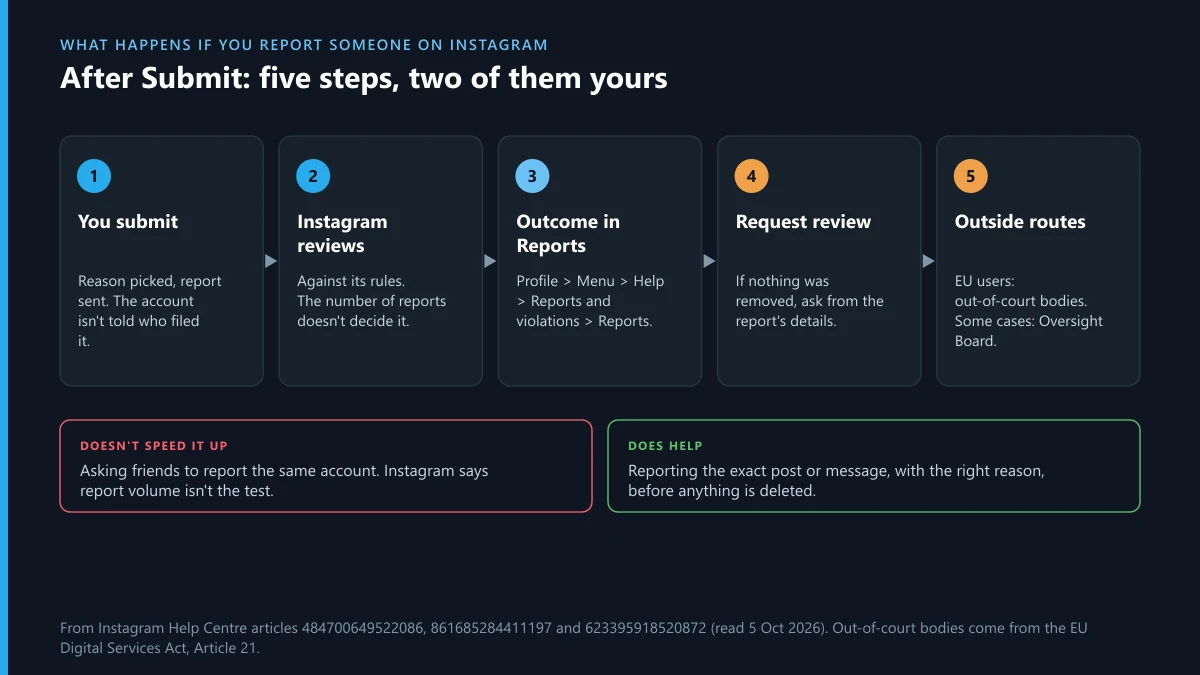
If you report someone on Instagram and nothing is removed, that isn't the end. Open the report's details and tap Request review, as Instagram's page on content it didn't remove explains. EU users have one more step. Meta's DSA transparency report for January to June 2026 counted 5,179 complaints on Instagram from people whose notice led to no action. 1,542 of those decisions were reversed, a little under three in ten. Disputes can also go to certified out-of-court bodies; Meta logged 10,328 of those in the same half-year, across all complaint types.
What decides the result is the content, not the number of reports. On its page about how it decides what to remove, Instagram says the number of times something is reported “doesn't determine whether or not it's removed”.
Will reporting an Instagram account get it deleted?
Only when the account keeps breaking the rules, or commits one violation severe enough to end it at once. A report starts a review. It doesn't order a deletion. People who search how to report an Instagram account and get it deleted are usually picturing a counter that hits a number. Meta describes strikes instead, and its strike page adds that all strikes on Facebook or Instagram expire after one year. Most accounts are disabled only after repeated warnings and restrictions; the most serious harms, such as child sexual exploitation, can end an account after one occurrence.
Meta does publish a strike ladder, but the restrictions on it apply to Facebook accounts: a warning at one strike, feature limits up to six, then 1-, 3-, 7- and 30-day posting blocks. The page says outright that those restrictions only apply to Facebook. We found no matching ladder for Instagram.
| What you want | What a report can realistically do |
|---|---|
| The account gone | Disabled if it keeps breaking the rules, or at once for the most severe harms |
| One post down | Removed if that post breaks a rule; the rest of the account stays |
| A fake account of you removed | Has its own route and form, so it doesn't depend on a reviewer spotting the problem in a feed |
| A follower buyer exposed | Fake follows can be stripped; the account itself is judged on what else it does |
| Rude but rule-abiding posts gone | Nothing; use block, mute or Restrict |
So the honest answer on how to report someone on Instagram and get them deleted: report each real violation, accurately, and let the strikes add up. Piling on doesn't help. Meta's inauthentic behaviour policy bans misusing its reporting systems “to harass, intimidate or silence others”, and Instagram's terms ban groundless reports. The same is true on Telegram. We have covered what actually gets someone banned on Telegram, the report-count myth for Telegram channels, why a Telegram mass report bot can't force a ban, the GitHub-to-Telegram trail of Instagram mass report scripts, the X mass report bots sold on Telegram, and whether a paid Telegram report service is worth hiring at all.
When the person you reported also runs a Telegram channel
Instagram's review stops at Instagram. A fake shop, a leaker or a harasser often sends people to a t.me link, and whatever happens there needs a Telegram report, filed against the specific channel, group, bot or message. Match what you find to the route:
Sometimes the person you reported hits back by reporting your Telegram account. If that gets it restricted, the recovery side has its own guides: recovering a banned Telegram account, unfreezing a frozen account, getting back into a locked Telegram account, and what a paid recovery expert can and can't do.
Sources
- Instagram Help Centre: Report a post or profile
- Instagram Help Centre: Report a comment
- Instagram Help Centre: Report a message or chat
- Instagram Help Centre: Block people
- Instagram Help Centre: Report something if you don't have an account or can't see it
- Instagram Help Centre: Check the status of something you've reported
- Instagram Help Centre: What to do if Instagram didn't remove content you reported
- Instagram Help Centre: How Instagram decides what to remove
- Instagram Community Guidelines
- Instagram, 19 November 2018: removing fake likes, follows and comments
- Meta Transparency Centre: Counting strikes (updated 23 April 2025)
- Meta Transparency Centre: Restricting accounts (updated 12 November 2024)
- Meta regulatory transparency reports: Instagram DSA report, January to June 2026 (published 28 August 2026)
- 16 CFR 465.8: misuse of fake social media indicators
- FTC: Consumer Reviews and Testimonials Rule, questions and answers
FAQ
Can you report someone on Instagram without an account?
Yes, with help. Instagram's advice for people without an account, or who can't see the content because they were blocked, is to ask a friend with an account to report it, with links and screenshots. For impersonation, Instagram's web form works without an Instagram login.
Will the person know I reported them?
No. Instagram says the account you reported won't see who reported it. The exception is intellectual property: a copyright or trademark report can pass the rights owner's name and email address to the person reported.
How long does Instagram take to review a report?
Instagram doesn't publish a time for ordinary reports. The one official figure covers EU legal notices about illegal content: Meta's DSA report for January to June 2026 gives a median of 28.89 hours from notice to action on Instagram, counting only the notices it acted on.
Does it help if lots of people report the same account?
No. Instagram says the number of times something is reported doesn't decide whether it comes down. One accurate report of the right post or message does more than a crowd of vague ones, and organised mass reporting breaks Meta's own rules.
What's the best way to report an Instagram account so it gets deleted?
If you're asking how to report an Instagram account to get it deleted, report every post, comment or message that actually breaks the rules, each from its own menu, plus the profile if the account itself is fake or run by a child under 13. Meta disables accounts after repeated violations. No report deletes an account on request.
Can I report someone on Insta for something they did on another app?
Not through Instagram. To report someone on Insta, the problem has to be on Instagram: the profile, posts, comments or messages. If the abuse moved to Telegram, WhatsApp or text messages, report it on that app, where the evidence actually sits.
Should I block someone before or after reporting them?
After. Report first so the reviewer gets the messages and posts, then block. Instagram doesn't notify people when you block them, and your conversation stays in your inbox after the block, so the evidence isn't lost.
Can the person I reported report me back?
They can, and their report is judged the same way yours was: on whether your posts, comments or messages break the rules. Instagram doesn't tell them who reported them. Keep your own account within the rules and keep your screenshots, in case you need to request a review.
Is buying Instagram followers illegal?
It always breaks Instagram's Community Guidelines. In the US, the FTC's rule on fake social media indicators, in force since 21 October 2024, makes buying fake followers unlawful when it's for a commercial purpose, such as an influencer inflating their reach to win brand deals. The rule doesn't reach a purely personal account.