4 October 2026 · Telegram Ban Service · 15 min read
How to report a scammer on Instagram: the app, the email myth and the police
To report a scammer on Instagram, open their profile, tap the three dots, then Report, and pick “Scam, fraud or spam” when the reasons appear. Report the DM or post that hooked you as well, from its own menu. Instagram has no email inbox for scam reports, so if money already left your account, call your bank and file a police report too.
How do I report a scam on Instagram from the app?
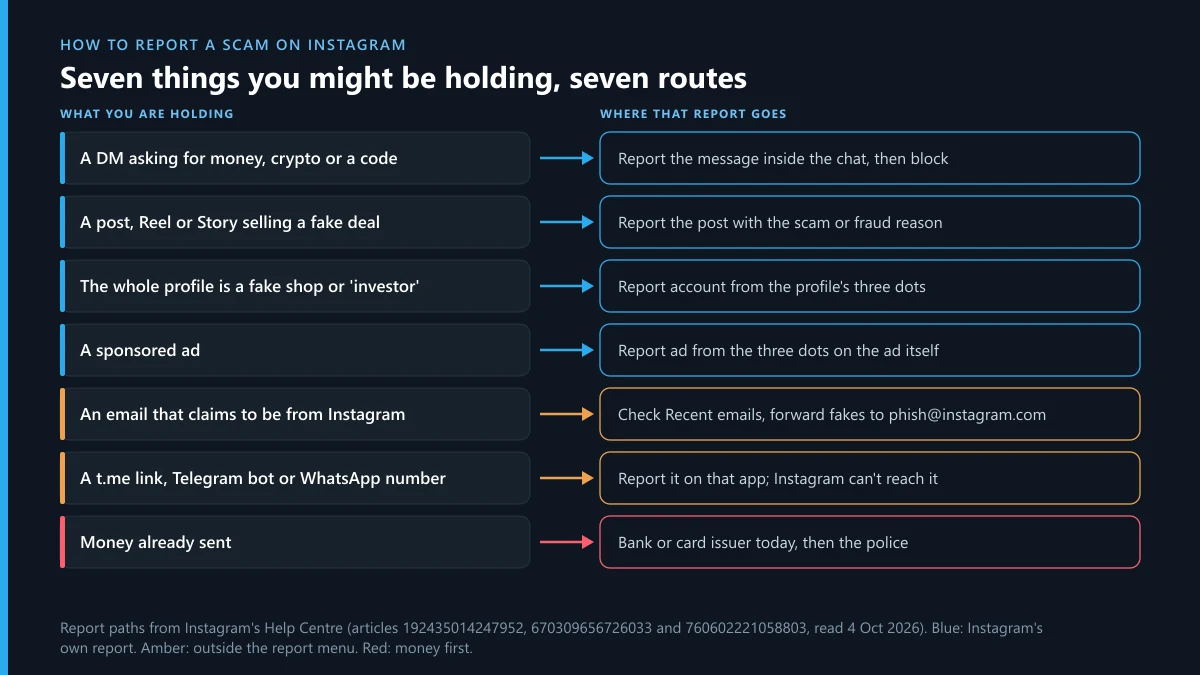
Report the thing that carries the scam, from its own three-dot menu, and choose the scam reason. Instagram's list of report reasons for posts and profiles calls it “Scam, fraud or spam”, between “Nudity or sexual activity” and “False information”, on its help page for reporting a post or profile. When we checked the help pages on 4 October 2026, we saw the same flow for every surface, so here is how to report scammers on Instagram app screens, item by item:
- The profile. Open the account, tap the three dots next to its username, tap Report, and choose to report the account itself rather than one of its posts.
- A post, Reel or Story. Tap the three dots on that item, then Report, then “Scam, fraud or spam”.
- A direct message. On a phone, press and hold the message and tap Report. On the web, hover over it, click Options, then Report and Submit report. Instagram's page on reporting a message or chat says reviewers read up to the 30 most recent messages in a reported conversation, so report the chat before you delete anything.
- A sponsored ad. Use the three dots on the ad itself. Reporting the advertiser's profile is a separate step.
- Then block. Reporting first keeps the conversation in front of the reviewer; blocking afterwards stops the follow-up messages.
One scam usually touches more than one of these. A fake shop has a profile, the post that sold you the item and the DM where it asked for payment, and each can be reported on its own. The menus get reworded now and then, so if a label has moved, search the in-app help for “report scam on Instagram”; the order of taps changes less often than the wording.
You don't need an account to file. The same help page says people without one “can report abuse, spam or anything else” that breaks the Community Standards, through the link it provides, and a friend with an account can report the profile from their phone.
| The scam in front of you | Report this first | Then report or call |
|---|---|---|
| A shop that took payment and never shipped | The profile, as scam or fraud | The post or ad that sold it; your bank or card issuer |
| A crypto or forex “mentor” with screenshots of profits | The DM conversation | The profile, and the Telegram channel it sends people to |
| “You won our giveaway, pay the delivery fee” | The DM | The fake brand account it came from |
| A message from “Instagram support” about a violation | The DM; Instagram doesn't send security warnings that way | Nothing else: don't click the link |
| A job paying you to like posts, then asking for a deposit | The DM and the profile | The Telegram or WhatsApp group the tasks moved to |
| Someone you met online who now needs money | The profile | The police, if you have paid |
| An account offering to recover what you lost | The profile | Nobody; it is the second half of the same scam |
Is there an Instagram scam report email?
No. Instagram doesn't take scam reports by email, and no Instagram fraud reporting email exists for accounts that cheated you. The one address it publishes is for something else: its phishing help page says “You can always report strange emails to [email protected].” That inbox is for emails pretending to be Instagram. Forward the fake message there, then report the account or DM in the app.
Many searches for an Instagram scam report email start with an email someone received: your account will be deleted in 24 hours, a copyright strike needs an appeal, a blue badge is waiting if you verify. Those emails are usually the scam. To check one, open the Recent emails list in Instagram's security settings, which shows the messages Instagram actually sent you over the last 14 days. If it isn't there, Instagram didn't send it. The same Help Centre states that Instagram will never contact you about account security through Direct messages, so a DM from “Meta Support” fails the test before you open it.
Be just as wary of the reverse offer. Pages that promise to forward your complaint to a private Meta email in return for a fee are selling an address that doesn't exist.
How do you report a fraudulent Instagram account instead of a single post?
Report from the profile, not from one post, and report every linked account separately. People who search “how to report fraudulent Instagram account” usually want the whole thing gone, and the profile report is the one that asks Meta to look at the account as a whole. That is the practical difference between how to report a scam on Instagram account-wide and flagging one post that sold you something.
Meta's scam rules changed their name this autumn. On 9 September 2026 the old Fraud, Scams and Deceptive Practices standard became Prohibited Commercial Practices, and the notice lists penalties up to disabling accounts. The policy also names “the use of multiple accounts” working together to defraud people, which is why the backup account matters: a scam shop with two or three spares is common, and each spare needs its own report.
Before you file, open “About this account” from the profile's three dots. It shows when the account joined, the country it is based in and any former usernames. A shop claiming ten years of trade that joined in August, or a “London” seller based elsewhere, is worth a screenshot for the police file as well.
What happens after an Instagram scam report?
A reviewer or an automated system checks the item against Meta's rules, and you may or may not hear back. Reports from the app usually show up under Support requests in your settings, Instagram publishes no deadline, and the scammer isn't told who reported them; Instagram's help pages describe reports as anonymous except for intellectual property reports.
Your report is one input among many. Most scam enforcement at Meta now starts before anyone complains. Its March 2026 update said 92% of the more than 159 million scam ads it removed in 2025 came down before anyone reported them, and that it took down 10.9 million Facebook and Instagram accounts tied to criminal scam centres. Some of that work ends offline. In February 2026 Meta described a raid on an alleged scam centre in Agbor, Nigeria, run by the Nigerian Police Force with the UK's National Crime Agency, in which seven suspects were arrested.
So what does a single Instagram scam report do? It puts a specific account and specific messages in front of the review system, which is how scams that slip past the filters get caught. It also leaves a record if the same account turns up in a police case. What it doesn't do is return your money or tell you the outcome in detail.
How to report a scammer on Instagram after you've already paid
Call the bank first and report to Instagram second. Instagram can remove the account, but it can't touch a bank transfer, card payment or crypto send, and how much you can claw back depends mostly on how fast your bank hears about it.
- Card payment. Call the issuer and ask for a dispute or chargeback. Have the date, amount and the seller's name as it appears on the statement.
- Bank transfer. Use the bank's fraud line the same day. In the UK, victims of authorised push payment fraud can claim reimbursement of up to £85,000 under the Payment Systems Regulator's rules, within 13 months of the last payment.
- Payment apps. Open a dispute inside the app. Money sent as a personal payment to “friends and family” usually carries no buyer protection, which is why scam shops ask for it.
- Crypto. There is no reversal. Write down the wallet address and the transaction hash, and tell the exchange you sent from, in case the receiving wallet is on a platform that can freeze it.
Then expect the second wave. Within days of a loss, accounts appear offering to hack the scammer or recover the funds for an upfront fee. That is the same scam run again on someone already primed to pay. The FBI's Internet Crime Complaint Center has warned that law enforcement won't refer victims to a company that charges to recover money, so report those accounts too.
How do you report an Instagram scammer to the police?
File online with the national fraud reporting service where you live, and bring the evidence pack shown below. Most people who need to report Instagram scammer to police no longer need a station visit; each country has an online route:
| Where you live | Where to file | Worth knowing |
|---|---|---|
| United States | The FBI's Internet Crime Complaint Center, plus the FTC at ReportFraud.ftc.gov | IC3 logged 1,008,597 complaints in 2025. The FTC shares reports with law enforcers but says it can't resolve individual ones. |
| England, Wales, Northern Ireland | Report Fraud, at reportfraud.police.uk or 0300 123 2040 | It replaced Action Fraud in December 2025; old Action Fraud links redirect. |
| Scotland | Police Scotland on 101 | Ask for a crime reference number for the bank. |
| Canada | Report Cybercrime and Fraud | The RCMP's joint reporting system with the Canadian Anti-Fraud Centre, launched in late 2025. |
| Australia | ReportCyber at cyber.gov.au; Scamwatch for the scam itself | ReportCyber goes to police. Scamwatch feeds the National Anti-Scam Centre. |
| India | cybercrime.gov.in, or the 1930 helpline for money lost | Call 1930 first when a transfer is recent. |
| Elsewhere | The national police's online report, or the local station | Take printed screenshots if you go in person. |
If you'd rather report Instagram scammer online in one sitting, build the evidence pack first. Every one of these forms asks for the same four things, and a removed account can take its profile and posts with it.
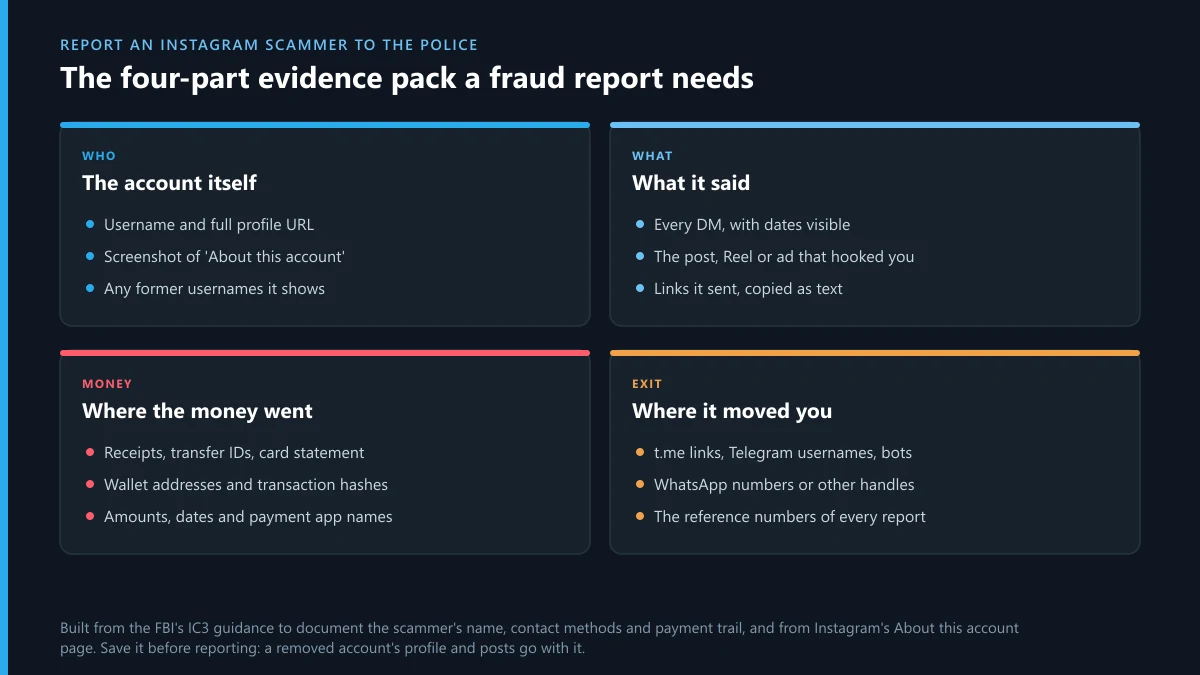
Police can do the one thing you can't: ask Meta for the data behind the account. Meta's law enforcement portal is closed to victims. Its login page says requests through the system can be made only by government bodies authorised to obtain evidence in legal proceedings, so the route to the scammer's identity runs through your police report. Keep every reference number; your bank will ask for it, and a later report on Instagram or Telegram is stronger with one.
The scammer moved you to Telegram: report that end too
Report it on Telegram as well, because removing the Instagram profile does nothing to the Telegram account, channel or bot where the money changed hands. Telegram has its own Report option on profiles, channels and bots, and anyone who was contacted can use it. Pick the route by the script the scammer used:
- A “VIP signals” or investment channel. Report the Telegram group or channel the pitch runs in, or send a single report covering the whole channel rather than each post.
- A task or job group. The first unsolicited message can be flagged as spam on Telegram, and the message that asked for a deposit can be reported on its own by its link.
- A bot that takes payments or “verifies” you. Here is how to report a scam bot from its Telegram profile.
- A Telegram profile posing as Instagram support or a recovery agent. Use the fake-profile report and the @notoscam channel.
- Threats to share edited nude images. These often come from deepfake bots running on Telegram; the illegal-content routes Telegram accepts and its abuse reporting options apply, and the police should see the same messages.
- Fake goods or a blackmail demand. See reporting an extortionist or counterfeit seller on Telegram.
- Your own product photos used to sell fakes. A DMCA notice against the Telegram channel reposting them is the tool, within the limits of copyright claims on Telegram.
- Money paid through Telegram. File a Telegram fraud report with the payment trail attached. If no menu reason fits, check which report option suits a Telegram scammer.
This end is the part our desk handles. We file the report through Telegram's own routes and follow up when a channel survives the first round, using the steps in taking down a Telegram channel route by route. Read what a Telegram report service can and can't promise before you hire anyone, us included. The background is in how Telegram removes an account or channel, which rule breaches get someone banned on Telegram, and why the number of reports matters less than their content.
How to report scammers on Instagram: what do Reddit threads get wrong?
Mostly the idea that more reports help. If you searched “how to report scammers on instagram reddit”, you likely found threads asking strangers to report a named account. We searched r/Scams through the Arctic Shift archive on 4 October 2026, for posts since April with “instagram report” or “instagram scammer” in the title. Eleven came back. Four asked readers outright to report a named Instagram account, and a fifth was titled simply “Instagram Mass report”. r/Scams' own rules forbid “personal army” requests like these, and Instagram reviews the content of a report, not the headcount behind it.
The useful advice in those threads is plainer: report once with the right reason, call the bank, and ignore anyone in the comments who says they can get the money back. The worst advice is paid. Sellers of “mass report” packages run the same report bots sold on Telegram. We followed the Instagram mass report bot code from GitHub to Telegram, compared Instagram spam report bots with Meta's own spam filter, and found the same sellers offering X and Twitter bots. Some never run at all: Telegram report bots that are themselves scams take the fee and vanish. Public blacklists don't do much either, as our look at Telegram scammer lists found.
Can an Instagram scammer come after your own accounts?
Sometimes, so close the doors they know about. A scammer who chatted with you has your username, often your phone number, and sometimes a login code you were tricked into sharing. Three follow-ups are common: a takeover attempt (“send me the code I just sent you”), false reports against you, and a new account that writes as if the first never existed.
- Turn on two-step verification on Instagram and on every messaging app you used with the scammer. Never read a login code to anyone.
- If they got into your Telegram, start with getting a Telegram account back from someone else's hands.
- If their reports got your account restricted, see recovering a Telegram account banned after false reports or what to do about a frozen Telegram account.
- Before paying anyone to restore access, read what a paid Telegram account recovery expert can actually do.
- If a task scam had you create a channel or group as part of the “job”, delete that Telegram channel once you've saved what's in it, so it can't be reused under your name.
Keep the folder from the first case. If the same person comes back under a new name, the old screenshots show a pattern that a single new report can't.
Sources
- Instagram Help Centre: Report a post or profile on Instagram (report reasons, read 4 October 2026)
- Instagram Help Centre: Report a message or chat on Instagram
- Instagram Help Centre: Protect yourself from phishing on Instagram
- Instagram Help Centre: Recent emails from Instagram
- Instagram Help Centre: Avoid getting scammed on Instagram
- Instagram Help Centre: report anonymity and its intellectual property exception
- Meta Community Standards: Prohibited Commercial Practices (renamed 9 September 2026)
- Meta, 11 March 2026: fighting scammers with new technology and partnerships
- Meta, 20 February 2026: work with the UK National Crime Agency and the Nigerian Police Force
- Meta Law Enforcement Online Request System
- FBI Internet Crime Complaint Center: 2025 Internet Crime Report (6 April 2026)
- US Federal Trade Commission: ReportFraud.ftc.gov
- Payment Systems Regulator: APP scam reimbursement
- RCMP and Canadian Anti-Fraud Centre: Report Cybercrime and Fraud
- Scamwatch, National Anti-Scam Centre: report a scam
- India: National Cyber Crime Reporting Portal
- Arctic Shift Reddit archive (r/Scams title search, 4 October 2026)
FAQ
Can I report an Instagram scammer if I don't have an Instagram account?
Yes. Instagram's help page on reporting posts and profiles says people without an account can still report abuse, spam and other rule breaks through the link it gives. A friend with an account can also report the profile for you. If you lost money, the police and your bank don't need you to have an Instagram account at all.
Will the scammer see that I reported them?
No. Instagram doesn't tell the account who reported it, except for intellectual property reports, where the rights owner's details can be passed on. Blocking is also silent. What the scammer may notice is that the chat stops working, so save the conversation before you report and block.
Can Instagram get my money back from a scammer?
No. Instagram can remove the account and its posts, but it has no access to a bank transfer, card payment, payment app or crypto wallet. Only your bank, card issuer or payment app can try to reverse a payment, and they move faster when you call them the same day and quote a police reference number.
Does Meta have an Instagram fraud reporting email?
No. The only address Instagram publishes, [email protected], is for emails that pretend to come from Instagram. Report scam accounts, posts and messages from inside the app, and take any money loss to your bank and the police, who can request account data from Meta.
How many reports does it take to remove a scam account on Instagram?
There's no number. A reviewer looks at whether the account breaks Meta's rules, and one report with the right reason and the actual scam message attached is worth more than a pile of reports from strangers. Asking a forum to mass-report an account mostly produces duplicates of the same report.
Can you report Instagram scammer online instead of at a police station?
Yes, in most countries. The US, England, Wales and Northern Ireland, Canada, Australia and India all take fraud reports through online forms, listed in the table above. Have the evidence pack ready before you start, because each form asks for the account, the messages, the payment trail and any off-platform handles.
Should I tell the scammer I'm reporting them?
No. A warning gives them time to delete the messages, change the username or move you to a new account. Screenshot the chat, the profile and the payment details first, report from the app, then block. Don't threaten them or post their details publicly either.
Someone offered to recover my money from the Instagram scammer for a fee. Is that real?
Almost certainly not. Accounts that appear after a loss offering to hack the scammer or recover funds are a known second scam aimed at people who were just cheated. The FBI has warned that law enforcement doesn't send victims to companies that charge for recovering funds. Report that account too.
Can Telegram Ban Service report the Instagram scammer for me?
We don't file Instagram reports; anyone the scammer contacted can do that from the app in a minute. We handle the Telegram end: the account, channel, group or bot the scammer moved you to, reported through Telegram's official routes with your evidence, for documented scam cases only.