6 October 2026 · Telegram Ban Service · 12 min read
How to report a post on Instagram, from a single picture to a Story or a copied Reel
To report a post on Instagram, tap the three dots above it (Options at the top right on a computer), tap Report and pick the reason that fits what you see. A photo, carousel and Reel all use that menu; a Story has its own three dots. If the picture is yours and someone copied it, use Meta's copyright form instead.
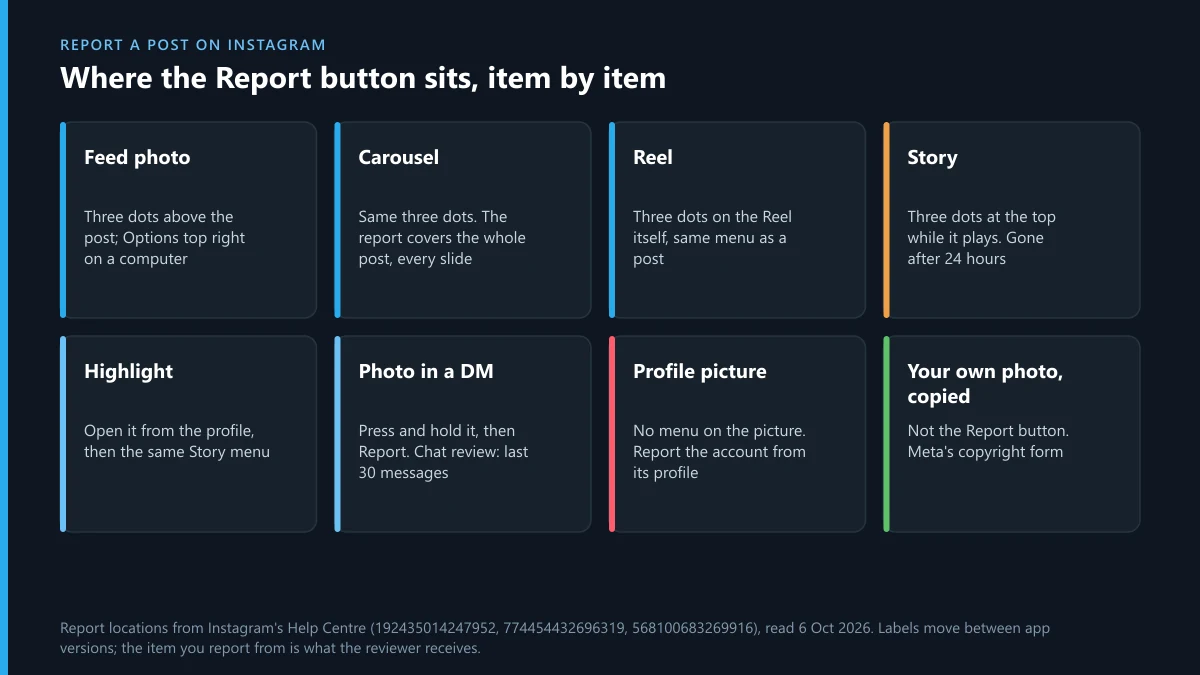
Where is the Report button on an Instagram photo, Reel or Story?
It sits on the item itself, behind the three dots, and whichever item you start from is the one the reviewer receives. That's most of what there is to know about reporting a post on Instagram. Start from a profile and you've asked Instagram to judge an account; start from the photo and you've handed over that photo and its caption. Instagram's post and profile reporting page spells out the phone route in three lines: tap Options above the post, tap Report, follow the on-screen instructions. On a computer you click Options in the top right of the post instead.
| What you're looking at | Where Report is | Worth knowing |
|---|---|---|
| A photo or video in the feed | Three dots above the post | The standard way to report a picture on Instagram |
| A carousel of several photos | The same three dots | There's no separate menu per slide, so one report covers the whole post |
| A Reel | The three dots on the Reel | Same reasons as a feed post |
| A Story | Three dots at the top while it plays | Gone after 24 hours unless it's saved to a Highlight |
| A Highlight | Open it from the profile, then the Story menu | Stays up until the owner removes it |
| A photo sent to you in a DM | Press and hold it, then Report | Reviewers read up to the 30 latest messages in a reported chat |
| A profile picture | Nowhere on the picture itself | Report the account from its profile |
| Your own photo, reposted by someone else | Not in the Report menu at all | Meta's copyright form, covered further down |
The profile picture is the only image on Instagram you can't report by itself. Report the account and choose the reason that explains why the picture is a problem. Your face on someone else's account is impersonation. A brand's logo is a trademark matter, and Instagram's trademark form treats use in a “profile picture, name, username or bio” as a reason of its own.
One habit saves trouble later: copy the post's link before you report it. Instagram's copy-link option exists for posts but not for comments, and the copyright and privacy forms both ask for links rather than usernames. A disappearing photo in a chat is the exception to screenshotting, too. Instagram's disappearing-message page now says screenshots are disabled for those, so report it while it's still open.
Which reason should you pick when you report a picture on Instagram?
Pick the reason that describes what the picture actually shows, not how you feel about whoever posted it. A nude photo reported as spam, or a scam post reported as bullying, asks the reviewer to test it against the wrong rule. Instagram keeps relabelling the menu between app versions, so match the meaning rather than hunting for an exact phrase.
Meta's own figures show where a report counts most. The Community Standards Enforcement Report gives a proactive rate for each policy: the share of removed content that Meta's systems caught before any user reported it. Turn those numbers around and you get the share where a person's report got there first.
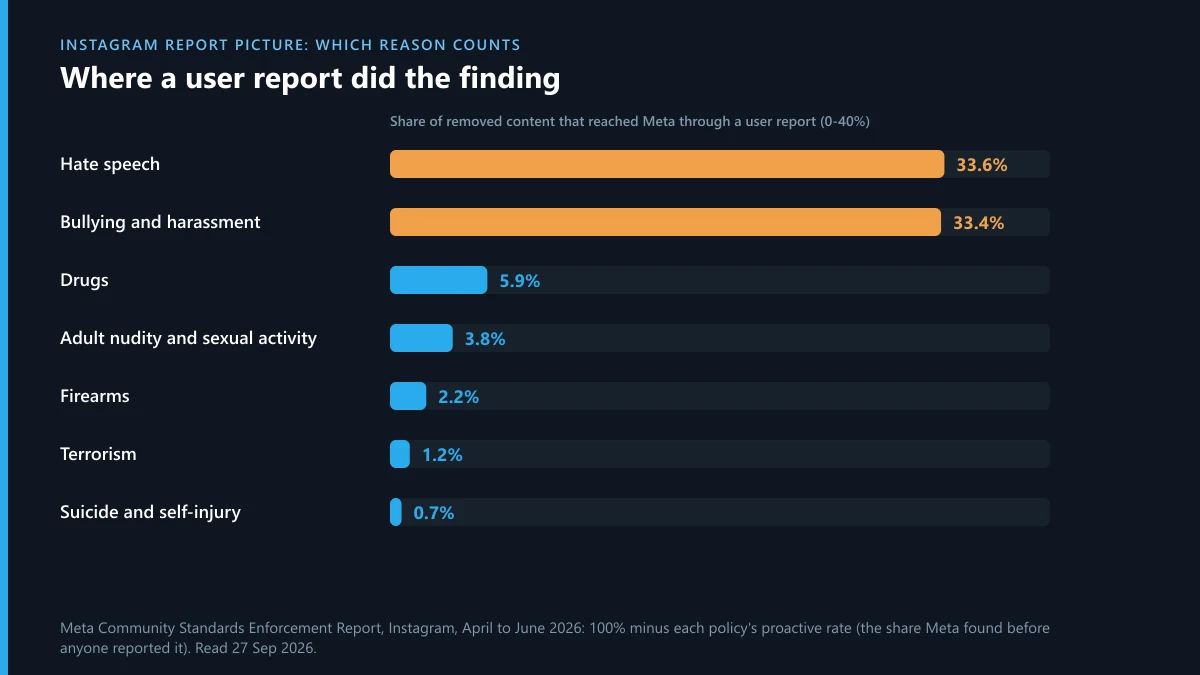
For April to June 2026, Instagram's proactive rate was 66.6% for bullying and harassment and 66.4% for hate speech. Roughly one removal in three in those categories began with someone pressing Report. Nudity sat at 96.2%, drugs at 94.1% and firearms at 97.8%, so for those your report usually confirms something the classifiers had already flagged. The bullying figure also moved fast: it was 79.3% the quarter before. When we worked through the charts for this page, that drop stood out more than any of the high numbers. A cruel caption or a mocking edit of someone's photo is precisely what the machines are missing more of.
What doesn't add weight is volume. A second report on the same post shows the reviewer nothing new, which is why the promises sold around this are worth reading closely before anyone pays. We've taken several apart: the Telegram mass report bot pitch, Instagram reporting scripts copied from GitHub and resold on Telegram, X report bots sold the same way, spam report bots aimed at Instagram accounts and report bots that take the money and do nothing. The Telegram side of the myth is no different. There's no report threshold that bans a channel, a Telegram ban follows a broken rule rather than a headcount, and a paid report service is only worth anything when it files accurate reports through the official routes.
How do you report someone's Story on Instagram before it disappears?
Open the Story, tap the three-dot icon at the top of the photo or video, tap Report and follow the prompts. Those are the steps on Instagram's Story reporting page, and the timing matters more than the taps. A Story drops out of view after 24 hours unless its owner pins it to a Highlight, and once it's gone there's nothing left to tap. If you see one that breaks the rules, an Instagram Story report filed then and there beats a plan to come back to it.
- Close Friends Stories report the same way. Being on the list doesn't change the menu.
- Replies to a Story arrive as direct messages, so a nasty reply gets reported from the chat, not from the Story.
- A Story already saved to a Highlight can be reported from the profile long after the 24 hours.
- Mentions and reshares are separate items. If someone reshares a post into their Story, report the original post if that's where the problem is.
Take a screenshot before you report a Story. Nobody at Instagram needs it, but if the account keeps going, a dated record of what it posted makes any later report about the account, or a police report, far easier to back up.
Are Instagram photos copyrighted?
Yes. A photo is protected the moment it's taken, and posting it on Instagram doesn't hand ownership to anyone. The U.S. Copyright Office's general FAQ puts it this way: a work is under copyright protection “the moment it is created and fixed in a tangible form”. Most other countries follow the same rule through the Berne Convention. No registration is needed and no © symbol either.
Instagram doesn't take the copyright from you. Its Terms of Use ask for a “non-exclusive, royalty-free, transferable, sublicensable, worldwide licence” to host and show what you post, and that licence ends when you delete the content. It covers Instagram. It doesn't give other users a right to repost your picture, and a “credit to the owner” caption isn't permission either.
Two limits trip people up. Meta's page on how copyright works at Meta says that if you take a photo, “you are likely to own the copyright”, but appearing in one doesn't necessarily give you any copyright in it. The same page says names, titles, slogans and short phrases usually aren't original enough to count. A copied pose, preset or caption idea isn't something the copyright form can remove.
How do you report an Instagram post or Reel for copyright?
Use Meta's intellectual property form rather than the Report button, and file it as the rights owner or someone authorised to act for them. When we opened Meta's IP reporting form in a logged-out browser in late September 2026, it loaded without an Instagram login. The first two questions were “Where are you asserting rights?” and “Are you the rights owner?”. Answering no stops it there.
- Copy the link of every post or Reel that uses your work. Each one needs its own URL.
- Pick the country where you hold the rights, then confirm you own them or represent the owner.
- Give your full name, postal address and phone number, and describe the original work, ideally with a link to where you first posted it.
- Paste the infringing links and say what was copied: the whole photo, a crop, the video, the sound.
- Sign the good-faith and accuracy declaration, which you make under penalty of perjury, and submit.
Know what the other side receives before you send it. Instagram's page on what the reported person sees lists the report number, the rights owner's name, the reporter's email and the details of the claim. Use a work email, or have an authorised agent file for you.
A Reel needs one extra decision: what exactly was taken. If someone re-uploaded your footage, report the Reel's link. If your track plays under someone else's video, the same form takes the claim, though labels and distributors mostly rely on Meta's Rights Manager, which identifies videos on Facebook and Instagram that match a rights holder's content. Meta says valid IP reports are acted on “typically within a day or less”, and that it disables repeat infringers in appropriate circumstances.
The volume is real. In Meta's DSA report for January to June 2026, 94,759 of the 388,783 legal notices filed against Instagram in the EU were about intellectual property, about one in four. And copying rarely stops at one platform. If a Telegram channel is reposting your photos or Reels, a DMCA notice filed with Telegram or a copyright complaint against the channel itself runs alongside your Instagram claim.
What happens to an Instagram post after it's reported?
A reviewer checks it against the rule you chose. If it breaks that rule it comes down, and if it doesn't it stays up. On the reporter's side, the outcome lands in your report history in the app's Help section, and the account you reported isn't told who reported them. The more anxious version of this question usually comes from the other end: someone whose Instagram post was reported, wondering what they'll see.
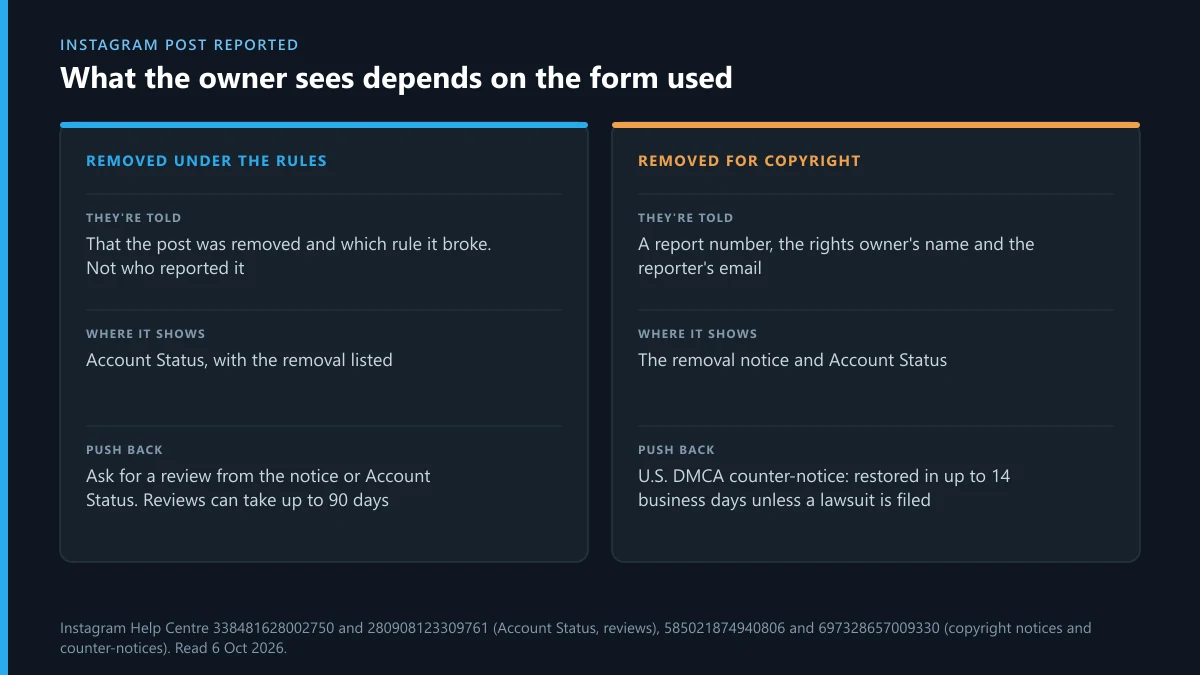
If the post is removed under the Community Guidelines, it shows up in Account Status, under Removed content, which you reach from Menu, then More info and support. You can ask for a review from the removal notice, from Account Status, or from Help, Support requests and Violations. Instagram's page on reviewing a removal warns that reviews can take up to 90 days, and the Oversight Board may be an option if you still disagree afterwards.
A copyright removal follows a different track. Content taken down under U.S. copyright law can be challenged with a counter-notice. Instagram's counter-notification page says it forwards the counter-notice, contact details included, to the person who reported you. Unless they tell Meta they've gone to court, the post can be restored in up to 14 business days, and it then won't be counted against you. File one only if you're sure the content was yours to post or was fair use. Otherwise it puts your name and address in front of the rights owner for nothing.
When the picture you reported turns up on Telegram
Reported photos have a habit of resurfacing in Telegram channels, where Instagram's decision means nothing. Report them there against the specific channel, group, bot or message, using the route that fits:
Reporting on both apps sometimes provokes a counter-attack, and accounts on the receiving end of retaliation reports do get restricted. If that happens to your Telegram account, these cover the way back: appealing a Telegram ban, what to do when the account is frozen, regaining access when you're locked out, and whether hiring a recovery specialist makes sense.
Sources
- Instagram Help Centre: Report a post or profile
- Instagram Help Centre: Report a story
- Instagram Help Centre: Disappearing photos and videos in chats
- Instagram Help Centre: Account Status
- Instagram Help Centre: Request a review of removed content
- Instagram Help Centre: Information shared with the person you report for IP infringement
- Instagram Help Centre: DMCA counter-notification
- Meta intellectual property reporting form
- Meta: How copyright works at Meta
- Meta Transparency Centre: Protecting intellectual property rights
- Meta Community Standards Enforcement Report, Instagram, April to June 2026
- Meta regulatory transparency reports: Instagram DSA report, January to June 2026 (published 28 August 2026)
- U.S. Copyright Office: Copyright in General FAQ
FAQ
Can I report a post on Instagram anonymously?
Yes, for ordinary reports. Instagram says reports are anonymous except when you report an intellectual property infringement. In that case the person who posted the content can receive the rights owner's name and the reporter's email address.
Can I report just one photo in a carousel?
Not separately. The three dots belong to the whole post, so the report covers every slide. Pick the reason that fits the photo that breaks the rules. For a copyright claim, paste the post's link and say which slide is your work.
How long does Instagram take to act on a reported picture?
Instagram doesn't publish a time for ordinary reports. For intellectual property, Meta says valid reports are handled typically within a day or less. If your own post was removed and you ask for a review, Instagram warns it can take up to 90 days.
Can I report an Instagram post from a computer?
Yes. On instagram.com, click Options in the top right of the post, select Report and follow the instructions. A Story is reported from the three-dot icon at the top of it while it plays.
Can I report a Reel that uses my music?
Yes, through Meta's intellectual property form, as the rights owner or someone authorised to act for them. Labels and distributors usually manage music through Meta's Rights Manager, which identifies videos on Facebook and Instagram that match their content.
Can I still report a Story after it expires?
Not from the app, because there's nothing left to tap. If the owner saved it to a Highlight, report it there. Otherwise keep your screenshot, since it helps if you later report the account or go to the police.
Does the person get a notification when their post is reported?
Not when you file the report. If the post is removed, they're told it went against the rules and it appears in Account Status, without the reporter's name. A copyright report is the exception: the rights owner's name and the reporter's email go to the poster.
What if the post is offensive but doesn't break any rule?
Then a report won't remove it. Unfollow, mute, restrict or block the account to keep it off your screen. Report what you can match to a specific rule, and pick that rule as the reason.