30 September 2026 · Telegram Ban Service · 15 min read
Telegram account recovery when the code, the email or the number won't cooperate
Telegram account recovery needs the phone number or a device still signed in; Telegram's FAQ says it can't help without one of them. When it stalls, read the exact screen: a flood wait means stop and wait, a password with no recovery email means a 7-day reset from inside, and a sign-up screen means the account is gone.
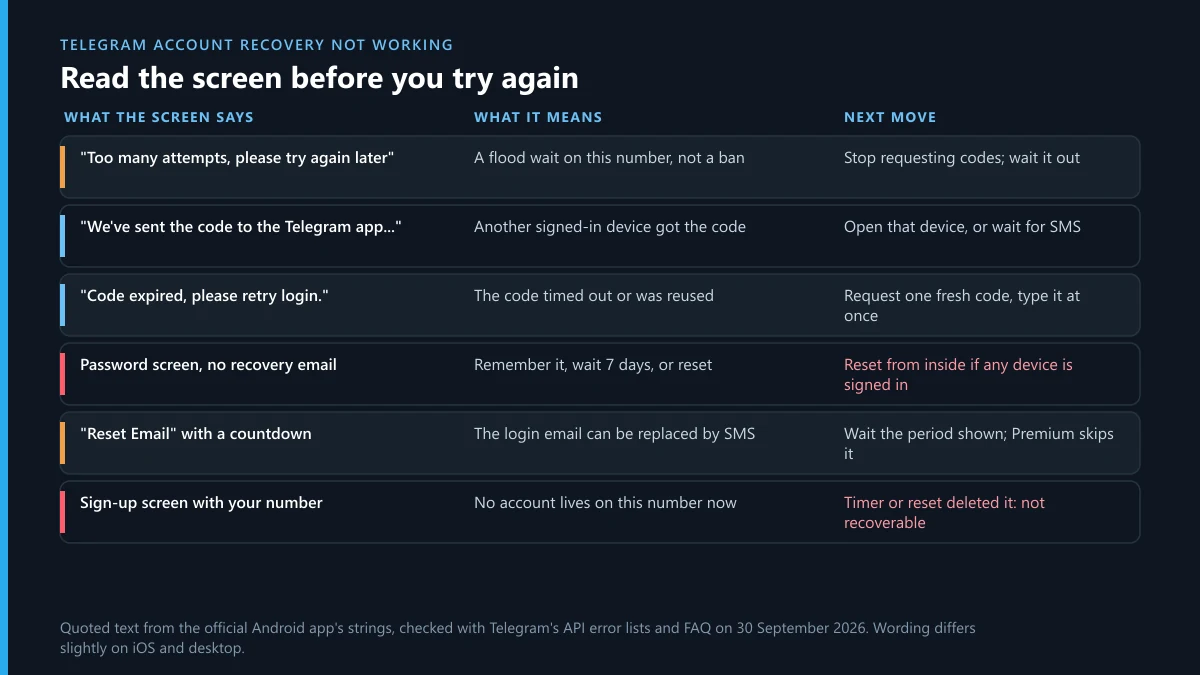
Most people who search for Telegram account recovery have already tried the obvious thing. They typed the number, waited for a code, and hit a wall. The wall has a message on it, and that message is more specific than it looks. When we pulled the string file of Telegram's official Android app on 30 September 2026, we matched each login and recovery message against the error lists in Telegram's own API documentation. Six screens account for nearly every stalled recovery we see described, and each one points to a different fix. Two of them mean the account can't come back at all, and it is better to learn that in the first ten minutes than after a week of support emails. This page goes screen by screen, then covers the clocks, the no-phone and no-email cases, and the people who will message you offering help.
What does the phone number flow look like when nothing goes wrong?
A normal sign-in has at most three questions, and the server's answer to each one decides the next screen.
- You enter the number. The server either sends a code or, if it recognises the device from an earlier sign-out, may skip the code entirely (more on that below).
- The code arrives by one route. The server picks it: a message inside another signed-in Telegram app, an SMS, a call, a code sent to your login email, or the wallet behind a Fragment number. Each code response carries a
timeoutand anext_type, so the app knows when to offer a different route. - You type the code. If two-step verification is off, you are in. If it is on, the server answers with
SESSION_PASSWORD_NEEDEDand the app shows the cloud password screen. - You type the cloud password. Correct, and the session opens with your chats pulled from the cloud.
- The other branch. If the server replies
PHONE_NUMBER_UNOCCUPIED, which the auth.signIn reference defines as "The phone number is not yet being used", the app shows a sign-up form. No account exists on that number any more.
Everything that goes wrong happens at one of those forks. Our longer walk-through of each sign-in check and what you keep covers the delivery routes one by one; the rest of this page deals with the moments when a fork refuses to open.
Why is my Telegram account recovery not working? Six screens, decoded
Because the screen you are stuck on usually means something narrower than "recovery failed". The table pairs each message, as the Android app words it, with the server error behind it.
| What the app says | What the server means | Next move |
|---|---|---|
| "Too many attempts, please try again later" | A flood wait: PHONE_NUMBER_FLOOD ("You asked for the code too many times") or a timed FLOOD_WAIT | Stop requesting codes. Each new request can extend the block. |
| "We've sent the code to the Telegram app on your other device." | A session is still alive somewhere and got the code | Find that device, or wait for the SMS option to appear |
| "Code expired, please retry login." | PHONE_CODE_EXPIRED: the code is no longer valid, usually because it timed out | Ask for one new code and enter it straight away |
| "Invalid code" | PHONE_CODE_INVALID: wrong digits, often an old code | Use only the newest code; check the SMS-word or missed-call format |
| "Since you didn't provide a recovery email…" | Two-step verification is on and no recovery address exists | Reset from a signed-in device, or accept that the only other reset deletes |
| A sign-up form for your own number | PHONE_NUMBER_UNOCCUPIED: no account on this number | The account was deleted. Nothing to recover; see the self-destruct section |
One more screen belongs to a different problem. A message that the number is banned (PHONE_NUMBER_BANNED in the auth.sendCode error list) is not a recovery failure but a ban, and it has its own appeal route in our guide to banned Telegram accounts. If a bot or seller is offering to lift that ban for money, our note on banned-number bots and what they really do explains why that offer fails.
How long does Telegram account recovery take?
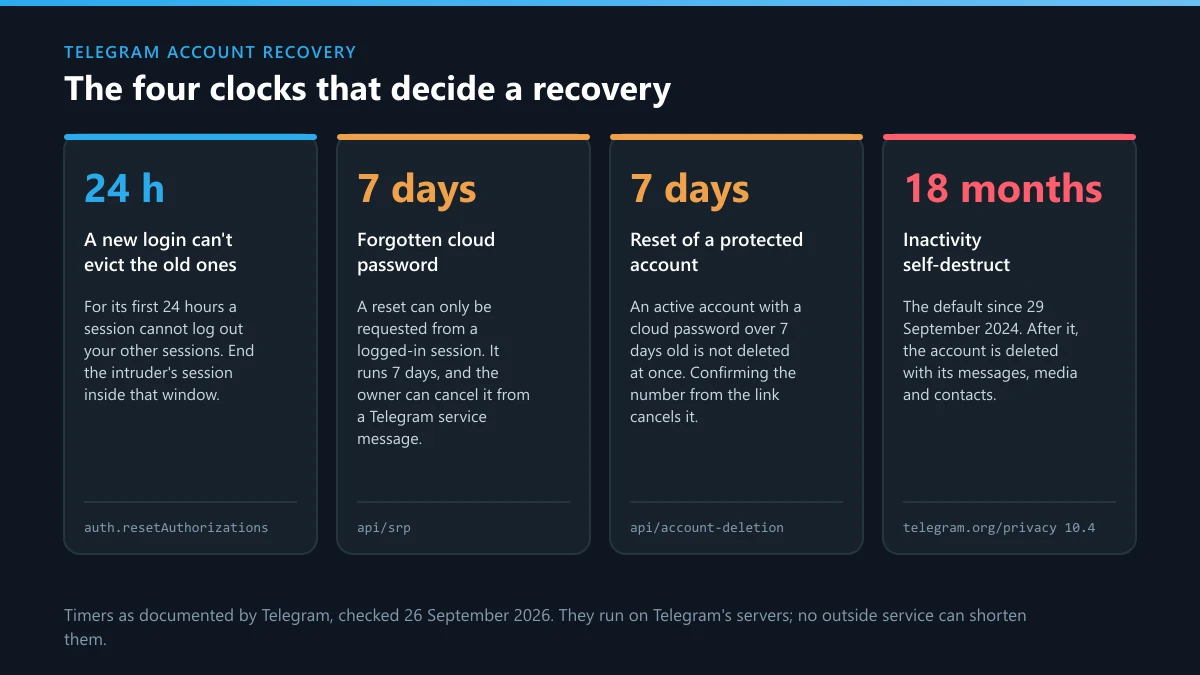
Anywhere from a minute to a week, and the difference is which clock you are standing in front of. Telegram publishes the length of some clocks and leaves others to the server.
- Seconds: the resend timer. The login documentation says the next route is used "if the phone code is not received within timeout seconds".
- Minutes to hours: a flood wait. The Android app has two versions of the message, one that names a time ("try again in…") and one that only says "later". No fixed length is published.
- 24 hours: the fresh-session lock. A session younger than a day can't log out your other devices or move the account to a new number.
- 7 days: a password reset from a signed-in device, a delayed account reset from outside, and the pause after a cancelled reset. The app's own wording for that last one reads "Please try again in 7 days."
- Varies: the login-email reset. Telegram's docs say the waiting period "will be 0 for Premium users"; everyone else sees a countdown in the app.
- 1 to 24 months: the self-destruct timer, 18 months by default. When it fires, no clock is left to wait on.
The support form is missing from that list on purpose. Telegram's FAQ says "we rely on volunteers for support", and no reply time is published anywhere. Plan around the clocks you can see.
Can you do Telegram account recovery without a phone number?
Only if you prepared something earlier, or a device of yours is still signed in. Telegram's FAQ is blunt about the default: "we can't help you unless you have access either to the phone number or to Telegram itself on any of your devices." Four exceptions sit inside that rule.
A device that is still signed in. Tablets, old laptops and Telegram Desktop on a work computer count. The code for a new login goes to that app, and from inside it you can change the account's number to one you control now, provided that session is more than a day old.
A device you signed out of yourself. This one is easy to miss. When an app logs out normally, the server may hand it a "future auth token". If you sign in again from that same app, and the app kept the token and it hasn't expired, the login docs say the server skips the code: it opens the session straight away, or asks only for the cloud password when two-step verification is on. It does not work on a device that was logged out remotely or wiped.
A passkey. The FAQ describes passkeys as "an additional login method that can be used instead of SMS". You can only create one while signed in, so it helps only if you set it up before losing the number.
A Fragment number. A +888 number receives its code through the connected TON wallet, not a SIM. Lose the wallet keys and that door closes too.
None of those four? Then the number itself is the route, and the carrier is the first call. Telegram's FAQ gives the same order: block the old SIM and get a new one with the same number, then sign in.
Telegram account recovery without email: which email is the screen asking for?
Telegram uses two different addresses, and "without email" means something different for each.
The login email is the one the app asks for at sign-in. Telegram's login docs explain that if you log in often enough, the app asks you to verify an email that will then receive login codes. When it does, the screen shows the address with most letters hidden (the server sends only an email_pattern), which is why people don't recognise it. Can't open that inbox? The Android app's reset screen says you can change the login email from another signed-in device, "otherwise" reset it "with an SMS code" once the countdown on screen runs out. In some countries there is a twist. Where SMS is expensive, the app says you "need a Telegram Premium account to immediately reset this email via an SMS code" and suggests asking a friend to gift one.
The recovery email is attached to the cloud password. It only matters when you've forgotten that password, and it only works if you added and confirmed it earlier. Nothing lets you add one while locked out.
So "without email" is fixable for the first kind, with patience or Premium. For the second kind, the next section applies.
What happens if you forget your cloud password and have no recovery email?
The app tells you in one sentence, and the sentence changes depending on where you are standing. Logged out, the Android wording is that your "remaining options are either to remember your password or to reset your account." Signed in on another device, the same sentence ends with "wait 7 days until your password is reset." Those are very different outcomes.
The signed-in version is the good one. According to the two-step verification docs, a reset requested from inside the app starts a 7-day server-side timer and keeps the account, chats and all. You can abort it during that week.
The logged-out version is "Reset account", and it is deletion with a delay. The app warns: "This action can't be undone." The account-deletion reference sets the delay: seven days if the password was set more than a week ago and the account was active in the last week, otherwise immediate. During those seven days the account's real holder gets a confirmation link that cancels the deletion and "will log out the user that tried to reset it."
If you see "Your recent attempts to reset this account have been cancelled by its active user," someone signed in to the account stopped your reset. If that someone isn't you on another device, treat it as a takeover and read our hacked-account steps before trying again.
Is old Telegram account recovery possible after the account self-destructs?
No. Telegram's FAQ says that after 18 months offline by default the account "will be deleted along with all messages, media, contacts and every other piece of data," and separately that "Termination of a Telegram account is irreversible." When you type the old number now, the server answers that the number isn't in use and the app offers a sign-up form. Signing up creates a new, empty account. The FAQ adds that you "will not get your history, contacts or groups back."
What survives lives in other people's accounts. Groups you created keep running, and the people you talked to may still hold the conversations on their side, which they can forward or export for you. Channels are harder: if you were the only admin, nobody can manage them any more. Our explainer on how Telegram channel deletion works shows what an ownerless channel can and can't do.
To keep this from happening to a second account, open Settings, then Privacy and Security, and raise the self-destruct period. The Android app offers 1, 3, 6, 12, 18 or 24 months. Repeatedly deleting and re-creating accounts on one number triggers a separate block that asks you to "wait for a few days before signing up again"; our page on deleting a Telegram account covers that message.
Can you recover a Telegram account if your phone number was hacked or ported?
Often yes, if you move in the right order. A SIM swap or unauthorised port-out gives someone else your number, and to Telegram the number is the account. The FBI's Internet Crime Complaint Center counted 971 SIM-swapping complaints and $17,366,758 in losses in its 2025 Internet Crime Report.
- Call the carrier first. Ask them to reverse the port or reissue the SIM, and to add a port-out PIN. Telegram can't do this part.
- Use any older session you still have. A device signed in for more than a day can end the intruder's session under Settings, Devices, while their fresh session can't end yours.
- Check the cloud password. If you had one, the number alone did not get them in. If they set one, reset it from inside the app.
- Watch for a reset message. If the intruder tries "Reset account" from outside, you receive the cancel link described above. Use it.
If the account is already being used to message your contacts, report it while you work on access. A spam report from your contacts and an impersonation report on the fake profile both go to Telegram's moderators, and a hijacked account that keeps scamming can end up banned regardless of who owns it.
Will real recovery account Telegram services contact me directly through the app?
No, and a message that arrives unasked is the clearest sign of a fake. People who post "will real recovery account telegram services contact me directly through the app?" in forums tend to get their answer within minutes, from exactly the accounts they should avoid. Telegram's own service messages come from one account, the login notification service user with ID 777000, and it sends codes and alerts, not offers of help. Telegram's login docs say its servers "will automatically invalidate login codes if they are sent by the user to another Telegram chat", which tells you what a stranger asking for your code wants: a code you haven't forwarded yet, typed into their own app.
The pattern is old and well documented. Singapore's Cyber Security Agency warned in its 1 December 2022 advisory that attackers "may impersonate your friend or Telegram's Support Team to request for the OTP". In a 2023 joint advisory with the police, the agency counted at least 50 victims and at least S$18,000 lost to one variant. None of that has changed.
Signs you are talking to a fake:
- They wrote to you first, after you posted about being locked out.
- They want your login code, cloud password or a screenshot of the Telegram chat.
- They want payment up front, usually in crypto, and promise a result in hours.
- They claim they can remove a ban or skip the 7-day wait.
Report the account with the in-app Report button and keep the chat. For money already lost, our guide to where to report a Telegram scammer lists the police and platform routes, and the Telegram fraud report page explains what evidence helps. You can also check a username against published Telegram scammer lists, though an empty result proves little. If the "agent" turns to threats after you refuse to pay, that is extortion; see reporting extortion and counterfeit sellers.
Are recovery bots and mass-report "unban" services any different?
They use the same pitch in a different wrapper. A bot that asks for your number and code is doing exactly what the fake agent does, only faster. Report the bot itself, following our notes on scam bots that sell reports or recoveries, and report lookalike support bots through the route for impersonating and deepfake bots.
Sellers who promise to "unban" an account by flooding Telegram with reports misunderstand how moderation works. Our breakdown of why a mass-report bot can't force an outcome and the page on how many reports it takes to ban a channel explain why volume does not decide a case. Reports lift nothing, either: a ban is lifted only by Telegram, on appeal.
A rule of thumb from checking these offers: any recovery that needs your code is a takeover. The only recoveries that work happen on your own screen, with your own number or device.
Back in, or not: what should you report next?
Either way, some damage may be left in public. A takeover account often clones channels, posts in groups under your name, or sends the same message to hundreds of people. Match the route to the object:
- A single message from the hijacked account: report that one message.
- A group or channel it set up: report the group or channel, or report the whole channel rather than one post when every post is the problem.
- A clone of your channel: steps to take down a copycat channel, plus a DMCA takedown if they copied your own material. The channel copyright infringement page covers which evidence Telegram asks for.
- Harassment or threats sent in your name: Telegram's abuse reporting routes.
- Illegal material posted from the account: the illegal-content reporting route, which has its own priority queue.
If the account you lost is now being used for fraud and you can't get it back, it is reasonable to want it removed. Our page on what actually gets an account banned on Telegram explains the thresholds, and an account takedown request is the formal version of that report.
Where Telegram Ban Service fits, and where it doesn't
We are a reporting desk, not a recovery shop. Telegram Ban Service can't sign you in, reset a password, shorten a clock or lift a ban, and we would be suspicious of anyone who says they can. What we do is the reporting work around a lost account: the fake support profiles, the clones, the scam bots and the hijacked account itself when it is being used to hurt people. Every case goes through Telegram's official routes and only when the account genuinely breaks the rules. Our Telegram report service page explains how a case runs, the full list of Telegram guides covers other situations, and you can reach the reporting desk with the usernames and screenshots you have. If you are weighing paid help for the recovery itself, read our look at what recovery services can actually sell first.
Sources
- Telegram FAQ: stolen phone, recovery email, passkeys, self-destruction, volunteer support
- Telegram API, user authorization: code timeout, future auth tokens, login email, login-code invalidation, ID 777000
- Telegram API, auth.sendCode: PHONE_NUMBER_FLOOD, PHONE_NUMBER_BANNED
- Telegram API, auth.signIn: PHONE_CODE_EXPIRED, PHONE_CODE_INVALID, PHONE_NUMBER_UNOCCUPIED
- Telegram API, two-factor authentication: email recovery and the 7-day logged-in reset
- Telegram API, account deletion: immediate vs 7-day delayed reset, cancel link
- Telegram for Android source, strings.xml (read 30 September 2026)
- FBI Internet Crime Complaint Center, 2025 Internet Crime Report (SIM swapping)
- Cyber Security Agency of Singapore, AD-2022-013, 1 December 2022
- Singapore Police Force and CSA, 31 August 2023: impersonation scams involving Telegram
FAQ
Can Telegram support do account recovery by email if I lost the number?
No. Telegram's FAQ says it can't help unless you have the phone number or Telegram open on one of your devices. The support form is still worth filing to document the case, but it does not move an account to a new number or send a code to an email address.
Why does Telegram ask for an email address I don't remember setting?
That is the login email. Telegram asks accounts that sign in often to verify one, then sends the login code there instead of by SMS. The screen shows a masked version of the address. If you can't open it, the Reset Email option swaps it for an SMS code after the waiting period the app displays.
Will the Reset account button bring my chats back?
No. Reset account deletes the old account, after a week or at once depending on the password's age, and lets you register the number again as a new, empty user. The Android app warns that the action can't be undone and that all messages and chats will be deleted. Use it only when the password is truly lost and no device is signed in.
How long do I wait after "Too many attempts" on Telegram?
Telegram does not publish a fixed figure. When the server sends a wait time, the app shows it in the message; the plain version only says to try again later. Stop requesting codes and wait, because every new request can extend the block. Waiting several hours before a single fresh attempt is the safest approach.
Does Telegram Premium speed up account recovery?
Only in one place. Telegram's login docs say the waiting period before you can reset a login email is zero for Premium users, and in countries with expensive SMS the app may require Premium to reset that email at once. Premium does not shorten the 7-day password reset, the 24-hour session lock or a ban.
Someone on Telegram offered to restore my account for a fee. Is that real?
Treat it as a scam. Telegram does not sell recovery, does not open conversations with you about it, and its login codes come only from the verified Telegram service account. Anyone who asks for your code, your cloud password or an upfront crypto payment is trying to take the account, not return it.