7 October 2026 · Telegram Ban Service · 14 min read
Instagram page report and account report: the in-app route, fake accounts and the police
An Instagram page report works like any account report, because Instagram has no separate pages. Open the profile, tap the three dots (Options on a computer), tap Report, then Report account, and pick the reason: rule-breaking posts, impersonation or an under-age owner. Without an account, use the impersonation form. For threats, sextortion or fraud, go to the police as well.
Is an Instagram page report different from an account report?
Not on Instagram's side. Instagram has accounts, not pages. A personal account, a business account and a creator account are all reported from the profile, through the same menu. “Page” is just what people call a shop profile, a fan account or a meme account, partly because Facebook really does have Pages. So an Instagram page report and an Instagram account report travel the same road.
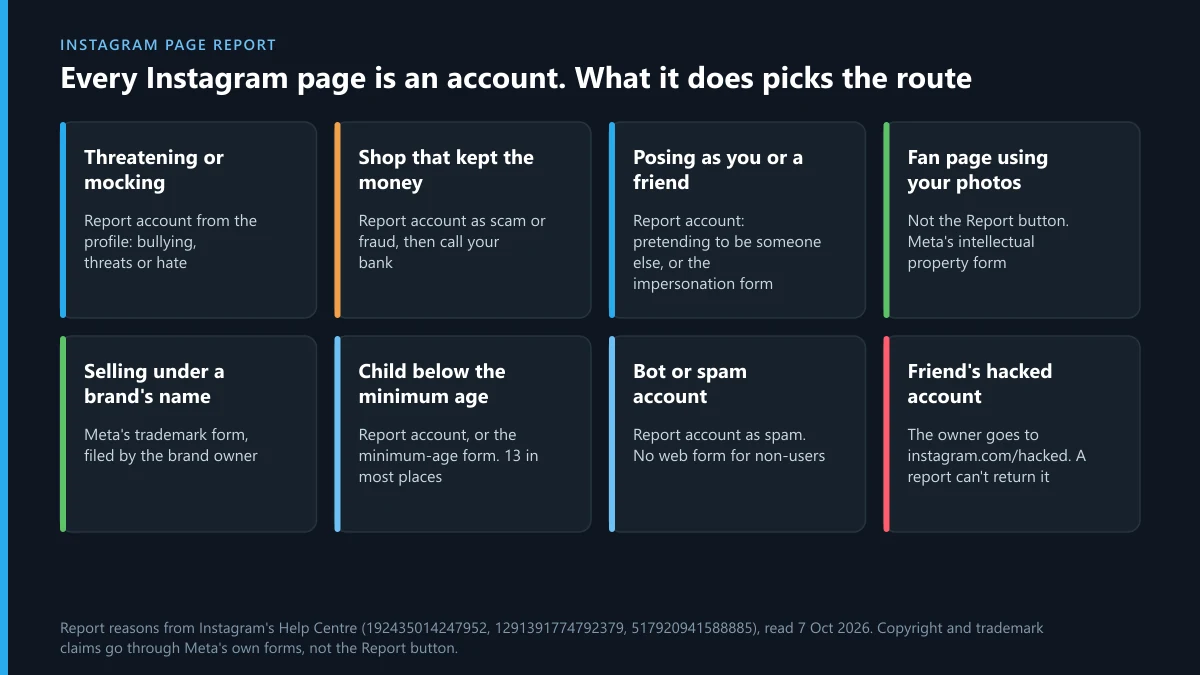
What changes the outcome is what the page is doing. That decides which reason you pick, and sometimes it decides that the Report button is the wrong tool altogether:
| The page you're looking at | What usually makes it reportable | Where the report goes |
|---|---|---|
| A personal account that threatens or mocks someone | Bullying, threats, hate | Report account, from the profile |
| A shop page that took the money and went quiet | Scam or fraud | Report account, plus your bank or card issuer |
| A page posing as you, a friend, a celebrity or a brand | Impersonation | Report account, “pretending to be someone else”, or the impersonation form |
| A fan, meme or repost page built on your photos | Copyright | Meta's intellectual property form, not the Report button |
| A page selling under a brand's name or logo | Trademark | Meta's trademark form, filed by the brand owner |
| An account run by a child below the minimum age | Age | Report account, or Instagram's minimum-age form |
| A bot or spam account with nobody real behind it | Spam | Report account as spam |
| A friend's account that someone else has taken over | Compromised | The owner goes to instagram.com/hacked; your report can't hand it back |
A business that runs both an Instagram profile and a Facebook Page is two separate things to Meta. Each report reaches the item it was filed on. If the same scam runs through the Facebook Page, report that Page on Facebook as well, because a report on the Instagram profile won't carry over to it.
How do you report an Instagram account from the app or a computer?
Start from the profile, not from a post, whenever the account as a whole is the problem. Instagram's post and profile reporting page and its impersonation reporting page describe the same path:
- Open the profile. Search the username, or tap the name on any post or comment it left.
- Tap the three dots at the top right. On a computer, click Options next to the username.
- Tap Report, then Report account.
- Pick what's wrong: it posts content that shouldn't be on Instagram, it's pretending to be someone else, or it may belong to someone under the minimum age.
- Answer the follow-up questions and submit.
That's how to report any Instagram account, private ones included. The menu sits on a private profile even when you can't see a single post. On Instagram, report an account you can't see at all through somebody else. If it has blocked you, the profile won't load for you, and Instagram's own advice is to ask a friend who can still see it to file the report.
There's also no Instagram report page on the web where you paste a username and report an account for breaking the rules. The forms Instagram publishes are narrower: impersonation, copyright, trademark, under-age accounts, privacy and legal requests. Copy the profile link before you start, and take a dated screenshot of the profile too. Usernames change, and the link to a reported Instagram account that renames itself stops working, while a screenshot doesn't.
How do you report a fake Instagram account?
How to report a fake Instagram account depends on which kind of fake it is, because Instagram treats them as different problems. “Fake” can mean an account copying a real person or brand, an account with no real person behind it, or an account lying about its owner's age. Only the first is impersonation, and the Instagram Report account path asks you to say which one you mean:
| Kind of fake | Reason to pick | Who can file it | What helps |
|---|---|---|---|
| It copies you | Pretending to be someone else, then You | You, in the app or through the form | The link to your real account |
| It copies a friend | Pretending to be someone else, then Someone you follow | Anyone with an account | The link to the real profile |
| It copies a celebrity | The celebrity or public figure option | Anyone | The verified account's link |
| It copies a business | The business or organisation option | Anyone; the owner can also use the trademark form | The brand's official site and registration |
| It's a bot or spam account | Spam | Anyone | Screenshots of the comments or messages it sent |
| It's run by a child | Under the minimum age | Anyone, in the app or by form | Nothing beyond the profile |
Before you report a fake Instagram account, open About this account from the three dots on its profile. Instagram's About this account page lists what it shows. Every account gets the date it joined and a former username count. That count is the number of changes, not the old names. Some accounts also show where they're based, accounts with shared followers, active ads and verification. A profile copying you that joined last week, or one that has changed its username six times, is worth a screenshot. That's the background you can't paste into the report itself, and it matters if the fake is deleted and comes back.
Report the profile once, at account level, rather than each stolen photo. On Instagram, report impersonation from the profile. Twelve separate reports on twelve copied pictures hand the reviewer twelve photos of you without the one fact that matters: someone else posted them as you.
The age row changed recently. Instagram's under-age reporting page now talks about the “minimum age” rather than 13. It's 14 in South Korea, Quebec, Spain and Florida, and 16 in Australia. The page says Instagram “will delete the account if we can't verify” that someone old enough manages it. The linked form adds that you won't get a confirmation when it does.
Instagram impersonation report form: when the app isn't an option
If you don't have an Instagram account, or the fake has blocked you, the impersonation form covers Instagram and Threads. When we went through it in late September 2026 it offered three situations. Someone created an account pretending to be me or a friend; someone is pretending to be a person I represent, such as my child; or I can't log in to my old account. The third isn't a report at all. It hands you to Instagram's sign-in help. For anyone working out how to report a fake account on Instagram without logging in, the first two are the whole route:
- Copy the fake profile's link, and your real account's username if you have one.
- Choose the situation, then answer whether the account is impersonating you or a friend.
- Fill in your contact details and attach whatever proof of identity the form requests.
- Submit, then watch the email address you gave, because that's where Instagram replies.
The form has no business option. A fake brand page goes through the in-app report or Meta's trademark form, and only the brand owner or its agent can file the second. That leaves one gap. Someone with no account, reporting a bot that's spamming them, has no form, so a friend with an account has to report it.
The traffic runs the other way too. A fake Instagram report is sometimes filed against the real person by the impersonator, hoping Instagram takes down the wrong profile. If your genuine account is disabled that way, log in and follow the on-screen review steps. Instagram's disabled-account page says that's where the review starts, and you may be asked to confirm who you are.
What happens when you report an Instagram account?
The account is checked against the reason you picked, and the result lands in your support requests in the app's Help section. The person isn't told who reported them. Reporting an Instagram account ends one of three ways.
- No action. Your request shows the account doesn't break the rule. If you think that's wrong, Instagram lets you ask for the decision to be looked at again.
- A warning or removed posts. The owner sees it in Account Status. Instagram says that “in most cases” an account gets a warning before it loses access.
- The account is disabled. It “will no longer be visible to others”, and its owner can still ask for a review, so a disabled account can come back.
Most of the deciding isn't done by a person. When we pulled Instagram's September 2026 records from the EU's DSA Transparency Database for this page, 285,725 of the 7,541,700 account terminations were marked as not automated. That's 3.8%. The other 96.2% were partly automated, so a careful, specific report gives the system something it can match. A vague one gives it nothing.
Can you get an Instagram account deleted by reporting it?
Only if the account breaks the rules badly enough or often enough, and the number of reports isn't what tips it. People look up how to get an Instagram account deleted by reporting because they hope there's a threshold. Instagram's page on how it decides what to remove says the opposite: “The number of times that something is reported doesn't determine whether or not it's removed from Instagram.”
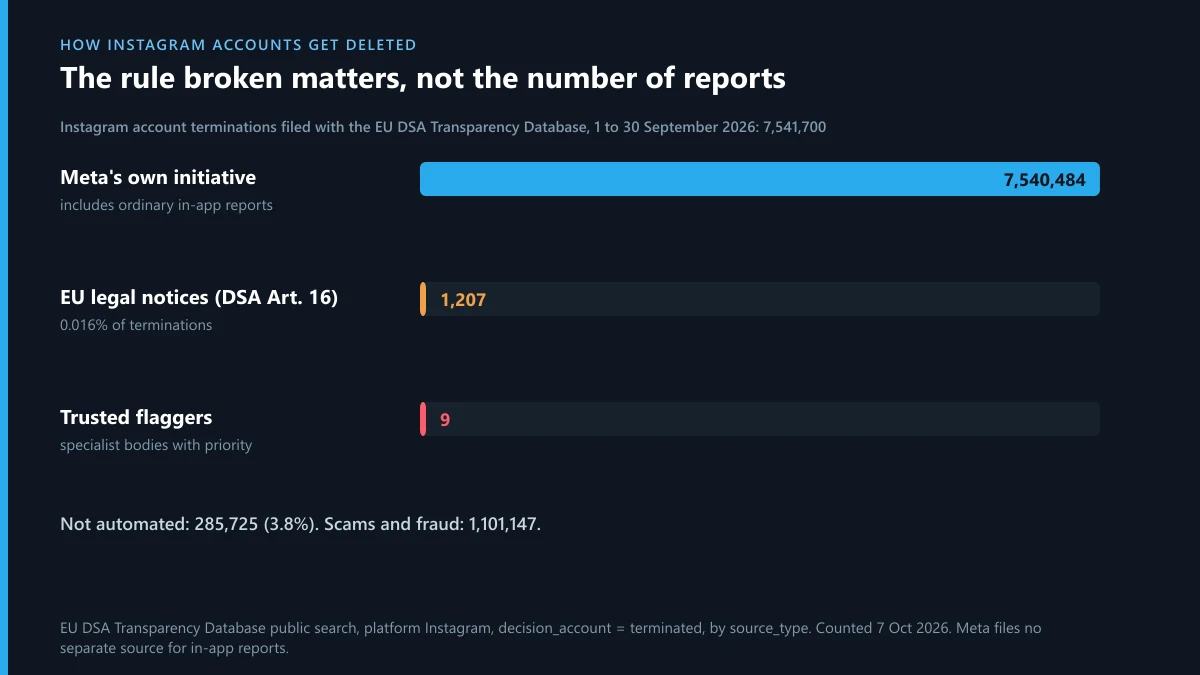
The September 2026 numbers show where deletions come from. Of 7,541,700 Instagram accounts terminated in decisions filed with the EU database, 7,540,484 were recorded as Meta's own initiative. Formal notices under Article 16 of the Digital Services Act, the legal-notice route anyone in the EU can use, ended in 1,207 terminations. Trusted flaggers, the specialist bodies whose reports get priority, accounted for 9. Scams and fraud alone made up 1,101,147 of the terminations. Meta files no separate source for ordinary in-app reports, so those sit inside the own-initiative figure. Either way, the column that matters is the rule broken, not the headcount behind it.
That's why a stack of reports bought from a seller rarely does what was paid for. We've taken the sales pitches apart elsewhere: Instagram mass report scripts copied from GitHub, spam report bots aimed at Instagram profiles, the X report bots sold in the same Telegram shops, what a Telegram mass report bot really sends and report bots that are scams in their own right. Telegram works the same way. There's no report count that bans a channel, a Telegram ban needs a rule to have been broken, and a reporting service is only worth hiring if it files accurate reports through official routes.
When should you report an Instagram account to the police?
When the account has committed a crime against you, not just broken a rule. Instagram's page on dealing with conflict or abuse is blunt about the urgent case: “If you or someone you know is in immediate danger, please contact your local authorities straight away.” Below that line, it comes down to what the account did:
| What the account did | Police? | Alongside it |
|---|---|---|
| Threatened to hurt you or someone else | Yes; the emergency number if it's immediate | Report account, and keep every message |
| Demanded money to keep intimate images private | Yes | Don't pay, and report the account in the app |
| Shared sexual images of a child | Yes; in the US also the NCMEC CyberTipline | Don't screenshot or forward the images |
| Took money as a fake shop or investment page | Yes, as fraud: IC3 in the US, Report Fraud in England, Wales and Northern Ireland | Call your bank the same day |
| Posed as you to borrow money from your contacts | Usually, as fraud | The impersonation report |
| Insulted you or set up a mocking fan page | Rarely | Report it to Instagram |
Reporting an Instagram account to police doesn't delete it. What the police can do that you can't is get the data behind it. Meta's information for law enforcement covers Instagram as well as Facebook. Meta will preserve account records for an official criminal investigation “for 90 days pending our receipt of formal legal process”. Officers file requests through the Law Enforcement Online Request System at facebook.com/records, which needs a government-issued email address. Emergency requests skip the queue where a child faces imminent harm or someone risks death or serious injury. Meta also says it won't review requests from anyone who isn't law enforcement, so a victim emailing Meta for the owner's details gets nowhere.
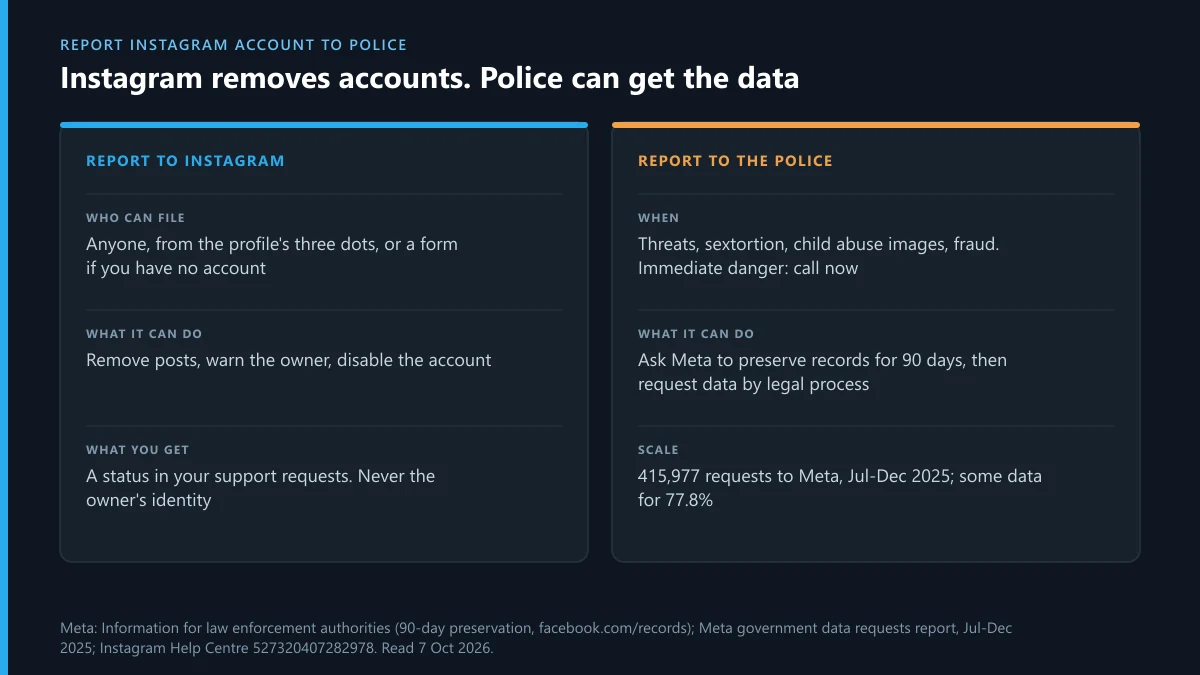
Those requests are routine. In Meta's government data requests report for July to December 2025, authorities worldwide sent 415,977 requests and some data was produced for 77.8% of them. US agencies alone sent 80,009, including 5,036 emergency requests, with data produced for 88.8%. Bring the officer what makes a request possible: the profile link, the username, dated screenshots, the messages and any payment records. Then send them to Instagram's law enforcement page, which Instagram itself tells you to point the police to.
When the Instagram account sends people to Telegram
Fake shops, investment “mentors” and impersonators rarely close the deal on Instagram. The profile is the shop window, and the payment, the blackmail or the leaked album sits in a Telegram channel or bot. Instagram's decision means nothing there, so report the Telegram end separately.
- A channel or group the page advertises. Start with reporting the group or channel it promotes. You can also file one report against the whole channel rather than its posts, or look at the routes that get a channel taken down and how a channel ends up deleted.
- Money taken by the same people. There's a Telegram fraud report and a guide to where a Telegram scammer can be reported outside the app. The public scammer lists people check first are worth a look before you trust any of them.
- Threats, sextortion or fake goods. Use reporting extortion and counterfeit sellers, or abuse reports on Telegram for harassment that followed you over.
- Your photos, posted or edited. These go through a DMCA notice to Telegram, a copyright complaint against the channel or reports on bots that fake nude images.
- The same fake under your name. See fake Telegram profiles that copy a real person, and taking down the account that runs it.
- Single messages, spam and bots. There's flagging one message at a time, a spam report Telegram acts on, reports on bots and already-banned numbers and who handles content that's actually illegal.
Retaliation is common once you report both ends, and a burst of counter-reports can get your own Telegram account restricted. If that happens, start with appealing a Telegram ban or unfreezing a frozen account. If you're simply locked out, there's getting back into your Telegram account, and a look at whether a recovery expert is worth paying. The fake account itself is reported to Instagram, not to them.
Sources
- Instagram Help Centre: Report a post or profile
- Instagram Help Centre: Report an account for impersonation
- Instagram impersonation report form
- Instagram Help Centre: What is About this account
- Instagram Help Centre: Report a user under the minimum age
- Instagram Help Centre: Disabled accounts
- Instagram Help Centre: How Instagram decides what to remove
- Instagram Help Centre: Ways to deal with conflict or abuse
- Instagram Help Centre: Information for law enforcement
- Meta: Information for law enforcement authorities
- Meta Transparency Centre: Government requests for user data, July to December 2025
- EU DSA Transparency Database: Instagram account terminations, September 2026 (counted 7 October 2026)
FAQ
How do I report an Instagram account if I don't have one?
Use one of Instagram's web forms if it fits: impersonation, intellectual property, trademark or an under-age account. Ordinary rule-breaking such as harassment or spam has no web form, so ask a friend with an account to report the profile from the app.
Will someone know I reported their Instagram account?
Not from an ordinary report. Instagram doesn't tell the account who reported it. The exception is an intellectual property report, where the rights owner's name and the reporter's email can be passed to the person reported.
How many reports does it take to delete an Instagram account?
There's no number. Instagram says the number of times something is reported doesn't determine whether it's removed. An account is disabled for the rules it breaks and how seriously or often, so one accurate report can do more than a hundred vague ones.
How long does Instagram take to review a reported account?
Instagram doesn't publish a time for in-app reports. For EU legal notices filed against Instagram content in the first half of 2026, Meta reported a median of 28.89 hours to act, counted only on the notices it acted on.
Can I report a private Instagram account?
Yes. The three dots and the Report option sit on a private profile even if you don't follow it and can't see its posts. Pick the reason you can back up, such as impersonation from its name and photo, or messages it sent you.
How do I report a fake Instagram account copying my friend?
Report it from its profile, choose pretending to be someone else, then Someone you follow, and point to the real account. Your friend can also use Instagram's impersonation form, which has an option for reporting on behalf of a friend.
What if Instagram says the fake account doesn't break its rules?
Check that you picked impersonation rather than spam or a general reason, since the reviewer tests the reason you chose. You can ask for the decision to be reviewed from your support requests, and the impersonation form lets you add proof of who you are.
Can the police make Instagram delete an account?
Not by filing a report. Police use Meta's law enforcement system to preserve and request account data. Removal is Meta's decision under its rules, or follows a court order, so report the account to Instagram as well.
Can I report an Instagram business page that sold me fake goods?
Yes. Report the account as a scam or fraud, keep the order and payment records, and contact your bank or card issuer straight away. If the goods carry a brand's name or logo, the brand owner can also file Meta's trademark form.