9 October 2026 · Telegram Ban Service · 13 min read
How to report a tweet, choose the reason that fits, and read what X sends back
To report a tweet, open the post's three-dot menu, choose Report, say who it affects and pick the description that fits. X confirms within 24 hours and sends updates by email and in the app. If the tweet is removed, the author is told which rule it broke, never who reported it.
Most guides to reporting a tweet stop at the Report button. The button is the easy part. What decides the outcome is the reason you pick on the next screen, and whether the problem belongs in the app at all. A copyright complaint, a leaked private photo or a post that breaks a national law each has its own X form, and the in-app menu can send them to the wrong queue. Then come the messages. X sends updates by email and in the app, and some of them are about your report while some only look that way. When a tweet is removed, the notice left in its place uses wording that's easy to misread. We read X's reporting guide and its page on post notices again on 9 October 2026. We also counted what X filed with the EU for the first week of October, to show which kinds of reports actually end in action.
How do you report a tweet on Twitter in 2026?
On the website and in both apps the route is the same, and it takes under a minute. Here's how to report a tweet on Twitter, now X:
- Copy the post's link and take a screenshot that shows the @handle and the date. If the author deletes it before X reviews it, the link is your proof that it existed.
- Open the three-dot menu on the post and choose Report. Older versions of the app called it the Twitter Report Tweet option; it's the same thing.
- Say who the report is for: yourself, someone else or a particular group, or everyone on X. Harassment rules turn on this answer, so be accurate.
- Describe what's happening. X's form is built around symptoms rather than rule names, so pick the description that matches what you saw.
- If X offers to add more posts from the same account, add the two or three clearest ones. One report can carry several posts, and X says that gives reviewers better context. On Twitter, reporting tweets one at a time from the same account adds less than one report with the posts attached.
- Check the summary screen. X shows what you're reporting and which rule it thinks may apply, so you can go back if the match is wrong.
- Decide on the checkbox Updates about this report can show these posts. Leave it ticked and the follow-up emails and notifications will quote the reported text. Untick it if you share a device or inbox, or just don't want to see the post again.
- Submit. X then suggests muting or blocking the account. Those are separate choices.
How do you report a tweet you saw in a direct message? Press and hold the message and choose Report message. To report the whole conversation, open the info icon and pick Report @username. Group messages can be reported the same way. A post report and a report of the whole account start from different places, too: the menu on the post, or the menu on the profile. Reporting the post is usually the better first move. Taking down a whole Twitter account is a different job with a higher bar, and the account route works best once you have several posts that show a pattern.
Which reason should you pick when you report a tweet?
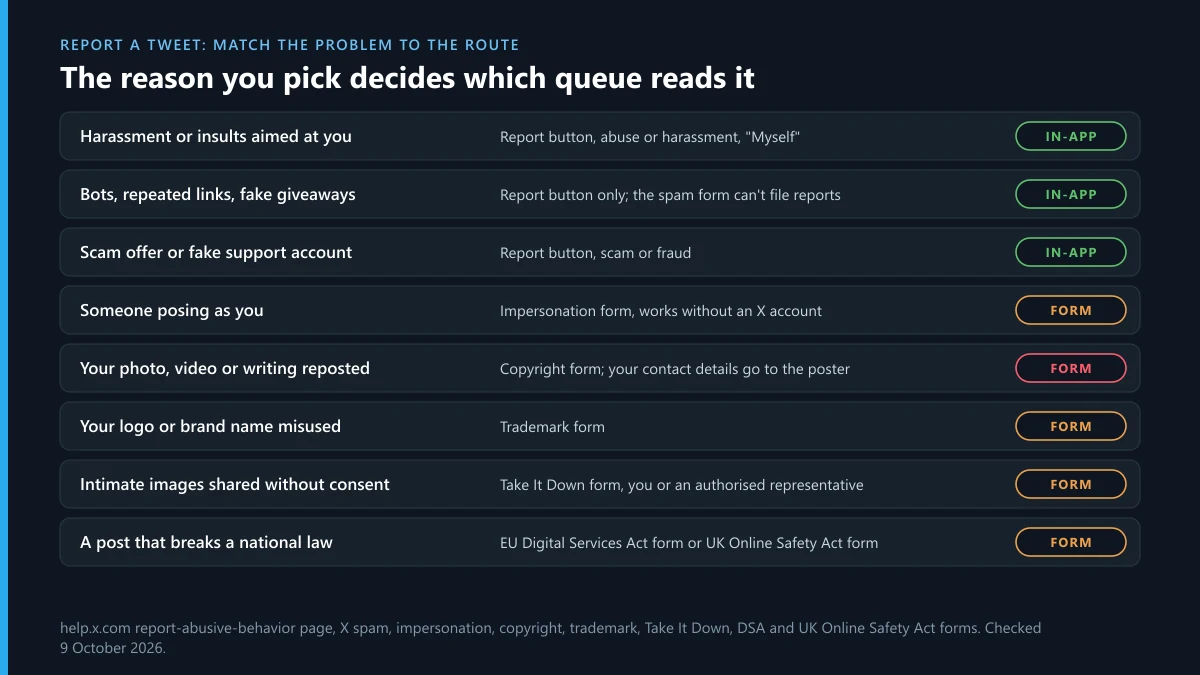
Pick the one that describes the harm, not the one that sounds most serious. A threat reported as spam lands with the spam filters and may never reach a person. Some problems shouldn't go through the in-app menu at all, because X handles them on separate forms that collect what a reviewer needs, such as proof that you own the work or have the right to file. The last column shows where the same problem goes on Instagram, for when a post has been shared to both.
| What the tweet does | Where to report it on X | The same problem on Instagram |
|---|---|---|
| Insults, pile-ons, unwanted sexual content aimed at you | In-app, abuse or harassment, "Myself" | Reporting harassment on Instagram |
| Bot replies, repeated links, fake giveaways | In-app only; X's spam form says reports can't be created there | Why Instagram spam report bots overpromise |
| A scam offer or fake support account | In-app, scam or fraud; the account route if it's the whole profile | Reporting an Instagram scammer |
| Someone posing as you or your brand | X's impersonation form, which works without an X account | When someone impersonates you on Instagram |
| Your photo, video or writing reposted | X's copyright form; it forwards your contact details to the poster | Filing an Instagram DMCA takedown |
| Your brand name or logo misused | X's trademark form | Instagram's trademark infringement report |
| Your address, phone or private photos posted | In-app, private information, or the Take It Down form for intimate images | A picture of you posted without permission |
| Threats to share intimate images unless you pay | In-app, plus local police; keep the messages | Reporting blackmail and sextortion on Instagram |
| A post that breaks a national law | X's EU form under the Digital Services Act, or its UK Online Safety Act form | Sending Instagram a legal request |
| Anything else that breaks the rules | In-app, closest matching description | How a post report works on Instagram |
The copyright row needs a warning. X sends the person who posted the material a copy of the notice, and that copy includes your name, address, phone number and email. If that worries you, an agent can file for you. Twitter reporting through the in-app button never shares your details with the other side. What the reported person sees after a report on X sets out every route side by side.
What do Twitter report notifications tell you?
Less than people hope, and not always about your report. After a report on Twitter, X's messages arrive in two places: your email, and the notifications tab in the app. They come in four kinds.
| Message | When it arrives | What it really tells you |
|---|---|---|
| "We received your report" | Usually straight away, but X allows up to 24 hours | The report is logged. Nothing has been decided. |
| A request for more information | During review | A reviewer needs something from you. Answer it, or the report may close as it stands. |
| An update saying X took action | When X acts on the reported posts or account | Some action was taken, anywhere from a warning to a permanent suspension. It may quote the post unless you unticked the box. |
| An in-app note that an account you recently reported was actioned | Any time after your report | Something happened to that account. X itself says this may or may not be related to your report. |
That last one trips people up. If ten people reported the same account, all ten may get the note, and the action may have been triggered by a different post entirely. Silence isn't a rejection either. X says reports are acknowledged within 24 hours and usually resolved in a few days, and some take up to 30. Instagram handles the reporter side differently: its updates land in the app's Support Requests, and reporting someone on Instagram walks through what that inbox shows.
There's no option in X's help pages to withdraw an in-app report once you've sent it. If you reported the wrong tweet, the review will simply find nothing broken. Instagram is more forgiving with intellectual property claims, and un-reporting a post on Instagram covers the retraction form it offers.
Tweet removed: what does each notice in its place mean?
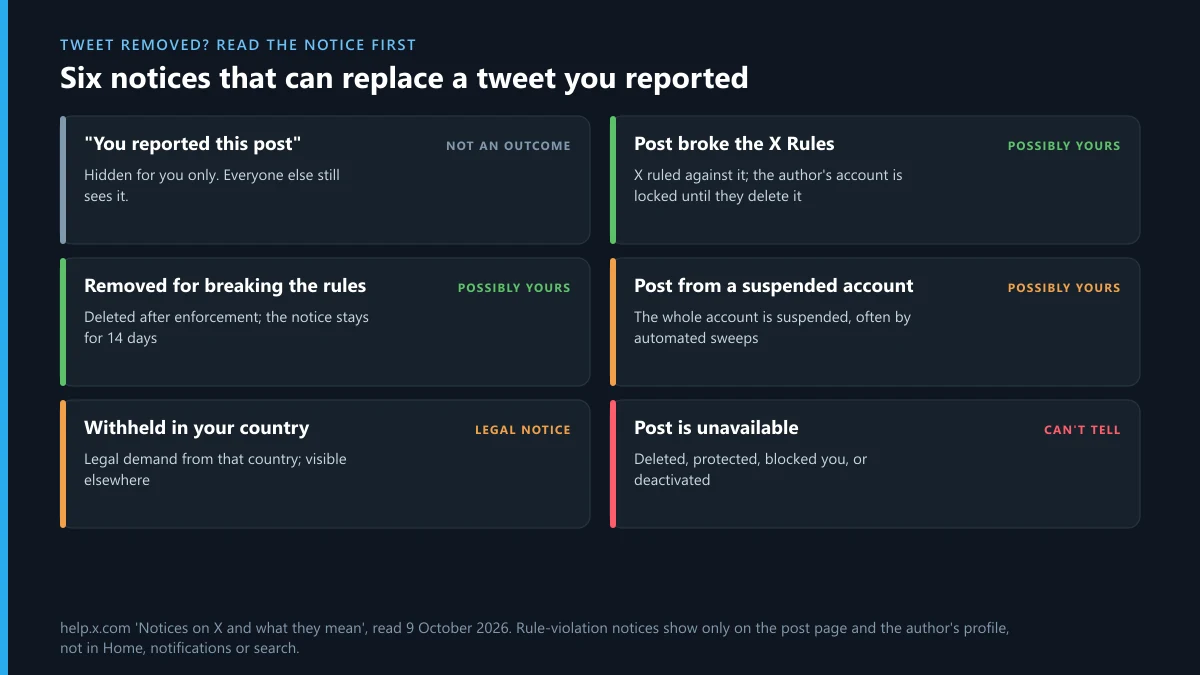
When you go back to a tweet you reported, you'll often find a grey notice instead of the post. They look alike, but they mean very different things, and only some of them point to your report. X's page on notices lists them all. Here they are in plain terms.
| What you see | What it means | Was it your report? |
|---|---|---|
| A notice saying you reported this post | X hid it for you only, with an option to view it again | Not an outcome. Everyone else still sees the post. |
| A notice that the post broke the X Rules | X ruled against it, and the author hasn't deleted it yet. Their account stays locked until they do. | Possibly. Someone's report or X's own systems found a violation. |
| A notice that the post is no longer available because it broke the rules | The author deleted it after enforcement. The notice stays for 14 days. | Possibly, same as above |
| A notice that the post is from a suspended account | The whole account was suspended | Possibly, though most suspensions come from automated sweeps |
| Withheld in your country | A legal demand from an authority in that country; it's still visible elsewhere | Only if you sent a legal notice |
| A sensitive-media warning | The post is up, behind a click-through. The X app for iPhone doesn't let you click through at all. | Not a removal |
| The post is unavailable | Deleted by its author, a protected account you don't follow, an account that blocked you, or a deactivated one | Can't tell from the notice |
Reported Twitter posts stay visible to everyone else until X decides. One detail from X's notices page matters for anyone checking up on a report. The rule-violation notice shows only on the post's own page and on the author's profile. It doesn't show in the Home timeline, notifications or search. So if a tweet you reported looks unchanged in your feed, open it directly before you decide nothing happened. A tweet removed for breaking the rules is also not the same as a tweet the author deleted to dodge the review. Both vanish, but only the first leaves the 14-day notice.
What if Twitter reported your own tweet as a violation?
If you're on the other side, the notice names the rule and the post, and it doesn't tell you who reported you. Your account is locked until you delete the post, or appeal if you think X got it wrong. X's enforcement list runs from limiting a post's reach, to making you delete it, to read-only mode, to suspension, and repeat violations move you up that list. A tweet reported once doesn't put your account at risk on its own. Twitter reports are judged on the content, not on how many people clicked Report.
If a rival seems to be organising reports against you, that's against X's rules on their side, not yours. X's Authenticity policy treats coordinated report campaigns and duplicate reports "in large numbers" as engagement spam. It also names paid third-party reporting services.
Which reports did X act on in the EU in early October 2026?
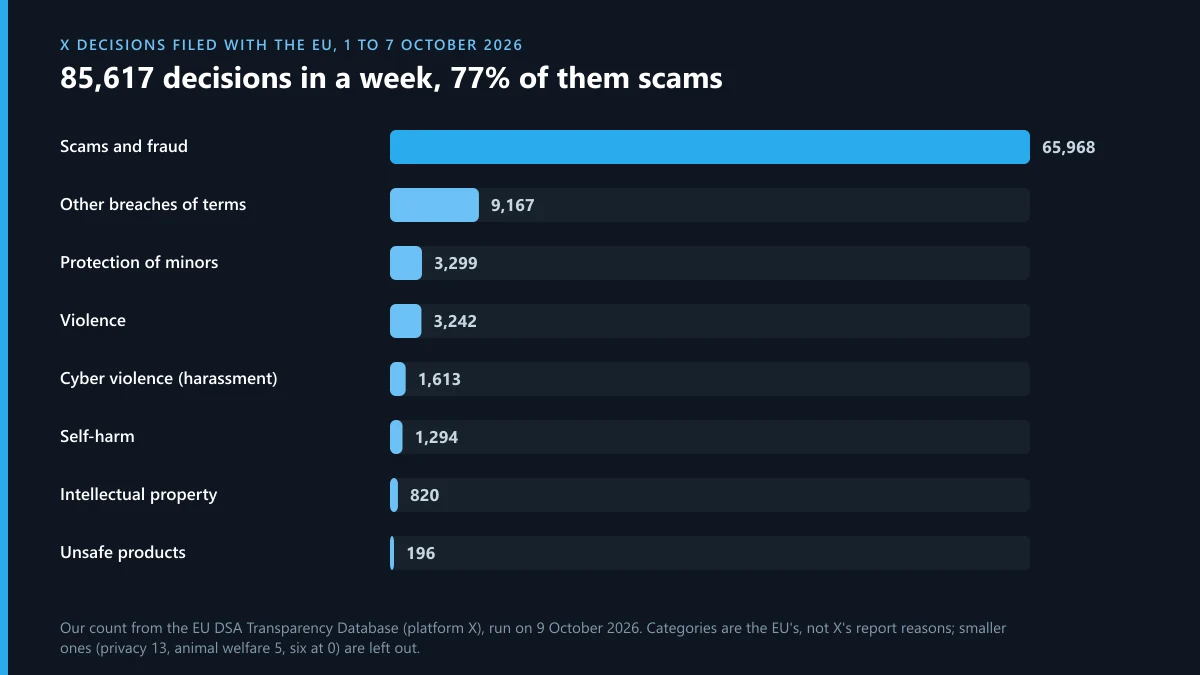
X has to file every moderation decision that affects EU users with the EU's DSA Transparency Database. On 9 October 2026 we counted X's filings for 1 to 7 October. They came to 85,617 decisions. 68,930 of them, about 80%, suspended an account, and a person made only 6,110 of the 85,617. The EU sorts decisions into its own categories, not X's report reasons, so the right-hand column is our closest match.
| EU category | X decisions, 1 to 7 Oct 2026 | Nearest route when you report a tweet |
|---|---|---|
| Scams and fraud | 65,968 | Scam or fraud, in the app |
| Other breaches of the platform's terms | 9,167 | Whatever fits; no single reason |
| Protection of minors | 3,299 | Child safety, in the app |
| Violence | 3,242 | Violent speech, in the app |
| Cyber violence, such as harassment and doxxing | 1,613 | Abuse or harassment, in the app |
| Self-harm | 1,294 | Suicide or self-harm, in the app |
| Intellectual property | 820 | X's copyright or trademark forms |
| Unsafe and prohibited products | 196 | Illegal goods, in the app |
| Data protection and privacy | 13 | Private information, in the app |
| Illegal or harmful speech | 0 | X files none here |
Scam accounts make up 77% of the week. With only 6,110 decisions made by a person, at least 59,858 of those scam decisions were automated. A report about an obvious scam account is joining a sweep that's already running. Harassment shows the opposite picture: 1,613 decisions in a week, filed as cyber violence, and none at all under illegal or harmful speech. Two categories have also grown fast. X filed 9,167 decisions under other breaches of its terms in seven days, against 492 for the whole of April to August 2026. Self-harm went from 431 over those five months to 1,294 in one week.
Older data from X's own EU transparency report shows which in-app reasons end in suspensions. Between April and June 2025, user reports led to 104,301 suspensions. 42,259 were for abuse and harassment, 26,653 for illegal goods, 18,439 for deceptive identities, 9,225 for spam and 3,143 for violent speech. In the same quarter, X's own systems suspended more than 27 million accounts for spam with no report at all. Reporting on Twitter matters most for harassment, sales of illegal goods and fake identities, where a person's report is often what starts the case.
Does it help to pay someone to file the report for you?
No. You don't need anyone's help to report Twitter abuse. A report is free, anyone with an account can file one, and X reviews it against the same rules no matter who sends it or how many times. What a paid service usually sells is volume: many accounts reporting the same post. X counts that as misuse under its Authenticity policy. We looked at what a Twitter ban service can legally file for you, and the honest version comes down to paperwork you could file yourself, such as a copyright notice through an agent.
The same pattern shows up on Instagram. The mass report bots shared on GitHub and Telegram run into the same review that a single report does. Paid Instagram ban services and Instagram account removal services promise results that only Meta can deliver. The real routes are slower and less dramatic: getting an Instagram account taken down on documented grounds, or seeing why you can't simply delete someone else's Instagram account. Reporting a whole Instagram page works much like the account route on X. And on both platforms the person you report isn't told it was you; whether an Instagram user finds out who reported them covers the cases where they work it out anyway.
For a case that's moving slowly, a better report beats more reports. Add posts that show a pattern, use the reason that fits, and keep your evidence. The evidence that gets a Twitter account suspended lays out that build-up step by step.
What if the trouble follows you to Telegram?
Reporting someone on Twitter sometimes brings retaliation somewhere else. Watch for login codes you didn't request or sessions you don't recognise on your Telegram account. If someone gets in, recovering a hacked Telegram account starts with ending their sessions before they change your cloud password. If you've lost access for another reason, such as a lost SIM, Telegram account recovery covers the routes Telegram offers. And if the harassment has made a Telegram account more trouble than it's worth, deleting your Telegram account explains what goes with it and the self-destruct timer.
Telegram won't act on a tweet, and X can't act on a Telegram channel, so report each piece where it lives. If you'd rather hand over the Telegram side, the buttons at the top of this page reach us.
FAQ
Can I report a tweet without an X account?
Not through the Report button, which only works when you're logged in. X's impersonation form is the main exception and accepts reports from people without an account. Most other X forms, including the copyright form, ask you to log in first.
How many times should I report the same tweet?
Once. A second report of the same post from the same account adds nothing, and many reports of the same post count as misuse under X's Authenticity policy. If the account keeps posting similar content, report the account and attach the new posts instead.
Why is the tweet I reported still up?
Either the review is still running, which can take up to 30 days, or X found no rule broken, or it limited the post's reach instead of removing it. Open the post directly rather than checking your feed, because rule-violation notices don't show in the Home timeline or search.
Does X email me when a tweet I reported is removed?
It sends an update by email or in-app notification when it takes action on what you reported, and the update quotes the post unless you unticked that box. No update doesn't mean the report failed. X also sends notes about action on accounts you recently reported that may not be linked to your report.
Can I report a tweet that has already been deleted?
No. Once the author deletes it, there's no menu to report from. Report the account instead and attach other posts, and keep your screenshot and link. For threats, take the screenshot to the police, since X works with law enforcement on investigations.
Will the author find out I reported their tweet?
Not from X. The notice they get names the rule and the post, not the reporter. The exception is a copyright notice, which X forwards with the filer's name and contact details. People sometimes guess from context, such as a reply to you being the only post removed.