11 October 2026 · Telegram Ban Service · 12 min read
How to get rid of bots on Twitter when 5, 500 or 5,000 of them follow you
How to get rid of bots on Twitter depends on how many there are. For a handful, open x.com in a browser and use Remove this follower, or block and report each one. For hundreds, clear them by hand in batches. For thousands, tighten your filters and let X's own sweeps lock them, because scripts that mass-remove followers break X's automation rules.
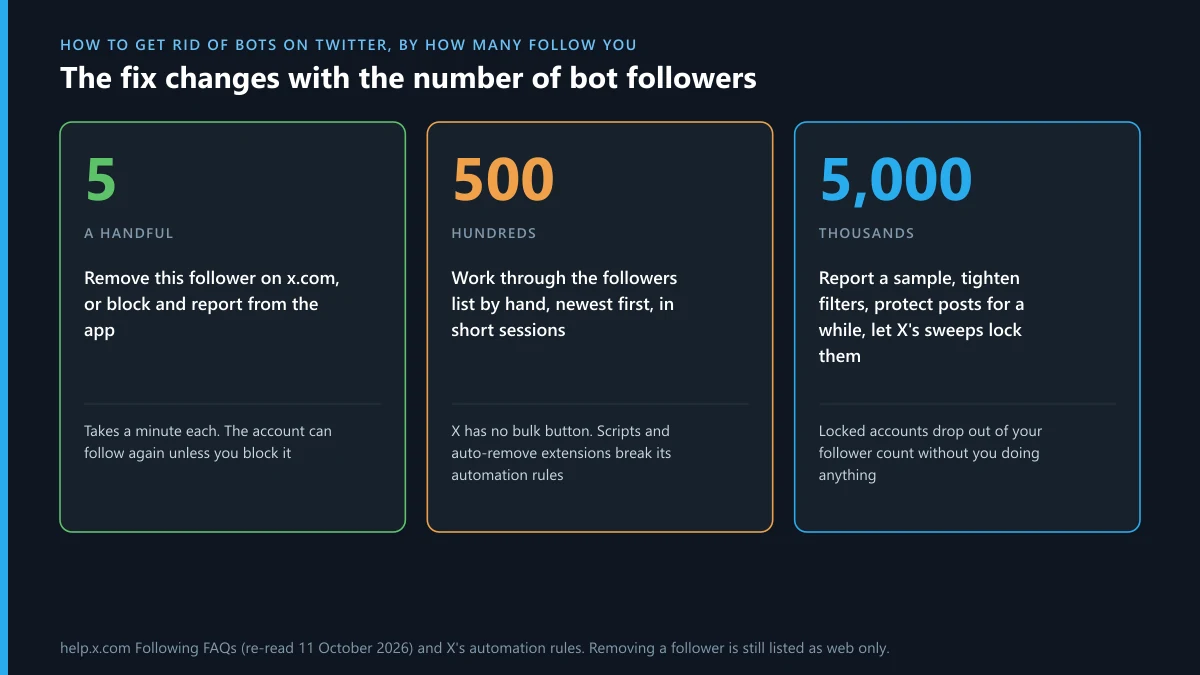
Advice about bot followers usually assumes you have three of them. Remove, block, report, done. That works until you open your followers list one morning and find four hundred accounts with eight-digit handles and no posts. X gives you no bulk button, and the tools that promise one tend to break X's own rules. So this guide is sorted by number. We re-read X's Following FAQs on 11 October 2026 to check what the remove option does today, and counted X's latest suspension filings with the EU to see how much of the clean-up X does without you. Spotting comes first, then removal at three sizes, then the settings that slow the next wave.
How to spot a bot on Twitter before you remove anyone
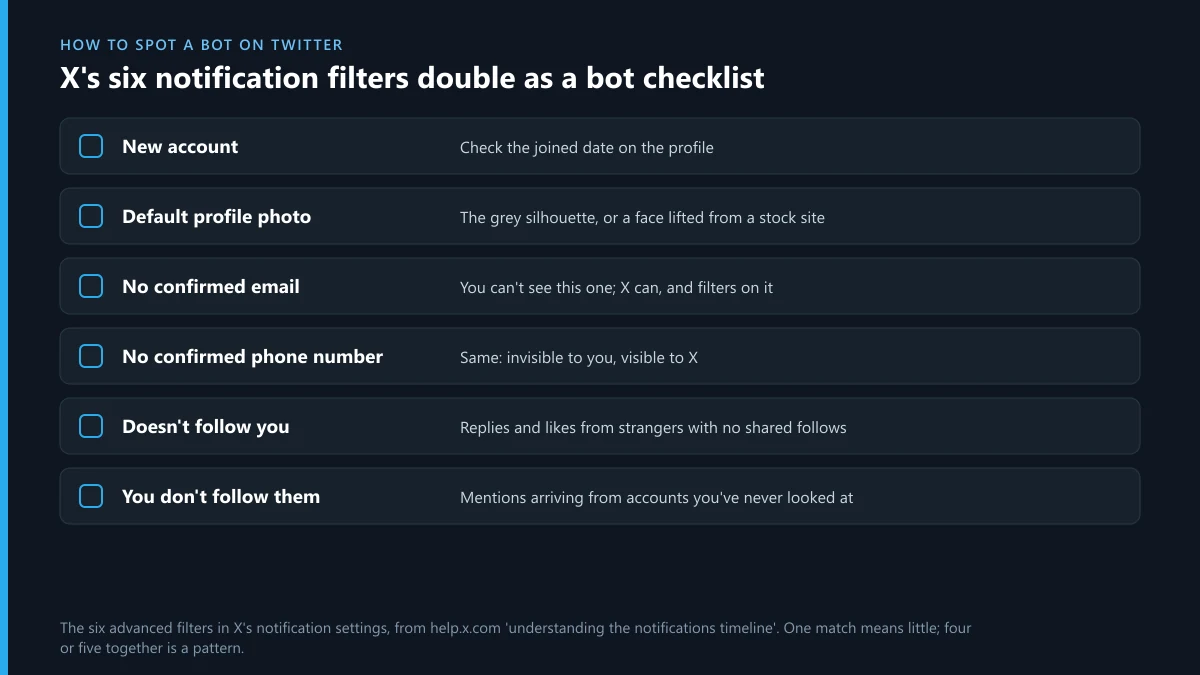
Look for several weak signs together, not one strong one. A new account isn't a bot. A new account with a default photo, a handle ending in a string of digits, no posts and 4,000 follows probably is. X has already written a checklist for you, though it doesn't call it that. The advanced filters in X's notification settings let you mute alerts from six kinds of account, and those six are the traits X itself treats as low-trust:
- accounts that are new
- accounts with a default profile photo
- accounts with no confirmed email
- accounts with no confirmed phone number
- accounts that don't follow you
- accounts you don't follow
You can check three of these by eye on any profile. Add what the filters can't see: a bio that is only a link, replies that would fit under any post, and a following count stuck near 5,000, the point where X starts limiting further follows. Four or five matches is enough to act on. Being wrong costs little, since a real person you removed by mistake can follow you again.
Why do bots follow me on Twitter?
Because following is free and you might look back. If your first thought was "why are Twitter bots following me, of all people", the answer is that they aren't picking you. A script follows thousands of accounts and hopes a few percent visit the profile, where the bio link does the selling. During X's "Not A Bot" test in 2023, new accounts that didn't pay the $1 fee couldn't post, like or reply, but could still follow, which says a lot about how cheap X considers a follow to be.
The usual triggers are ordinary. You posted a word a script watches for, such as a coin name, a wallet brand or "giveaway". You followed a big account and its newest followers got scraped. Or the bots are padding their own history so they look lived-in before someone buys them. When people write "Twitter spam accounts following me in batches of twenty", it's almost always that last kind, and nothing you did caused it. What they want from you is a follow back, a profile visit or an opened DM. Give them none of the three and most move on.
How to remove bot followers on Twitter when it's only a handful
Use a browser, not the app. The steps in X's Following FAQs say "tap or click", but when we opened the page on 11 October 2026 the note under them still read that removing a follower "is available on web only". The same steps answer how to remove bot followers on X from a phone, as long as you use the phone's browser:
- Open x.com in a browser and log in.
- Go to your profile and open the Followers list. The newest followers are at the top, which is where a fresh batch of bots will be.
- Click the three-dot icon beside the account and choose Remove this follower, then confirm.
- Or open the bot's profile, click the three dots there and pick the same option.
The catch is in X's own text: a removed account can follow you again if your posts are public. For a bot that keeps coming back, block it. A block forces the unfollow and stops a new one. If you'd rather not keep a long block list, block and then unblock a minute later, which leaves the account unfollowed without the block. For a dozen accounts this takes less time than reading about it. People who search "remove bot followers Twitter" often expect a hidden setting, and there isn't one.
How to get rid of bot followers on Twitter when there are hundreds
By hand, in short sessions, and with a rule for what counts. The method for how to get rid of bot followers on X doesn't change at this size. It just takes longer. Work from the top of the Followers list, since it's sorted newest first and a bot wave arrives together. Decide on your test before you start, say three of the signs from the checklist, so you aren't judging each profile from scratch. A hundred removals is about twenty minutes.
What you shouldn't do is hand the job to a script. X's automation rules, updated in April 2026, forbid "non-API-based forms of automation, such as scripting the X website", and name permanent suspension as a possible result. A browser extension that clicks Remove for you is that kind of script, running on your account. The same page says you're responsible for what connected apps do in your name. Losing the account to clean its follower list is a bad trade. The services sold as shortcuts are no better. We've looked at the mass report bots for X sold on Telegram, and their Instagram cousins, Instagram spam report bots and the mass report scripts passed around GitHub and Telegram. All three ask for your login or your money and deliver neither removals nor bans.
Is a Twitter bot follower checker worth using?
For a big account, sometimes. For most people, no. A Twitter bot follower checker reads your follower list through X's API and scores each account on the same signs you can see yourself: age, photo, post count, follow ratio. It can't see confirmed emails or phone numbers. Only X can. So a checker gives you an estimate, and X has no official one to compare it with.
The price tells you who these tools are for. X's API pricing charges an outside app $0.010 for each follower record it reads. Auditing 10,000 followers costs the tool about $100 before it makes a cent, so a free checker is either sampling a small slice or earning from you some other way. Before you connect one, read the consent screen. A checker needs read access and nothing more. If it asks to post, follow or read your DMs, close the tab. The audit also doesn't remove anyone. You get a list, and the clicking is still yours.
What can you do when thousands of bots follow you at once?
Less than you'd like, and X does more than you'd expect. You can't remove 5,000 accounts by hand in any sensible time, and you can't script it. What you can do is protect your posts for a few days, so that new followers need approval, and report a sample of twenty or so from the wave. Then wait.
The waiting isn't wishful. We counted X's filings in the EU's DSA Transparency Database for 1 to 10 October 2026. X logged 172,474 decisions in those ten days, 148,831 of them account suspensions. The scams and fraud category, where X files its platform-manipulation cases, held 144,966, and 143,380 of those were fully automated. That's 98.9% decided with no person involved, in the EU alone. Bot waves are found by pattern, and a wave that hit you hit others too.
When X locks those accounts, your number moves by itself. The Following FAQs put it plainly: "When accounts are locked, we remove them from follower counts across profiles globally." Take a dated screenshot of the spike if you're worried it looks bought. X's rules punish buying and selling followers, and being followed isn't either one.
How to stop bots from following you on Twitter
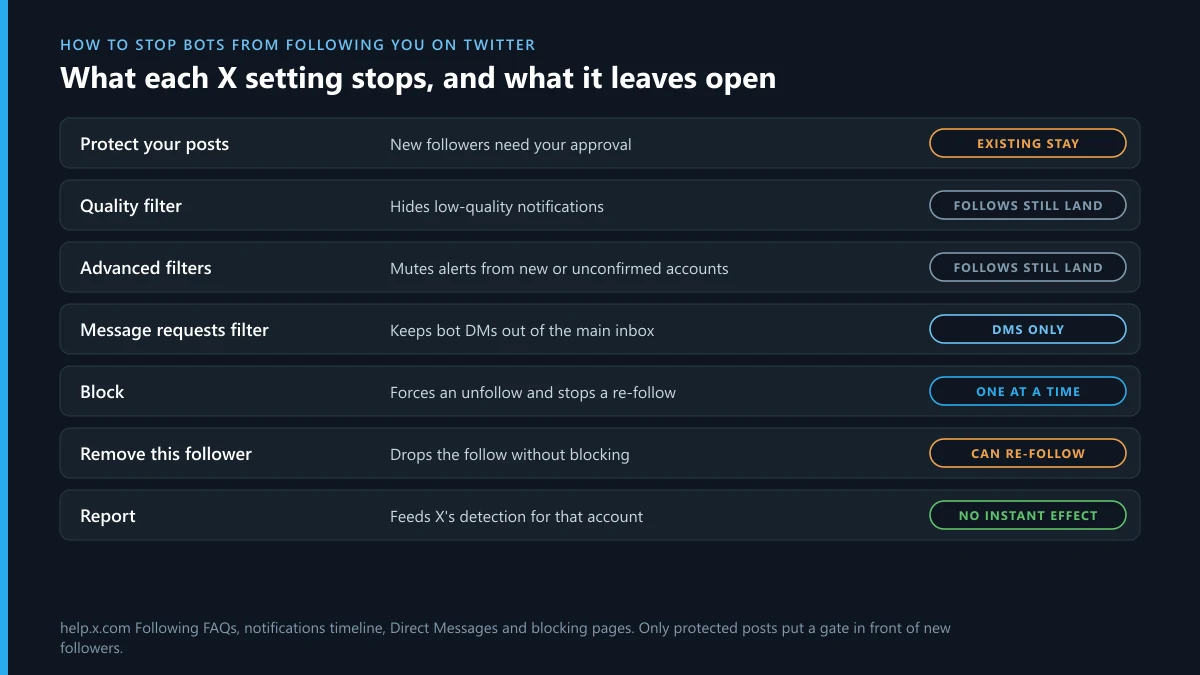
Only one setting puts a gate in front of a follow, and that's protecting your posts. Everything else hides bots from you without keeping them off your list. That's the honest answer to how to stop bots on Twitter: you can stop seeing most of them, and you can stop a few from following. Here's what each control does.
| Control | What it stops | What it leaves open |
|---|---|---|
| Protect your posts | New followers have to request, and you approve each one | Followers you already had stay. Your posts can't be reposted or seen by non-followers |
| Quality filter | Low-quality notifications. It's on by default for new accounts | The follow still happens. You just aren't told |
| Advanced notification filters | Alerts from the six account types listed above | Same: hidden, not blocked |
| Message requests filter | Bot DMs reaching your main inbox | Has no effect on follows, likes or replies |
| Muted words | Replies and mentions containing bait words such as coin names | Doesn't touch the follower list |
| Block | That one account following you again | The next account from the same operator |
If you'd like public posts, turn on the quality filter and at least the "new account" and "default profile photo" filters, then stop feeding the scripts: don't follow back, don't click bio links, don't reply to the bait. Protecting your posts is worth it for a week during a wave, and for good if you never wanted an audience of strangers.
How to block bots on Twitter, and what a block changes
Open the profile, tap the three dots and choose Block. You can also block straight from a reply or from a notification. The bot stops following you, can't follow again, and can't reply to you or message you. If you're wondering how to get rid of bots on Twitter that keep answering your posts, this is the quickest move.
A block doesn't hide you, though. Since late 2024, X's blocking page has said that if your posts are public, accounts you've blocked can still see them. They just can't engage. So blocking is a tool for your follower list and your replies. It isn't a privacy tool, and it won't keep a scraper from reading your timeline. It's also one account at a time. X has no import for block lists today, so blocking suits the persistent few and does little against a wave.
How to report bot accounts on Twitter
From inside the app or x.com, on the bot's profile: three dots, Report, then the spam or fake-account reason. X has no web form for bots, so you need to be logged in to report a Twitter bot. Report the account when the whole profile is automated, and report a single post when a real-looking account sent one spam reply.
Keep your expectations modest. One report doesn't summon a reviewer. It adds a signal to the detection that produced the numbers above. We've written up what X does with a report after you send it, and for bots the usual answer is a lock and a phone or email challenge the bot can't pass. Don't file the same report from several accounts, because X treats repeated reporting as spam in its own right. If a bot operation is aimed at you personally, with copied photos or threats, you're past bot clean-up and into the steps X takes before it suspends an account and the routes that can take a Twitter account down. Be wary of anyone selling speed. Our review of what Twitter ban services really sell found mostly the same repeated reports X ignores.
Why are Twitter bots liking my tweets?
To put a name in your notifications. Likes on X have been private since June 2024, so nobody else can see who liked your post. Only you get the alert. That makes a like a cheap, quiet advert aimed at one person: you see an unfamiliar name, tap it, and land on a profile whose bio link is the point. Complaints about "Twitter bots liking my tweets" within seconds of posting describe a script watching a keyword, and usually the same one that follows you a moment later.
X's automation rules ban automated likes outright, so every one of these breaks the rules and can be reported. In practice the faster fix is the notification filters from the table. With "new account" and "default profile photo" switched on, most bot likes never reach you, and a like that nobody sees has no value to the operator. Don't tap through out of curiosity. Twitter bots following me, liking a post and then sending a DM is one script doing three jobs.
What if the same bots turn up on Instagram or Telegram?
They often do, because the bio link has to lead somewhere. X can act only on X, so each platform needs its own report. This table sorts our Instagram guides by what the account is doing there.
Telegram is the other common destination. A bot that DMs you a "verification" link is usually after a login code. If you typed yours in and lost the account, start with getting a hacked Telegram account back. For a lost number or a code that never arrives, our Telegram account recovery walkthrough covers the rest. And if the spam has soured you on the app altogether, how deleting a Telegram account works explains what goes and what stays behind.
FAQ
Can bot followers get my X account suspended?
Not just by following you. X's rules target people who buy or sell followers and engagement, and being followed by bots is neither. If a sudden wave worries you, keep a dated screenshot of the spike and don't follow the accounts back.
Does removing a follower on X notify them?
No. X sends no alert when you remove a follower. The account simply stops following you, and its owner would only find out by checking your profile and seeing the Follow button again.
Will my follower count drop when X removes bots?
Yes. X's Following FAQs say locked accounts are removed from follower counts across all profiles, so your number can fall overnight after a sweep. That drop is the clean-up working, and it happens to everyone the same bots followed.
Can I remove all my bot followers at once?
No. X has no bulk remove button, and its automation rules forbid scripting the website, which is how auto-remove extensions work. The options are removing by hand, protecting your posts, or waiting for X to lock the accounts.
Does making my account private remove bot followers I already have?
No. Protecting your posts only changes what happens next: new followers have to send a request. Everyone who followed you before the switch stays on the list until you remove or block them.
Is there an official X tool that checks for bot followers?
No. X doesn't offer a follower audit. Third-party checkers estimate from public signs such as account age and post count, and they pay X for each follower record they read, so free ones usually sample only part of your list.