12 October 2026 · Telegram Ban Service · 13 min read
Telegram Username Check: What the App, t.me and Fragment Each Tell You
A Telegram username check has one reliable source: the Username field in Telegram's own Settings, which answers "available" or "already taken" as you type. A t.me link and Fragment help, but each misses cases. No online Telegram username availability checker or bot can ask Telegram that question directly, because the method is closed to bots.
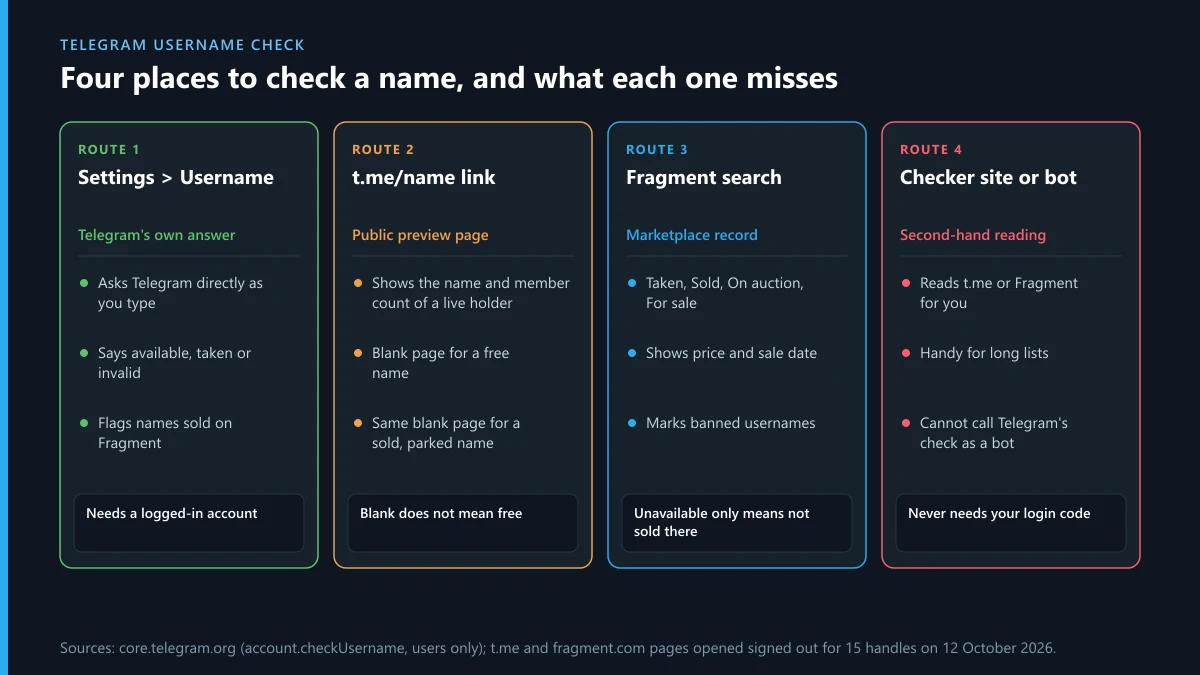
You have a name in mind. It might be your shop, your band, or the handle you already use on two other apps, and before it goes on a flyer you want to know whether Telegram will let you have it. On 12 October 2026 we opened fifteen handles on the two pages where a name can be looked up without an account, the t.me link and the Fragment marketplace, and set the results beside the messages Telegram's app is built to show. The pages disagreed more often than we expected. Two names that looked empty on t.me had been sold in 2022. A five-letter string we typed at random already belonged to a channel with one subscriber. So the short version is that three sources exist, one of them is authoritative, and the other two need reading with care.
How do you run a Telegram username check in the app?
The check is built into the field where you set a username, and it runs before you save anything. That makes it safe to use as a lookup, as long as you back out afterwards.
- Open Settings and tap Username on your own profile.
- Type the name you want, without the @ sign. The app shows "Checking username..." while it asks Telegram.
- Read the line that replaces it. Green means the name is free right now; red gives one of the reasons in the next section.
- Leave the screen without saving, unless you do want the name. Saving replaces your current username, and your old t.me link stops opening a chat with you.
For a channel or group the same check sits in the public link field that appears when you switch the type to Public. One limit applies there that doesn't apply to your personal name: Telegram's client configuration caps public channels and supergroups at 10 per account, or 20 with Premium, so a heavy channel creator can be refused a perfectly free name.
What does each message under the Username field mean?
The wording below comes from the string file in Telegram's open Android source, which we read on 12 October 2026. Behind the field sits a method called account.checkUsername. It accepts 5 to 32 characters drawn from letters, digits and underscores, ignores capital letters, and has exactly three error codes: invalid, occupied, and available for purchase on Fragment.
| What the app says | What it means for you |
|---|---|
| "[name] is available." | Free at this moment. Nothing is reserved until you save. |
| "Sorry, this username is already taken." | A user, bot, channel or group holds it. The app does not say which, or how active the holder is. |
| Taken, but "currently available for purchase" | The name is a collectible that can be bought on Fragment. Telegram will not assign it. |
| "A username must have at least 5 characters." | Too short for a basic username. Some short names carry the same purchase note. |
| "The username must not exceed 32 characters." | Too long. Trim it. |
| "Sorry, a username can't start with a number." | The first character has to be a letter. |
| "Sorry, this username is invalid." | A character or pattern Telegram rejects, such as a dot, a dash or a space. |
Two of these answers are final and one is not. "Available" and "invalid" mean what they say. "Taken" is the ambiguous one, and the rest of this page is mostly about working out what kind of taken you are looking at.
Can a t.me link tell you whether a Telegram username is available?
Partly. Typing t.me/ plus the name into a browser is the quickest way to check telegram username availability without logging in, and for names in active use it works well: you see the holder's display name and, for channels, a subscriber count. The trouble starts with the empty page. When nobody is using a name, t.me shows a generic card that says you can contact @name right away, with a Send Message button. We got that same card for names that are owned.
| Handle we opened | t.me, signed out | Fragment | How to read it |
|---|---|---|---|
| @durov | "Pavel Durov", 10,420,970 subscribers | Taken | In use by a channel |
| @telegram | "Telegram News", 9,354,124 subscribers | No page of its own; fell back to search results | In use |
| @username_bot | "Username Bot", Start Bot button | Taken | In use by a bot |
| @notoscam | "Report Impersonation", Send Message | Taken | In use by an account |
| @xqzvj (five random letters) | A channel with 1 subscriber | Taken | Held, barely used |
| @news | Empty contact card | Sold for 994,000 TON on 18 Nov 2022 | Owned, not pointed at any chat |
| @auto | Empty contact card | Sold | Owned, parked |
| @abcd | No name shown, a "Preview channel" link | Sold for 17,733 TON on 24 Nov 2022, marked BANNED | Owned and banned from use |
| Two invented 16 and 19 character names | Empty contact card | "Unavailable" in search results | Not sold on Fragment; most likely free, but only the app can confirm |
| 1testname, testname_, test__name | No page; redirected to telegram.org | No page; near matches offered | Not a valid username format |
Read the @news and @auto rows against the invented names: on t.me they are identical. Anyone judging telegram username availability from the link alone would have marked two six-figure collectibles as free. The redirect in the last row is useful, though. If t.me bounces you to Telegram's home page, the format itself is wrong and no amount of waiting will change that.
Is there a Telegram username availability checker online you can trust?
There is no official one outside the app. Every telegram username checker online that we found in search results on 12 October 2026, whether a hosted tool, a script or a browser page, gets its answer from one of the two public sources above. One hosted checker says so in its own listing: it infers availability from public preview pages and warns that results can change if Telegram alters the HTML. Others read Fragment and return its labels. That means a third-party telegram name checker inherits the blind spots in the table: it can't tell a free name from a parked collectible unless it queries both sources, and it can't see names Telegram has reserved.
They still have a use. If you are choosing among forty candidate names, a tg username checker that works through the list in a minute beats typing each one into Settings. Treat the output as a shortlist. Then check the two or three survivors in the app, which is the only place that speaks for Telegram. And don't pay for the lookup. The underlying pages are free to open.
Why can't a Telegram username checker bot give a definite answer?
Because the one method that knows is closed to bots. Telegram's documentation for account.checkUsername carries the line "Only users can use this method". A telegram username checker bot therefore has two options. It can read t.me and Fragment, like the websites do, or its operator can run an ordinary user account behind the scenes and pass your query through that. You have no way to tell which you are getting, and neither is better than opening Settings yourself.
The risk is in what some of these bots ask for next. A lookup needs a name and nothing else. If a bot wants your phone number, a login code that has just arrived in your Telegram chat, or a payment to "reserve" a name, close it; codes sent to you are for signing in to your account, and a stranger who has one is in. The pattern is the same one we documented with Instagram spam report bots sold inside Telegram and with mass report scripts passed around on GitHub and Telegram: a bot that promises something only the platform can do.
Telegram username already taken: what can you actually do?
It depends on which of two kinds the name is, and Telegram's FAQ entry on taken usernames treats them differently.
- Basic username. These go to whoever asks first. Telegram says it can help you acquire one for your account or channel if you already hold that same username on at least two of Facebook, Twitter and Instagram. The request goes to @Username_bot. The FAQ also says Telegram reserves the right to recall usernames from unused bots and channels and from open squatters, which is why near-empty holders like the one-subscriber channel in our table are worth a request.
- Collectible username. These are bought and sold on Fragment, with ownership recorded on the TON blockchain. Telegram states it cannot assign them. Your options are to see whether the name is for sale or to make the owner an offer through Fragment.
One case looks like this and isn't. If the name was yours last week and now shows as taken, nobody beat you to it: someone changed it from inside your account. That is a break-in, and the steps are in our guide to recovering a hacked Telegram account, starting with ending the intruder's session.
Does Telegram delete inactive accounts, and does the username come back?
Yes to the first part. Telegram's FAQ says that an account which does not come online for at least 18 months is deleted along with its messages, media, contacts and other cloud data. That 18 months is a default. The setting is called "Delete my account if away for", and the Android source lists six choices: 1, 3, 6, 12, 18 and 24 months. Coming online once restarts the clock.
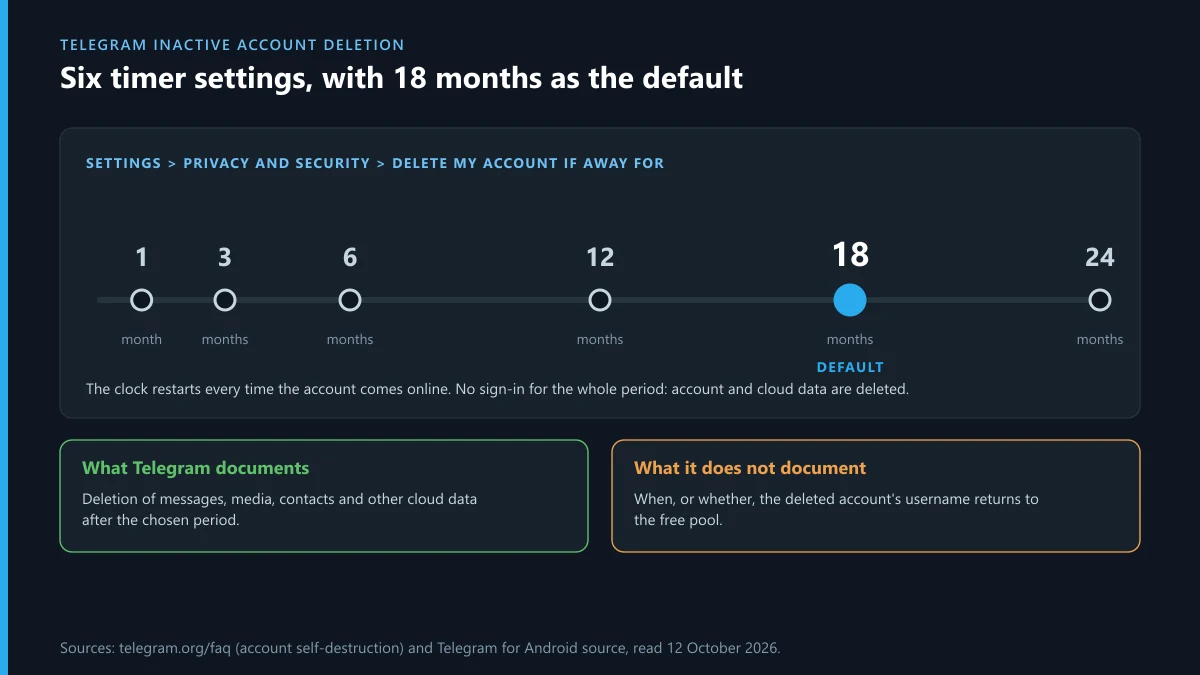
The second part has no official answer. Nowhere in the FAQ does Telegram say when, or whether, a deleted account's username returns to the free pool, and users on its public bug tracker report both outcomes. So telegram inactive account deletion is real, but it is not a schedule you can plan a name around. Two things are documented. An owner can skip the wait by deleting a Telegram account by hand, and channels outlive their creators, because the FAQ says groups and channels stay up with their admins when the creator's account goes. A name attached to a channel does not fall free because one person stopped logging in.
If the dormant account is your own, the question is different. Signing in before the timer runs out keeps both the account and its name, and our walkthrough on getting back into a Telegram account covers lost numbers and missing codes. A name stuck behind a restriction is a separate problem again; see what to do about a frozen Telegram account.
Is there a Telegram username hold after a change or a deletion?
Telegram publishes no hold period. Other platforms do (X, for one, says a deactivated account's name is kept for 30 days), and people arrive expecting the same rule here. We looked for it in the FAQ and in the API documentation for usernames on 12 October 2026 and found nothing that sets a number of days. What the sources do show is three situations in which a name stays out of reach.
- It was bought as a collectible. The owner keeps it whether or not it points at a chat, as @news and @auto showed.
- It is banned. Fragment's page for @abcd warns that banned usernames cannot be used until they are unbanned, with no guarantee that will happen.
- It is attached to a channel, group or bot that still exists, however quiet.
The practical advice follows from the uncertainty. If you hold a name you care about, don't release it to "move" it between your account and your channel unless you can do both steps in one sitting, because the app makes no promise about the gap. And if you are waiting on someone else's name, the Username field is your telegram username hold indicator: the day it turns green, the wait is over.
What if the account holding your name is copying you on Instagram or X as well?
This comes up more than you'd think, because of the two-of-three rule. People check a Telegram name, find it taken, go to confirm they hold it on Instagram and X, and discover a lookalike there too. Each of those is a separate report on a separate platform, and the right route depends on what the account is doing with your name.
| What the lookalike is doing | Where that complaint belongs |
|---|---|
| Using your name and photos as if it were you | Reporting an Instagram account that impersonates you |
| Trading under your registered brand | Filing an Instagram trademark infringement report |
| Reposting your videos, artwork or product shots | Sending an Instagram DMCA takedown notice |
| Posting a photo of you that you never agreed to | A picture of you posted on Instagram without permission |
| Taking payments from your customers | Reporting a scammer on Instagram |
| Threatening to publish private images | Making an Instagram blackmail report |
| Sending you or your followers abuse | Reporting harassment on Instagram |
| One post is the problem, not the profile | Reporting a single Instagram post |
| The whole profile is the problem | An Instagram page report against the account |
| The content is unlawful where you live | An Instagram legal request under local law |
| The same thing on X | How a Twitter account gets taken down, and what gets someone suspended on Twitter |
If you've never filed a report, start with the basics of how to report someone on Instagram. A common worry is being identified, so read whether the person will know you reported them first; for X there is a matching piece on what happens after you report someone on Twitter. And if you flag the wrong account, which is easy when two handles differ by an underscore, here is how to un-report a post on Instagram.
A report is not a delete button. We've written plainly about whether you can delete someone else's Instagram account (you can't; Instagram can) and about what it takes to get an Instagram account taken down. If you are thinking of paying for help, read what an Instagram account removal service can honestly offer, how an Instagram ban service differs from a report you file yourself, and the same for a Twitter ban service. None of them, ours included, can get a username transferred to you. That stays with the platform.
FAQ
How do I check if a Telegram username is available?
Open Settings, tap Username and type the name without the @ sign. Telegram checks as you type and shows either that the name is available or the reason it isn't. Leave the screen without saving if you only wanted to look. For a channel, the same check runs in the public link field.
Is there an official Telegram username checker online?
No. Telegram's own check lives inside the app and needs a logged-in account. The t.me link and Fragment are official pages you can open in a browser, but each shows only part of the picture, and every third-party checker we found reads one of those two.
Does Telegram delete inactive accounts?
Yes. By default an account that doesn't come online for 18 months is deleted with its messages, media and contacts. The owner can set the period to 1, 3, 6, 12, 18 or 24 months, and signing in once restarts the count.
How long is a Telegram username on hold after an account is deleted?
Telegram doesn't publish a hold period. Its FAQ describes account deletion but says nothing about when a deleted account's username becomes free again, and user reports conflict. The only sure test is the Username field in the app: when it says available, it is.
Why does the app say a username is taken when the t.me page is empty?
Most often because the name was bought as a collectible and isn't assigned to a chat. In our 12 October 2026 check, @news and @auto showed the same empty card on t.me as never-registered names, yet Fragment lists both as sold. Banned usernames can look empty too.
Can a Telegram username checker bot get a taken name for me?
No. Bots can't even call Telegram's availability method, let alone transfer a name. The only Telegram-run route is a request to @Username_bot, which considers basic usernames you already hold on two other major platforms. A bot that asks for your login code is phishing.
Can I get a four-letter Telegram username?
Not as a basic username; those need at least five characters. Shorter names exist only as collectibles traded on Fragment. The three four-letter names we opened, @news, @auto and @abcd, had all been sold, two of them in November 2022.