24 October 2026 · Telegram Ban Service · 12 min read
How to get a YouTube video taken down: name the ground first, then use the form built for it
To get a YouTube video taken down, decide which ground it breaks: a Community Guidelines rule, your copyright, your privacy, or a law. Rules go through More > Report, copyright through the removal request, privacy through the privacy complaint form, and legal issues through Google's legal form. Your own video you delete in Studio.
Most people who ask how to take down a youtube video have already pressed Report once, watched nothing happen, and started wondering how many more reports it needs. The count was never the problem. YouTube removes a video when the person filing names a ground the video actually breaks and sends it through the channel built for that ground. A copyright complaint sent as a "spam" flag, or a privacy problem sent as "harassment", lands with a reviewer checking the wrong rulebook. So this guide starts with the ground, then the form, then what you can expect back.
Which ground does the video break?
There are four grounds that get somebody else's upload removed, plus the simple case where the video is yours. Pick the row that describes the harm, not the one that sounds most serious. If two rows fit, file both: a re-upload of your video that also shows your home address is a copyright case and a privacy case at the same time, and each review runs on its own.
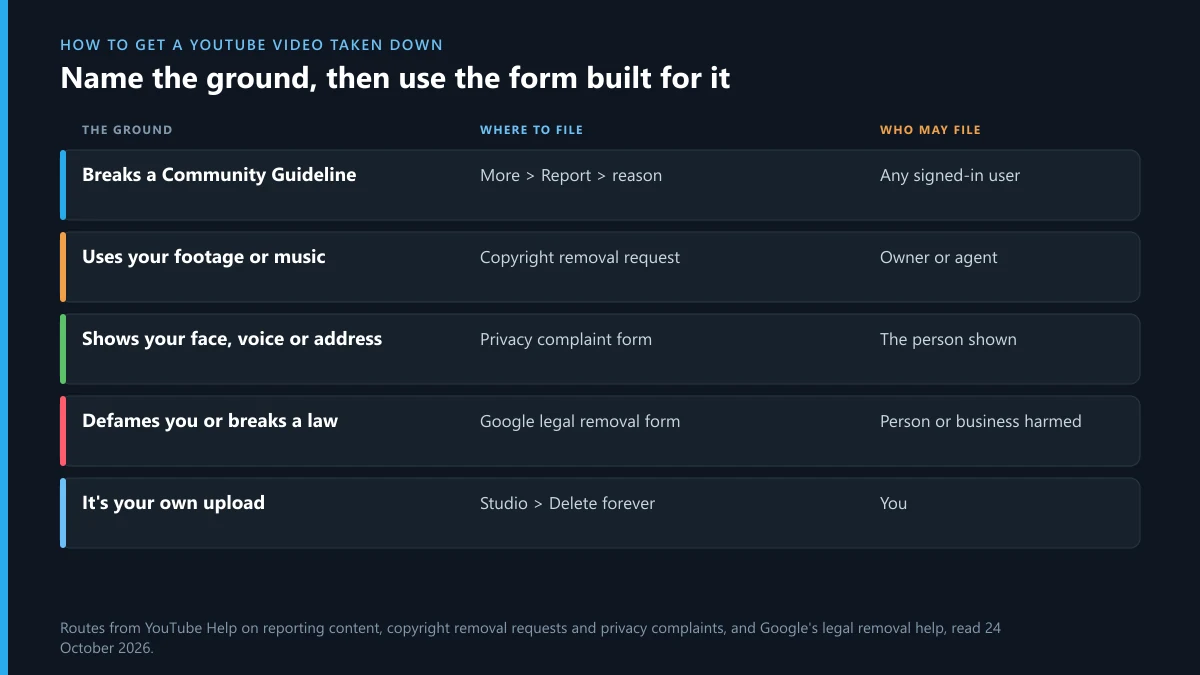
| What the video does | Ground | Where to file | Who may file |
|---|---|---|---|
| Scams, hate, harassment, sexual content, violence, spam | Community Guidelines | More under the video > Report | Any signed-in user |
| Uses your footage, music or artwork | Copyright | Copyright removal request | The owner or their agent |
| Shows your face, voice, name, address or ID | Privacy | Privacy complaint form | The person shown (or a guardian) |
| Defames you, uses your trademark, breaks a local law | Legal | Google's legal removal form | The affected person or business |
| It's your own upload | None needed | YouTube Studio > Delete forever | You |
How to get someone's YouTube video taken down for breaking the rules
This is the route for most bad uploads, and it's the answer to how do you take down a video on youtube that isn't yours. Sign in, open the video, click More (the three dots) under the player, choose Report, pick the reason that matches and submit. On a Short the three dots sit on the video itself. Use the details box: a timestamp and one sentence ("at 2:14 he reads out a phone number and asks viewers to call it") tells the reviewer exactly where to look.
YouTube's help page on reporting is plain about what follows: reported content "is not automatically taken down", and if it breaks nothing, "no amount of reporting will change that." If the video does break a rule, it's removed and the channel gets a warning or a strike. The full menu for videos, channels and comments, with which reason to pick, is in our walkthrough of YouTube's report buttons. If what you're dealing with is a person targeting you across many uploads, read what YouTube counts as harassment before you file, because the policy has thresholds that decide whether a video comes down or stays.
How many reports does it take to get a YouTube video taken down?
None beyond one good one. People search how many reports to get a youtube video taken down, or how many reports to take down a youtube video, because they assume a threshold triggers removal. YouTube's flags page says reviewers check flagged videos "against all of our Community Guidelines and policies, regardless of why they were originally flagged", and its enforcement report says "suspicious or exceptionally high flagging volumes" are identified and set aside. In April to June 2026 users sent 82,393,855 flags on 23,484,860 videos, yet only 123,855 removals that quarter started with a user flag. Coordinated mass flagging isn't a shortcut; it gets filtered out, and organising it can break YouTube's own rules on abuse of reporting.
How to request YouTube to take down a video that uses your work
If the upload is your footage, your song or your artwork, the strongest route is the copyright removal request, and it's how to ask youtube to take down a video with legal weight behind it. Only the copyright owner or someone authorised to act for them, such as a lawyer, may file. YouTube's copyright removal page lists what a valid request needs: your contact details, a description of the work, direct links to each infringing video, two legal statements, and a signature.
- Open YouTube Studio, go to Content detection (some help pages still call it Copyright), then Removal requests, and click New request.
- Paste each video link. You can't file against a whole channel or playlist, so every upload needs its own link.
- Choose removal now, or schedule it: a scheduled request "gives the uploader 7 days to take action and avoid a copyright strike."
- Tick "Prevent copies" if you control the work worldwide, so matching uploads are blocked in future.
The trade-off is your identity. The copyright page says your full legal name "may be shared with the uploader", and the request may be published to the Lumen database. A takedown youtube video request on false grounds is also risky: the uploader can counter-notify, and misrepresentation can bring legal liability. Every accepted request is a strike on the channel, and three active strikes terminate it. The same notice works on other platforms with small differences in the form, laid out for filing a DMCA takedown on Instagram and sending a DMCA notice to X.
Does youtube take down videos with copyrighted music? Often not. Most music in uploads is matched by Content ID, and the label usually chooses to run ads on the video or mute the track rather than remove it. A strike only follows when the owner files a removal request. So will youtube take down my video with music? It can, but a claim is far more common than a takedown.
How to have a YouTube video taken down because it shows you
Videos that show your face, your voice, your full name, your address or your ID number go through the privacy complaint form, not the Report menu. YouTube says it won't share your name or contact info with the uploader, and it may give the uploader time to blur or cut the part first. The test is whether you're uniquely identifiable in the video, weighed against things like public interest and whether you consented. A step-by-step on that form, with the reply emails decoded, is in our guide to YouTube's privacy complaint.
Two cases need faster handling. Intimate images shared without consent have their own Google removal form, and in the US the TAKE IT DOWN Act now gives platforms 48 hours to act on valid requests. Threats or extortion belong with the police as well as YouTube; a takedown removes the video, not the person.
When the ground is a law, not a YouTube rule
Defamation, trademark misuse, court orders and local legal restrictions go through Google's legal removal form, reached from YouTube's help centre under "Report a legal issue". Pick the issue type, give the country whose law you rely on and explain which statement is false or which mark is used. Google may block a video in one country rather than remove it worldwide, so a successful legal request can still leave the video visible elsewhere. Google sends copies of legal notices to Lumen but doesn't share the sender's contact details. Instagram has its own version of this route, set out in making a legal request to Instagram.
Can private or unlisted YouTube videos be taken down?
Yes. YouTube's Community Guidelines say the policies apply to all types of content on the platform, "including, for example, unlisted and private content." So can youtube take down private videos, and can unlisted youtube videos be taken down? Both can lose a video and earn the channel a strike, and copyright tools scan uploads whatever their visibility. The practical limit is who can report: you can only flag a private video you've been invited to watch, and an unlisted one you've been sent the link to. Copyright and privacy forms just need the link.
For creators, that means will youtube take down private videos you uploaded? It can, if they break the rules. Switching a bad video to private doesn't make it safe, and doesn't cancel a strike already given.
How to take down your own YouTube video, Short or old channel
If the video is yours, you don't need YouTube's permission. Open YouTube Studio, go to Content, hover over the video, click Options (the three dots), then Delete forever, tick the box and confirm. That covers how to take down your youtube video, how to take down a youtube short (Shorts sit under the Shorts tab in Content) and how to take down old youtube videos in bulk: tick several rows and choose More actions > Delete forever. On the phone app, open the video in Your videos, tap the three dots and choose Delete. If you only want it hidden, set it to Private instead, which keeps the views and comments in case you change your mind.
To take down your youtube channel, go to youtube.com/account_advanced, choose Delete channel, sign in again, and pick between hiding the channel or permanently deleting it. Hiding keeps your videos private and recoverable; deleting removes them for good. How to take down an old youtube channel you can't sign into is a recovery problem first: run Google's account recovery with the old email or phone, and only then delete it. Telegram works differently, and the steps for that account are in deleting a Telegram account.
How to get a YouTube channel taken down
There's no single form that takes down a youtube channel. A channel goes when it collects three Community Guidelines strikes within 90 days, three active copyright strikes, or one case of severe abuse such as a channel built for scams or impersonation. So how to get someone's youtube channel taken down is really a question of evidence: report the channel itself with Report user for impersonation or spam, and report or file against each violating video so the strikes add up. If the channel copies a person, the impersonation route on other networks follows the same logic, explained for impersonation on X and for an account pretending to be you on Instagram. The account-level steps on other platforms are in getting an Instagram account removed, taking down an X account and reporting a whole profile on X.
What YouTube's October numbers say about takedowns
The EU's DSA Transparency Database shows what YouTube does with removal requests in practice. We counted YouTube's entries for 1 to 23 October 2026 on 24 October; the last days may still be filling in.
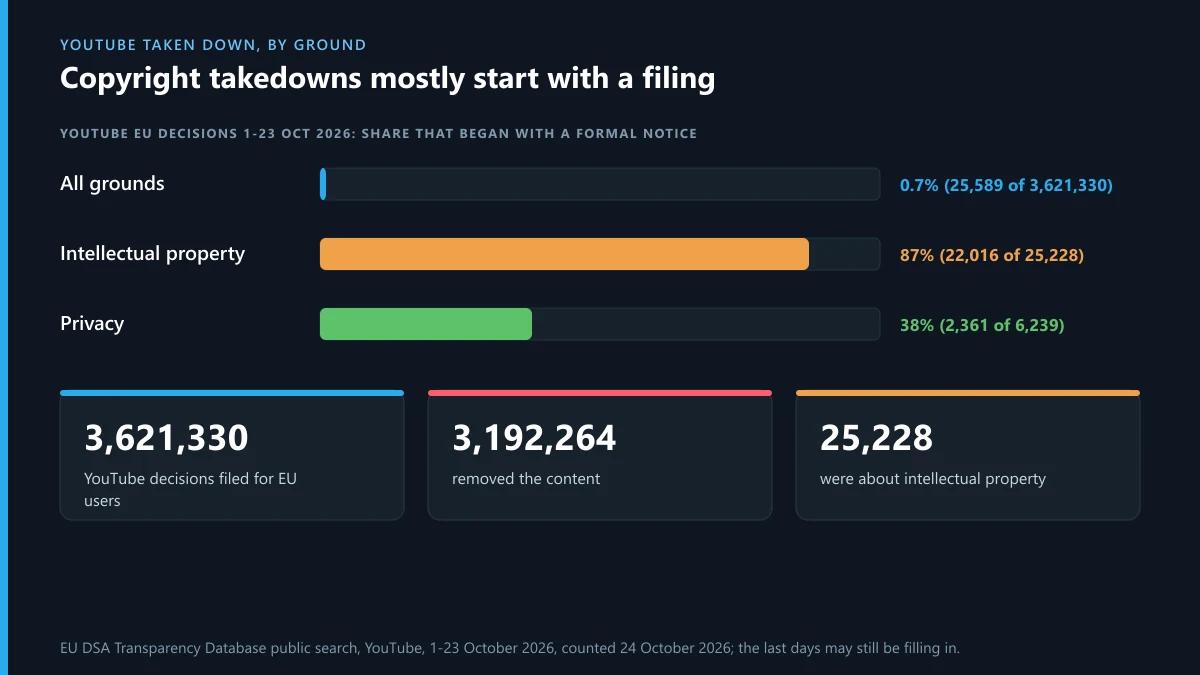
Of 3,621,330 moderation decisions for EU users, 3,192,264 removed content and only 25,589 (0.71%) began with a formal notice under Article 16 of the DSA; the rest YouTube found on its own. The ground changes the picture. Intellectual property accounts for 25,228 decisions, 22,016 of them (87%) from formal notices, and privacy for 6,239, with 2,361 (38%) from notices. A copyright or privacy complaint isn't a vote added to a pile; it's often the only reason the case exists. A well-filed form on the right ground is how videos taken down from youtube actually get there.
Can you watch YouTube videos that were taken down?
Usually not on YouTube. Once a video is removed, its address shows "Video unavailable" with a short reason, such as a copyright claim, a guidelines violation or a deleted account, and YouTube offers no way to play it. People asking how to watch youtube videos that were taken down, how to find taken down youtube videos or how to view taken down youtube videos usually end up in three places:
- The Internet Archive's Wayback Machine. Paste the old link into web.archive.org. You'll often find the title, description and thumbnail; the video itself was saved only for some popular uploads.
- Re-uploads. Search the exact title on YouTube and other video sites. Copies spread fast, and they may be removed too.
- The uploader. A creator who deleted their own video may still have the file and repost it.
Be careful with sites promising to download taken down youtube videos. Most only fetch archived copies that exist elsewhere, many are ad traps, and saving a video removed for copyright doesn't make the copy legal. If your video was the one taken down, the email and the Studio notice name the policy, and you have 90 days to appeal; in April to June 2026, 87,953 of 1,269,277 appeals got the video back.
Why did YouTube take down my video?
The removal email and the notice in YouTube Studio name the policy, and the copyright page in Studio shows who filed if it was a copyright request. Why does youtube take down videos it never warned about? Most removals are found by its systems, not by people: in April to June 2026, automated flagging spotted 98.6% of the 11,159,676 videos removed. How to not get your video taken down on youtube comes down to three habits: use music you've licensed or YouTube's Audio Library, blur faces and plates of people who didn't agree to be filmed, and read the policy for your topic before you upload.
Searches that look like this one but aren't
A few searches near this topic have nothing to do with removals. "Take me down youtube" usually means a song: Take Me Down by The Pretty Reckless or by Alabama, while "take me down to the little white church" is Little Big Town's Little White Church, and "take you down youtube" is the Chris Brown song. "Did project zorgo take down youtube" refers to a storyline from the Spy Ninjas videos; YouTube was never taken down. "Youtube takes down rick roll" is a long-running joke: Rick Astley's official video is still up and passed a billion views in 2021, though re-uploads of it get copyright claims like any other music. Searches for how to take down blinds youtube or blinds with hidden brackets want home tutorials, which you'll find by searching YouTube itself. And we don't cover how to take down a drone with lasers: aiming a laser at any aircraft can be a crime.
When the same content is on Telegram or Instagram
Videos removed from YouTube often reappear in Telegram channels. A channel that suddenly shows the "This channel cannot be displayed" notice has usually already been restricted. On Instagram, a single re-posted clip goes through the post report on Instagram, and if you worry about being identified, check whether Instagram tells people who reported them. Be wary of anyone on Telegram offering to "remove any video" for a fee in exchange for your login: if login codes you never asked for start arriving, read what Telegram's "limit exceeded" message means. Scammers often pose under handles close to real services, so checking who owns a Telegram username before you pay anyone is worth a minute, and if you hold a handle a scammer wants, selling a Telegram username safely explains how transfers work.
FAQ
Can I get a YouTube video taken down if it isn't breaking a rule?
Only if it breaks another ground: your copyright, your privacy or a law. If it breaks none of those, YouTube leaves it up however many people report it.
How long does a YouTube takedown take?
YouTube publishes no fixed time. Guidelines reports and privacy complaints are usually answered within days; a scheduled copyright request gives the uploader 7 days before it takes effect.
Can a private YouTube video be taken down?
Yes. The Community Guidelines apply to private and unlisted content, so a private video can be removed and the channel can get a strike. Only people who can see a private video can report it.
Will the uploader know I asked for the takedown?
Not for a report or a privacy complaint. For a copyright removal request, your full legal name may be shared with the uploader and the request may be published to the Lumen database.
Can I get a whole YouTube channel taken down in one request?
No. Copyright requests need a link for each video, and channels are terminated after three strikes in 90 days, three copyright strikes, or one case of severe abuse.
What happens if I file a false copyright takedown?
The uploader can counter-notify and get the video restored, and a request that knowingly misstates ownership can bring legal liability. YouTube can also stop accepting your requests.
Can I watch a YouTube video after it's taken down?
Not on YouTube. Try the Wayback Machine with the old link, search for re-uploads by title, or ask the uploader if they removed it themselves.
My video was taken down by mistake. What now?
Appeal from the notice in YouTube Studio within 90 days; a different reviewer decides. For a copyright strike, ask the claimant to retract it or file a counter notification.
Is there a YouTube takedown notice template?
You don't need one. The copyright form in YouTube Studio builds the notice from your answers, and the privacy and legal forms do the same.
Is a Reddit tip to mass report a video worth trying?
No. YouTube filters exceptionally high flagging volumes out of its data, and reviewers judge the video, not the number of flags. One precise report on the right ground does more.