14 October 2026 · Telegram Ban Service · 11 min read
This channel cannot be displayed: Telegram's notice, sorted by who sent it
The notice means Telegram's servers attached a restriction to that channel, group, bot or message, and your app is printing the sentence it was sent. There are four usual causes: an 18+ filter you control, a rule that applies only to app-store builds, a platform-wide block for copyright or other violations, or a country restriction.
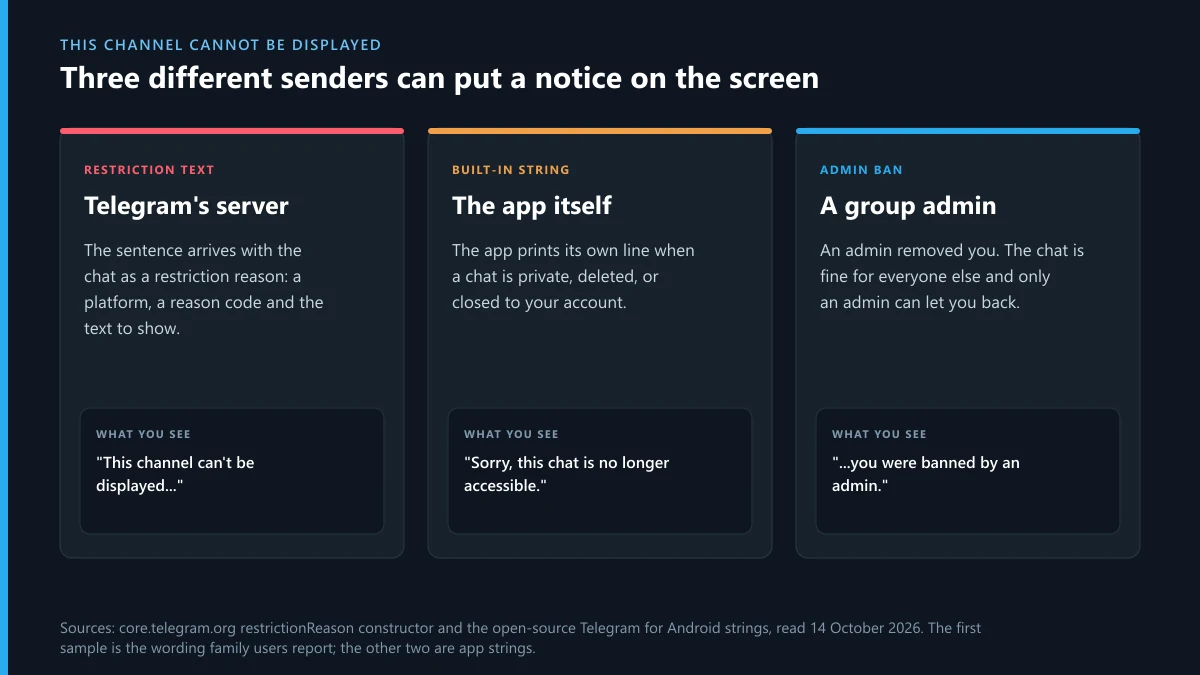
Most guides to this notice list six fixes and hope one works. We wanted to know where the sentence comes from first. On 14 October 2026 we downloaded the language file of the open-source Telegram for Android app, 933 KB of interface text, and searched it for "can't be displayed". There was no match. The app doesn't contain that sentence. It arrives from Telegram's servers together with the chat, and the app prints whatever it was given. That one fact decides which fixes can work and which can't, so the rest of this page is organised around it.
What does the "this channel cannot be displayed" Telegram notice mean?
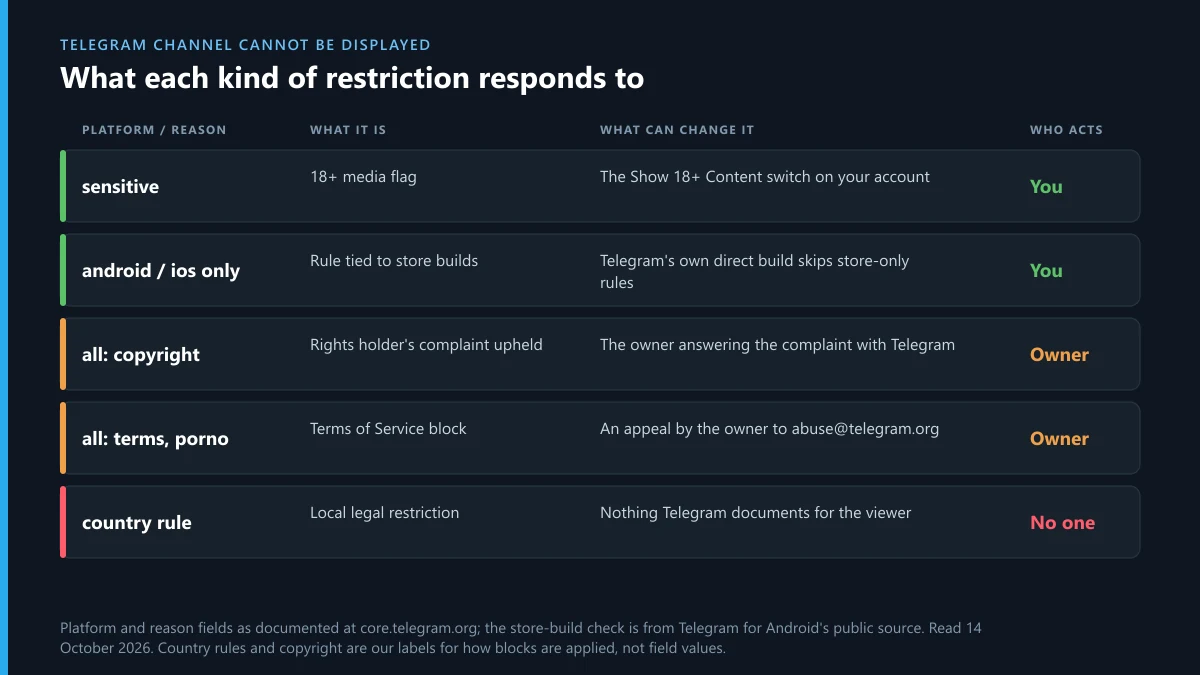
It means a restriction record is attached to the chat on Telegram's side. Telegram's developer documentation describes the record in the restrictionReason constructor, which has three fields. Platform says where the rule applies, with values such as ios, android or all. Reason is a short code, and the documentation gives porno and terms as examples. Text is described as the "error message to be shown to the user".
So the wording on your screen was written by Telegram for that specific restriction. This explains why people report slightly different sentences for the same problem, and why searches arrive as "telegram this channel cannot be displayed", "this channel can't be displayed telegram" or "telegram this channel can't be displayed". The app doesn't choose between cannot and can't. It prints what it was given.
The useful part of the record is the platform field. A restriction marked for one platform shows only there. A restriction marked all shows everywhere, on every phone, on desktop and on the web. If the same channel opens on your laptop and fails on your phone, you have learned that the rule is tied to the phone build and that the channel itself still exists.
Which version of the notice are you looking at?
Read the sentence again and match its last few words to the table. The reason is usually stated in the text itself. Where the text gives no reason, the test in the third column tells you more than the wording does.
| What the notice says or does | Who put it there | Quick test | What can change it |
|---|---|---|---|
| Media or the chat is covered by an 18+ warning | Telegram, with the reason code sensitive | A View Anyway button is offered | Your own Show 18+ Content setting |
| Can't be displayed, with a mention of pornographic content or of the app store | Telegram, for one platform | Opens in Telegram Desktop or on the web | The build of the app you use |
| Unavailable or blocked due to copyright infringement | Telegram, after a rights holder's complaint | Fails on every device and account | Only the channel owner, through Telegram |
| Blocked for violating Telegram's Terms of Service | Telegram's moderators | Fails on every device and account | Only the owner, by appeal |
| Can't be displayed because of local laws | Telegram, for a country | Friends abroad can open it | Nothing Telegram documents for viewers |
| "Sorry, this chat is no longer accessible." | The app itself | The link fails for everyone, or you were removed | Nothing, if the chat was deleted |
| "Sorry, you can't access this chat because you were banned by an admin." | A group or channel admin | Other members still post there | That admin |
The last two rows are quoted from the Android app's language file, where they do exist. The first five are our summary of the wording families users report, since Telegram publishes no list of restriction texts. If your sentence is short and gives no reason at all, such as a bare "this channel cannot be displayed", run the desktop test before anything else.
Is "Telegram: this group cannot be displayed" a different problem?
No. Groups, channels and bots carry the same restriction record, so "this group can't be displayed telegram" and "this group cannot be displayed telegram" are the channel notice with one word swapped. In Telegram's data model a large group is a kind of channel, which is why the two behave alike. People who type "telegram this group can't be displayed" or "telegram channel cannot be displayed" are looking at the same mechanism.
The notices that say unavailable or inaccessible are a separate family. "Telegram: this group is unavailable" and the shorter "telegram group unavailable" usually point to one of three plain causes:
- The group was deleted by its owner, or removed by Telegram.
- The group turned private and your old public link no longer leads anywhere. The app's text for this is "Sorry, this channel is private, so you can't view its content."
- Your account is limited. The Android file holds a line for it: "Unfortunately, you were banned from participating in public groups."
Telegram Desktop has its own wording for a dead chat, "Sorry, this group is not accessible." If you see that on the computer and the phone alike, the group is gone or closed to you, and no setting brings it back. If the third cause fits and your whole account is the thing being limited, the reading to do is what the ban screens on a Telegram account mean and which can be appealed.
When one message or one bot says it can't be displayed
Because restrictions can sit on a single message as well as on a whole chat. The search "this message cannot be displayed telegram" comes from people who opened a working channel and found one post replaced by a grey line. The channel is fine. One post in it drew a complaint or tripped a rule, and Telegram restricted that post alone.
Copyright is the usual case. A complaint names specific posts, and Telegram can restrict those posts without touching the rest. "Telegram: this message cannot be displayed" on three film uploads in an otherwise ordinary channel is that pattern. When complaints pile up, the whole channel tends to follow.
Bots work the same way as channels. The Android code that reads restriction records has a separate branch for bots, so "this bot can't be displayed telegram" is the same record attached to a bot account. Telegram's FAQ names "porn bots" as an example of public content it takes down to stay in the App Store and Google Play, which is why bot notices so often appear on phones and not on desktop.
How to remove "this channel cannot be displayed" in Telegram: what a setting can change
Two kinds of restriction respond to something on your side. The others don't, and it saves time to know which is which.
The 18+ switch
Telegram tags adult media with the reason code sensitive, and an account setting decides whether it's hidden. In the Android app the switch is called Show 18+ Content and sits in Chat Settings. Telegram Desktop lists it as Sensitive content under Chat Settings. The setting belongs to the account, so changing it on one device changes it on all of them. Telegram's API also carries a flag for whether an account may change the setting at all, and its documentation says some countries require age verification before restricted content is shown. If the switch is missing or greyed out for you, that is the reason.
Store build or direct build
We read the function that handles restriction records in Telegram's public Android source code. It shows the notice when the platform is all. When the platform is android, it shows the notice only if the app is not what the code calls a standalone build. In plain terms, a rule marked android applies to the Google Play version and is skipped by the version Telegram distributes itself. Telegram says as much on its own download page for Android, where the direct version is described as having "fewer restrictions".
That is an official Telegram app from Telegram's own site. It is a different thing from the modified clients that blogs recommend for this notice. A modified client asks for your login code, and whoever built it can read everything the account holds. We've handled enough stolen accounts to say plainly that a hidden channel isn't worth that trade.
What no setting touches
A restriction with platform all is enforced by the server for every app. Copyright blocks and Terms of Service blocks are of this kind. Changing builds, clearing the cache, reinstalling or logging in on another phone does nothing, because the answer is the same wherever the question is asked from.
Blocked due to copyright infringement on Telegram: can the channel still be opened?
No, and guides that promise otherwise are selling something. When a notice says a channel is unavailable due to copyright infringement, Telegram has acted on a complaint and the block applies to every viewer. People search for how to access a copyright infringement Telegram channel, or how to view copyright channels on Telegram, and the honest answer is that the content has been withdrawn from everyone, the way a video removed from any other platform is.
The complaint behind it follows a published route. The Telegram FAQ tells rights holders to write to [email protected], and adds that requests should come only from the copyright owner or an agent authorised to act for the owner. The same answer says Telegram doesn't process requests about private groups and chats, so these blocks land on public channels, groups, bots and sticker sets.
How to open a banned channel in Telegram gets the same answer for the same reason. A banned channel on Telegram is switched off at the server. What searchers usually find instead is a "mirror" channel or a bot that claims to unlock the original. Those are a well-worn way to collect login codes. If one has already had yours, go straight to the first steps after someone else gets into your Telegram account.
If you are on the other side, and the blocked channel was reposting your course, book or film, then the notice is the outcome you asked for. It's worth checking the channel's other handles, because pirates rarely run one.
How to leave a Telegram group that cannot be displayed?
Leave it from the chat list, without opening it. A restricted group often stays in your list and can't be opened, which hides the usual Leave button inside the group's profile. The chat list has its own controls:
- Android: press and hold the group in the chat list, open the menu, and choose Leave Group or Delete and exit. For a channel the option is Leave Channel.
- iPhone: swipe left on the chat in the list and tap Delete, then confirm leaving.
- Desktop: right-click the chat in the left column and choose Leave group or Leave channel.
If the entry returns after you delete it, do the same from Telegram Desktop or the web app, where the chat is sometimes still treated as open. Leaving doesn't affect your account. Staying in a blocked chat doesn't either, as far as anything Telegram publishes goes, but an account that sits in many blocked groups is worth tidying.
My Telegram channel is banned: how do owners get it reviewed?
By writing to Telegram, from the owner's account, with the channel link. That is the whole official process, and nobody outside Telegram can shortcut it. The FAQ's own line on this is short: if you think a bot, channel or sticker set was banned "for no apparent reasons", write to [email protected].
For people asking how to recover a banned Telegram channel, three things raise the odds of a reply that helps. Quote the exact sentence viewers see, and say which devices show it. Then answer the likely complaint: for a copyright block, show the licence or your authorship of the named posts, and for a terms block, say what you removed. Last, pick the right address. Copyright disputes go to [email protected] and everything else to [email protected].
For accounts in the EU, Telegram's Digital Services Act page adds a commitment in writing. Telegram says it will notify users of restrictions and guide them on how to possibly remove them, and that if it made a mistake it will lift or update the restriction. That is the nearest thing to a published answer on how to unban a Telegram channel. No timeline is given.
We don't take on channels that were blocked for a real violation, and no honest service can reverse one. When the owner's account was limited along with the channel, sort the account out first. The ways back into a Telegram account you can't open covers lost access, and Telegram's own recovery routes for numbers, codes and passwords covers the rest.
Starting again under a new name
Telegram publishes nothing on what happens to the username of a blocked channel, so don't plan around getting it back. Owners who rebuild usually need a fresh handle. Checking whether a Telegram username is free takes a minute, and how the Fragment username market prices names explains the paid side. From there, what buying a Telegram username involves and how owners sell a Telegram username they no longer use cover both directions. Anyone closing the old account altogether should read what deleting a Telegram account erases before they do.
How to unban a Telegram group, and which kind of ban is it?
The phrase covers three situations with three different people in charge. A banned Telegram group in the first sense was blocked by Telegram, and the owner's email described above is the only route. The other two are more common and much easier.
An admin banned you from the group. The app says so in words: you were banned by an admin. Only an admin of that group can undo it. They open the group's settings, go to Removed users, and take your name off the list. Telegram's bot documentation notes that an unbanned user doesn't rejoin automatically and has to come back through a link, so ask for a fresh invite at the same time.
You are the admin and want someone back. The same Removed users list is where you do it. Remove the person from the list, then send them the invite link.
Your account was limited from public groups. This follows spam reports against you, and Telegram's spam FAQ sends appeals to the @SpamBot account inside the app. It is a limit on the account. The groups themselves are untouched.
Banned Telegram groups and channels in 2026, by Telegram's own counter
Far more than most people guess. Telegram's moderation overview runs a live counter, and on 14 October 2026 it read 27,742,320 groups and channels blocked so far this year. We had noted the same counter on 6 October, when it stood at 27,126,529. The difference is 615,791 in eight days, or about 77,000 blocks a day.
At that rate, running into a blocked chat is ordinary. The same page puts child-abuse-related groups and channels blocked in 2026 at 450,012, a category in which no appeal is entertained and none should be.
Telegram's Terms of Service are four short lines: no spam or scams, no promoting violence on public channels, no illegal pornographic content on public channels, and nothing recognised as illegal in most countries. Nearly every platform-wide block traces back to one of the four, or to copyright.
The same content is on Instagram or X as well: which report fits each?
A Telegram block removes one copy. Channels that pirate, impersonate or extort usually advertise on other platforms, and each platform takes its own report. These are the pieces we point people to, grouped by what the account is doing.
On Instagram. The menu itself is walked through in the report options Instagram gives for a person. Abuse in comments and DMs goes through Instagram's harassment reporting, and threats to publish something unless you pay belong with reporting blackmail on Instagram. If you flagged the wrong post, see whether an Instagram report can be withdrawn. For whole accounts, read which violations get an Instagram account taken down and whether anyone can delete an Instagram account that isn't theirs. Paid help is covered in what an Instagram ban service can lawfully do and how Instagram account removal services operate.
On X. Start with how to report a single post on X or the menu for reporting a whole X account. Pirated material calls for a DMCA notice to X, and a brand name used to sell access calls for X's trademark complaint. A profile posing as you goes through the impersonation report on X. Published addresses or phone numbers go through the private-information report for doxxing. Swarms of fake followers pushing a channel link are covered in clearing bot accounts off an X profile.
For the account behind it all, the rule breaks that lead to an X suspension shows which reports count, the routes for taking down an X account sets them in order, and why nobody can delete another person's X account directly deals with the usual misunderstanding. What a Twitter account removal service is allowed to file describes the paid version.
What not to use. Channels that sell bulk reporting are a frequent source of the blocked-channel notices people land on this page with, since Telegram bans them too. Instagram mass-report scripts shared on GitHub and Telegram and Telegram bots that promise mass reports against X accounts explain why platforms discount that volume and what buyers lose.
FAQ
Does a VPN fix "this channel cannot be displayed" on Telegram?
Only where the restriction is tied to a country, and Telegram doesn't document how it decides that. A VPN does nothing for copyright blocks, Terms of Service blocks or the 18+ filter, which apply to the chat or the account wherever you connect from.
Why does the channel open on my computer and fail on my phone?
Because the restriction is marked for the phone platform only. Telegram's restriction record has a platform field with values such as ios, android or all. A rule marked for one platform is shown there and skipped elsewhere, so the channel still exists.
Is the notice the same as being banned from Telegram?
No. The notice is about the chat. Your account is unaffected and every other chat works. An account ban looks different: you are signed out, or the app tells you that you were banned from participating in public groups.
Will the channel owner know I tried to open a blocked channel?
Nothing Telegram publishes suggests so. A blocked channel is switched off at the server, and its owner has no tool that lists people who tapped a dead link. Telegram itself processes the request like any other.
Can a blocked Telegram channel come back?
Yes, if Telegram lifts the restriction after the owner writes in. Telegram's EU page says it will lift or update a restriction it applied by mistake. It gives no timeline, and viewers have no way to speed it up.
Should I report a channel that shows this notice?
There is nothing left to report. The notice means Telegram already acted. Report a new channel that reposts the same material, and include the blocked channel's link so moderators can see the connection.
How to recover a banned Telegram channel if you own it?
Write to [email protected] from the owner account with the channel link and the exact notice viewers see. For a copyright block, write to [email protected] with proof of your rights. Telegram is the only party that can lift the block, and it publishes no deadline.
Why do some messages in a channel vanish while the rest stay?
Restrictions can apply to single messages. A copyright complaint names specific posts, and Telegram can restrict those and leave the channel up. Repeated complaints against the same channel tend to end with the whole channel blocked.