19 October 2026 · Telegram Ban Service · 11 min read
How to report a YouTube channel, a single video or a comment, and what your flag actually sets off
To report a YouTube video, click More under it, choose Report, pick a reason and submit. To report a YouTube channel, open its page, click …more in the description, then Report user. You need to be signed in, the uploader isn't told who flagged them, and nothing is removed until a reviewer agrees.
YouTube hides its report buttons in three different places depending on what you're pointing at, and the channel one is the hardest to find because it sits behind a "…more" link most people never click. Then there's the reason list, where picking the wrong option for impersonation or bought subscribers sends the report to a reviewer looking for something else. This page goes door by door: the video, the channel, the comment, the reason, and what happens to your report afterwards.
Which YouTube report button fits what you found?
Pick the door by the thing that breaks the rules, not by how annoyed you are with the person. A single bad upload is a video report; a channel built around scams, impersonation or re-uploads is a channel report; one nasty reply is a comment report. Privacy and copyright problems skip the Report menu and go to a form.

| What you found | Where to report it | Does the uploader learn who you are? |
|---|---|---|
| One video or Short | More under the video > Report | No |
| A whole channel, its banner or its avatar | …more in the channel description > Report user | No |
| A comment or live chat message | More next to it > Report | No |
| Your face, voice, address or ID | Privacy complaint form | No, YouTube won't share your name or contact info |
| Your own video re-uploaded | Copyright removal request | Your full legal name and email may be shared |
How to report a YouTube video, on a phone or a PC
YouTube's help page on reporting inappropriate content gives the same short path on every device, and it answers how to report a video on youtube, how do you report a youtube video and how to report youtube videos in one go:
- Sign in and open the video.
- Below the player, click or tap More (the three dots).
- Choose Report.
- Select the reason that best fits what the video does.
- Click Report to send it.
For a Short, the three dots sit on the video itself rather than under it. If a channel posts many bad videos, reporting a video on YouTube one at a time is slower than reporting the channel once, but the single-video report is still the right tool when only one upload breaks a rule. X uses a similar per-post menu; its version is laid out in how to flag a single post on X.
How to report a YouTube channel on PC and in the app
On a computer, open the channel page, click "…more" at the end of the channel description, then click Report user. YouTube then offers four choices: Hide user from my channel, Report channel art, Report profile picture, or Report user. The last one is the actual channel report. Pick a reason, click Next, add details if you want, and Submit. In the app, open the channel, tap the three dots at the top and choose Report user.
That is the whole answer to how to report a youtube channel on pc, how to report channels on youtube and how to report a yt channel. Use the details box: a short list of the worst video links tells the reviewer where to look. When the channel belongs to someone you know, reporting someone's youtube channel works the same way, and if all you want is to stop them commenting on your own uploads, hiding them is faster; blocking or hiding someone on YouTube walks through it. X keeps its profile report in a similar place, see reporting a whole account on X.
How to report a YouTube comment or a live chat message
Point at the comment, click More beside it, choose Report, select a reason and click Report. Live chat works the same way during a stream: hover over the message, then More, then Report. People asking how to report someone on youtube or how to report people on youtube for harassment usually mean comments, and YouTube's comment policy is blunt about the result: if a reported comment breaks the Community Guidelines, it's removed. The commenter may also see their ability to comment paused for a while. If the same person is behind a stream of comments on your videos, reporting each one and hiding the user works better together than either alone.
Which reason to pick for impersonation, ban evasion or bought subscribers
The reason you choose decides which policy the reviewer opens first, though YouTube says reviewers check flagged content against all of its policies anyway. Getting the reason right still speeds things up.
Impersonation
To report a youtube channel for impersonation, use Report user and the impersonation reason, then name the real channel in the details. YouTube's impersonation policy says you can report "yours or another creator's channel", so a fan can file it. The policy names the usual tricks: adding "Real" or "Official" to a name, a handle that looks or sounds like an established one, and words such as "Backup," "Shorts," or "Live" added to a creator's name. The same steps on X are in reporting an impersonator on X.
Ban evasion
There is no "ban evasion" option in the menu. YouTube's channel termination rules bar a terminated person from "using, possessing, or creating" other channels, including channels where they're "repeatedly or prominently featured". So to report a youtube channel for ban evasion, use Report user, pick the closest reason (often spam or misleading) and write in the details that it is a returning channel, with a link or archive of the old one.
Buying subscribers
Fake views and subscribers fall under YouTube's fake engagement policy, which bans anything that "artificially increases" views, likes, comments or other metrics, plus channels promoting those services. To report a youtube channel for buying subscribers, report the channel under spam or misleading and say what you saw: a jump of thousands of subscribers overnight, or videos that sell view packages. Bot followers are a cross-platform problem; X's side is in removing bot followers on X.
Inappropriate content
To report a youtube channel for inappropriate content, or to report inappropriate videos on youtube aimed at kids, pick the reason that matches the harm: sexual content, violent or repulsive content, child abuse, or harmful acts. Videos that may not suit younger viewers can end up age-restricted rather than removed.
Are YouTube reports anonymous?
Yes, for anything sent from the Report menu. YouTube's help page says reporting content is anonymous, "so other users can't tell who made the report", and removal emails to creators name the policy, not the person who flagged. So does youtube tell you who reported your video? Not for a guidelines flag. A privacy complaint is also kept quiet: YouTube says it won't share your name or contact info with the person who posted the content.
Copyright is the exception. YouTube's copyright removal page says your full legal name "may be shared with the uploader", the owner's name becomes part of the public record, and your email may go to them too. If you want to report a youtube channel anonymously or report a youtube video anonymously, use the Report menu or the privacy form, and use a copyright request only when you're willing to be named, or send it through a lawyer. X treats reporter identity differently by route as well, set out in what X tells the person you reported.
Can you report a video on YouTube without an account?
Not from the Report menu. When we checked the video page signed out in September 2026, we saw a prompt that read "Need to report this? Sign in to report content that breaks our rules," and the channel panel offered nothing but Share channel. Two routes do open without a login. The privacy complaint form at support.google.com/youtube/contact/privacy_complaint loads signed out, and Google's legal removal forms take an email address. So you can report a video on youtube without an account only for privacy or legal problems; for a guidelines report, a free Google account is the price of entry. The same privacy logic for photos posted on Instagram is in getting your photo removed from Instagram.
What happens when you report a YouTube video or channel?
A reviewer looks at it, and nothing is taken down automatically. YouTube's own wording is that reported content "is not automatically taken down"; if it breaks the Community Guidelines it's removed, if it's borderline for younger viewers it may be age-restricted, and if it breaks nothing, "no amount of reporting will change that." Creators hear about a removal by email and in their channel settings. A channel can be terminated after three strikes in 90 days, or at once for severe abuse.
On a computer you can track video reports at youtube.com/reporthistory. The Reporting History page uses three labels: Live means not yet reviewed or judged not violating, Restricted means something like an age limit, and Removed means gone. If a video you flagged isn't listed, YouTube says that usually means many others already flagged it and it's under review. Channel and comment reports don't show there, so what happens when you report a youtube channel is only visible from the channel itself: it stays, loses videos, or shows as terminated.
Do YouTube reports work? What the numbers say
They work when the content really breaks a rule, but machines do most of the finding. YouTube's Transparency Report for April to June 2026 counts 82,393,855 human flags on 23,484,860 videos. In the same quarter it removed 11,159,676 videos, and only 123,855 of those (about 1.1%) were first spotted by an ordinary user; automated systems found 98.6%. So does reporting a youtube video do anything? It does when a reviewer can see the violation; a flag on a video the systems missed is exactly the gap reports fill.
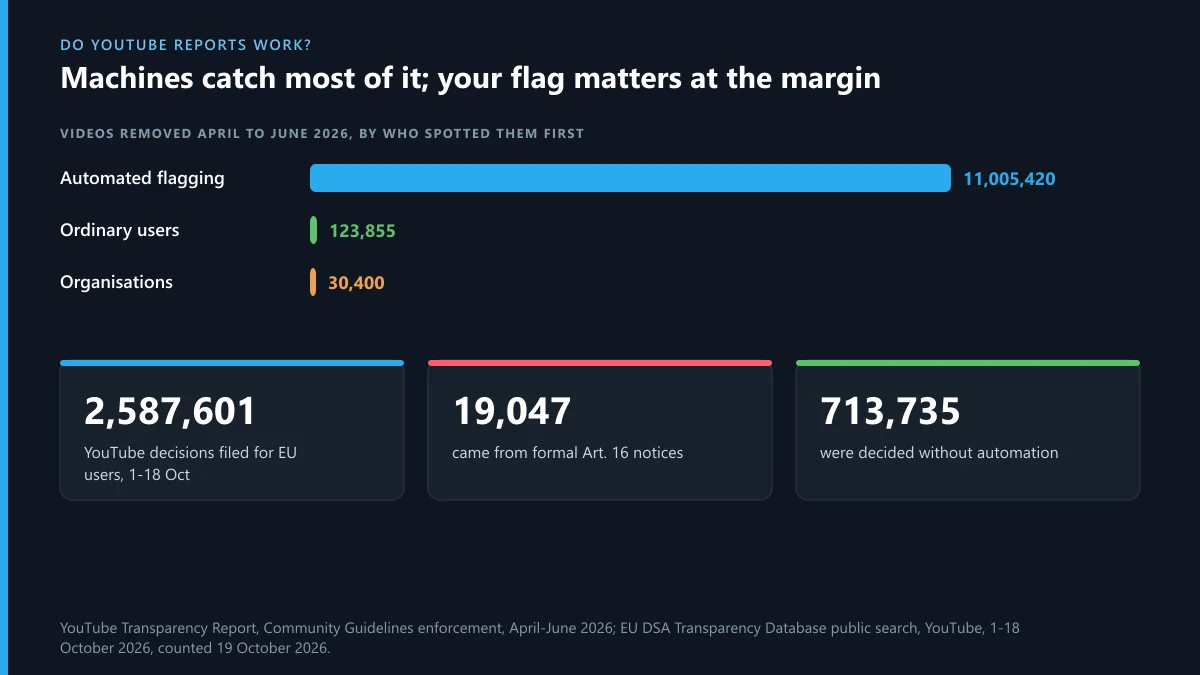
The EU's DSA Transparency Database gives a fresher view. We counted YouTube's entries for 1 to 18 October 2026 on 19 October; the last days may still be filling in. Of 2,587,601 moderation decisions for EU users, 19,047 (0.74%) came from formal notices under Article 16 of the DSA, and 713,735 (about 28%) were decided without automation. Privacy is a small slice: 4,783 decisions, 1,809 of them from notices. The takeaway for anyone reporting is plain: a precise report about a real violation gets read by a person far more often than people assume, while piling on more flags adds nothing.
The same person on X, Instagram or Telegram
People who run a scam or impersonation channel on YouTube usually run the same act elsewhere. On Instagram, the in-app steps are in reporting someone on Instagram, and when reports stall, what it takes to get an Instagram account taken down covers the escalation. If the copy uses your brand rather than your face, a trademark complaint fits better: see Instagram's trademark complaint form and X's trademark route. For hands-on help with a whole account, there is our Instagram account removal service and the X account removal service.
On Telegram, mirror channels of YouTube scams are common, and a channel that suddenly shows "This channel cannot be displayed" has usually already been restricted. Be careful with anyone offering to "remove a strike" or "restore a channel" for a fee: the usual next step is asking for your login code, and if codes you never requested start arriving, read what Telegram's "limit exceeded" warning means.
FAQ
Does YouTube tell you who reported your video?
No. Reports from the Report menu are anonymous, and removal emails name the policy, not the person who flagged it. The only route where your name may reach the uploader is a copyright removal request.
How many reports does it take to get a YouTube channel deleted?
There's no number. YouTube reviews the content, not the count, and says that if nothing breaks the rules no amount of reporting will change that. A channel is terminated after three strikes in 90 days or one case of severe abuse.
Can I see the status of a channel I reported?
Not in Reporting History, which only lists videos. Check the channel itself: removed videos, a terminated notice, or no change at all are the only signals you get.
Is it worth reporting a video many people already flagged?
Yes, if you can add something new in the details, such as context the others may not know. A duplicate flag with nothing new doesn't speed up the review. If the video is missing from your Reporting History, it's already being reviewed.
Can I report a YouTube channel for posing as me?
Yes. Use Report user on the channel and pick impersonation, then name your real channel in the details. Fans can report it too, because YouTube's impersonation policy covers yours or another creator's channel.
Can I report a YouTube ad?
Yes. Click Sponsored on the ad and select Report ad, then fill in the short form. Ad reports go to Google's ads team, not the Community Guidelines reviewers.
Will the channel owner know I hid them?
No. Hiding a user from your channel stops their comments from showing on your videos, and YouTube doesn't notify them. It's separate from a report and doesn't count against their channel.
How to report a YouTube video for privacy if it shows only my voice?
Use the same privacy complaint form. YouTube's privacy guidelines cover videos featuring you and AI content that mimics your likeness or voice, so a clip that uses your voice without your face can still qualify.
How to report someone on YouTube who keeps making new channels?
Report each new channel with Report user and say in the details that it belongs to a terminated person, with a link to the old channel. YouTube's termination rules bar that person from creating or using other channels.
What if a YouTube video shows my home address?
Use the privacy complaint form, not the Report menu. It opens without signing in, YouTube won't share your name with the uploader, and it may give the uploader a chance to remove the details first.