24 October 2026 · Telegram Ban Service · 9 min read
How to report a seller on Facebook Marketplace, even after they block you or delete the listing
Open Marketplace, tap the listing, tap the seller's name, then Options, Report, and pick Scam. For a buyer, report from the chat under Selling. If they blocked you or deleted the listing, report the Messenger chat or ask a friend to report the profile. Lost money goes to your bank and the police too.
A Marketplace deal goes wrong in one of a few ways. The seller takes a deposit and goes quiet. The buyer sends a fake payment screenshot. Or the listing vanishes and the profile blocks you the minute you complain. Each case leaves a different trail, and the report button you need depends on what's still visible to you. On 24 October 2026 we re-read Meta's Marketplace help pages and counted how often Facebook acts on scam listings in the EU. This guide is sorted by what you can still see.
How to report a seller on Facebook Marketplace while the listing is still up
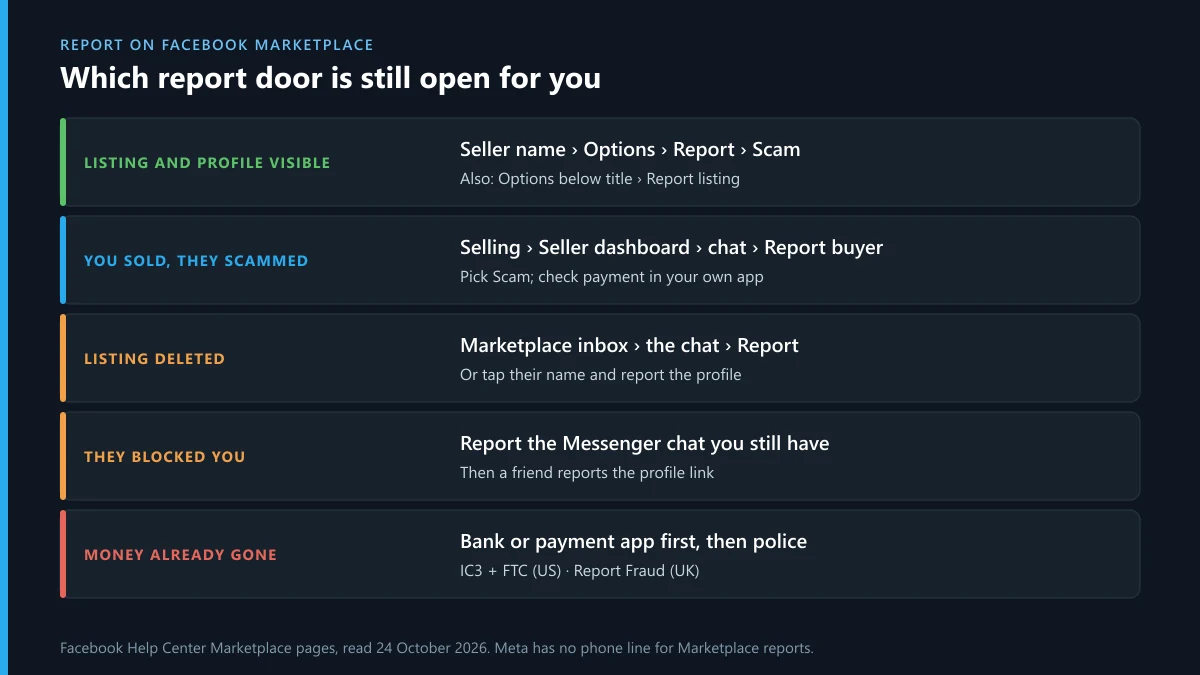
This is the easy case, and it works from the app or a computer. Meta's help page for a facebook marketplace report seller lists these steps:
- From your Feed, open Marketplace.
- Open a listing from that seller, then tap the seller's name under Seller information.
- Tap Options, then Report.
- Pick the reason and follow the prompts.
For a facebook marketplace report scam seller, choose Scam at step 4. It's the reason that puts the report in front of the commerce team. If the problem is the item, not the person, report the listing instead: the Options button sits below the listing title, then Report listing. A listing report removes one ad. A seller report puts the whole account in review, and Meta's own note on that page says it "may suspend or ban sellers" who break its Commerce Policies.
That is how to report a seller on Facebook Marketplace in under a minute. Do it before you message them again. A scammer who senses a complaint often deletes the listing and blocks you, and then most of these menus are gone.
Facebook marketplace report buyer: the route runs through your own listing
Sellers get scammed too, and the path is different because a buyer has no listing of their own. For a facebook marketplace report buyer, go to Marketplace › Selling › Seller dashboard › Your listings. Open the item they bought, open your chat with them, then Options › Report buyer. On the help page that covers the facebook marketplace report scam buyer case, the chat menu says More options › Report and you choose Scam.
Meta's scam guide names the buyer tricks to look for. They send a screenshot of a payment instead of a payment. They "overpay" and ask for the difference back. They claim the extra is for a mover. Or they send a fake email that looks like it's from Zelle or Venmo, asking you to upgrade your account before the money arrives. Check your own payment app, never the screenshot. Meta adds that buyers who file fraudulent Purchase Protection claims face consequences too.
How to report someone on Facebook Marketplace that blocked you
Blocking hides the profile and the listings from you, so the Options menu disappears. Meta's answer is short. Its help page on reporting what you can't see says you "may need to ask a friend to help you". Here is how to report a scammer on Facebook Marketplace if they blocked you, in the order that works best:
- Report the chat. The Messenger thread usually stays in your inbox after a block. Open it, tap the person's name, and use Report. This works because the messages are yours to see.
- Ask a friend to report the profile. Send them the profile link. You saved it, didn't you? If not, copy it from the chat header. They follow the seller steps above.
- Add detail. Meta says it can't act until it finds the content, so the friend should mention the item, the date and the amount.
The same steps cover how to report a seller on Facebook Marketplace that blocked you and a buyer who did the same. Don't make a second account to get around the block. That breaks Facebook's rules on fake accounts and can get your own profile restricted.
How to report seller on Facebook Marketplace when listing is deleted
A deleted listing takes the Report listing button with it, but not the seller. Go through the person instead. Open your Marketplace inbox, find the conversation about the item and report it from there, or tap their name and report the profile. The chat keeps the item title, the price and what they told you, which is the evidence Meta needs.
This is also why screenshots matter before you complain. Capture the listing, the price, the seller's profile page with its URL, and every message about payment. A listing that's gone and a profile that blocked you leave you with only what you saved.
What happens after a facebook marketplace report scam?
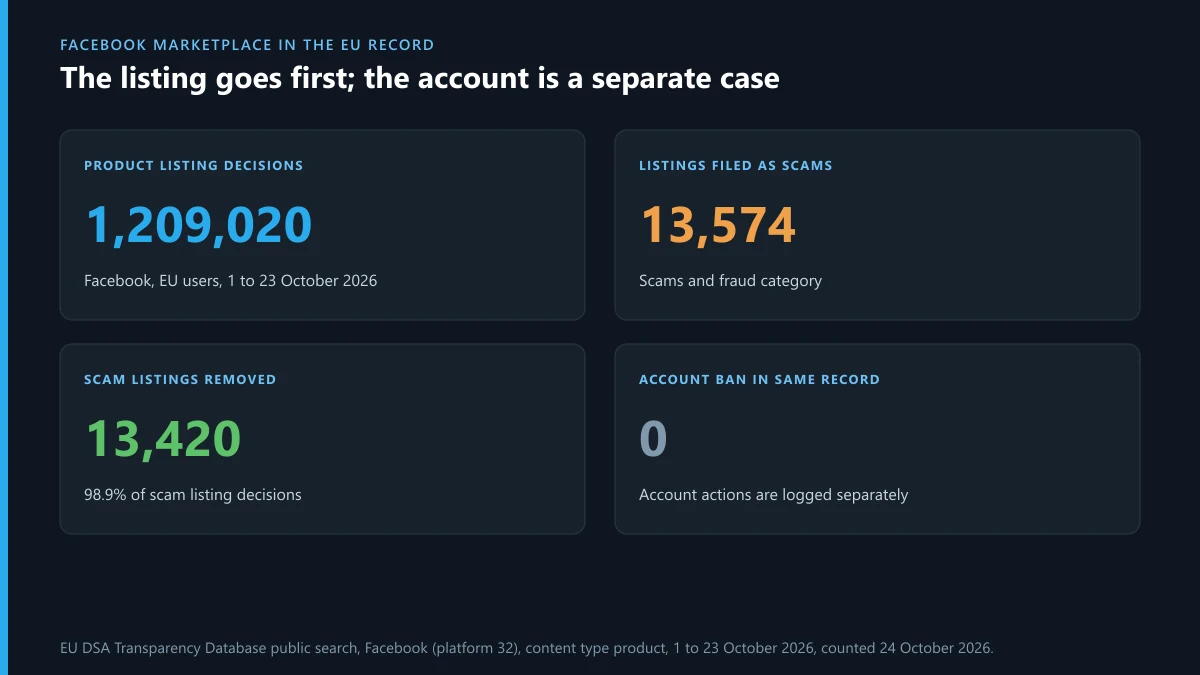
Usually a removed listing, and not much more you can see. A facebook marketplace report fraud case doesn't get a reply with the outcome for the account, only a note in your Support Inbox. Meta files every Facebook moderation decision for users in the EU in the public DSA Transparency Database. We counted 1 to 23 October 2026 on 24 October:
| Facebook decisions, EU, 1 to 23 Oct 2026 | Count |
|---|---|
| All decisions | 20,963,023 |
| Filed under scams and fraud | 1,378,662 |
| Decisions on product listings | 1,209,020 |
| Product listings filed as scams and fraud | 13,574 |
| Of those, listing removed | 13,420 (98.9%) |
| Of those, filed as Meta acting on its own initiative | 13,419 |
| Of those, with an account suspension or ban in the same record | 0 |
Nearly every scam-listing decision is filed as Meta's own initiative, not as a response to a notice. That fits how Meta treats a user report: as a pointer for its own review against its rules, not as a legal notice it must answer. Read the last line with care too. It doesn't mean scam sellers keep their accounts. Meta logs account actions as separate records, so a listing removal and a ban show up as two entries. What it does show is that the listing is the first thing to go. One report on one listing rarely ends an account. Reports on the seller's profile, with the chat attached, are what build a case against the person.
How to report someone on Facebook Marketplace to police
Meta can remove a profile, but it won't refund a cash deal or a bank transfer. If money left your account, the platform report is only one of three. The order matters, because banks move faster in the first hours:
| Who | Where | Why |
|---|---|---|
| Your bank or payment app | The fraud line on the back of your card, or the app's dispute menu | Only they can stop or reverse a payment. Zelle and bank transfers are hard to undo; card payments are easier |
| Police (US) | FBI IC3 and ReportFraud.ftc.gov, plus your local police for a report number | A crime report number is what banks ask for in a dispute |
| Police (UK) | Report Fraud, the service that replaced Action Fraud; in Scotland, call 101 | Gives you a crime reference number |
Bring the profile URL, the listing screenshots, the chat and the payment record. If you paid through checkout on Facebook, Purchase Protection may cover you. Meta's scam guide says items paid for in person with cash or person-to-person apps aren't eligible, and the program isn't offered in every country. This is the full answer to how to report someone on Facebook Marketplace for scamming: Meta for the account, the bank for the money, the police for the record.
How to report sellers on Facebook Marketplace by phone
You can't. Meta has no phone line for Marketplace reports, and any "Facebook Marketplace support number" in a search ad or a comment is a scam of its own. The real help options are the Report menus above and the Meta AI support assistant chat at the bottom of each help page. Any call from "Facebook" offering to recover your money is a recovery scam. Hang up. The same goes for anyone who asks for a code sent to your phone, which Meta's scam guide lists as phishing.
How to report seller on Facebook Marketplace: what Reddit gets right and wrong
People searching for how to report seller on Facebook Marketplace reddit threads usually find the same three tips. Two hold up. One doesn't.
- "Report the profile, not just the listing." Right. It matches what the EU record shows: the listing goes, the account stays unless the person is reported.
- "Get friends to report it too." Partly right. A friend is the only route after a block, and Meta's help page says so. But piling on reports doesn't speed a review, and Meta decides on the content, not the count.
- "Leave a bad review so others are warned." Risky. Meta removes reviews that break its rules, and a review that states something you can't prove can come back at you.
How to report a scammer on Facebook Marketplace who also works other apps
How to report a Facebook Marketplace scammer doesn't end at Facebook. A facebook marketplace report scammer filing removes one profile, and the same person is often already selling under another name. Marketplace scammers often push the chat to WhatsApp, Instagram or Telegram early. Meta's guide names that move as a warning sign, because scams that leave Messenger are harder for Meta to track. When the same person turns up on Instagram, reporting an Instagram scammer from the profile uses the same Scam reason. For a shop-style account, reporting a whole Instagram page covers it, and the general Instagram report steps cover posts, DMs and comments. If you worry they'll see who reported them, whether Instagram tells someone you reported them answers that; Facebook works the same way. If the seller threatens to post your photos or chat after you complain, the steps for reporting blackmail on Instagram apply on Facebook too.
On X, reporting an account on X handles a fake seller profile. A copy of your own shop goes through X's impersonation form. If they post your address after a dispute, use the doxxing report on X. And what it takes to get someone else's X account removed explains why one report rarely ends an account there either.
Scammers who move to Telegram often trade in handles. If someone offers to sell you one in a Marketplace chat, buying a Telegram username the safe way shows the official route through Fragment, and a Telegram username lookup tells you if the handle is even theirs. If you own a handle someone wants, selling a Telegram username covers fees and transfers. And if a buyer asks for "a code we just sent you", read what Telegram's Limit exceeded message means before you hand anything over.
FAQ
Will the seller know I reported them on Facebook Marketplace?
No. Facebook doesn't tell the person who reported them. They may guess if you'd just complained in the chat, which is why it's better to report first and stop replying.
Can I report a Marketplace seller without a Facebook account?
Not directly. Meta's help says to ask a friend with an account to report it, with links and screenshots. Marketplace itself needs a Facebook login to use.
How long does Facebook take to review a Marketplace report?
Meta gives no fixed time. Listing reports are often handled within a day; reviews of an account can take longer. You can see the status of your report in your Support Inbox.
Can Facebook get my money back from a Marketplace scammer?
Only for eligible purchases made through checkout on Facebook, under Purchase Protection, which isn't offered everywhere. For cash, bank transfers or payment apps, ask your bank or the payment app.
What reason should I pick when I report a scam seller?
Pick Scam. It sends the report to the team that applies the Commerce Policies. Use Report listing instead when only the item is the problem, such as a banned product.
Is there a Facebook Marketplace phone number?
No. Meta has no phone support for Marketplace. Numbers that claim to be Facebook support are scams, and so are callers offering to recover lost money.
Can I report a buyer who never showed up?
You can, but a no-show alone rarely breaks a rule. Report when there's a scam sign, such as a fake payment screenshot, an overpayment refund request, or a request for a code.
Should I report the scammer to the police if I only lost a small amount?
Yes, if money left your account. A police or IC3 report gives you a reference number banks often ask for, and small reports help police link one scammer to many victims.