22 October 2026 · Telegram Ban Service · 11 min read
Instagram report forms: picking the right one and finding your report number
Instagram report forms are web forms in the Help Centre for problems the in-app Report button can't judge: copyright, trademark, counterfeits, impersonation, privacy, under-13 accounts and local-law complaints. Form reports send an email with a unique report number; in-app reports have no number and show up under Support requests instead.
Instagram has two reporting systems that rarely mention each other. One is the Report button inside the app, which sends a post, comment or profile to reviewers who check it against the Community Guidelines. The other is a set of web forms that ask who you are, what right you hold and what proof you have. People mix them up all the time, then go looking for a report number that one of the two systems never issues. This page sorts the forms by the problem they solve, shows what each wants before you open it, and traces where your number ends up.
Report button or form: which system is your problem in?
The button is for rule breaking that anyone can see: spam, nudity, hate, bullying, scams, violence. The forms are for problems that need a fact only you can supply, such as "this is my photo", "this is my brand", "this account is pretending to be me" or "this breaks the law where I live". A reviewer looking at a post can't know whether you took the picture, so ownership claims never work through the button.
A rough test: if the complaint would still be true when a stranger looked at it, use the button. For a single photo or Reel, how reporting a single Instagram post works covers where the menu sits. If the complaint depends on who you are, you need one of the Instagram report forms below.
Which of the Instagram report forms fits your problem?
There are more forms than most guides list, and several branch internally. These are the ones that matter for an account or its content, matched to the situation that sends people to them.
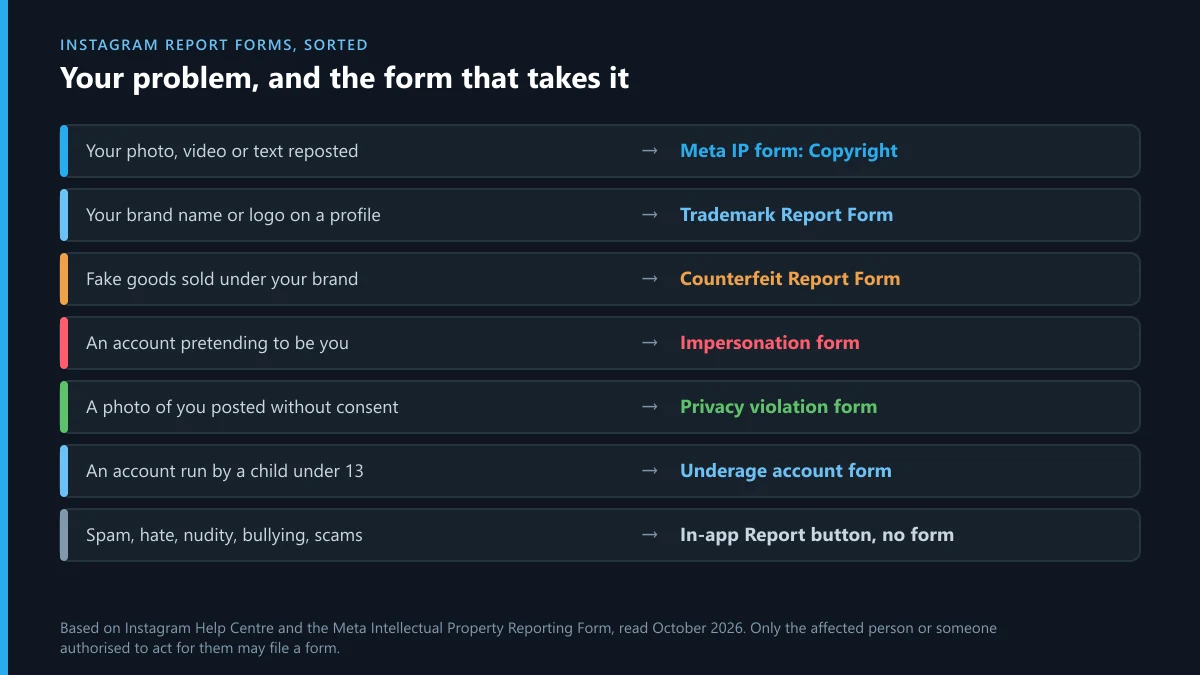
| Your problem | The form | What it will ask you for |
|---|---|---|
| Your photo, video or text reposted | Meta Intellectual Property Reporting Form, Copyright branch | Country of rights, owner or agent status, contact details, the original work, links to each copy, sworn statement |
| Your brand name or logo used on a profile | Trademark Report Form | One registered mark per report, registration number and office, up to 30 links |
| Fake goods sold under your brand | Counterfeit Report Form | The same registration details, plus whether it's a post, Story, ad or whole account |
| An account pretending to be you or your business | Impersonation form | The fake username and a photo of your government ID |
| A photo or video of you posted without consent | Privacy violation form | The link and which image; adult reports depend on where you live |
| An account run by a child under 13 | Underage account form | The username and why you think the user is under 13 |
| A post that breaks the law in your country | Legal removal request | Your country, the specific statements and the law they break |
| You filed an IP report and want it withdrawn | IP Retraction Form | Your original report number |
Two rules cut across all of them. Only the person affected, or someone authorised to act for them, may file; Meta's IP forms refuse "someone else" outright. And each form handles one kind of claim, so a report that mixes copyright with impersonation is usually refused for both. If a stranger reposted a picture of you, what to do when a photo of you appears on Instagram without your consent explains why that goes to privacy, not copyright.
The Instagram intellectual property report form, branch by branch
The Instagram intellectual property report form is no longer an Instagram page at all. Copyright, trademark and counterfeit claims for Instagram, Facebook, Threads and WhatsApp now start at one Meta form on help.meta.com, which asks first which right is being infringed and then which platform the content is on. It opens without a login, which matters if you don't have an Instagram account or the account you'd use has been locked.
The old Instagram copyright infringement report form at help.instagram.com redirects to that Meta form, so bookmarks and older guides still land in the right place. Pick Copyright and you'll be asked where you assert rights, whether you're the owner or an authorised agent, your full name, postal address, phone and email, a description of the original work, and the URL of every copy. It ends with a good-faith statement made under penalty of perjury and an electronic signature. Pick Trademark with Instagram selected and you're passed to the separate Trademark Report Form, where the trademark logic is covered in filing a trademark complaint against an Instagram account.
If you're searching for the copyright report form Instagram Help Center pages point to, it's this one. Meta's help pages on IP reporting all link to it, and the earlier per-platform forms are retired. Removal under the US procedure has its own counter-notice rules; Instagram's DMCA takedown and counter-notice track explains how the two tracks split.
Instagram report number: who gets one and how to find it
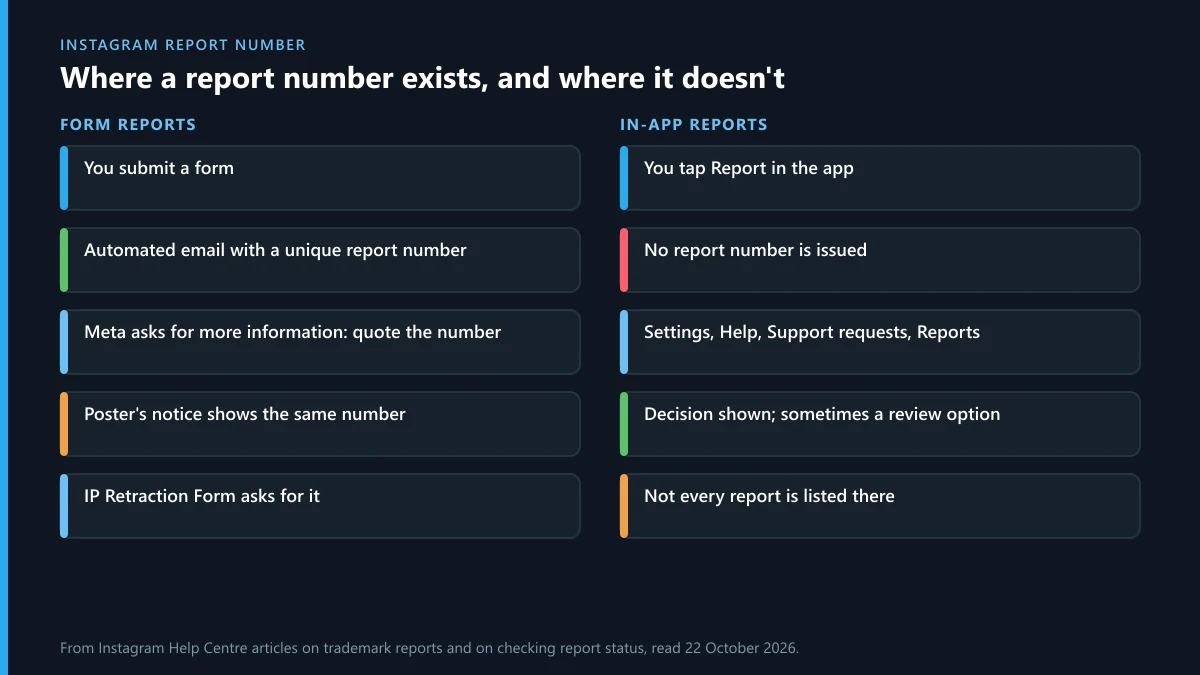
Only form reports carry an Instagram report number. Meta's help page on trademark reports says that after you submit through the online form or by email, "you'll receive an automated email that contains information about your report, including a unique report number", and tells you to save it. Copyright reports work the same way.
So how to find report number Instagram issued? Search the inbox of the email address you typed into the form, including spam, for the automated message sent right after you submitted. If you can't find it, check Accounts Center under Password and security, then Recent emails, which lists genuine Meta emails from the last 14 days. That's also the quickest way to tell a real message from a fake one.
The report number Instagram gives you has three uses. You quote it when Meta's team writes back asking for more information. You type it into the IP Retraction Form if you settle with the poster. And it's on the notice the poster receives, together with the rights owner's name, the email you gave and the appeal instructions, which is why Meta suggests filing with a generic business address rather than a personal one.
In-app reports: no number, just Support requests
A report made with the Report button never produces a number. Instagram's help says you "may have the option" to check its status under Support requests: on a computer, More, then Settings, then Help, then Support requests and Reports. In the app it sits under Settings and activity, then Help. There you can see when Instagram acted, what it decided and, for some types of content, request a review.
The same page warns that every report you've made may not be viewable there. A report that doesn't appear hasn't necessarily vanished; it may simply belong to a category Instagram doesn't track for reporters. If you need a reference you can quote later, the content probably belonged in a form, not the button.
How to report an Instagram account online without the app
You can report Instagram account online, from a desktop browser, in two ways. Signed in at instagram.com, open the profile, click the three-dot menu next to the username and choose Report; the flow matches the app. Signed out, the button isn't there, and the forms are your only route.
That is where the report Instagram account form choice matters. The impersonation form and the IP form both accept people without an Instagram account, because the person being copied often doesn't have one. The forms for deceased users' accounts behaved differently in a signed-out check earlier this month and sent the browser to the login page, so expect to sign in for those. Whichever form you use, an account that exists only to break rules can be taken further; removing an Instagram account through Meta's own channels covers what makes Meta disable a whole profile rather than one post.
Can't report Instagram account? Six reasons it fails
When someone says they can't report Instagram account pages, it is almost always one of these.
- You're signed out. The Report button needs a logged-in account. Use a form, or sign in on a browser.
- The profile says "User not found". The account blocked you, was deactivated or was renamed. Search the new name from another account, or use a form that asks for the username rather than a link.
- You're reporting the wrong thing. A profile picture has no menu of its own; report the profile. A comment has its own Report option, separate from the post.
- The reason isn't in the menu. Ownership, brand and legal claims aren't in-app reasons. The menu will send you to the matching form or offer nothing that fits.
- The form refused you. Filing for a friend, a celebrity or a brand you like is blocked; only the affected person or their representative may file.
- It went through but nothing happened. Removal turns on what the content is, not on a tally of complaints, according to Instagram's own help. Ten reports of the same post weigh the same as one.
Meta also lists misusing its reporting systems to harass or silence others as inauthentic behaviour, so organised waves of false reports can cost the reporters their accounts. X has the same rule, and its own routes are set out in how to report an account on X.
How many Instagram IP decisions were made in the EU this October?
The EU's DSA Transparency Database logs every moderation decision affecting users in the EU. We counted Instagram's entries for 1 to 21 October on 22 October 2026; the last few days may still be filling in. Of 5,723,692 decisions, 17,364 (0.30%) were filed under intellectual property infringement, the category that copyright, trademark and counterfeit forms feed.
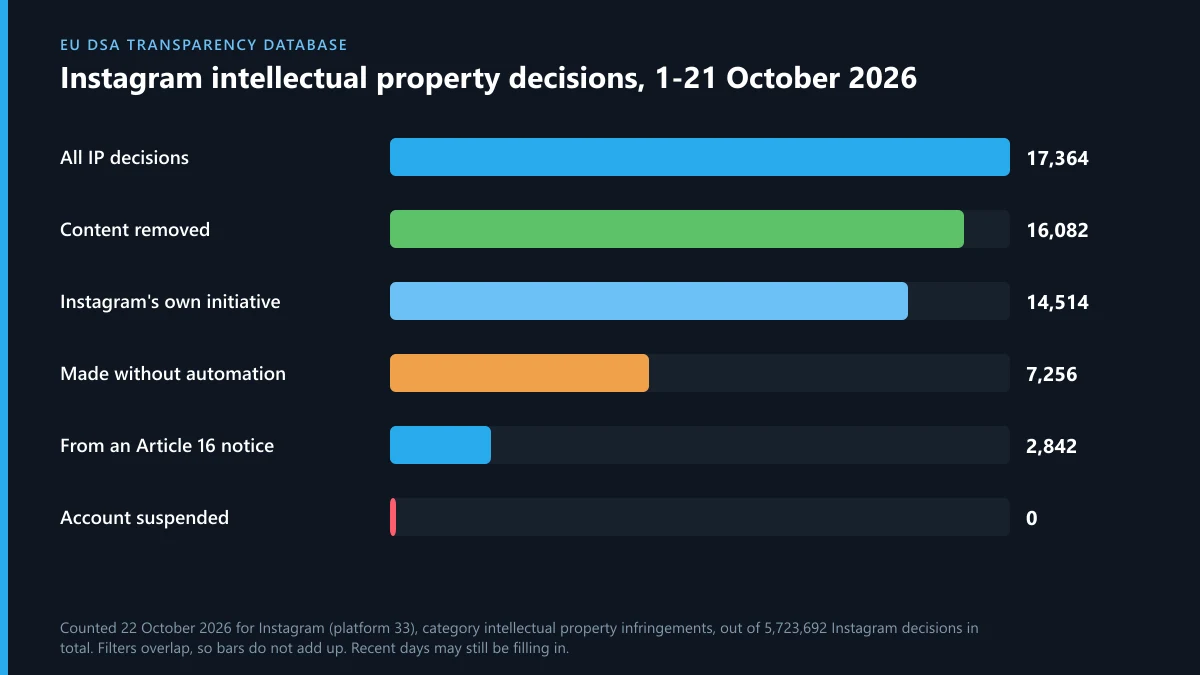
16,082 (93%) of those removed the content. 14,514 (84%) were logged as Instagram's own initiative, which is where acted-on rights-owner reports and automated matches tend to land, while 2,842 (16.4%) came from a formal notice under Article 16 of the DSA. 7,256 (42%) were made without automation. Not one was logged as an account suspension in that window: IP reports take down posts, and whole accounts go only under the repeat-infringer policy, which Meta applies without publishing a count.
When the same person is on X or Telegram
Someone who copies your work or your name on Instagram usually does it elsewhere too. On X, impostors go through X's impersonation report, copied media through a DMCA notice to X, and a stolen logo through X's trademark complaint process. If they post your address or phone number, reporting doxxing on X is faster than any copyright route. For court orders and requests that need Meta's legal team rather than a reviewer, see how Meta's legal request forms work.
Telegram is where many of these accounts sell or move their audience. If your old handle is being squatted or traded, how Telegram usernames are sold and transferred shows how a name changes hands. And if login codes you never asked for start arriving while you chase an impostor, read what Telegram's "limit exceeded" message means before you type anything. No genuine Meta or Telegram team will ask you for a code in a chat.
FAQ
Where do I find my Instagram report number?
In the automated email Meta sends to the address you entered on the form, right after you submit. Only form reports get one. Reports made with the in-app Report button have no number; check them under Support requests instead.
Does reporting through the app give me a report number?
No. In-app reports are tracked under Settings, Help, Support requests and Reports, where Instagram shows its decision and sometimes a review option. Not every report appears there.
Is the Instagram copyright form still on help.instagram.com?
The old Instagram copyright form now redirects to Meta's Intellectual Property Reporting Form on help.meta.com, which covers Instagram, Facebook, Threads and WhatsApp in one place.
Can I use Instagram report forms without an account?
Some, yes. The Meta IP form and the impersonation form accept people without an Instagram account. The in-app Report button and some other forms need you to sign in.
Will the person I report see my name?
For in-app reports, Instagram says the reported account won't see who reported them. Intellectual property reports are the exception: the poster receives the rights owner's name, the email you gave and the report number.
Why can't I report an Instagram account?
Usually because you're signed out, the profile is hidden from you or deleted, the problem isn't an in-app reason, or the form refused a report filed on someone else's behalf. Each has a different fix, set out above.
Does reporting an account many times get it removed faster?
No. Instagram says the number of times something is reported doesn't determine whether it's removed. One accurate report with the right form is worth more than many repeats.
Can I withdraw a copyright or trademark report?
Yes. Meta's IP Retraction Form asks for your original report number, and Meta restores the content where it can.