16 October 2026 · Telegram Ban Service · 11 min read
How can I report someone on Facebook, and which reason actually gets it reviewed?
How can I report someone on Facebook? Open their profile, click the three-dot Options button, choose Report profile and pick the reason that matches what they did. Meta reviews the report against its Community Standards and doesn't tell the person who filed it. Some reasons only count as feedback, so choose the specific one.
Typing "report abuse facebook" or "report abuse on FB" into a search bar usually lands you on Meta's Reporting abuse hub, which explains the button but not the choice behind it. The button is easy. The choice is where reports succeed or quietly die, because the reason you tick decides which rule a reviewer checks, and a few reasons never reach a reviewer at all. This page walks through the clicks first, then the choice, then what happens once you press Submit.
How do I report someone on Facebook from their profile?
Use the Report profile option on the person's page. Meta's Report content on Facebook article gives these steps, and we checked them on 16 October 2026:
- Log in and open the profile, from your Feed or by searching the name.
- Click Options, the three dots to the right of the profile buttons.
- Click Report profile.
- Pick the option that best describes how the profile breaks the Community Standards.
- If a Submit screen appears, submit. Then click Done.
That covers how do I report a person on Facebook, how to report someone in Facebook and how report someone on Facebook, however the search was worded. If the problem is one post, comment or message rather than the whole person, report that item instead. A post goes through Options in its top-right corner and Report post. A message goes through Messenger: open the chat, click Information or Options, then Report. Item reports carry the exact evidence, so they are often stronger than a profile report.
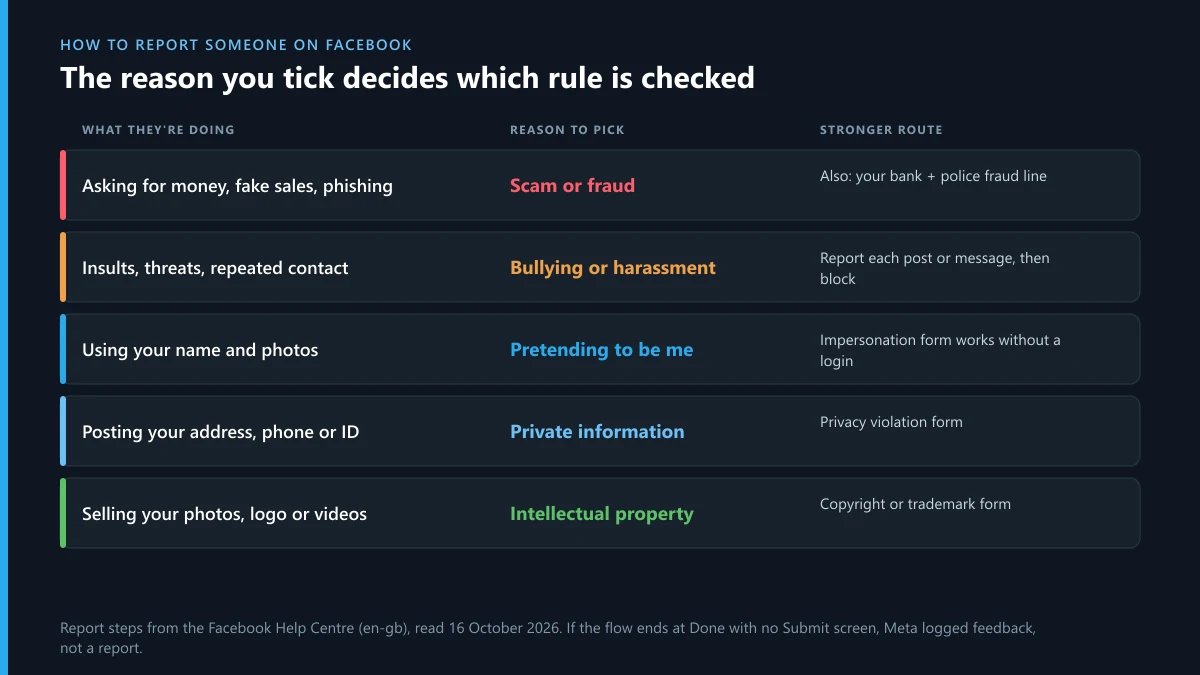
Which reason should you pick when you report someone to Facebook?
Pick the reason that names the rule the person broke, not the one that describes how you feel. A reviewer checks your report against the rule you chose. A scammer reported as "spam" can pass the spam test. A fake copy of you reported as "fake account" can look real enough to stay. The table matches common problems to the reason that fits and, where one exists, the better route.
| What the person is doing | Reason to pick | Stronger route, if any |
|---|---|---|
| Asking for money, fake sales, phishing links | Scam or fraud | Report the messages too, then your bank and the police fraud line |
| Insults, threats, repeated unwanted contact | Bullying or harassment | Report each post or message; block afterwards |
| Using your name and photos | Pretending to be me | Impersonation form if you have no account |
| Posting your address, phone or ID | Sharing private information | Privacy violation form |
| Selling your photos, logo or videos | Intellectual property | Meta's copyright or trademark form |
| A child under 13 on the platform | Under-age user | Under-age account form |
Facebook isn't the only network that sorts reports this way. Instagram's report menu for a person, a post or a message is built on the same Meta categories, and X has its own split between reporting a single post on X and reporting a whole X account from its profile menu.
Report abuse on Facebook, or just give feedback? Why some clicks never reach a reviewer
Meta says so in its own steps. After you pick a reason, "you may then be able to submit a report", and "for some types of content, we don't ask you to submit a report, but we use your feedback to help our systems learn." The same line appears for profiles, Pages and messages. In practice, if the flow ends at Done without a Submit button, you gave feedback, not a report, and nothing will appear in your Support Inbox.
Meta doesn't publish which reasons are feedback-only. So if no Submit screen appeared, go back and choose the most specific reason that is true. "I don't like it" is not a rule. "They're asking my friends for money" is.
How to report someone on Facebook for bullying
Report the person, and report the worst posts or messages one by one. Facebook's bullying and harassment help page lists three responses by severity: unfriend, block, and report the person "or any abusive things they post". It adds three habits we'd also recommend. Don't retaliate, tell someone you trust, and save screenshots before anything gets deleted.
- Report before you block. After a block you can't see their posts, so you can't report them. Facebook's fix for that case is asking a friend to report.
- Report threats as threats. A message that threatens violence or threatens to share intimate images belongs under its own reason, and Meta's page tells anyone in immediate danger to contact local police.
- Parents can report too. If a classmate's account targets your child, you can report the posts from your own account. Your child doesn't need to file it.
When we read Meta's bullying pages on 16 October 2026, the linked "California Cyberbullying Prevention Act on Facebook" article showed only "This content isn't relevant in your location" outside the US. Some help is geo-locked, so a link a friend in California sends you may show nothing where you are.
Bullying that moves to X follows its own rules. If someone publishes your address there, X's private-information report for doxxing is the route, and it's judged more strictly than general abuse.
How to report someone on Facebook for scamming
Report in three places, in this order. First, report the profile and every message that asked for money, under Scam or fraud. Second, call your bank if you paid, because a card or transfer dispute has deadlines that a Facebook report doesn't stop. Third, report to the police fraud line where you live: in the US that's ReportFraud.ftc.gov, which says reports are shared with over 2,000 law enforcers, and in England, Wales and Northern Ireland it's Report Fraud, which replaced Action Fraud.
Scam reports are also where automation is heaviest. Of the 766,774 Facebook decisions Meta filed under scams and fraud for EU users in the first half of October 2026, only 11,591 were made with no automation, about 1.5%. A clear report with the payment request in a screenshot is what lets a system match the account to a pattern. For scam Pages, Marketplace listings and ads, each with its own menu, see every Facebook scam report menu and form.
Scammers rarely stay on Facebook. Many push victims to Telegram, then try to take over the victim's own Telegram by flooding the login; what Telegram's "Limit exceeded" warning means explains that step. On X, scam follower networks are easier to cut back with a guide to removing bot followers on X.
Can you report someone on Facebook if you don't have an account or they blocked you?
Yes, but usually through someone else. Facebook's Don't Have an Account? page says to "ask a friend with an account" to use the report link near the content, and warns that Meta can't act "until we can find the content". So send your friend the exact profile or post link and your screenshots.
The one exception is impersonation. Meta keeps a separate form for a profile or Page pretending to be you, and it works without a login. If someone has built a copy of you on Instagram as well, the steps for reporting an Instagram account impersonating you follow the same logic.
What happens if you report someone on Facebook?
Meta reviews the report, removes what breaks its rules, and keeps your name out of it. The Reporting abuse page says: "We don't include any information about the person who filed the report when we contact the reported." It also says reporting "doesn't guarantee that it will be removed". Whether you searched what happen if you report someone on Facebook or the tidier version, the order of events is the same:
- Review. Software, a person or both check the item against the reason you chose.
- Outcome. The content stays up, comes down, or the account gets a strike. Repeated strikes lead to limits, then a disabled account.
- Notice. Submitted reports show up in your Support Inbox, where you may see the status and, if nothing was removed, an option to request another review.
- The other person. They're told their content was removed and why, not who reported it. Intellectual property reports are the exception, since Meta may pass the rights holder's contact details on.
X handles the same question differently, and what the reported person sees after an X report sets out its notices side by side with Facebook's.
How to report someone on Facebook and get them deleted: is that possible?
You can't delete anyone. You can give Meta a reason to disable the account. Meta's help pages list the grounds: repeated violations, one severe violation, accounts made to dodge an earlier ban, dangerous individuals, and accounts that misrepresent who they are. Meta also says the number of times something is reported doesn't decide whether it's removed. A hundred reports on a lawful profile do nothing, and organised false reporting breaks Meta's rules itself.
The numbers show how rare a full removal is. For bullying and harassment, filed as cyber violence, Meta logged 73,265 Facebook decisions for EU users in the first half of October 2026. 55,133 removed a post or comment. Only 9 suspended or terminated an account. Harassment reports take content down far more often than they take people down. On X the ladder from warning to suspension is laid out in how an X account actually gets suspended, and the paid side of it is weighed in what an Instagram ban service can lawfully do.

Facebook reports in numbers, first half of October 2026
Meta files every Facebook moderation decision that affects EU users with the EU's DSA Transparency Database. We counted two categories on 16 October 2026, for 1 to 15 October. The first query returned an HTTP 500 error and worked on the retry, which is normal for that database.
- Scams and fraud: 766,774 decisions. 446,623 removed content, 318,358 suspended an account, 608 terminated one. 11,591 involved no automation.
- Cyber violence (bullying, harassment): 73,265 decisions. 55,133 removed content, 9 hit an account. 21,051 involved no automation, about 29%.
- All Facebook decisions in the window: 10,688,972.
Two things stand out. Harassment gets a human look nearly twenty times as often as scams do, because context matters more in an insult than in a payment request. And scam reports are the ones most likely to cost the other person their account, because scam patterns repeat across many victims.
The same person is on Instagram or X: where to report there
Each network needs its own report, even inside Meta. When someone sells copies of your brand on Facebook and Instagram at once, Meta's trademark report for Instagram runs separately from the Facebook one. On X, the same misuse goes through X's trademark complaint for impersonating brands, and stolen photos or videos through a DMCA notice filed with X. Keep one folder of screenshots with dates. You'll reuse it for every report.
FAQ
Does Facebook tell someone you reported them?
No. Meta's Reporting abuse page says it doesn't include any information about the person who filed the report. Intellectual property reports are the exception, because Meta may share the rights holder's contact details with the person whose content was removed.
How long does a Facebook report take?
Meta publishes no fixed time for a first review. If you request another review from your Support Inbox, Meta says it usually answers within 24 hours. Feedback-only reasons never get an answer at all.
Can I see the reports I've made on Facebook?
Yes, if they were submitted as reports. Open Help and support, then Support Inbox, then Reports about others. Feedback that ended at Done without a Submit screen won't be listed.
How many reports does it take to get someone banned on Facebook?
There is no number. Meta says the count of reports doesn't decide removal. One report under the right reason starts a review; many reports under the wrong reason don't add weight.
Can I report someone on Facebook for something they said in a private message?
Yes. Open the conversation in Messenger, click Information or Options, then Report. Messages you report are sent to Meta for review, and screenshots help if the other person deletes them.
Should I report or block first?
Report first, then block. Once you block a profile, you can't see its posts or messages, so you can't report them. If you blocked already, ask a friend to report the content for you.
Can I report a dead person's Facebook profile that someone has taken over?
Yes. Report it as a hacked or impersonating account, and a family member can ask Meta to memorialise or remove the profile with proof of death and of the relationship.