18 October 2026 · Telegram Ban Service · 10 min read
How to report a video on tik tok, and when a TikTok copyright infringement claim is the better tool
To report a video on TikTok, open it, tap the Share arrow or press and hold the video, tap Report, choose a reason and tap Submit. The uploader isn't told who reported it. If the video copies your own work, use TikTok's copyright form instead, which only the rights owner or their agent can file.
Two kinds of people land here. One wants a harmful clip gone: a fight filmed at school, a scam ad, a video that shows their street. The other found their own video re-uploaded under someone else's name. Both press the same Report button, and the second group usually gets nowhere with it, because a theft claim needs a legal form, not a guidelines report. This page splits the two jobs, then covers the uploader's side: strikes, muted sounds and whether you can get copyrighted.
Report button or copyright form: which one does this video need?
Use the Report button when the video breaks a Community Guideline, and the copyright form when it uses work you own. The difference decides who reviews it, what proof counts and whether your name travels with the complaint.
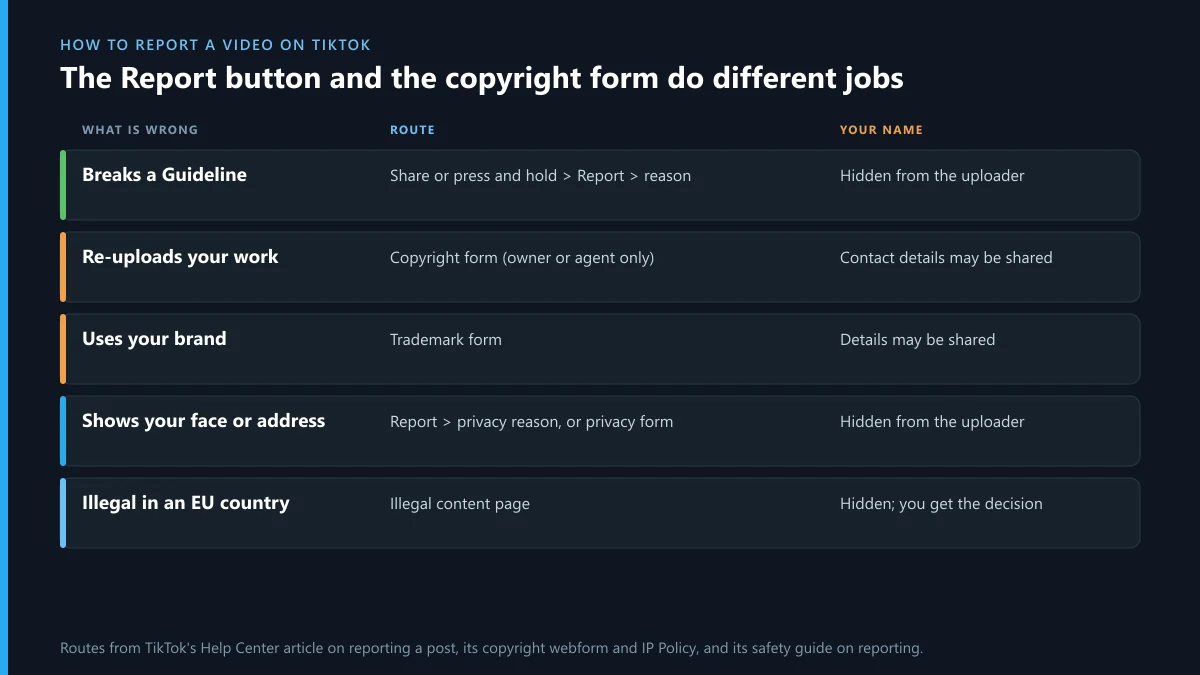
| What is wrong with the video | Route | Does the uploader see your name? |
|---|---|---|
| Violence, hate, scams, nudity, bullying | Share or press and hold > Report | No |
| Re-uploads your video, music or photos | Copyright form | Your contact details may be shared |
| Uses your brand name or logo | Trademark form | Your details may be shared |
| Shows your face, address or documents | Report > privacy reason, or the privacy form | No |
| Illegal under an EU country's law | Illegal content page | No, and TikTok tells you its decision |
How to report a video on tik tok, step by step
TikTok's help article on reporting a post gives the same short path in the app, and it is the whole answer to how do you report a video on tiktok, how to report a tik tok video, how to report video on tiktok and how do you report a tiktok video:
- Open the video.
- Tap the Share arrow on the right, or press and hold the video.
- Tap Report.
- Pick the reason, then a subtopic if one is offered.
- Tap Submit.
On a computer, hover over the video and click More options, then Report. If you need to report videos on tiktok from one account in bulk, there is no multi-select: each one is reported on its own, which is also how do you report videos on tiktok when a whole series is the problem. Once the videos are the account's only purpose, report the account itself from its profile. Searches such as tiktok report video, report a tiktok video, report a video on tiktok, how do i report a tiktok video and how to report videos on tiktok all end at this menu.
Can you report a tiktok video without the app? Yes: TikTok's web feedback form opens without a login and has a "Report a potential violation" topic. Other networks hide the same button in different places, compare reporting a single Instagram post and reporting one post on X.
If you report a video on TikTok, is it anonymous?
For a guidelines report, yes. TikTok's safety guide on reporting says it "will not disclose your identity to the person whose content or account you're reporting", and removal notices and appeals don't name the reporter either. You can follow what happened under Profile, then Settings and privacy, then Support, then Safety Center, then Report records.
A copyright claim is different, and this is where people get caught out. The copyright form warns that your contact information may be shared with the person who posted the content, and TikTok's IP Policy says it may give them the name of the copyright owner. Outside the EU, if they appeal, TikTok forwards the whole appeal to you. So if the uploader is someone you know and you'd rather they didn't find out, a guidelines report keeps you hidden and a copyright claim does not.
What counts as TikTok copyright infringement?
Copyright infringement on TikTok means posting someone's protected work, such as a video, song, photo or artwork, without their permission and outside an exception like fair use or fair dealing. TikTok's current IP Policy took effect on 26 April 2025 and names both exceptions. The tiktok copyright policy also sits under the Terms: by posting, users license other users to adapt and build on content through TikTok's own features, depending on their sharing settings. That is why a Duet or Stitch of your video is usually not copyright infringement tiktok will act on, while a full download re-posted on another account is.
Copyright on tiktok covers the creative work, not the idea. Someone filming the same trend, recipe or joke format hasn't copied you. Someone using your logo or brand name is a trademark problem, which has its own form and its own strike count; the Meta and X versions are in filing a trademark complaint on Instagram and reporting a trademark misuse to X.
How the TikTok copyright form works, and where DMCA fits
The tiktok copyright form lives at tiktok.com/legal/report/Copyright. When we walked through it in September 2026, we saw it open with an email check before anything else. Then it asked:
- whether you are the owner or authorised to act on the owner's behalf;
- the type of work: video, original music, non-music audio, photo, logo or other;
- where the original lives, in a 350-character link box, with evidence uploads under 20 MB;
- the links to the copies, in a box that takes up to 35,000 characters, so one filing can list many videos;
- an optional box asking TikTok to stop future copies;
- three sworn statements and your full legal name as the signature.
That form is TikTok's version of a DMCA notice, so a tiktok dmca filing and a tiktok copyright claim are the same thing in practice. TikTok's registered DMCA agent, listed with the US Copyright Office, also takes notices at copyright@tiktok.com, but TikTok's own pages only point to the form and in-app reports. A copyright claim tiktok rejects is most often missing the original link or the owner's name: in its H2 2025 report TikTok counted 173,140 invalid requests. The same notice structure works on a DMCA takedown on Instagram and a DMCA notice to X.
Can you get copyrighted on TikTok, even on LIVE?
Yes. "Getting copyrighted" means a rights owner's notice led TikTok to take your post down and add a copyright strike. TikTok's Help Center says three copyright strikes mean a permanent ban, strikes expire after 90 days, and a burst of notices arriving together may count as one. Copyright and trademark strikes are counted separately, so two of each is not a ban but three of one kind is.
Can you get copyrighted on tiktok live? The IP Policy covers everything you share on TikTok, LIVE included, so playing someone's film or a full album on a stream can lead to the LIVE being cut off and a strike. Sound is the other common case: a clip with unlicensed music may be muted rather than removed, which is not a strike. So when people ask can you get copyright on tiktok or can you get copyrighted on tiktok, the honest answer is that a muted sound is a warning and a removal notice is the strike. To see where you stand, open TikTok Studio, then More tools, then Account check.
Is there a TikTok copyright checker before you post?
No. TikTok has no public tiktok copyright checker that scans a draft and clears it. The tiktok copyright check that does exist runs after posting: Account check shows any strike or restriction on your posts. Business accounts get one safety net: they're limited to TikTok's Commercial Music Library, a catalogue of sounds already cleared for brand content. Third-party "checker" sites can tell you whether a song is popular, not whether its owner will file.
What about how to get around tiktok copyright, or how to get past copyright on tiktok? Speeding a song up, mirroring the clip or adding a border doesn't change who owns it, and matching tools are built to see through exactly those edits. The routes that hold up are boring: use your own footage, use sounds from TikTok's library inside the app, get a licence, or rely on commentary that's really fair use. If a strike is wrong, appeal it in the app instead of re-uploading.
How to delete a TikTok video you sent to someone
A video you shared in a direct message can't be pulled back from the other person's inbox. Deleting the message or the chat removes it from your side only; the person you sent it to can still see it. The one lever you have is the video itself: if it's your own post, deleting it or setting it to private stops the shared link from playing for anyone who isn't allowed to see it. If the video is someone else's, you can only report it. Telegram handles this differently and lets you delete a message for both people; its full clean-up is in deleting a Telegram account and its chats.
What TikTok's EU filings show for October 2026
TikTok logs every moderation decision affecting EU users in the EU's DSA Transparency Database. We counted its entries for 1 to 17 October on 18 October 2026; the last days may still be filling in. Of 5,688,673 decisions, 6,764 (0.12%) were filed under intellectual property infringement. Only 292 of those (4.3%) came from a formal notice under Article 16 of the DSA, the legal route rights holders use. 3,426 of them (51%) were decided without automation. Across all TikTok decisions for 1 to 15 October, that share was about 16%.

Read the gap the right way. Copyright is a tiny share of what TikTok removes, and most copyright decisions aren't logged as outside notices at all. TikTok's own H2 2025 IP report shows the global scale: 401,471 copyright requests, 63.0% of which led to a removal. So a well-documented claim works more often than not, but a third still fail, mostly on missing proof.
The same video copied to X, Instagram or Telegram
Stolen clips rarely stay on one app. If the copier's whole X profile exists to repost other people's work, report the profile through X's account report menu; repeated infringers lose accounts there too, as how X permanently removes an account explains, and Meta's side is in what gets an Instagram account deleted. When a video exposes your home address or phone number, a privacy report beats a copyright one; see reporting doxxing on X. When reports run out, Meta's legal request routes cover court orders.
On Telegram, pirated TikTok compilations often sit in public channels. Checking a Telegram username tells you whether a handle is a live channel before you report it. And be wary of sellers offering "strike removal": the usual next step is a request for your login code, so if codes you never asked for arrive, read what Telegram's "limit exceeded" warning means.
FAQ
Does TikTok tell the uploader who reported their video?
Not for a Community Guidelines report. TikTok says it won't disclose your identity, and removal notices don't name the reporter. A copyright or trademark claim is different: your contact details and the owner's name may be passed to the uploader.
How many copyright strikes before TikTok bans you?
Three copyright strikes lead to a permanent ban. Each strike expires after 90 days, several notices arriving at once may count as one, and copyright and trademark strikes are counted separately.
Can I file a TikTok copyright claim for someone else's video?
Only if you are the rights owner or authorised to act for them, such as their agent or label. A fan or friend can't file it. They can still report the video with the Report button if it breaks another rule.
Is a muted sound on TikTok a copyright strike?
No. When a video uses music TikTok can't license for it, the sound may be muted while the video stays up. A strike follows a rights owner's notice that leads to removal. Account check shows which one you got.
Can I report a TikTok video without an account?
Yes. TikTok's online feedback form opens without logging in and has a topic for reporting a potential violation, and the copyright form only needs an email address you can verify.
What happens after I report a video on TikTok?
A reviewer checks the video against the Community Guidelines. If it breaks one, it is removed or limited and the uploader gets a notice naming the rule. If not, nothing changes. Your report shows up under Safety Center, Report records.
Is a Duet or Stitch of my video copyright infringement?
Usually not. TikTok's Terms let other users adapt and build on what you post through TikTok's own features, depending on your sharing settings. You can turn Duet and Stitch off for your videos. A full re-upload on another account is a different matter.