18 October 2026 · Telegram Ban Service · 11 min read
How to report someone on WhatsApp: the right button for a number, a group or a scam
Open the chat, tap the contact or number at the top, scroll down and tap Report, then Report again. Tick the box if you also want to block them. WhatsApp gets up to their last five messages to you and isn't required to ban anyone. Groups, businesses and unknown numbers each have their own Report option, and fraud also goes to the police.
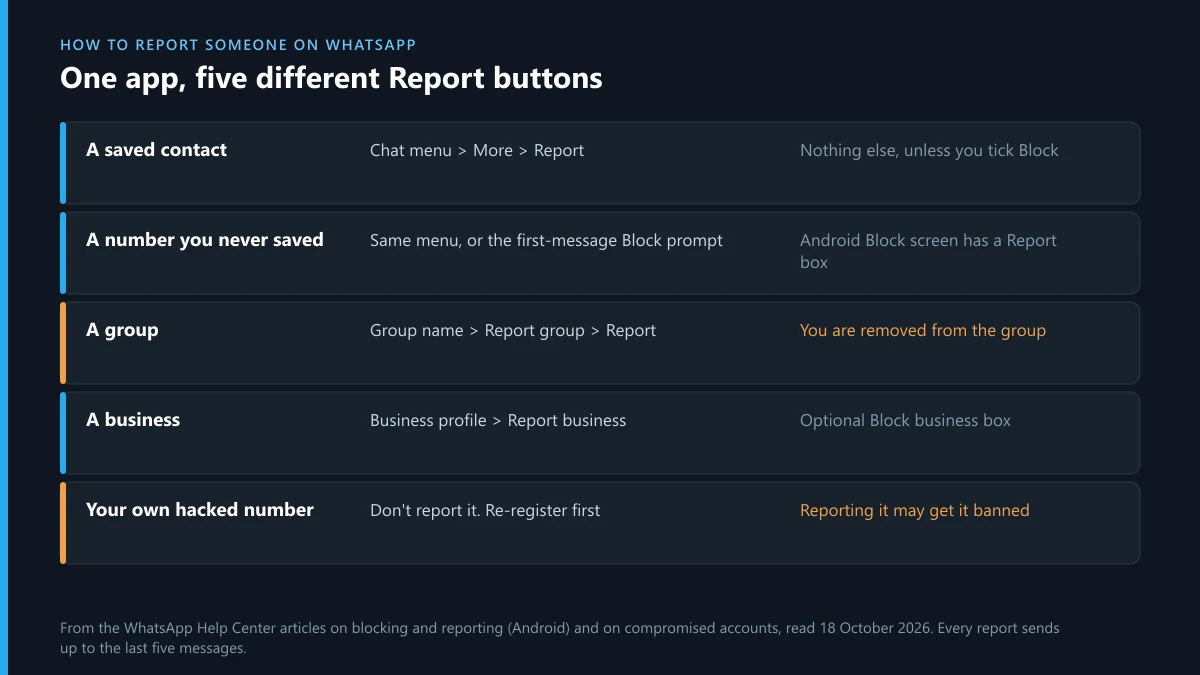
WhatsApp has no web form for reporting another user. Its help article on blocking and reporting puts every report inside the app, and the button sits in a different place depending on what you're reporting. A contact, a number you never saved, a group, a business and a view once photo each have their own Report option. Pressing the wrong one is the usual reason a report doesn't do what people expect. We went through that article for Android, iPhone and web on 18 October 2026. Below is the button to use for each case, and then where to go when a WhatsApp report isn't enough.
How to report someone on WhatsApp, step by step
Start from the chat. On Android, open the chat, tap the three-dot menu, then More, then Report. On iPhone, tap the person's name at the top of the chat, scroll to the bottom and tap Report. A second route works on both: open the chat info, scroll down and tap Report followed by the contact's name or number. Either way, a box offers to block the sender as well. Tick it if you want the messages to stop, because a report alone doesn't stop them.
Take screenshots before you tap. WhatsApp's help article says the report sends "up to five of the last messages they've sent to you", plus basic details of your last five calls, the account ID, and when and in what format each message was sent. That is all WhatsApp sees. The police, your bank and any other platform will need more than five messages, and once you block, you can no longer add to the chat.
| What you're reporting | Where the button is | What else happens |
|---|---|---|
| A saved contact | Chat menu > More > Report, or chat info > Report | Nothing, unless you tick Block |
| A number you never saved | The same menu, or the Block prompt WhatsApp shows the first time an unknown number writes | On Android, Block has a Report to WhatsApp box you can tick |
| A group | Group name > Report group > Report, or tick Report group while exiting | You are removed from the group |
| A business | Business profile > Report business > Report | Optional Block business box |
| A view once photo or video | Open it, then the menu > Report | The report covers that media |
The steps look much the same on other apps, but the evidence they send doesn't. Instagram attaches the post or profile itself, as the menus Instagram uses to report a person shows, while WhatsApp can send only what the encryption lets you hand over.
How to report a WhatsApp number that isn't in your contacts
The route is the same, but you start from the chat the number opened. To report a WhatsApp number you never saved, open its chat and use the menu, More, then Report, the same as for a contact. The quicker route is the prompt WhatsApp shows above a first message from an unknown number. On Android, Block from that prompt comes with a Report to WhatsApp box you can tick, and the help article also lists a Block button on the "Not a contact" notification.
There is one limit. You can only report a WhatsApp number that has messaged or called you, because the report is built from that chat. A number you saw in an ad, a post or a comment can't be reported to WhatsApp until it contacts you. If the number appears in replies on X, clearing scam bots from your X replies deals with the accounts that post it, and the ad itself goes to the platform that ran it.
If a number is spamming you in bulk, WhatsApp's help pages describe a privacy setting that blocks high volumes of messages from unknown accounts. It filters new spam. It doesn't report anyone.
How to report a WhatsApp scam contact number
Report it in the app, then report the fraud to the authorities. Searches for "report WhatsApp scam contact number" often expect a phone line at WhatsApp. There isn't one, and anyone who phones you claiming to be WhatsApp support is running the scam. Note the number in full, with the country code, before you report and block it. Scam numbers change often, and the police will want the exact number that contacted you.
How to report a WhatsApp number to cyber crime
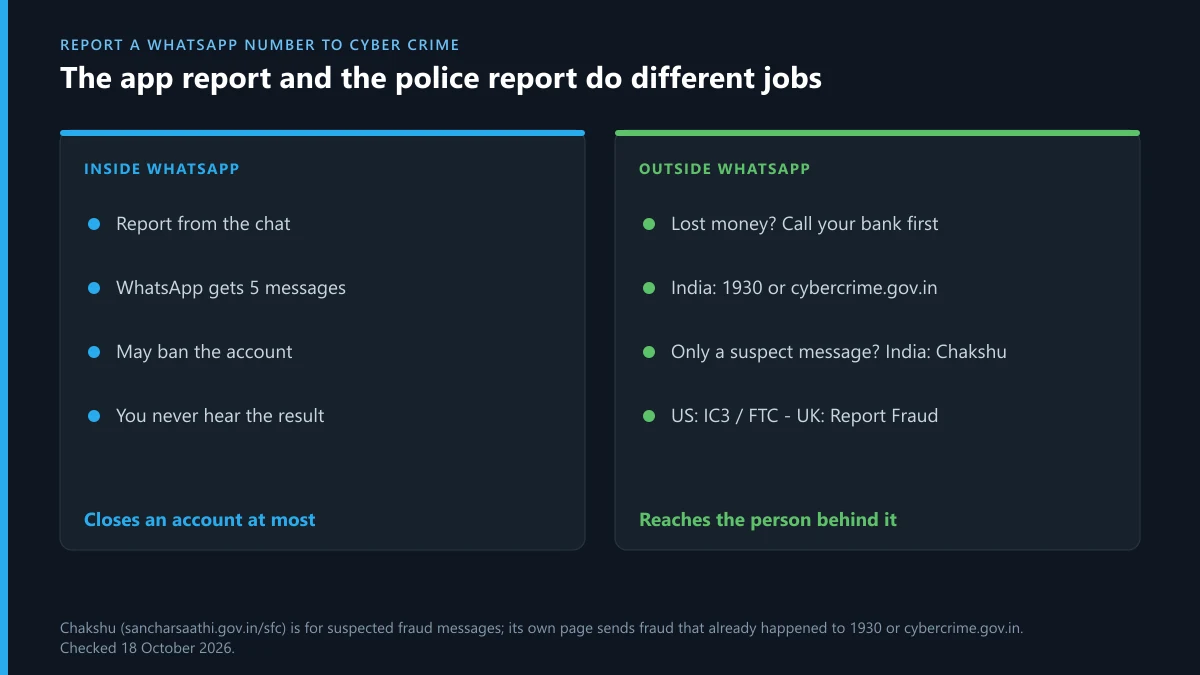
Only the police can act against the person behind the number. A WhatsApp report can at most close their account. To report a WhatsApp number to cyber crime, use your country's own channel, and pick it by one question: did you lose money or data, or only receive the message?
- India: the government's Sanchar Saathi portal runs Chakshu, which takes reports of suspected fraud calls, SMS and WhatsApp messages. The same page says Chakshu is not for reporting fraud that has already happened or other cyber crime. For that, call the 1930 helpline or file at cybercrime.gov.in.
- US: the FBI's IC3 takes internet crime complaints. Consumer scams can also go to the FTC's ReportFraud site.
- UK: Report Fraud, on 0300 123 2040. In Scotland, call 101. The 7726 forwarding number covers SMS text messages only, not WhatsApp.
- Anywhere: if you paid anything, call your bank before you do anything else. Payments can sometimes be recalled within hours, but rarely after a few days.
Attach your screenshots, the full number and any payment details to the police report. Then report the number inside WhatsApp too. The two reports go to different places, and neither replaces the other.
How to report WhatsApp fraud
To report WhatsApp fraud, use both routes in order: save the evidence, report to the police or fraud service above, then report and block in the app. WhatsApp's scam advice comes down to the same idea: pause, stop replying, then block and report.
One kind of fraud targets people who have just been banned. Anyone offering to "unban" a WhatsApp number for a fee is selling something WhatsApp says can't be bought. Its ban page states that "third party services can't ban your WhatsApp account or remove your account ban". That is also the line between a lawful ban service and a scam, and what an honest ban service will and won't do sets it out for Instagram, where the same pitch is common.
How to report a WhatsApp account and get it banned
You can report it, but you can't make WhatsApp ban it. The help article says a report "won't necessarily result in us banning" the account. WhatsApp reviews the reported messages against its Terms of Service, and only WhatsApp decides. WhatsApp publishes no count of reports that leads to a ban, so more reports from more people don't trigger one automatically.
What helps is a report that shows a clear rule break: scam requests, threats, spam sent in bulk, or child abuse material. The last of these should not be screenshotted at all; report it to the platform and to NCMEC or your national hotline instead. A report about an argument or an insult rarely meets the bar. X works the same way, and which rule breaks get an X account suspended shows that only some reasons lead to a suspension. Wiping an account entirely is rarer still, as whether you can delete someone else's X account explains.
How to report a fake WhatsApp account
First work out which kind of fake you're dealing with. There are two, and reporting the wrong one can backfire.
- A stranger's number using your name or photo. Report it from its chat like any other number. If friends received the messages, ask them to report it too, because only people the account contacted have a chat to report from.
- Your own number, taken over by someone else. Don't report it. WhatsApp's page on compromised accounts warns that if you report the account you're trying to recover, "we might ban it" and you could lose access and data. It recommends recovering first: re-register with the 6-digit code sent to your phone, which logs every other device out. Then warn family and friends, because whoever had it "could impersonate you in chats and groups".
Fake accounts rarely stay on one app. The same impostor often has a profile on X too, and X's impersonation report and who may file it covers that side. If the fake profile uses a photo of you, getting a picture of you taken off Instagram sets out the privacy route there.
How to report a spam group on WhatsApp
Tap the group name, then Report group, then Report. To report a spam group on WhatsApp, you can also tick Report group while you exit it. Android and web offer a box to delete the chat at the same time. Either route takes you out of the group.
What happens when you report a WhatsApp group?
The last five messages in the group go to WhatsApp, and WhatsApp says that "no one in the group will know about the report". You are removed from the group, and only an admin can invite you back. If one member is the problem rather than the whole group, report that member from their profile. That route keeps you in the group.
A newer detail affects anyone who forwards group history. WhatsApp's help article says that if someone you sent message history to reports content from that history, "you'll be reported", and the original sender won't be. If you're adding people and sharing old messages with them, check what's in those messages first.
How to report a WhatsApp group for selling illegal products
Screenshot the listings, prices and admin numbers, then report the group in the app. Drugs, weapons, fake documents and stolen card details are crimes, not only Terms of Service breaches. Give the police the same evidence through the cyber crime channels above. The in-app report sends WhatsApp just five messages and removes you from the group, so finish collecting evidence before you press it. Don't buy anything to "prove" the case.
What happens when you report a WhatsApp number?
The other person isn't told, and your chat stays as it was unless you also blocked them. The help article says "the user or group won't be notified". What happens when we report on WhatsApp after that is a review on WhatsApp's side: the account may be banned or left alone, and WhatsApp doesn't send you the result. Our full breakdown of what a WhatsApp report sends and who sees it covers that step in detail, including what Report and block adds.
X runs a similar process with different visibility, as what the reported account learns on X shows.
How to report someone on WhatsApp without them knowing
Every in-app report is anonymous to the person you report, so you don't need a special trick to report someone on WhatsApp without them knowing. They can work out a block, though. Their messages stop showing the second tick and your profile photo stops updating for them. If you need them not to notice, report without blocking, mute the chat, and leave it there.
I reported a WhatsApp contact by mistake: can I un-report someone?
No. The help pages describe no way to withdraw or edit a report, so there is no setting for how to un report someone on WhatsApp. The five messages are already with WhatsApp. If you reported a WhatsApp contact by mistake, that rarely matters on its own: a review that finds nothing against the rules ends with no action. What you can undo is the block. Go to Settings, then Privacy, then Contacts (on Android), then Blocked contacts, tap the person and unblock them. Messages they sent while blocked won't arrive.
A report by mistake in a group can't be undone either. You were removed, so ask an admin to add you back.
The same person is on Instagram, X or Telegram
A WhatsApp report covers one number. Scammers and harassers usually run accounts on other apps too, and each platform needs its own report.
Instagram: a profile that exists only to harass or scam can be reported as a whole, and reporting an entire Instagram page or profile shows how.
X: report a single tweet that breaks the rules and, separately, the X account behind it from its profile.
Telegram: if you're reporting accounts on Telegram and get stopped, why Telegram says "Limit exceeded" and when it lifts explains the timed limits. Scammers sometimes pose as handle dealers too, so before you pay anyone for a name, read how buying a Telegram username works on Fragment.
FAQ
Can I report a WhatsApp number without a chat?
No. WhatsApp's reports are built from a chat, so the number has to have messaged or called you. A number you only saw in an ad or a post can be reported to the platform that showed it, or to the police if it's a scam.
Does reporting someone on WhatsApp block them?
Not by itself. A report alone leaves their messages and calls coming. Tick the block box on the report screen, or use Report and block on iPhone, to stop them.
Will WhatsApp tell me what happened to my report?
No. WhatsApp reviews the report against its Terms of Service and doesn't send you the outcome. If the account is banned, you'll only notice that it stops working.
Is there a WhatsApp phone number for reporting scams?
No. Reporting happens only in the app. Anyone who calls claiming to be WhatsApp support is not WhatsApp. Report the fraud to your national fraud or cyber crime service as well.
Should I report my own hacked WhatsApp account?
No. WhatsApp warns that reporting an account you're trying to recover might get it banned. Re-register with the 6-digit code sent to your phone first, which logs out every other device.
Can a group admin see who reported the group?
No. WhatsApp says no one in the group will know about the report. Members may notice you left, because reporting a group removes you from it.
Can I report a single WhatsApp message?
WhatsApp's help article lists reports for a contact, an unknown number, a group, a business and view once media. A contact report sends that person's last five messages to you, so report the person who sent the message.