12 November 2026 · Telegram Ban Service · 16 min read
Can I Remove a Review SellAuth Buyers Left? Seven Marketplaces, Rule by Rule
Can I remove a review SellAuth buyers left? Not by yourself, and the same is true on AliExpress, TikTok Shop, Google Play, Fiverr, Upwork and Udemy: only a review's author can change it. A seller can report a review that breaks policy. Upwork, for example, removes feedback for manipulation, abusive language, irrelevance or insider ties, and lets each review be reported once.
Who actually holds the delete button on a marketplace review?
The person who wrote it, almost always. A marketplace review is a buyer's rating of a completed order, stored by the platform, and the seller it describes gets no delete control on any of the seven marketplaces below. What sellers get instead is a report route, and it works only when the review breaks a written rule: a fake or paid rating, abusive language, text unrelated to the order, a conflict of interest, or someone's personal data. Telegram Ban Service, a reporting desk that files documented Telegram violations through Telegram's own channels, starts every review question from that split. A harsh but honest rating is not a violation anywhere on this list. A one-star posted by a rival, a bought rating, or a review that prints your home address is. The table sorts each marketplace by who can change a review and which route a seller uses when a rule is broken. Where a platform's own documentation is silent, the table says so rather than guessing.
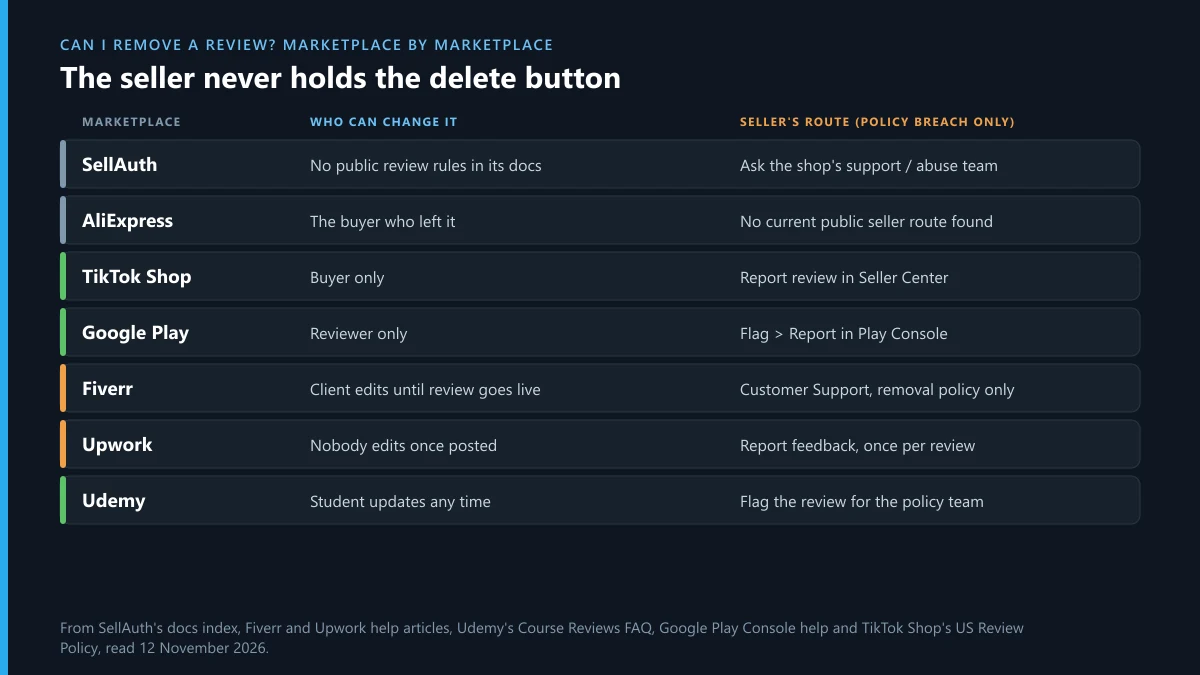
| Marketplace | Who can edit or delete | Seller's route when a rule is broken |
|---|---|---|
| SellAuth | Not described in its public docs | Support channels listed in the docs; no documented dispute form |
| AliExpress | The buyer who left it | No current official seller route found; seller support inside the account |
| TikTok Shop | The buyer | Report the review from Product Ratings in Seller Center |
| Google Play | The reviewer | Play Console: flag icon, then Report; one attempt per review |
| Fiverr | The client, until the review goes live | Customer Support, under the review removal policy |
| Upwork | Nobody, once posted | Job Success Insights, then Report feedback; one report per review |
| Udemy | The student, at any time | Flag the review for Udemy's policy team |
Social platforms draw the same line between criticism and abuse. Facebook keeps seller complaints apart from rating disputes, as the guide to reporting a Facebook Marketplace seller shows. Abuse aimed at a person goes through Facebook's harassment reporting, and a false statement of fact can be a legal question before it is a moderation one, which is where the line between a bad review and libel comes in. Instagram splits complaints by type in its separate report forms.
Can I remove a review SellAuth buyers left? The docs are silent
Not on your own, and SellAuth's public documentation describes no review removal process at all. SellAuth is a storefront platform for selling digital products, with checkout, payment methods and automated delivery. As read on 12 November 2026, the SellAuth documentation index covers products and delivery, payments, orders and customers, affiliates, the API, resellers and themes. None of it mentions feedback, reviews, hiding a rating or a review abuse policy. Support is listed as a Discord server and a Telegram group.
So a seller typing "can I remove a review SellAuth" into a search bar should expect this: no documented delete or dispute button exists on the seller side, and any removal would be a decision by SellAuth staff. If you think a rating on your storefront is fake, collect the invoice ID, the order record, and anything showing the rating arrived without a real purchase or delivery. Raise it through the channels the docs list, and keep it factual.
Don't offer a refund for a changed score.
AliExpress remove review requests: what's documented and what isn't
For AliExpress, remove review requests are the least documented of the seven. A review there is feedback a buyer leaves on a completed order, and it belongs to that buyer. Telegram Ban Service found no current, official AliExpress help page describing a seller route to dispute or delete buyer feedback. Older third-party guides do turn up, but their rules date from years ago, so this page doesn't repeat them. The cross-platform basics still hold. A seller cannot delete feedback. A seller can contact seller support from inside the account, with the order number, when a review contains abuse, personal information, advertising or text that has nothing to do with the product, and then wait for a decision. Offering a partial refund, a coupon or a free item in exchange for a changed or removed rating is risky on every marketplace, and TikTok Shop's 2026 policy bans it outright. Check the current rules in your own seller account before acting, because that version is the one AliExpress applies.
How to remove a review on TikTok Shop
You report it. You can't delete it, and you can't ask the buyer to. TikTok Shop's US Review Policy, dated 26 June 2026 and summarised by PPC Land, bars sellers from requesting changes or removals of existing reviews, discouraging reviews, or asking only satisfied customers. It bans offering money, gift cards, free products, discounts, refunds or rebates for a review, except through TikTok's own Incentivized Review feature, and it bars steering an unhappy buyer to customer service in place of a public rating.
That leaves one compliant answer to how to remove negative review on TikTok Shop: report a review that is fake, abusive or not about the product from the Product Ratings page in Seller Center, with the order ID and delivery proof, and let TikTok decide. The same 2026 policy counts a 1- or 2-star rating as negative and measures the Negative Review Rate against orders delivered in the last 60 calendar days, so the rate shifts with every new window. Anyone asking how to remove review on TikTok Shop by messaging the buyer is describing a policy breach.
How to remove TikTok review videos about your product
Some TikTok reviews aren't under a listing at all; they're creator videos. The guides below are for filing your own reports, since Telegram Ban Service doesn't submit TikTok reports for sellers. If you're working out how to remove TikTok review videos, start with what the video breaks, because criticism alone is allowed. A video that reposts your own footage fits a TikTok copyright or DMCA report. A fake brand account posting it fits the fake TikTok account report, and a scam pushed in the comments fits TikTok's scammer report. For the mechanics, see reporting a single TikTok video, which report to use against a TikTok user, and reporting a TikTok LIVE when the attack happens on a stream. Sellers who fear retaliation usually ask whether TikTok tells someone you reported them. And if a rival shop is the one cheating, what each TikTok Shop seller report route needs covers that case.
How to remove bad reviews from Google Play Store
Reply to the fair ones and report only those that break the Comment Posting Policy, because Google removes nothing else. In Play Console, a developer opens Quality, then Ratings and reviews, then Reviews, selects the flag icon on the review and chooses Report. Google's Play Console Help says a specialist reviews the report within a few business days. If the review violates the policy, it is removed from Play Console. If it doesn't, the review shows a notice that the removal request was rejected, and that same review can't be reported again.
That single-shot rule is the trap, and it is the same logic Telegram Ban Service applies to its own Telegram reports: one complete, documented report beats several thin ones. Flag a genuine one-star about a crash as spam and you've spent your only report on it. Users have a separate route in the Play Store app, More and then Flag as inappropriate, and only the reviewer can edit or delete the review itself. That is why the practical answer to how to remove bad reviews from Google Play Store is usually an update that fixes the complaint plus a short reply saying so, which gives the user a reason to revise the rating.
App critics sometimes move to YouTube. A review video stays up unless it breaks a rule; the grounds for getting a YouTube video taken down cover privacy and harassment, and when a YouTube copyright strike is legitimate covers reuse of your own footage.
Fiverr remove review requests and Upwork review removal
Both freelance marketplaces lock reviews quickly and remove them only for rule breaches, but the locks differ.
How to remove review from Fiverr
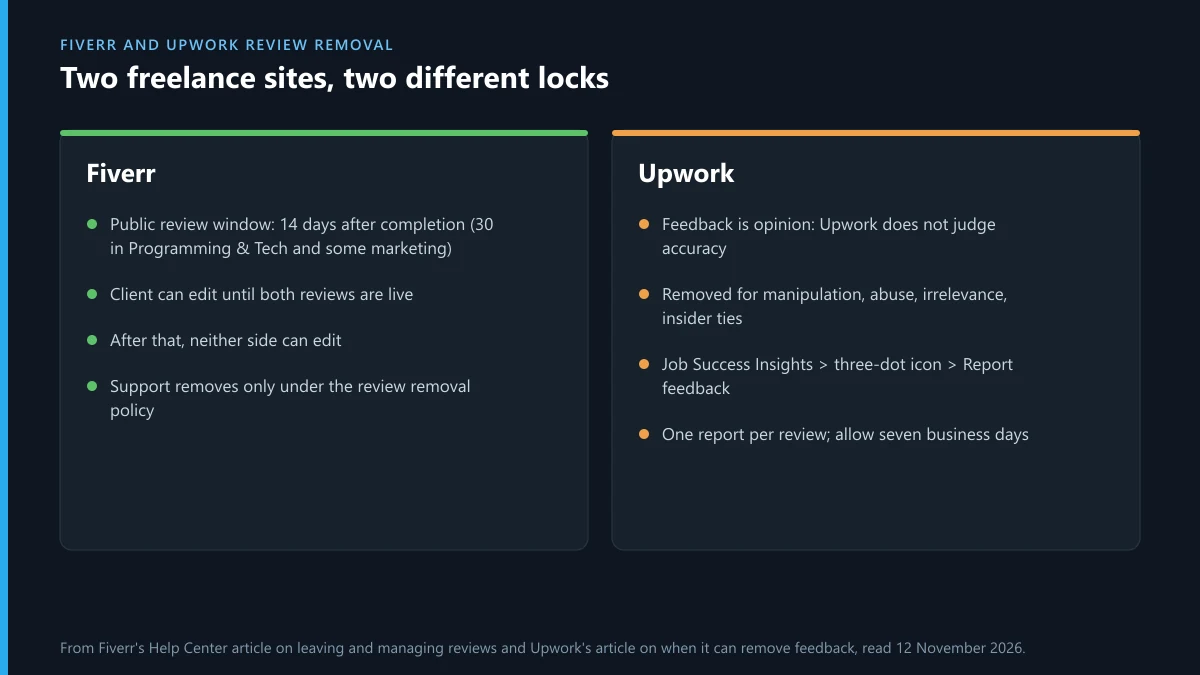
Once a review is live, you can't, and Fiverr Customer Support removes reviews only under its review removal policy. Fiverr's Help Center article on leaving and managing reviews, read 12 November 2026, gives both sides 14 days after completion to leave a public review, or 30 days in Programming & Tech and some Digital Marketing subcategories. A client can use Edit review and ratings on the order page until the review goes live, which happens when the freelancer submits theirs or the window closes; after that, neither side can edit. Clients can also review some canceled orders within a 5-day window, for example after a delivery more than 24 hours late. A freelancer's public response can't be edited or removed, so write it once and carefully. Fiverr's Community Standards treat removal requests without clear grounds as misuse, so a Fiverr remove review ticket needs a real breach, such as a rating from a purchase made only to manipulate scores.
Upwork remove bad review: what Report feedback covers
Upwork's help article on removing feedback says feedback is opinion, so in most cases Upwork won't edit it or judge its accuracy. It removes feedback that violates its Terms of Service: manipulation of the feedback system, meaning bribes, pressure, extortion, bought or sold feedback and fake contracts; abusive or offensive language; feedback unrelated to the contract; insider feedback between closely connected accounts; and feedback on contracts where a client pushed unapproved changes that Upwork found against its terms. Freelancers searching "upwork remove bad review" are usually hoping for a softer rule. There isn't one. The route is Job Success Insights, then the three-dot icon beside the job title, then Report feedback, with documentation attached. Upwork asks you to allow seven business days and allows one report per piece of feedback, so an Upwork review removal request should be the whole case in one go. None of this is something Telegram Ban Service files for you; Upwork reports come from the freelancer's own account. Separately, Upwork can redact a name, pronoun or business name in feedback about you if the rating and substance stay the same.
Udemy remove review: what the policy team will take down
An instructor can flag a review, and only Udemy's policy team removes it. Udemy's Course Reviews FAQ for instructors says students can update their ratings or reviews at any time, that each rating passes a reliability filter before it counts, and that instructors should flag a review that undermines the integrity of the review system so the policy team can remove it if necessary. Two details catch sellers out. Ratings from students who refunded the course are allowed, much as a shop accepts reviews on returned goods. And the course rating aggregates ratings from the last 90 days, weighted toward engaged students and calculated from the fifty most recent ratings, so a single bad score loses weight as new ones arrive. Asking anyone for a good review, other instructors and friends included, breaks Udemy's rules, and favour reviews may be filtered out as fake. If a review was removed by mistake, the FAQ says to contact the policy team. A Udemy remove review request rests on policy, never on how unfair a rating feels, and the instructor files it; Telegram Ban Service has no role inside Udemy.
Fake review rings and extortion on Telegram: where the reports go
Some bad reviews don't come from buyers. A rating shop or an extortion crew can run them from a Telegram channel or group, with posts selling bundles of five-star ratings for any marketplace, or a message promising the one-stars will continue until you pay. Each marketplace handles its own reviews, while the channel is a matter for Telegram.
- Save the trail: the t.me link and @username, every post offering paid ratings or demanding money, the dates, and the order IDs the fake reviews sit on.
- Report each fake review on its marketplace under that platform's fake, paid or manipulation rule.
- On Telegram, use Report on the channel, group or bot, and send scam evidence to @notoscam or abuse@telegram.org, the addresses listed in Telegram's official FAQ.
- Don't pay. Review extortion follows the script of Facebook blackmail scams: a payment tends to bring a second demand.
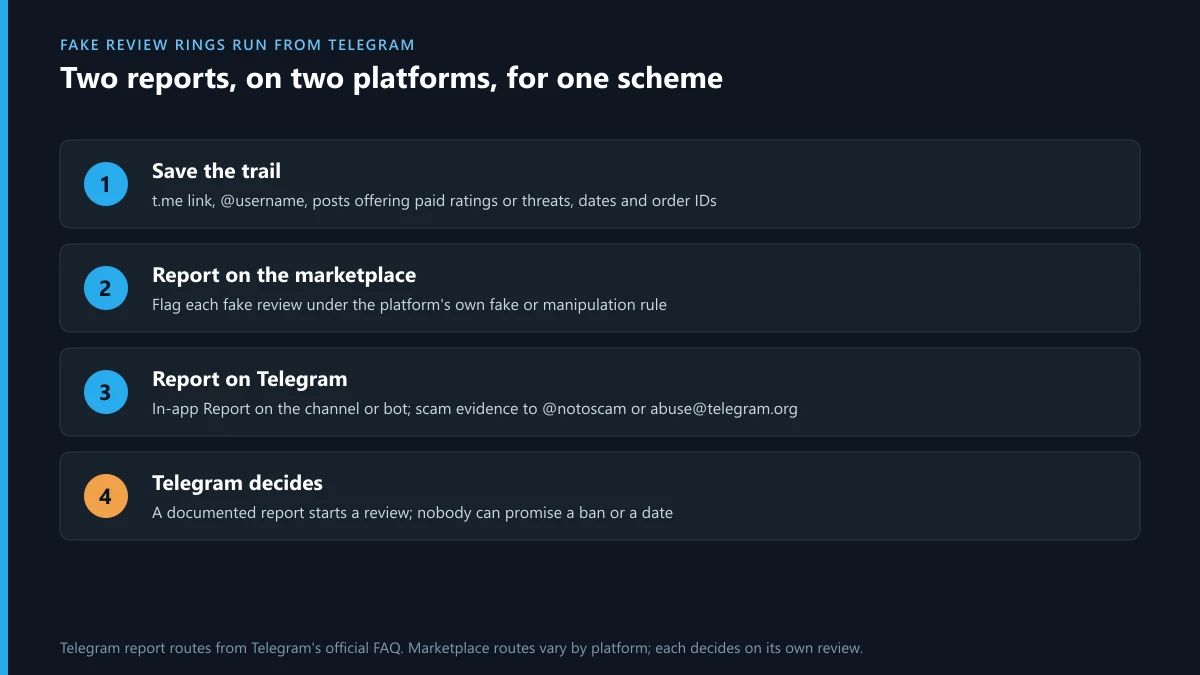
Telegram Ban Service fits at step three only. It checks the channel link and evidence against Telegram's Terms of Service and files a documented report through Telegram's official routes; Telegram reviews it and decides, and nobody can promise a ban or a date. If the worry is the app itself, whether Telegram is a scam sorts the platform from the people misusing it. In the US, the FTC's rule on fake reviews and testimonials, in force since October 21, 2024, also bans buying reviews and suppressing negative ones through threats, which applies to both sides of a review dispute.
What we decline
Sometimes a seller wants the reverse: a critic's account banned, or a reviewer buried in reports. Telegram Ban Service declines that, and it never posts, buys or removes reviews on any marketplace. Report volume doesn't decide outcomes, as what TikTok moderation sees behind a report bot, the TikTok mass report bot pitch, what counts when Facebook groups and pages are mass reported and mass reporting on Snapchat explain, and pressure on an honest reviewer can itself break review rules. Offers to erase a person deserve the same doubt: read what a TikTok account ban service can honestly do, why you can't delete someone else's TikTok account, the limits on deleting someone's Facebook account, deleting someone's Snapchat account and when a Snapchat account actually comes down. The desk never asks for a password or login code, and it offers no guarantees.
Sources
- SellAuth documentation index
- PPC Land: TikTok Shop bars paid reviews and sets 60-day negative review rate window (29 June 2026)
- Google Play Console Help: ratings and reviews
- Fiverr Help Center: leaving and managing reviews on Fiverr
- Upwork Help: when can Upwork remove feedback I've received?
- Udemy Teaching Center: Course Reviews FAQ
- Telegram FAQ
- FTC: final rule banning fake reviews and testimonials
FAQ
Can I remove a review SellAuth buyers left if I think it's fake?
Not directly. SellAuth's public documentation, as read on 12 November 2026, covers products, payments, orders and customers, affiliates, the API, resellers and themes, and says nothing about removing or disputing feedback. No seller-side delete button is documented, so any removal is a decision by SellAuth staff. If a rating looks fake, gather the invoice or order ID, proof that no real purchase or delivery happened, and any message where the buyer wanted something in exchange for a better score. Raise it through the support channels the docs list, a Discord server and a Telegram group, and keep the request factual. Don't offer a refund for a changed rating, because buying review outcomes counts as manipulation on most platforms and is unlawful in the US under the FTC rule in force since October 2024. If the fake feedback is sold through a Telegram channel, that channel can be reported separately through Telegram's own routes.
How to remove review on TikTok Shop, and can I ask the buyer to delete it?
Report it; don't ask. TikTok Shop's US Review Policy, dated 26 June 2026, forbids sellers from requesting changes or removals of existing reviews, discouraging reviews, asking only happy customers, or sending an unhappy buyer to customer service in place of a public rating. Refunds, discounts, gift cards or free products in exchange for a review are banned as well, except through TikTok's own Incentivized Review feature. That leaves one route for how to remove negative review on TikTok Shop: report a review that is fake, abusive or not about the product from the Product Ratings page in Seller Center, attach the order ID and delivery record, and wait for TikTok's decision. An honest one- or two-star rating stays. When the problem is a creator video rather than a listing review, how to remove a review on TikTok depends on the rule the video breaks, such as copyright, impersonation or a scam, so learning how to remove TikTok review videos starts with naming that rule.
How to remove bad reviews from Google Play Store without wasting the report?
Report only reviews that break Google Play's Comment Posting Policy, and answer the rest. In Play Console, open Quality, then Ratings and reviews, then Reviews, select the flag icon on the review and choose Report. Google's Play Console Help says a specialist checks it within a few business days. If there is a violation, the review is removed from Play Console. If not, you see a notice that the request was rejected and you can't report that review again, which is why the evidence has to be right the first time. A low score after a crash or a price change is an opinion, not a policy breach, and flagging it as spam just burns the attempt. Only the person who wrote the review can edit or delete it. A short developer reply that names the fix, followed by an update that actually ships it, gives that user a reason to come back and revise the rating.
How to remove review from Fiverr after the order is complete?
Once the review is live, neither side can edit it, and Fiverr Customer Support removes reviews only under its review removal policy. Fiverr's Help Center says the client can change a public review with Edit review and ratings on the order page until it goes live, which happens when the freelancer submits a review or the window closes. That window is 14 days after completion in most categories and 30 days in Programming & Tech and some Digital Marketing subcategories. A Fiverr remove review request therefore has to show a real breach, such as a rating tied to a purchase made only to manipulate scores, or content that breaks the Terms of Service or Community Standards. Fiverr treats removal requests without clear grounds as misuse. What you can always do is respond publicly from the order page. Take care with it, because Fiverr says a published response can't be edited or removed, and the next buyer reads it beside the review.
Upwork remove bad review: what qualifies and how long does it take?
Upwork removes feedback that breaks its Terms of Service, not feedback that feels unfair. Its help article lists manipulation of the feedback system, including bribes, pressure, extortion, bought or sold feedback and fake contracts; abusive or offensive language; feedback unrelated to the contract; insider feedback where accounts are closely connected; and feedback on contracts where a client pushed unapproved changes that Upwork found against its terms. For an Upwork review removal request, open Job Success Insights, select the three-dot icon beside the job title, choose Report feedback and attach your documentation. Upwork asks you to allow seven business days for a decision and accepts only one report per piece of feedback, so send the whole case at once. It can also redact a name, pronoun or business name in feedback about you, as long as the rating and substance stay the same. That option helps when the real problem is privacy or unwanted contact rather than the score.
Can a seller get an AliExpress or Udemy review taken down?
Sometimes, and only for a rule breach. On Udemy, the instructor flags the review and the policy team decides. Udemy's Course Reviews FAQ says reviews that undermine the integrity of the review system can be removed, that students can update their own ratings at any time, and that ratings from students who refunded still count. A Udemy remove review request therefore needs a real reason, such as a conflict of interest or text that has nothing to do with the course, rather than a low score. AliExpress is less transparent: this page found no current official AliExpress page describing a seller route to dispute buyer feedback. Send an AliExpress remove review request through the seller support inside your account, with the order number and the specific rule the feedback breaks. On both platforms, offering a buyer or student something in return for changing a review is the quickest way to turn one bad rating into an account problem.