November 12, 2026 · Telegram Ban Service · 14 min read
How to report a review that is fake, bought or coordinated
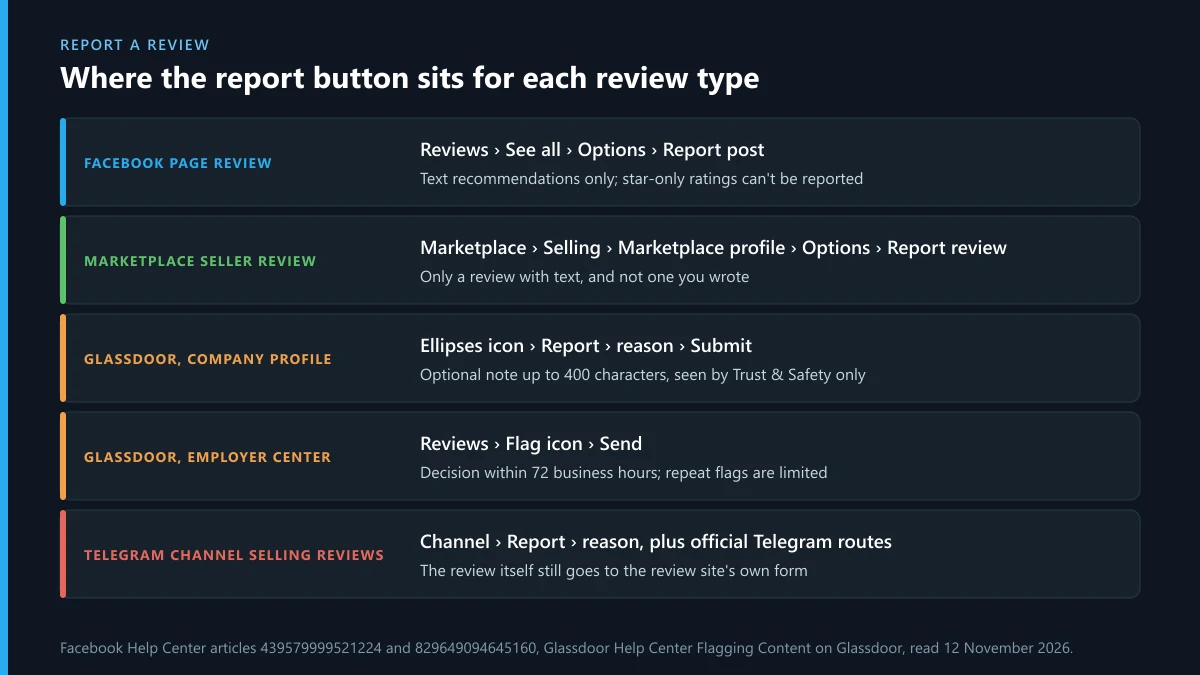
To report a review, open the menu on the review and pick the platform's report option: Options, then Report post, on a Facebook Page recommendation; Options, then Report review, on a Marketplace seller review; or the ellipses icon, then Report, on Glassdoor. As of November 2026, Facebook's Help Center says a star-only rating can't be reported, so the review must contain text.
What does it mean to report a review, and when does a report work?
Reporting a review asks the site that hosts it to test that one review against its written rules. It is not an appeal about fairness.
Facebook checks recommendations against its Community Standards and Glassdoor checks against its Community Guidelines; both say they may remove what breaks them, and both leave the rest alone. A harsh one-star from a real customer who disliked your prices will usually stay up. A review that is spam, comes from someone who never dealt with you, was written by a rival's staff, harasses a named employee or was paid for fits a rule, and that rule is what your report has to name. Marketplace adds its own narrower test, covered below. Telegram Ban Service is a reporting desk for Telegram channels, groups and bots that break Telegram's Terms of Service, so its role in a review problem begins only where the reviews are ordered or sold on Telegram.
The rest you can do yourself, for free, from the review's own menu.
How to report a fake review on Facebook Page recommendations
To report a fake review on a Facebook Page, open the Options menu on that recommendation and choose Report post. Facebook's help article on reporting a recommendation or review gives the computer path:
- On the Page, click Reviews, which sits below Details under the cover photo.
- Click See all next to Recent reviews.
- Click Options in the top right of the recommendation you want to report.
- Select Report post and follow the on-screen instructions.
That is the full answer to how to report a fake review on Facebook. Searches phrased as report fake review facebook, report fake reviews facebook or facebook report fake review all end at the same Report post menu, because a recommendation is handled as a post. Two limits shape what you can do. A recommendation that holds only a star rating and no words cannot be reported at all, according to the same article. And a recommendation you saw earlier may disappear because Facebook removed it or because its author changed the audience, so take a screenshot with the date visible before you file anything.
If you came here asking how to report fake reviews on Facebook in bulk, there is no bulk tool; each one is its own report. Telegram Ban Service does not file these Facebook reports for anyone, because the Report post menu is open to every person who can see the review.
When the reviewer is the problem, not the review
Several recommendations from one invented profile point to the account, so how to report fake Facebook reviews of that kind starts with the steps for reporting the fake Facebook account behind a review reach the source rather than one post. To report fake Facebook reviews that name or insult a staff member, Facebook's harassment reporting route fits better than spam, while a review stating false facts about a crime or a health risk may be a defamation question rather than a review report. The broader guide to reporting someone on Facebook lists the profile options, and how a Facebook post report differs from a Page report explains why the post route always submits. Reviewers are not told who filed, as covered in whether a Facebook report stays anonymous, and what Facebook does after a report lands sets out the review stages.
How to report a fake review on Facebook Marketplace
On Marketplace you report a seller review from your own Marketplace profile, using Options and then Report review. The Marketplace seller review report article lists the steps on a computer:
- From Feed, click Marketplace in the left menu.
- Click Selling, then Marketplace profile.
- Below Seller reviews, click Options next to the review you want to report.
- Click Report review.
Facebook only takes the report when you did not write the review and the review includes text. The grounds are wider than on a Page. Meta says it may remove seller reviews that break Community Standards or that do not focus on the service you offered, so a review about a buyer's politics, or about another seller entirely, has a clear reason attached.
One fact matters most for how to report fake review on Facebook Marketplace. In its explanation of how seller reviews work, Meta says it does not verify whether every reviewer actually bought from the seller, and that reviews are written in the iPhone or Android app from a purchased listing or from the chat thread. A reviewer with no chat and no sale in your history is therefore worth stating in your report, in one plain sentence. When the person was a scammer rather than a reviewer, use the Marketplace seller report or Facebook's scam reporting steps instead.
Glassdoor: where do you report fake reviews?
Glassdoor takes review reports in two places: the ellipses menu on any review, and the Flag icon inside the Employer Center. Its help article Flagging Content on Glassdoor, updated 23 September 2026, describes both.
From a company profile
- Click the Ellipses icon in the upper right of the Company, Interview or Benefits review.
- Click Report and choose the reason from the drop-down menu.
- If a text box appears, explain the problem in 400 characters or fewer. Only Glassdoor's Trust & Safety Team sees it, not the reviewer or the employer.
- Click Submit.
From the Employer Center
Select Reviews, click the Flag icon below the review, add your explanation if a box is shown, and click Send. Glassdoor says it responds within 72 business hours with its decision, and that it limits how often the same content can be flagged.
That limit is the reason glassdoor report fake reviews requests often fail on the second try. The first flag should already name the guideline and carry the strongest evidence, such as a review describing an office or job title that never existed at your company, or five reviews sharing the same unusual phrase in one week. A note saying only that a review is unfair, or that the reviewer must be a former employee you dislike, gives the moderator nothing to test against the guidelines. Telegram Ban Service plays no part in that decision either; Glassdoor alone reads the flag.
How to report coordinated fake reviews on platforms
Treat a coordinated attack as a pattern: document the cluster first, report each review with the same evidence, then report the accounts and the place where the order was posted.
Coordination rarely shows in one review. It shows in the spread, which is why a dated record matters more than any single screenshot.

| Signal | What to capture | Where it goes |
|---|---|---|
| Timing burst | Dated screenshots of the review list and the rating before and after | The note on each review report |
| Throwaway accounts | Profile screenshots showing no photos, friends or other reviews | A fake-account report on that platform |
| Copied wording | The repeated phrases side by side | Each review report, briefly |
| Order post | The link and screenshot of the post naming your listing as a target | A report on the platform hosting the post |
| No customer match | A private check of your sales or staff records | One line saying no transaction was found |
Telegram Ban Service asks for this same dated record when a campaign traces back to a Telegram channel. Keep customer names out of any report; one sentence that you checked your records is enough. Then report each review on its own. Asking friends or staff to report the same review again and again adds nothing, for the reasons explained in why mass reporting a Facebook Page or group does not count extra, and it can look like the same coordinated behavior you are complaining about. When the reviews arrive alongside a demand for money to stop them, the pattern described in pay-or-we-post blackmail schemes on Facebook applies, and that message is evidence too.
Does the FTC fake-review rule help when you report fake reviews?
Indirectly, yes: since 21 October 2024, a US FTC rule lets courts penalize knowingly writing, buying or selling fake reviews.
The Federal Trade Commission announced the final rule on 14 August 2024. Its questions-and-answers guidance names the parts most relevant to a review campaign. Section 465.2 bars writing, creating or selling fake or false reviews, including ones attributed to people who do not exist, such as AI-written reviews. Section 465.4 covers paying for reviews that must express a set sentiment, and Section 465.7 covers suppressing reviews by intimidation or unfounded legal threats. The guidance says review brokers generally fall under the ban on selling reviews, and that reputation firms are not immune.

The rule does not change any platform's report button. Facebook and Glassdoor still decide removals under their own rules, and the FTC enforces its rule itself. What it gives you is vocabulary. A report note that says a review appears to be bought, with the order post attached, describes conduct a federal regulator treats as unlawful, and the FTC sent warning letters to 10 companies about possible violations in December 2025. A seller of fake reviews in the US can also be reported to the FTC directly.
What if the fake reviews are bought in a Telegram channel?
Then two reports are needed: the reviews go to the review site, and the channel selling them goes to Telegram.
The case starts with what you can already see. You send the t.me link of the channel or group, screenshots of the posts that list your business or set a price per review, and the dates the reviews hit your page. The desk reads that public material against Telegram's Terms of Service, which bar using the service to scam or spam users and to promote illegal activity on publicly viewable channels and bots. If a violation is there, it files through the in-app Report option and the other official routes listed in the Telegram FAQ. Private chats and closed groups nobody can open stay out of reach. Telegram Ban Service files the report; Telegram makes the final decision, on its own timeline, and the reviews themselves still need the Facebook or Glassdoor reports above.
What we decline: removing honest reviews, reporting a critic or competitor who broke no rule, sending waves of reports or using bots, writing counter-reviews, and any request for a Facebook, Glassdoor or Telegram password or 2FA code. No outcome or timeline is promised. Requests to delete someone's Facebook account over a bad review get the same answer.
A report-a-review checklist for any other platform
Every platform follows the same four moves, and the order matters more than the menu names.
- Screenshot the review with the date, the reviewer name and the page it sits on.
- Open the menu on the review itself, not on the business page, and pick the rule it breaks.
- Use the note box for evidence only: dates, no matching customer, the order post link.
- Keep a log of what you filed and when, so a second report, an appeal or a legal letter starts from facts.
Review sellers advertise wherever buyers scroll. On TikTok, fake TikTok accounts and TikTok scammers selling reviews each have a route, alongside TikTok's report flow for a profile, reporting a TikTok LIVE that pitches paid reviews and whether a TikTok report stays confidential. WhatsApp groups that coordinate review drops are handled in reporting a WhatsApp contact or group, with what WhatsApp does with a report covering the follow-up.
On YouTube, start with the YouTube channel report; YouTube reporter privacy explains who sees your name, and the truth about YouTube mass report bots explains why paid volume does not decide removals. Snapchat has reporting someone on Snapchat and the Snapchat account report, and Snapchat mass reporting meets the same limit.
Sources
- Facebook Help Center: How to report a recommendation or review on a Facebook Page
- Facebook Help Center: Report a seller review on Facebook Marketplace
- Facebook Help Center: How seller reviews work on Facebook Marketplace
- Glassdoor Help Center: Flagging Content on Glassdoor
- FTC: Final rule banning fake reviews and testimonials (14 August 2024)
- FTC: The Consumer Reviews and Testimonials Rule, questions and answers
- FTC: Warning letters to 10 companies under the Consumer Review Rule (December 2025)
- Telegram Terms of Service
FAQ
How do I report a fake review on Facebook?
Open the business Page, click Reviews below Details under the cover photo, click See all next to Recent reviews, then click Options on the recommendation and select Report post. That is how to report a fake review on Facebook from a computer, and the help article on recommendations describes the same flow. People who search report fake Facebook reviews or report fake review facebook are asking the same thing, and there is no separate fake-review form. Pick the reason that matches what is actually wrong: spam, a profile that is not a real person, or harassment of someone named in the text. Facebook then checks the recommendation against its Community Standards and may remove it. The reviewer is not told who reported. Take a dated screenshot first, because a recommendation can vanish if its author changes the audience, and you may need the record for a second report or an appeal.
Can a star-only rating be reported on Facebook?
No. Facebook's Help Center says recommendations that only include a star rating can't be reported, so the report fake reviews facebook route only works on a recommendation with written text. That rule frustrates many owners, because a burst of empty one-star ratings is a common sign of a coordinated attack. What you can still do is report the account that left the rating if it is fake, using the profile's own report menu, since a removed account usually takes its activity with it. Reports filed under facebook report fake review searches therefore split in two: the text reviews get Report post, and the empty ratings get an account report when the profile is invented. Facebook makes both decisions. An honest customer's low score with no text simply stays, and no outside service can change that through Facebook's tools, because the platform offers no route for it.
How to report a fake review on Facebook Marketplace?
From Feed, click Marketplace in the left menu, then Selling, then Marketplace profile. Below Seller reviews, click Options next to the review and click Report review. That is how to report a fake review on Facebook Marketplace, and Facebook only accepts it when the review has text and you did not write it. The grounds go further than on a Page: Meta says it may remove seller reviews that break Community Standards or that don't focus on the service you offered. For anyone asking how to report fake review on Facebook Marketplace when the reviewer never bought anything, mention that you have no chat or sale with that person. Meta says it does not verify that every reviewer purchased from the seller, so your record is the evidence. A buyer who scammed you is a different problem, handled with the Marketplace buyer or seller report rather than the review report.
How does Glassdoor handle a report on a fake review?
Members click the Ellipses icon on the review, click Report, choose a reason from the drop-down and, if a text box appears, explain in 400 characters or fewer before clicking Submit. Employers can also use the Flag icon under the review in the Employer Center and click Send. Glassdoor says it answers within 72 business hours and limits how often the same content can be flagged, so a glassdoor report fake reviews attempt should be complete the first time. Name the guideline, then the evidence: a job title or office that never existed, or several reviews posted in one week with the same phrase. The note goes only to the Trust and Safety Team, never to the reviewer or the employer. A review that is simply negative, or that you believe came from a former employee you parted with badly, is not by itself grounds for removal, and Glassdoor decides each case on its own reading.
How to report coordinated fake reviews on platforms?
Document the pattern before you report anything. Screenshot the review list with dates, note the rating before and after the burst, save the reviewer profiles, and copy any repeated phrases side by side. If you find the post that ordered the reviews, save its link. That is the core of how to report coordinated fake reviews on platforms: each review still gets its own report through the site's menu, and each note carries the same short evidence. Then report fake reviews at their source, meaning the invented accounts and the channel, group or page where the order was posted, on whichever platform hosts it. Do not ask friends to file the same report repeatedly. Volume does not decide removals on Facebook, Glassdoor or Telegram, and a pile of identical reports can read as coordination from your side. Keep customer data out of every note.
Is buying fake reviews illegal in the US?
Under the FTC's Consumer Reviews and Testimonials Rule, in force since 21 October 2024, writing, creating or selling fake reviews is prohibited, and courts can impose civil penalties for knowing violations. The FTC's guidance says review brokers generally fall under the ban on selling reviews, and it also covers paying for reviews that must express a set sentiment. The rule does not alter any platform's tools. When you report fake reviews on Facebook, Facebook still decides under its Community Standards, and Glassdoor under its guidelines. The rule matters for how you describe the problem: a note saying a review appears to be bought, with the seller's post attached, points to conduct a federal regulator treats as unlawful. You can also report a fake-review seller to the FTC. Anyone learning how to report fake Facebook reviews outside the US should check local consumer law, since this rule is American.
What can Telegram Ban Service do about channels that sell reviews?
Telegram Ban Service reports public Telegram channels, groups and bots whose own posts break Telegram's Terms of Service, which bar scamming or spamming users and promoting illegal activity on publicly viewable channels. When reviews of your business are being sold or ordered on Telegram, send the t.me link, screenshots of the posts naming your listing and the dates the reviews arrived. The desk checks that material and, if a violation shows, files through Telegram's official routes, aiming at a ban of the channel. Telegram makes the decision, and no timeline is promised. The service does not report a review on Facebook or Glassdoor for you; those you file yourself with the steps on this page, including when you want to learn how to report fake reviews on Facebook. It never asks for a password or 2FA code, and it declines honest critics, competitors who broke no rule and any request for mass reporting.