12 November 2026 · Telegram Ban Service · 16 min read
How to Remove Photos From Homes.com After the Sale Closes
How to remove photos from Homes.com: ask your listing agent to delete or hide them in the MLS record first, because Homes.com fills most listing pages from MLS feeds. Then email support@homes.com with the property address and proof you own the home. Homes.com's Terms of Use add one limit: it keeps the rights to imagery it produced itself.
You closed on the house. Why are the listing photos still public?
Closing changes the MLS status, but it does not delete the copies that portals already pulled from that record.
The chain is longer than most buyers expect. A photographer, hired by the listing agent or the brokerage, shoots the house. The agent uploads the set to the local multiple listing service (MLS). From there, IDX feeds and syndication agreements push the record out to consumer portals: Homes.com, Zillow and its sister site Trulia, brokerage sites such as Compass, and search portals such as Estately and Movoto. Each one stores its own copy. When the house sells, the agent marks it closed, and many portals keep the sold page, kitchen and bedrooms included, as a record of the sale.
Start upstream.
That is why anyone asking how to remove photos of your home online, or how to remove photos from real estate sites in general, usually sends four or five requests, not one, and why a portal can quietly re-import a gallery while the MLS record still carries it. Telegram Ban Service, a reporting desk that files reports on Telegram channels, groups and bots through Telegram's own routes, sees the far end of this chain: interior shots from a sold listing reposted in a scam channel months after closing. The real estate side comes first here, and it is something you or your agent handle directly with each site.
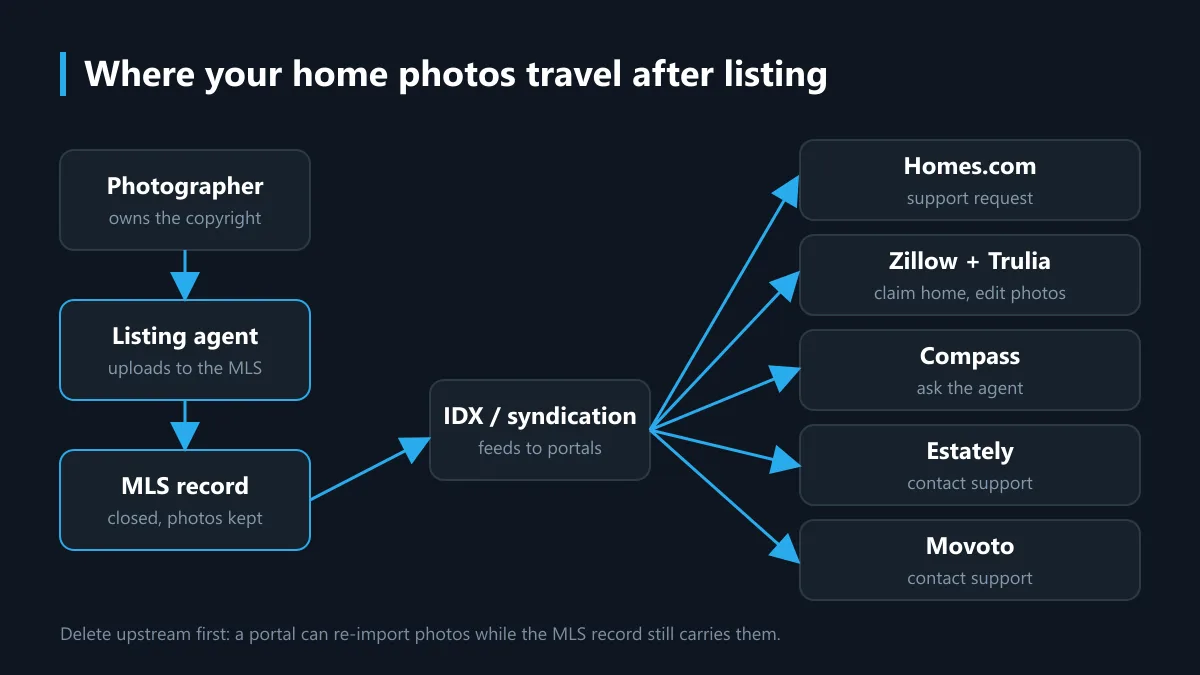
How to remove photos from MLS after closing, starting with the listing agent
Ask the seller's listing agent, or that agent's managing broker, because they are usually the only people who can edit the MLS record.
A homeowner cannot log into an MLS, and neither can Telegram Ban Service. In a 2022 report, NAR's REALTOR Magazine quoted realtor.com as saying that only licensed agents and brokers who pay for MLS membership can post or remove listings, and a broker in the same piece said listing photos become the property of the MLS where the home was listed (NAR, May 2022). Rules differ from one MLS to the next, so read that as one practitioner's description, not a national rule. Here is how to remove home photos from MLS in practice:
- Find the listing agent's name on the old listing page or in your closing documents.
- Email the agent and ask them to remove house photos from MLS, or, if their MLS keeps sold photos for appraisers, to suppress them from public feeds.
- Ask which portals their MLS syndicates to, and when the change will reach those feeds.
- No answer after a week or two? Write to the managing broker named on the listing; NAR's piece lists the broker as the next contact.
- Keep the thread. When a buyer rather than the seller writes in, portal support teams can ask for proof that the MLS side already acted.
What does "after closing" change? Before closing, the seller signed the listing agreement and controls the marketing. Once you own the house, the agent has no contract with you at all, so any request to remove photos from MLS listing records rests on goodwill and on that MLS's own policy. People search mls remove photos, remove mls photos or remove photos from mls listing; all of them lead to this same email. Nobody outside the brokerage can send it for you.
How to remove photos from Homes.com directly
The short version of how to remove photos from Homes.com: write to its support team, because its help center documents no owner self-service photo tool as of November 2026.
Homes.com, part of CoStar Group, lists two contacts on its help page How Do I Contact Homes.com?: the phone line 800-431-5509 and the address support@homes.com. Its Terms of Use add a detail that matters for any Homes.com remove photos request. The company keeps exclusive ownership of photos, videos and other imagery that it created itself under an advertising or listing package. If Homes.com shot the photos for the agent, it holds the rights; if the agent's photographer did, the pictures arrived through the feed.
A note that only says remove my home photos rarely gets far. A request that gets read has five parts: the full address, the closing date, your name as it appears on the deed, which photos you want gone (all of them, or only the interiors), and a line saying the listing agent has already removed them from the MLS. Attach that agent's email if you have it.
If support replies that the gallery comes from the MLS feed, go back to the agent with that answer. Typed without the dot, as in homes com how to remove photos, the search leads to the same two steps. Telegram Ban Service has no contact inside Homes.com.
Trulia, Compass, Estately and Movoto: which route does each one take?
Each portal answers to a different owner, so a request to remove photos from Homes.com does nothing for the others.
| Site | Who can change the photos | Route you can use |
|---|---|---|
| Homes.com | Homes.com support; the listing agent through the MLS | support@homes.com or 800-431-5509 |
| Trulia | The claimed owner or current listing agent on Zillow | Claim the home on Zillow, then edit photos; Trulia support if they persist |
| Compass | The Compass agent who listed the home, through the MLS | Ask that agent and the managing broker |
| Estately | No owner photo tool documented | Contact Estately support in writing |
| Movoto | No owner photo tool documented | Contact Movoto support in writing |
How to remove photos from Trulia
Trulia belongs to Zillow Group, and its home pages run on Zillow's listing data. Zillow says only the claimed owner or the current listing agent can remove photos from a home details page, and that it cannot retrieve photos once they are deleted (Zillow news, help for owners). So how to remove photos from Trulia comes down to this: claim the home on Zillow, open the owner view, choose Edit, then the photo editor, and delete or hide the gallery. The change should carry over to Trulia. If the old pictures still appear after a few days, contact Trulia's help center and mention the Zillow edit. The same steps cover how to remove listing photos from Trulia when you are the seller who moved out, and how to remove home photos from Trulia as the buyer. Searches for trulia remove photos or remove photos trulia end at the same Zillow claim.
How to remove photos from Compass
Compass is a brokerage, not an aggregator, so its pages show listings by its own agents plus MLS data. If a Compass agent sold the house, that agent is the person who can change the MLS record, and the managing broker is the escalation. Compass's privacy center handles consent and personal-data requests; it does not describe removing listing photos, so do not expect that form to do it. In practice, how to remove home photos from Compass is an MLS request through the agent; compass remove photos searches turn up no separate form.
Estately and Movoto
Both are search portals built on MLS listing feeds. Neither publishes an owner photo tool that could be verified for this page, so the honest route is a written request to each site's support with your address and closing date, sent after the MLS side has changed. So how to remove photos from Estately and how to remove photos from Movoto both start with the agent. To remove photos from Estately or remove photos from Movoto before the feed updates is unlikely to stick, because the next import can restore them; estately remove photos and movoto remove photos searches find nothing faster. Telegram Ban Service cannot file on any of these portals.
Who owns the photos, and can a DMCA notice remove them?
The photographer usually owns the copyright, not the homeowner. So the person who can force removal under copyright law is often the one who shot the house.
Under US law, copyright belongs to the author from the moment the photo is taken, unless it was a work made for hire or the rights were transferred in writing, as the US Copyright Office explains. Owning the building gives you no copyright in pictures of its rooms. A takedown notice under the DMCA, set out in 17 U.S.C. 512 and summarized on the Copyright Office's Section 512 page, must come from the copyright owner or someone authorized to act for them. A buyer filing one for a photographer's images would be making a false claim.
What you can do is ask. Some photographers license images to the agent only for the duration of the listing; if that license has ended, the photographer or the brokerage may be willing to send notices to sites that still display the gallery. Licenses vary, so ask the agent who shot the house before assuming anything. Telegram Ban Service cannot file a copyright notice for photos it does not own either.
What removal cannot do, and what should you check afterwards?
Removal clears the portal pages you name; it cannot recall copies already saved by search engines, scrapers or people.
Sold-price history and public deed records are a separate matter and stay, because they come from county records rather than the photo gallery. Search results catch up on their own crawl schedule. Once a page no longer shows the photos, Google's Refresh Outdated Content tool lets anyone ask it to update the stale result, one URL per request.
A short checklist for how to remove home photos from real estate sites, and how to remove pictures of your home from internet searches, once the portals change:
- Search your street address in quotes, then open the Images tab.
- Check Homes.com, Zillow, Trulia, Realtor.com, Redfin, Compass, Estately and Movoto by address, logged out.
- Note every page that still shows interiors, with the date you checked.
- Send a refresh request for each stale search result.
- Repeat in a month; feeds sometimes restore a gallery after an MLS edit.
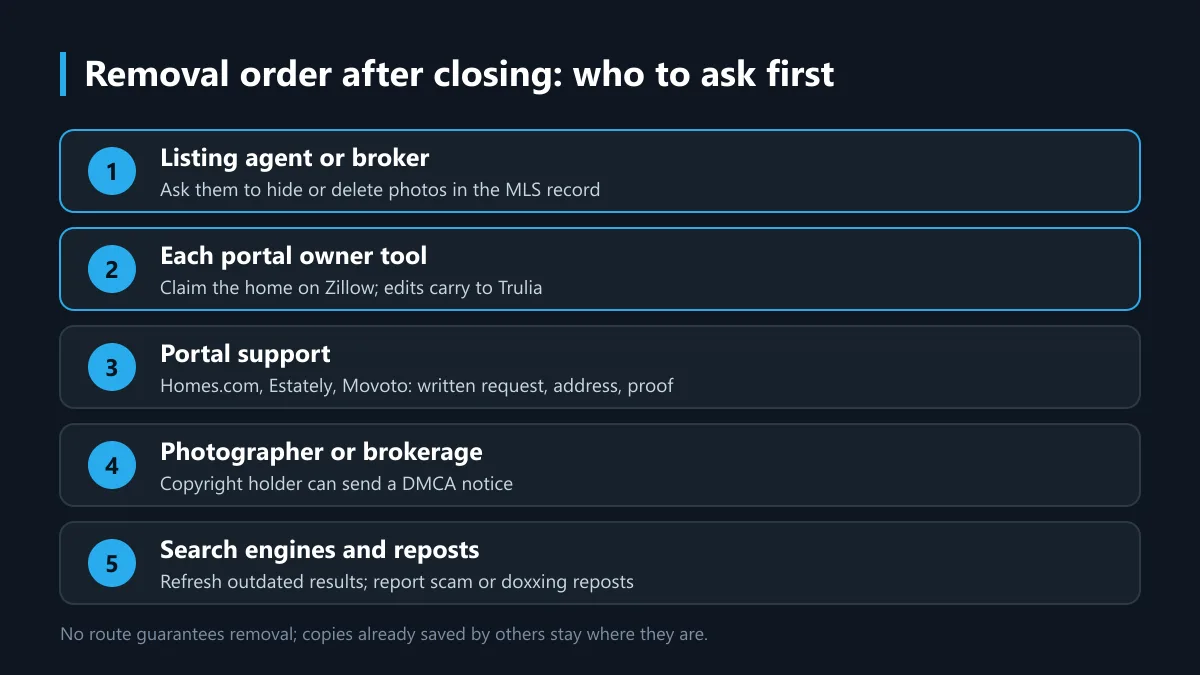
Expect partial results. Most owners who try to remove home photos end up with the interiors gone and one exterior shot left on a sold record, and that is a reasonable place to stop unless the photos are being misused. None of this needs a paid helper; Telegram Ban Service, for its part, steps in only once the photos are misused on Telegram.
When your house photos turn up on Telegram
Report the channel, group or bot inside Telegram and email its abuse team, because Telegram reviews public content on its own platform and nobody else can remove it there.
Listing photos get reused in two harmful ways. The first is the rental scam. The FTC's guidance on rental listing scams describes scammers copying a real listing, swapping in their own contact details and asking for a deposit before anyone sees the property. Your old photos then sell a house that is not for rent. The second is harassment: a channel that posts your address beside the gallery so readers know the layout of your home. Both often pair with threats like doxxing and sextortion threats on X or Facebook blackmail scams.
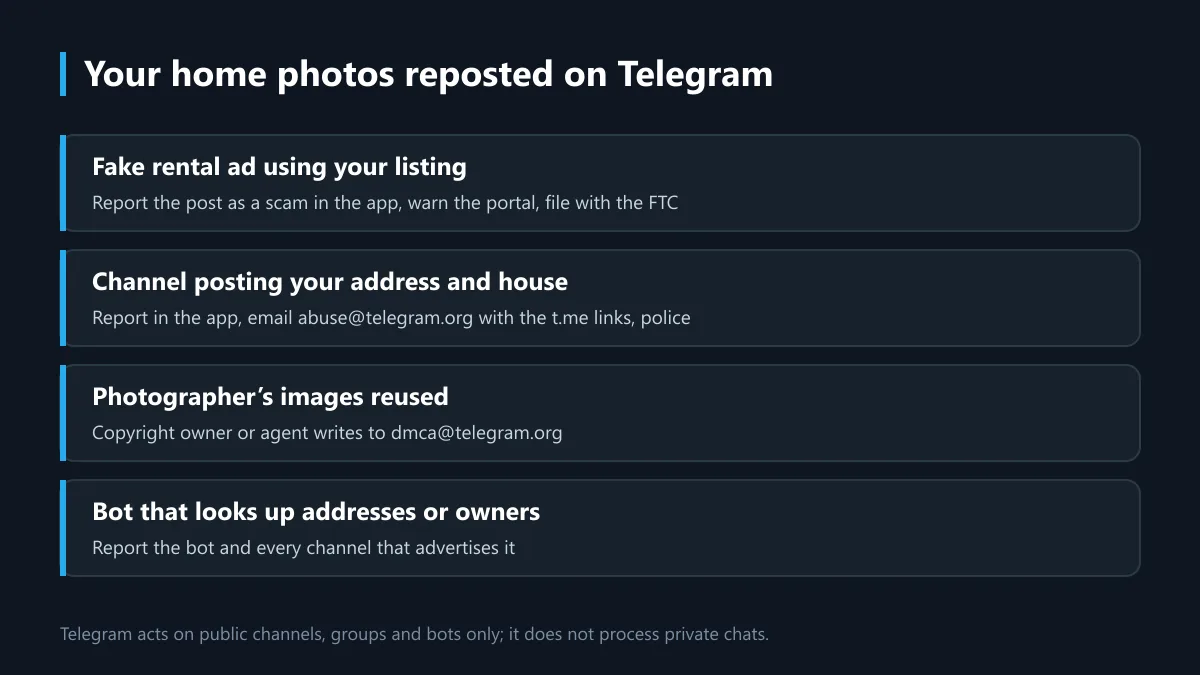
Telegram's FAQ sets the routes. Every app has a Report button. Illegal public content can be sent to abuse@telegram.org with the t.me links, and copyright complaints go to dmca@telegram.org from the owner or an authorized agent. Telegram says it does not process requests about private chats or private groups. Read how a Telegram ban is decided for what moderators weigh, and whether Telegram itself is a scam risk if the rental ad came through a Telegram contact.
This is where Telegram Ban Service has a defined job. The desk reads the channel or bot, checks each post against Telegram's Terms of Service, orders the evidence by date and files the report through Telegram's official routes; Telegram makes the final call, with no ban or timeline promised. It declines rule-abiding channels, critics and competitors, never asks for a password or login code, and sells no report bots. Volume does not decide outcomes, as the pages on why Snapchat mass reporting fails, YouTube mass report bots and what TikTok moderation sees from report bots explain. It also does not send unsolicited Telegram mass DMs, and what a TikTok account ban service can honestly do sets out the same limits elsewhere.
Scams with your photos rarely stay on one app. A fake rental may run through a fake seller on Facebook Marketplace, a storefront covered by the routes for a TikTok Shop seller report, or a profile you can handle through reporting a fake TikTok account and Instagram's report forms. For abuse aimed at you, see reporting harassment on Facebook, libel posted on Facebook, what happens on Facebook after a report and what counts in a Facebook group or page report. When an account exists only to post you, the guides on taking down a Facebook account that breaks the rules, the limits on deleting someone's Facebook account, the Snapchat account takedown process, why you cannot simply delete someone's Snapchat account and what deleting someone else's TikTok account involves apply. A walkthrough video of your house on YouTube? Read getting a YouTube video taken down, and, if the photographer owns the footage, how a YouTube copyright strike is filed or TikTok's copyright report.
Sources
- Homes.com Support: How Do I Contact Homes.com?
- Homes.com Terms of Use
- Zillow: removing photos from a home details page
- Compass Consent and Preferences Center
- NAR REALTOR Magazine: Off the Market Doesn't Always Mean Off the Internet (2022)
- US Copyright Office: Who owns a copyright
- US Copyright Office: Section 512
- Google Search Console Help: Refresh Outdated Content tool
- FTC: Rental listing scams
- Telegram FAQ
FAQ
How do I remove photos from MLS after closing if the agent ignores me?
Escalate in writing, because the MLS record is the source most portals copy from. Send the listing agent one clear email asking them to remove house photos from MLS, or to suppress them from public feeds, and give a date. If a week or two passes, write to the managing broker named on the old listing. NAR's REALTOR Magazine, in 2022, named the broker as the next contact for buyers in exactly this spot. The local MLS itself usually deals only with members, so a homeowner complaint there may go nowhere. That is how to remove photos from MLS after closing, and it is also how to remove home photos from MLS when you were the seller and have since moved. People phrase it as remove mls photos, mls remove photos or remove photos from mls listing; the step is the same. Keep the whole thread, since Homes.com and other portals may ask for it.
How to remove photos from Trulia if they are still showing?
Claim the home on Zillow first, because Trulia is part of Zillow Group and its home pages draw on the same listing data. Zillow says only the claimed owner or the current listing agent can remove photos from a home details page, and deleted photos cannot be brought back. After you claim the home, open the owner view, choose Edit, then the photo editor, and delete or hide the gallery. The change should appear on Trulia. If it does not after a few days, contact Trulia's help center, give the address and say the Zillow photos are already gone. That covers how to remove home photos from Trulia and how to remove listing photos from Trulia. Searches like trulia remove photos or remove photos trulia land on the same two steps. Nothing here needs a fee, and no outside service can claim the home for you, since Zillow verifies the owner.
How to remove home photos from Compass after a Compass agent sold the house?
Ask the Compass agent who listed it, then the managing broker at that Compass office. Compass is a brokerage, so the photos on its site come from its own agents' listings and from MLS data, and the agent controls the MLS record. Compass's privacy center handles consent and personal-data choices; it does not describe a listing-photo removal process, so a privacy request is the wrong tool for this. Put the address, closing date and the photos you want removed in one email. If the agent removes them in the MLS, the Compass page and the portals fed by that MLS should follow on their next update. That is the realistic answer to how to remove photos from Compass, and to compass remove photos or remove photos from Compass searches. Expect a sold record to keep at least the basic facts of the sale.
How to remove photos from Estately or Movoto?
Contact each site's support in writing after the MLS side has changed. Estately and Movoto are search portals built on MLS feeds, and neither publishes an owner photo tool that could be verified for this guide. So how to remove photos from Estately and how to remove photos from Movoto both start upstream with the listing agent, then a short support request: the address, your name as owner, the closing date, and a note that the MLS record no longer carries the gallery. Asking a portal first often fails, because the next feed import can bring the photos back. Searches like estately remove photos or movoto remove photos rarely find more than this, since neither site documents a dedicated form. Keep a dated screenshot of each page before and after. If either site does not reply, a second email quoting the first one is reasonable; neither is required by law to answer in a set time.
Can the new owner, not the seller, ask to remove my home photos?
Yes, anyone can ask, but the new owner holds no copyright in the photos and no contract with the listing agent. That shapes how you ask. A buyer who wants to remove my home photos writes to the seller's agent and broker, then to each portal, explaining that they now own the property and that interior photos expose its layout. Zillow lets a verified owner edit or hide photos on a claimed home, which covers Trulia too. For a Homes.com remove photos request, email support@homes.com or call 800-431-5509 and include proof of ownership, such as a recorded deed or a closing statement with private figures blacked out. The seller can help: a request from both parties is harder to wave away. Never send account passwords to anyone offering to do this for you; the portals do not need them, and neither does any honest helper.
How long does it take to remove pictures of your home from the internet?
Plan in weeks, not days. The MLS edit can be quick once the agent acts, but each portal updates on its own feed schedule, and support requests to Homes.com, Estately or Movoto have no published response time. Search engines refresh later still; Google's Refresh Outdated Content tool lets you request an update once the photos are gone from the page. So how to remove pictures of your home from internet results is really a sequence: agent, portals, support teams, then search. The same order answers how to remove photos from real estate sites in general and how to remove home photos from real estate sites that no one at the MLS controls. Copies saved by scrapers or by people who downloaded the gallery stay where they are. How to remove photos of your home online fully is not possible; reducing what a stranger can find in one search is.
Can Telegram Ban Service remove photos from Homes.com or other listing sites?
No. Telegram Ban Service has no access to Homes.com, Zillow, Trulia, Compass, Estately, Movoto or any MLS, and it does not file requests with them for anyone. How to remove photos from Homes.com is a job for you or your agent: deal with Homes.com and the MLS directly, as described above; homes com how to remove photos searches lead to those same steps. The desk works on the Telegram side only. When a public channel, group or bot reuses your listing photos in a rental scam, or posts them next to your address, it checks the posts against Telegram's Terms of Service and files a documented report through Telegram's official routes. Telegram decides, and no ban or date is promised. It declines channels that follow the rules, never asks for a password or login code, and does not sell report bots. Copyright complaints there must come from the photographer or an authorized agent.